How to Build Enterprise Applications with Angular That Stay Easy to Change

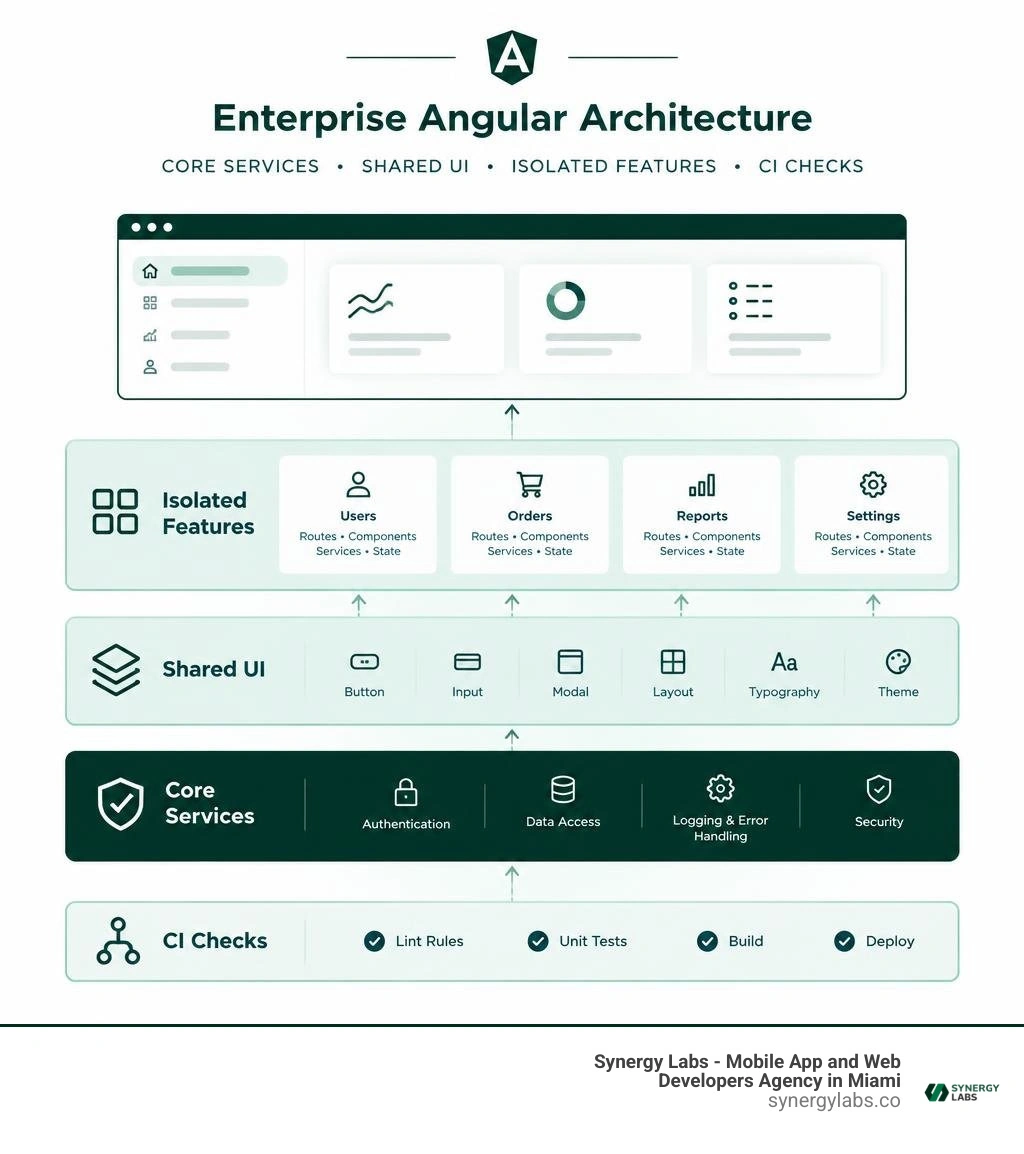
To build an enterprise application with Angular, start with business domains, not one large app module. Keep app-wide services such as authentication in a core layer. Put reusable, business-free UI in shared libraries. Give each feature its own routes, components, data services, and state, then lazy-load it. Enforce those boundaries with lint rules and test them in CI.
That structure helps teams ship new features without pulling unrelated code into every change. It also gives you a clear place to make decisions about Signals, NgRx, security, and performance. I'm the director of product at Synergy Labs, and this guide walks through those decisions step by step.
Common build enterprise applications with angular vocab:
How to Build Enterprise Applications with Angular Using Modern Architecture
Enterprise frontends rarely collapse because of syntax. They collapse under the weight of tangled dependencies, circular imports, and shared states that turn a simple button tweak into a multi-team incident.
When you set out to build enterprise applications, creating clear architectural boundaries is your first line of defense. In Angular, this means partitioning your codebase into three primary tiers: Core, Shared, and Feature layers.
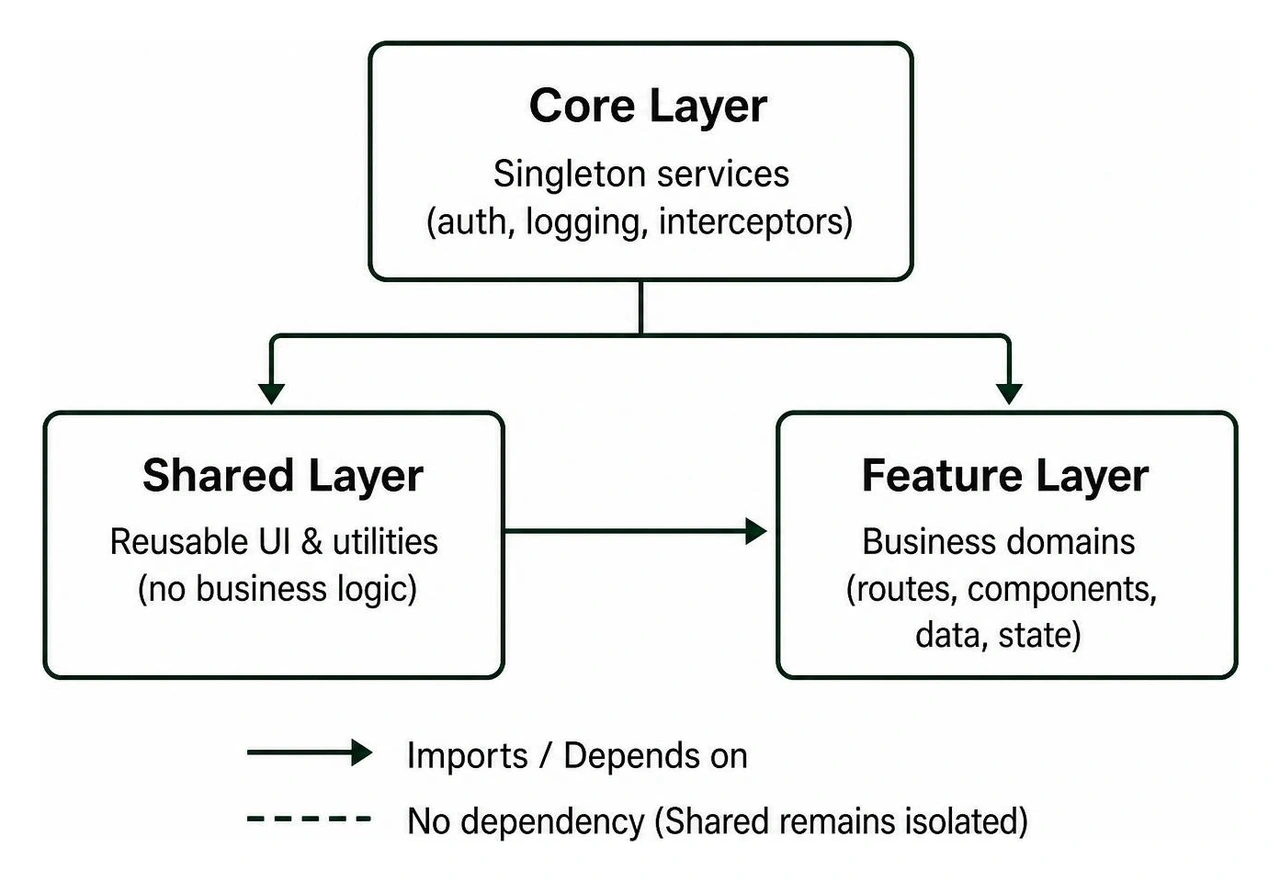
The Core layer contains singleton services that must exist exactly once across your entire application runtime. This includes authentication providers, logging engines, session caches, and root HTTP interceptors.
The Shared layer acts as an internal UI kit. It contains pure presentational components, custom pipes, structural directives, and generic styling helpers. The cardinal rule of the Shared layer is that it must contain zero business logic and never import code from any feature domain.
The Feature layer contains bounded business domains such as billing, user management, policy underwriting, or inventory tracking. Each feature lives in its own sandboxed space, owning its routes, smart container components, data transformations, and local state.
Teams that adopt this strict Core, Shared, and Feature architecture see up to a 40% reduction in cross-feature bugs. When isolated domains communicate exclusively through explicit boundaries, a bug in the billing checkout cannot silently corrupt the user profile state.
Why Teams Build Enterprise Applications with Angular in 2026
Angular holds roughly 23% of the professional developer market and logs over 1.7 million weekly downloads on npm. That longevity is not an accident; it is the direct result of Angular's opinionated, complete engineering environment.
Unlike modular frameworks that require you to assemble disparate routing, form validation, and HTTP utilities from third-party ecosystems, Angular delivers a unified toolchain backed directly by Google. As outlined in our enterprise app development complete guide, predictable tooling is essential when software must stay maintainable across five- to ten-year lifecycle horizons.
In modern development, standalone components have eliminated unnecessary NgModule boilerplate, reducing code complexity by roughly 30%. When paired with fine-grained reactivity, native dependency injection, and TypeScript strict mode, Angular allows large, distributed teams across enterprise hubs like San Francisco, Chicago, and Austin to collaborate safely without constantly stepping on each other's toes.
Recommended Folder Structure to Build Enterprise Applications with Angular
Maintaining order across thousands of files requires an intuitive, self-documenting directory structure. Rather than organizing files by technical type (such as placing all services in one giant folder and all components in another), group your files by domain responsibility:
- src/app/core/: Houses application singletons, root providers, base HTTP clients, logging mechanisms, and identity management.
- src/app/shared/: Houses atomic UI primitives (buttons, modals, inputs), business-agnostic formatting pipes, and accessible directives. These should be structured as isolated leaf components to ensure complete tree-shakability.
- src/app/features/: Houses distinct business domains. Each subfolder represents a bounded capability (e.g.,
features/orders/, features/analytics/) containing its own sub-routes, domain services, container views, and local stores. - src/app/routes.ts: The root router configuration file that defines lazy-loaded entry points for each business domain.
For a deeper dive into module decoupling and layout strategies, review the Enterprise Angular Architecture Guide for production metric breakdowns.
Monorepo Enforcement and ESLint Module Boundaries with Nx
Even the cleanest folder conventions fall apart over time if they are not strictly enforced by automated tooling. When delivery deadlines loom, developers can easily slip in a quick import from an unrelated feature module, inadvertently reintroducing tight coupling.
Using an Nx monorepo solves this issue by letting you assign metadata tags to every project within your workspace:
- Tag
type:app can depend on type:feature, type:ui, and type:core. - Tag
type:feature can depend on type:ui, type:data-access, and type:util, but never another type:feature. - Tag
type:ui can only depend on type:util and never on type:data-access or type:feature.
By using ESLint module boundary rules (such as @nx/enforce-module-boundaries), the build engine fails immediately if a developer attempts an illegal cross-boundary import.
Furthermore, Nx uses dependency graph analysis to run tasks exclusively on affected code. In large enterprise codebases, running nx affected cuts CI test and build durations by up to 70%, transforming a 20-minute pipeline into a brisk 5-minute build.
Enterprise State Management: Signals vs. NgRx SignalStore

State management in complex frontends has evolved dramatically. For years, enterprise Angular teams defaulted to traditional Redux boilerplate, writing dozens of actions, reducers, and effects for even basic CRUD operations.
Modern Angular applications achieve predictable, high-performance state by combining Angular Signals for local component reactivity with NgRx SignalStore for complex, domain-level global state.
Signal-First Reactive Architecture
Angular Signals introduce fine-grained reactivity directly into the framework core. A Signal represents a value wrapper that notifies consumers when that value changes, completely decoupling state mutation from manual change detection cycles.
By pairing Signal-driven inputs (input()), model bindings (model()), and queries (viewChild()) with ChangeDetectionStrategy.OnPush, components evaluate DOM bindings only when their specific inputs change.
This approach eliminates the performance overhead of full-tree zone dirty-checking, boosting rendering speeds by up to 80% across data-dense enterprise dashboards.
Global Domain State with NgRx SignalStore
When an application requires coordinated state spanning multiple routes, optimistic API updates, and background caching, a structured store is essential.
The NgRx SignalStore provides a lightweight, highly extensible state container. Using functional composition patterns like withState, withComputed, and withMethods, teams can build modular stores without excessive boilerplate:
- State immutability: All updates are executed through pure updater functions, preventing unmonitored mutations.
- Computed selectors: Derived values recalculate lazily, executing only when referenced by active UI nodes.
- Reactive side effects: Asynchronous HTTP calls and WebSocket feeds plug seamlessly into state methods using RxJS pipeable operators where needed.
For complete implementation blueprints showcasing production state setups, explore the Angular Enterprise Blueprint.
Smart Container vs. Dumb Presentational Components
To keep large applications maintainable, maintain a clean division between smart (container) and dumb (presentational) components:
- Smart Container Components: Connected directly to domain stores and router parameters. Containers handle data fetching, coordinate side effects, pass Signal inputs down to children, and handle custom emitted events.
- Dumb Presentational Components: Pure, presentation-only building blocks. They receive data strictly via
input() bindings, contain zero injected business services, and communicate with the outside world purely through output() events.
This separation makes unit testing straightforward: dumb components can be tested entirely in isolation using mock inputs without needing elaborate service stubs.
Fast initial page loads directly influence internal user efficiency and operational productivity. In enterprise portals serving thousands of concurrent employees, bloated bundles can slow down interactions and eat into cloud bandwidth.
Understanding performance optimization is just as vital for frontends as it is when architecting cloud based enterprise apps.
Advanced Lazy Loading and Route Preloading Strategies
Lazy loading is non-negotiable for enterprise applications. Rather than bundling your entire application into a single monolithic JavaScript payload, configure your router to load code chunks on demand:
Lazy loading feature routes can cut initial bundle sizes by up to 50%.
To eliminate navigation latency without bloating the initial payload, implement an intelligent preloading strategy (such as Quicklink). This downloads background feature bundles in the background only when their navigation links become visible in the user's viewport.
Asset Optimization and Memory Leak Prevention
Long-lived single-page applications are especially vulnerable to memory leaks if asynchronous subscriptions are not torn down properly when components unmount.
Always use modern lifecycle utilities to clean up async tasks:
- Lifecycle Destroy Operators: Use
takeUntilDestroyed() inside constructor injection contexts to automatically unsubscribe from RxJS streams when a component or service is destroyed. - NgOptimizedImage Directive: Enforce responsive image sizing, automatic WebP format conversion, and priority resource hints on critical layout assets.
- Virtual Scrolling via Angular CDK: When displaying large datasets, render only the DOM nodes currently within view to maintain 60fps scrolling performance.
Enterprise applications manage sensitive business data, calculate financial transactions, and process private records. Hardening your application against common vulnerabilities while standardizing API communications requires a robust foundation.
For architectural patterns regarding enterprise resilience, refer to Doguhan Uluca's comprehensive resource Angular for Enterprise Applications.
Functional HTTP Interceptors and API Error Handling
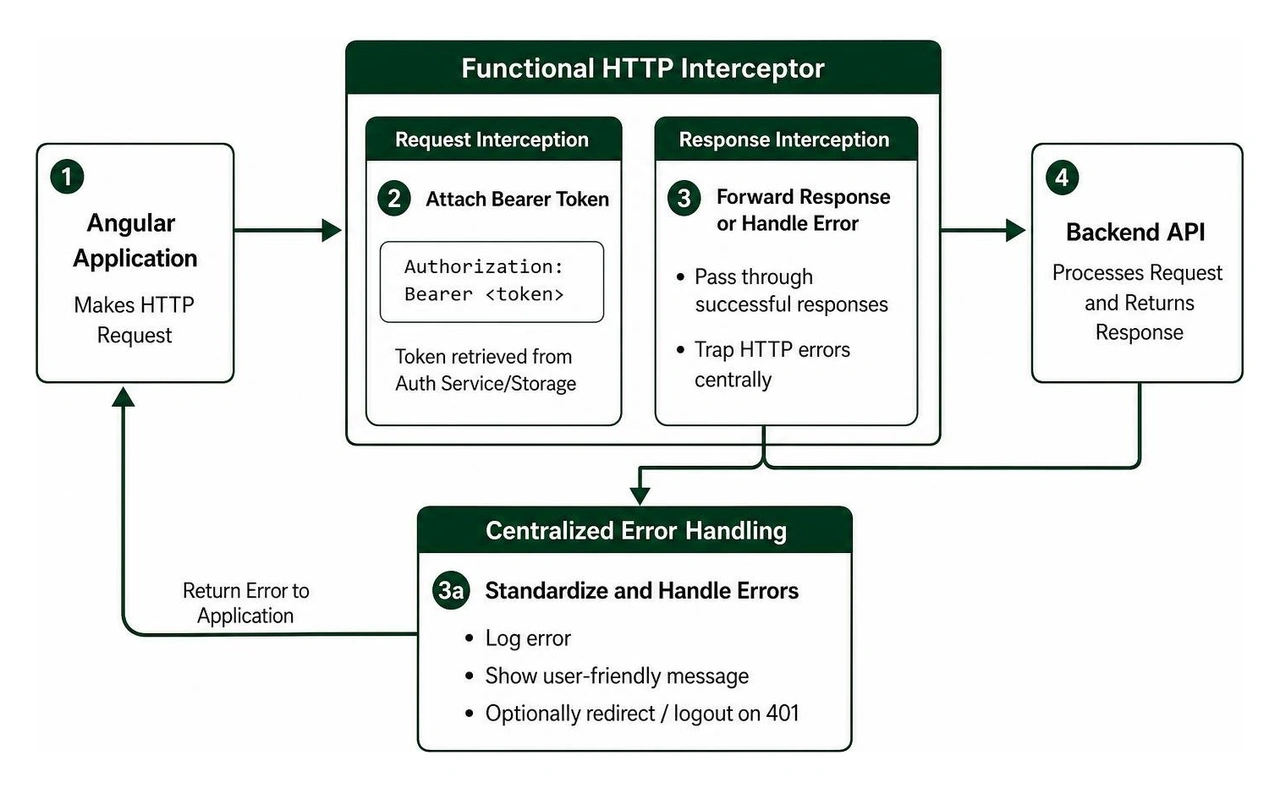
Modern Angular relies on functional HTTP interceptors via HttpInterceptorFn. This pattern simplifies interceptor chaining, token injection, and global error handling:
- Authentication Interceptor: Automatically attaches OAuth2/JWT Bearer tokens to outgoing API requests and coordinates background token refreshes upon encountering a 401 response.
- Correlation ID Injection: Appends unique trace identifiers (
X-Correlation-ID) to every outgoing request to help your backend systems trace issues across microservices. - Global Error Handling Interceptor: Intercepts HTTP failure payloads, translates raw errors into user-friendly messages, logs traces to an analytics backend, and routes fatal authorization errors to login screens.
Enterprise Security, Access Control, and WCAG AA Compliance
Building resilient enterprise frontends requires strict adherence to corporate security and accessibility standards:
- Content Security Policy (CSP): Configure strict CSP response headers to neutralize Cross-Site Scripting (XSS) risks by banning inline scripts and untrusted eval expressions.
- Role-Based Route Guards: Use
canMatch guards to prevent unauthorized users from even downloading protected feature code chunks over the network. - WCAG AA Compliance: Use Angular CDK accessibility modules (
FocusTrap, ListKeyManager, LiveAnnouncer) and semantic HTML to ensure internal dashboards are fully accessible via screen readers and keyboard navigation. - Dynamic Theming: Build themes using CSS custom properties (variables) mapped to design tokens, ensuring high-contrast visibility and seamless brand switching.
Modernizing legacy applications often begins with implementing these security and accessibility standards. Learn more about migration workflows in our guide to legacy system modernization best practices.
Testing, CI/CD Quality Gates, and Governance
A large software architecture is only as dependable as the automated test harness defending it. Teams that run comprehensive unit and end-to-end testing pipelines experience 50% fewer production defects compared to untested codebases.
Modern Testing Stack: Vitest and Playwright
Enterprise development has largely shifted toward modern testing tools designed for speed and reliability:
- Vitest: Replaces legacy Karma/Jasmine setups, running component unit tests directly in native ESM environments with execution speeds up to 10 times faster.
- Angular Component Test Harnesses: Isolate test interactions from underlying DOM structure changes, keeping tests maintainable even when UI components are refactored.
- Playwright: Handles cross-browser end-to-end testing, visual regression comparisons, and network mocking within automated CI pipelines.
Automated Quality Gates and Architectural Documentation
To maintain consistent standards across large engineering teams, automate governance directly in your version control workflows:
- Husky and Commitlint: Enforce conventional commit standards and run quick linting checks on staged files before code can be committed locally.
- Storybook Design Systems: Document your shared UI primitives in an interactive catalog, allowing designers and developers to review components in isolation.
- Compodoc: Automatically generate structural architecture documentation, dependency trees, and API signatures directly from your TypeScript code.
- Lighthouse CI Audits: Run automated accessibility, performance, and SEO checks on every pull request, blocking regressions before they reach production.
Frequently Asked Questions About Enterprise Angular Development
What makes Angular suitable for large-scale enterprise systems?
Angular provides an opinionated framework with built-in routing, state handling, form validation, and security primitives. This built-in consistency ensures that large, distributed teams write code that fits together naturally, making long-term maintenance straightforward.
When should you migrate legacy Angular codebases to standalone components and Signals?
You can migrate iteratively. Angular supports running standalone components alongside legacy NgModules within the same application. Teams should migrate high-traffic modules first to benefit from smaller bundles and faster OnPush change detection.
How do you enforce strict layer boundaries in large development teams?
Use an Nx monorepo configured with @nx/enforce-module-boundaries lint rules. Tag libraries by scope and domain, configure your linter to disallow illegal imports, and fail CI builds automatically whenever a boundary rule is broken.
Modernize Your Enterprise Architecture with Synergy Labs
Building enterprise-grade Angular applications requires balanced decisions across system architecture, reactive state management, strict security, and automated testing. When structured properly around domain boundaries, your application stays scalable and easy to evolve as business requirements grow.
At Synergy Labs, we help enterprises design, build, and modernize scalable web and mobile applications. Our delivery model combines an in-shore CTO who guides your technical strategy with an agile, high-performing offshore development team.
With transparent milestone-based payments and fixed-budget models, we ensure your projects are delivered on time, within budget, and built to the highest architectural standards.
Ready to build scalable web applications that last? Explore our custom enterprise app development services or contact our technical team at Synergy Labs today to schedule an architectural consultation.


.avif)

.avif)


