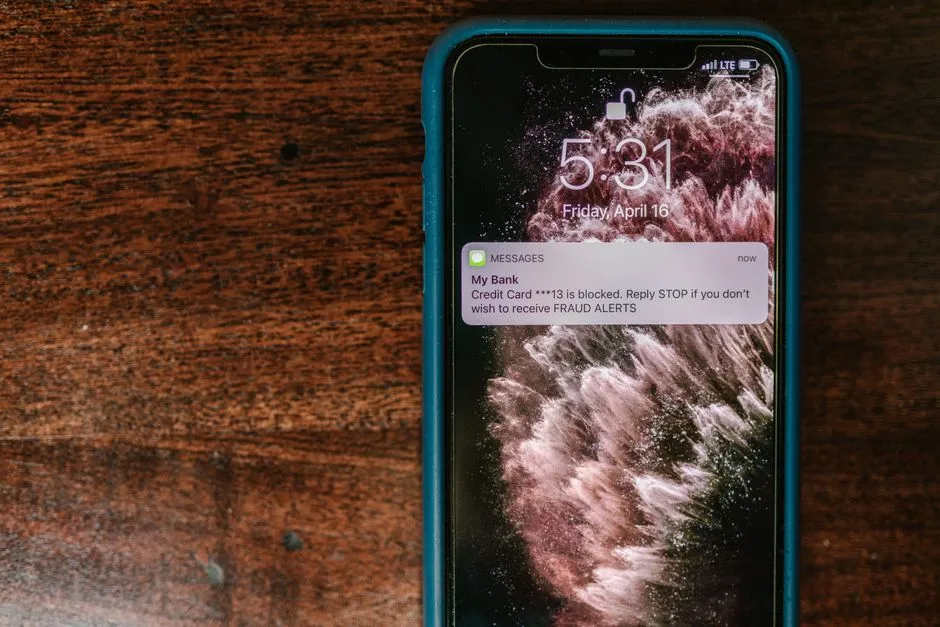
70% of all internet fraud originates from mobile devices — yet most apps ship with little to no security built in. Here's how to change that from day one.
How to secure mobile apps starts with understanding the landscape: mobile devices now handle everything from banking to healthcare, making them prime targets for cybercriminals. If you're looking for a quick answer, here's what you need to know:
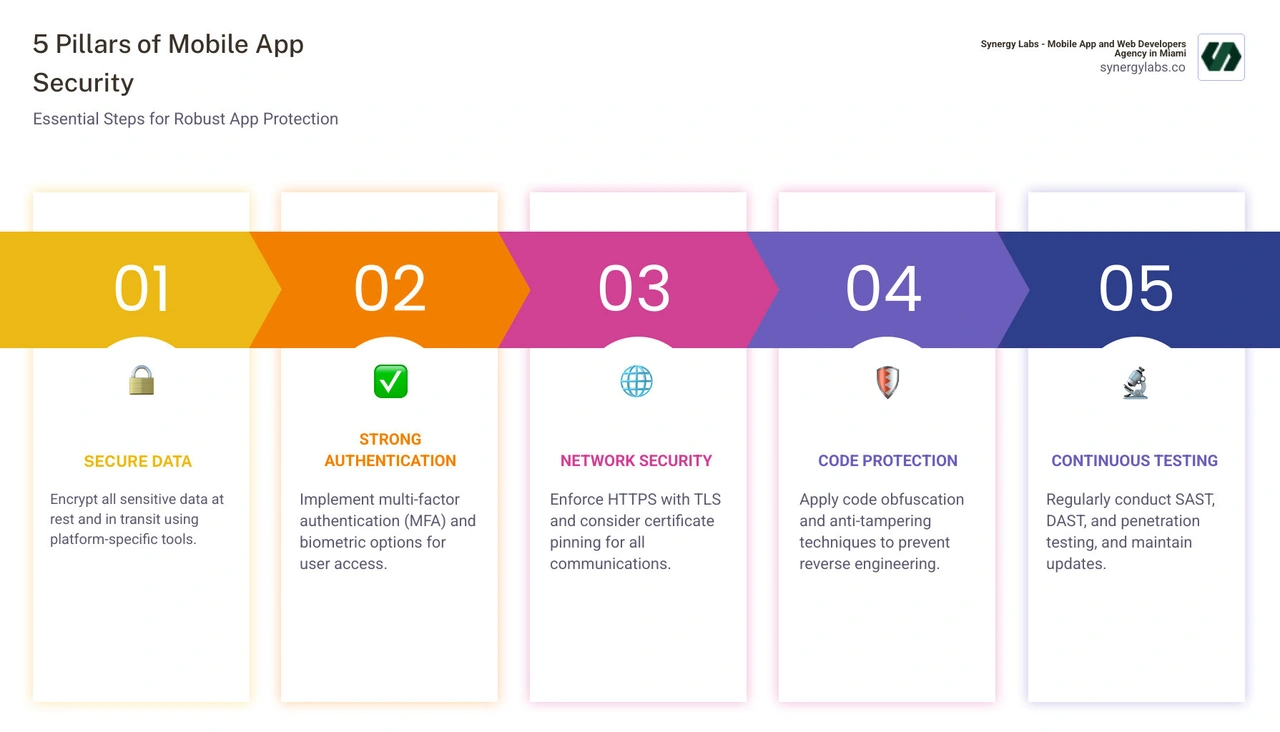
Essential Steps to Secure Your Mobile App:
Encrypt all sensitive data - both at rest and in transit using platform-specific tools like Android Keystore and iOS Keychain
Implement strong authentication - use multi-factor authentication (MFA) and biometric options
Secure your network communications - enforce HTTPS with TLS and consider certificate pinning
Apply code obfuscation - make reverse engineering difficult with tools like ProGuard
Test continuously - use SAST, DAST, and penetration testing throughout development
Follow platform guidelines - leverage Android and iOS security features
Minimize permissions - request only what your app truly needs
The stakes are incredibly high. 70% of all internet fraud can be traced to mobile devices, and a shocking 85% of mobile apps have little to no security protection. Even more concerning, 40% of businesses don't scan their app code for security vulnerabilities, and 33% of companies never test apps to ensure they're secure.
These aren't just statistics - they represent real businesses losing customer trust, facing regulatory fines, and dealing with data breaches that could have been prevented. For startups and growing companies, a single security incident can be catastrophic, potentially destroying years of hard work and reputation building.
The good news? Security doesn't have to slow you down or break your budget. When integrated from the start of development, robust security measures actually accelerate your path to market by preventing costly reworks and building user confidence from day one.
This guide walks you through everything you need to know about how to secure mobile apps - from fundamental principles to advanced techniques used by top-tier development teams. Whether you're a technical founder, a product manager, or working with a development partner, you'll learn practical, actionable strategies to protect your app, your users, and your business.
As the team at Synergy Labs, we've secured mobile applications across fintech, healthcare, and consumer platforms, and we've seen how proper security practices can differentiate a successful app from a vulnerable one. Our approach to how to secure mobile apps integrates security throughout the development lifecycle, ensuring protection without sacrificing user experience or speed to market.
The High Stakes of Mobile Security: Understanding the Threats
Mobile app security is crucial because our devices are extensions of ourselves, holding everything from photos to banking credentials. This convenience creates a massive target for cybercriminals.
A security breach extends beyond technical glitches, causing significant reputational damage and eroding user trust. Financially, a breach is devastating, with costs from investigations, remediation, legal fees, and regulatory fines. A leading mobile security index report highlights the severe business impact, proving that neglecting mobile security is a gamble no business should take. User trust is paramount and incredibly difficult to regain once lost.
Common Vulnerabilities and Threats
To understand how to secure mobile apps, we first need to understand what we're up against. Mobile applications face a unique array of threats, distinct from their web counterparts. These include:
Insecure Data Storage: This occurs when sensitive user data, like login credentials, financial information, or personal identifiers, is stored unprotected on the device. An attacker gaining access to the device could easily retrieve this data.
Data Leakage: Often unintentional, data leakage happens when an app inadvertently exposes sensitive data through logging, caching, or unencrypted backups. This can also include data sent to third-party analytics services without proper anonymization.
Malware and Spyware: Malicious software designed to infiltrate mobile devices, often disguised as legitimate apps. Malware can steal data, disrupt operations, or even take control of the device. Spyware specifically aims to monitor user activity without their knowledge. The fact that Android devices are 47 times more likely to carry malware than Apple devices highlights a platform-specific risk that developers must address.
Reverse Engineering: Attackers can decompile an app's code to understand its logic, identify vulnerabilities, or even steal intellectual property. This is particularly relevant for proprietary algorithms or sensitive business logic.
Code Tampering: After reverse engineering, attackers might modify the app's code to introduce malicious functionality, bypass security controls, or alter its behavior for illicit gains.
Broken Cryptography: Poorly implemented or weak cryptographic algorithms can render encrypted data vulnerable. This includes using outdated encryption standards, weak keys, or incorrect cryptographic modes.
The Dangers of Insecure Communication
Mobile apps rarely operate in isolation; they constantly communicate with backend servers, third-party APIs, and other services. If this communication isn't properly secured, it opens doors for critical attacks:
Man-in-the-Middle (MITM) attacks: An attacker intercepts communication between the app and its server, reading or modifying data in transit. If your app communicates over unencrypted HTTP, it's essentially shouting sensitive data across a crowded room.
Unencrypted Data Transmission: Sending sensitive information over unencrypted channels (like HTTP instead of HTTPS) is a cardinal sin in mobile security. This data can be easily captured and read by anyone monitoring the network.
API Vulnerabilities: APIs are the backbone of most mobile apps. If not properly secured, they can be exploited through injection attacks, broken authentication, excessive data exposure, or insecure configuration, leading to data breaches or unauthorized access.
Session Hijacking: Attackers can steal a user's session token, allowing them to impersonate the user and gain unauthorized access to their account without needing their credentials.
The Human Element: Social Engineering and User Behavior
Even the most technically secure app can be compromised if users fall prey to social engineering. This isn't about code flaws, but about exploiting human psychology:
Compromised passwords: Weak, reused, or easily guessed passwords remain a significant vulnerability. If a user's password for one service is compromised, it can be used to gain access to other accounts.
Unsafe downloads from third-party stores: While app stores like Google Play and Apple App Store have stringent security checks, third-party app stores often do not. Nearly one in four people mistakenly believe it's safe to download third-party mobile apps as long as those apps aren’t accessing corporate data – a dangerous misconception. This is particularly relevant for Android users, as Android supports third-party app stores more readily than iOS.
Building Security In: The Secure Development Lifecycle (SDLC)
At Synergy Labs, we believe security is a foundational principle, not an afterthought. Shifting from reactive to proactive security is crucial for how to secure mobile apps. The DevSecOps approach integrates security at every stage of the development lifecycle, not just as a separate phase. This proactive stance helps avoid common mobile app development mistakes that cause security vulnerabilities.
How to secure mobile apps with a secure development lifecycle (SDLC)
Integrating security into the SDLC means weaving it into every stage, from requirements to deployment.
Secure by Design: Security considerations begin at the very first stage. This involves performing threat modeling to identify potential risks and designing the app architecture to mitigate them. It’s about making security a core requirement, not an optional feature.
Threat Modeling: Before writing a single line of code, we identify potential threats, vulnerabilities, and attack vectors. This proactive analysis helps us design security controls into the application from the ground up, reducing the cost and effort of fixing issues later.
Secure Coding Standards: Developers adhere to established secure coding guidelines specific to mobile platforms (Android and iOS) and programming languages. This minimizes common coding errors that can lead to vulnerabilities.
Code Reviews: A peer review process is essential. Developers review each other's code for security flaws, adherence to coding standards, and potential vulnerabilities, ensuring a collaborative approach to security.
The Principle of Least Privilege (PoLP)
A cornerstone of robust security is the Principle of Least Privilege (PoLP). This means that any user, program, or process should have only the minimum necessary permissions to perform its function.
Minimizing app permissions: Your mobile app should only request permissions absolutely essential for its core functionality. For example, a calculator app doesn't need access to the user's camera or contacts. Overprivileged apps are a significant risk, as they can be exploited to access sensitive data if compromised.
Limiting developer access: Internally, team members should only have access to the parts of the app or infrastructure strictly necessary for their job. This reduces the attack surface and potential for insider threats.
Protecting user data: By adhering to PoLP, we inherently protect user data by restricting who and what can access it.
The concept of PoLP in practice beautifully illustrates how granular access control is key.
Continuous Security Testing
Even with the best intentions and secure coding practices, vulnerabilities can creep in. That’s why continuous security testing is non-negotiable for how to secure mobile apps.
Static Application Security Testing (SAST): SAST tools analyze source code, bytecode, or binary code to identify security vulnerabilities without actually executing the application. It's like a powerful spell-checker for security flaws, catching issues early in the SDLC.
Dynamic Application Security Testing (DAST): DAST tools test the application in its running state, simulating real-world attacks to find vulnerabilities that might not be visible in the code alone. This helps identify issues related to server configuration, authentication, and session management.
Penetration Testing: Ethical hackers simulate real-world attacks to uncover vulnerabilities, often combining automated tools with manual techniques. This provides a comprehensive assessment of the app's security posture.
Core Technical Pillars of How to Secure Mobile Apps
Building a secure mobile app isn't just about following a checklist; it's about implementing robust technical safeguards that protect data and user interactions. This section covers the hands-on techniques developers must implement to build a secure foundation.
Secure Data Storage and Encryption
Protecting data, both when it's sitting idle and when it's moving, is fundamental.
Data-at-rest protection: This refers to data stored on the device itself. Sensitive information should never be stored in plain text.
Platform-specific secure storage: Android and iOS offer built-in mechanisms for secure data storage.
Android Keystore: This system allows you to generate and store cryptographic keys in a secure container, making them much harder to extract from the device. Developers can use hardware-backed keystores (like a Trusted Execution Environment or StrongBox) for even greater security, ensuring keys never leave the secure hardware. For details on working with data securely on Android, Google's documentation is invaluable.
iOS Keychain: Similar to Android Keystore, the iOS Keychain securely stores small bits of sensitive information like passwords, encryption keys, and certificates.
Leveraging the Secure Enclave: On iOS devices, the Secure Enclave is a dedicated secure subsystem within the main processor that provides advanced security capabilities, especially for cryptographic operations and biometric data. Keys generated and stored here are never exposed to the main operating system.
Encrypting local databases and files: For larger amounts of sensitive data, such as local databases or downloaded documents, encryption should be applied using strong, industry-standard algorithms.
Robust Authentication and Authorization
Knowing who your users are and what they're allowed to do is paramount.
Multi-Factor Authentication (MFA): Adding extra layers of verification beyond just a password significantly improves security. This could involve a one-time code sent to a registered device, biometric verification, or a security key.
Biometric authentication: Features like fingerprint scanning and facial recognition offer a convenient yet secure way for users to access apps. However, these should always be backed by a strong fallback (like a PIN or password) and carefully implemented using platform-provided APIs to avoid spoofing.
Secure session management: User sessions must be managed carefully, with short expiration times for sensitive operations and robust mechanisms to prevent session hijacking.
OAuth 2.0 and OpenID Connect: These open standards provide secure frameworks for delegated authorization and identity verification, especially when interacting with third-party services.
Role-Based Access Control (RBAC): Ensuring users only have access to the features and data relevant to their role within the application.
Avoiding OWASP's top risk of Insecure Authentication/Authorization is critical. This category covers a wide range of flaws, from weak password policies to improper session handling, all of which can lead to unauthorized access.
Fortifying Network Communications
As discussed earlier, insecure network communication is a major vulnerability.
Data-in-transit protection: All communication between your app and external servers must be encrypted.
Enforcing HTTPS with TLS: This is the absolute minimum standard. Always use HTTPS with Transport Layer Security (TLS) for all network requests to encrypt data and verify server identity.
Certificate Pinning: This advanced technique improves HTTPS security by "pinning" your app to a specific server certificate or public key. If an attacker tries to use a different, even valid, certificate (e.g., in an MITM attack), the app will reject the connection.
API security best practices: Implement robust authentication and authorization for all API endpoints, validate all input, and sanitize all output to prevent injection attacks and data leakage.
Input and output validation: All data received by the app (input) and sent by the app (output) must be rigorously validated and sanitized to prevent malicious data from being processed or displayed.
Code Obfuscation and Tamper Resistance
Protecting your app's code from prying eyes and malicious modifications is a critical step in how to secure mobile apps.
Preventing reverse engineering: Attackers often try to decompile mobile apps to understand their logic, extract sensitive information (like API keys), or modify them.
Code obfuscation tools: Tools like ProGuard and R8 for Android (often used for release builds) make the code harder to read and understand by renaming classes, methods, and variables to meaningless names, and by adding dummy code. The Android docs recommend using ProGuard for code obfuscation.
Anti-tampering checks: Implement mechanisms within the app to detect if its code has been modified or if it's running in an unauthorized environment.
Root and jailbreak detection: Compromised devices (rooted Android, jailbroken iOS) offer attackers greater control. Apps handling sensitive data should detect these states and either refuse to run or operate in a limited, secure mode.
Runtime Application Self-Protection (RASP): RASP technologies integrate into an application and can detect and prevent attacks in real-time by monitoring its execution flow and environment.
Advanced Security: Platform-Specifics and Future Trends
Once the core technical pillars are in place, we look to advanced strategies and platform-specific nuances to create a truly resilient application against sophisticated attacks.
Leveraging the OWASP MASVS Framework
The Open Web Application Security Project (OWASP) is a non-profit foundation dedicated to improving software security. Their resources are indispensable for how to secure mobile apps.
The OWASP Mobile Application Security Project provides a comprehensive suite of resources, including the Mobile Application Security Verification Standard (MASVS). The MASVS is the industry standard for mobile app security, offering a detailed framework for assessing the security of mobile apps across various platforms. It's a fantastic resource for developers and security testers alike.
The MASVS outlines several key control groups that cover critical areas of mobile app security:
MASVS-STORAGE: Secure storage of sensitive data on the device.
MASVS-CRYPTO: Proper implementation of cryptographic functionality.
MASVS-AUTH: Secure authentication and authorization mechanisms.
MASVS-NETWORK: Secure network communication between the app and remote endpoints.
MASVS-PLATFORM: Secure interaction with the underlying mobile platform and other apps.
MASVS-CODE: Security best practices for data processing and app updates.
MASVS-RESILIENCE: Resilience against reverse engineering and tampering attempts.
MASVS-PRIVACY: Implementing privacy controls to protect user privacy.
By aligning with the MASVS, we ensure our mobile apps meet a globally recognized standard for security.
Platform-Specific Considerations: How to secure mobile apps on Android vs. iOS
While many security principles are universal, both Android and iOS have unique architectures, APIs, and security features that developers must leverage.
Using the Play Integrity API: This API helps determine if a device is genuine, if the app is genuine, and if the user is a real human. It's Google's recommended solution for checking device and app integrity, replacing the older SafetyNet Attestation API (which was fully turned down in January 2025). This is essential for preventing apps from running on compromised devices or being tampered with.
FLAG_SECURE for screenshot prevention: For sensitive screens (e.g., banking transactions), developers can use WindowManager.LayoutParams.FLAG_SECURE to prevent users from taking screenshots or recording the screen, protecting confidential information from accidental capture.
Scoped storage: Introduced in Android 10, scoped storage limits an app's access to external storage to its own app-specific directory and specific media types, reducing the risk of data leakage and unauthorized file access.
iOS security:
Apple's ecosystem is often lauded for its strong security, but developers still have a crucial role to play.
App Sandboxing: iOS enforces a strict sandbox environment for each app, limiting its access to system resources and other apps' data. This containment mechanism prevents a compromised app from affecting the entire device.
App Transport Security (ATS): ATS, enabled by default since iOS 9, forces apps to use secure HTTPS connections for all network communication, preventing unencrypted data transmission.
Using the App Attest API: Similar to Android's Play Integrity API, Apple's App Attest API (iOS 14+) allows developers to cryptographically vouch for the authenticity of their app and device, helping to detect and mitigate fraudulent activity and tampering.
Secure Enclave: As mentioned earlier, the Secure Enclave provides a hardware-level secure environment for cryptographic operations and key storage, crucial for protecting sensitive user data and biometric information.
Preparing for 2025: The Future of Mobile Security
The threat landscape is constantly evolving, and so must our approach to how to secure mobile apps. Looking ahead to 2025, we anticipate several trends that will shape mobile app security:
AI-driven threat detection: Artificial intelligence and machine learning will play an increasingly vital role in real-time threat detection, anomaly behavior analysis, and predicting emerging attack patterns.
Zero Trust Architecture: Moving away from the traditional "trust but verify" model, Zero Trust assumes no user or device is inherently trustworthy, requiring continuous verification for every access attempt, regardless of location.
Whitebox Cryptography: This technique aims to protect cryptographic keys even when the cryptographic software is exposed to attackers, by embedding the keys directly into the software implementation in a way that resists extraction.
Rise of privacy-enhancing technologies: With growing user and regulatory demands for privacy, we'll see more widespread adoption of technologies like federated learning, differential privacy, and homomorphic encryption to process data without exposing its raw form.
Planning for these future trends is integral to building resilient apps, especially for enterprise app development, where data sensitivity and compliance are paramount.
The Balancing Act: Security, Usability, and Ongoing Maintenance
Security is not a one-and-done task; it's a continuous process that must coexist with a great user experience. No one wants an app that's so secure it's unusable, or one that's easy to use but leaves data exposed. Finding that sweet spot is key to how to secure mobile apps effectively.
Secure Updates and Patch Management
The moment your app is launched, the clock starts ticking for new vulnerabilities to be finded.
Importance of timely updates: Regular updates are crucial for patching newly finded security flaws, addressing compatibility issues, and integrating new security features.
Secure update delivery mechanisms: Updates must be delivered securely, with cryptographic signing to ensure their authenticity and integrity. This prevents attackers from distributing malicious updates.
In-app update notifications: Gently nudging users to update their apps is important.
Forced updates for critical vulnerabilities: In cases of severe security flaws, a forced update mechanism might be necessary to protect users from immediate threats.
Security vs. User Experience (UX)
Achieving a balance between ironclad security and a smooth, intuitive user experience is one of the biggest challenges in how to secure mobile apps.
Finding the right balance: Too much security friction can drive users away. Too little, and you risk breaches. The goal is to implement security measures that are effective but minimally intrusive.
Frictionless authentication (e.g., biometrics): Biometric authentication (Face ID, fingerprint) offers a perfect example of balancing security and UX. It's highly secure yet incredibly convenient.
Clear communication with users about security features: Educate users about why certain security measures are in place. Transparency builds trust.
Progressive permissions requests: Instead of asking for all permissions at once, request them contextually, only when the feature requiring them is used. This feels less intrusive to the user.
Overcoming Common Security Challenges
Even with the best strategies, challenges arise.
Third-party library risks: Most modern apps rely heavily on third-party libraries and SDKs. These components can introduce vulnerabilities if not properly vetted, updated, and managed. We rigorously evaluate and monitor all third-party dependencies.
Evolving threat landscape: Cybercriminals are constantly innovating. Staying ahead requires continuous monitoring, research, and adaptation of security measures.
Budget constraints: Security often gets overlooked in favor of new features, especially for startups. However, the cost of a breach far outweighs the investment in proactive security.
Finding qualified experts: Mobile app security is a specialized field. Finding and retaining security talent can be challenging. This is where partnering with an experienced agency like Synergy Labs can make a significant difference.
Choosing the right mobile security software: The market is flooded with tools. Selecting the right static analysis, dynamic analysis, and runtime protection solutions requires expertise.
Your Partner in Building Fortified Mobile Apps
Securing a mobile app is a multifaceted, ongoing commitment, not a simple checklist. It requires a proactive approach that integrates security from initial design through post-deployment monitoring and maintenance. From our offices in Miami, New York City, and Chicago, to our teams supporting clients in Dubai, Doha, and Riyadh, we understand the global and local nuances of mobile app security.
Building a secure, high-performance app requires deep expertise. At Synergy Labs, we make security a cornerstone of our development process. We don't just build apps; we build fortresses for your data and your users' trust. Our team of senior talent provides personalized service, ensuring that robust security is woven into every line of code and every feature. Let's build something amazing and secure together. Explore our app development services to get started.
¡Uy! Algo ha ido mal al enviar el formulario. Inténtelo de nuevo, por favor.
Preguntas frecuentes
Tengo una idea, ¿por dónde empiezo?
¿Por qué utilizar SynergyLabs en lugar de otra agencia?
¿Cuánto tardaré en crear y lanzar mi aplicación?
¿Para qué plataformas desarrolla?
¿Qué lenguajes de programación y marcos de trabajo utiliza?
¿Cómo protegeré mi aplicación?
¿Proporcionan asistencia, mantenimiento y actualizaciones continuas?
Asóciese con una agencia TOP-TIER
¿Listo para empezar su proyecto?
Concierteuna reunión a través de este formulario y le pondremos en contacto directamente con nuestro director de producto, sin vendedores de por medio.
¿Prefiere hablar ahora?
Llámenos al + 1 (645) 444 - 1069
Cuéntenos un poco sobre su proyecto y nos pondremos en contacto con usted en breve.
You’re Booked! Here’s What Happens Next.
We’re excited to meet you and hear all about your app idea. Our team is already getting prepped to make the most of your call.
A quick hello from our founder and what to expect
Get our "Choose Your App Developer Agency" checklist to make sure you're asking the right questions and picking the perfect team for your project.



.avif)

.avif)


