Remove Android Adware Before It Spreads
For effective adware removal for Android, disconnect from Wi-Fi and mobile data, run a Google Play Protect scan, then uninstall recently added or suspicious apps. If an app will not uninstall, remove its Device Admin or Accessibility permissions first. Also clear browser notifications, cache, and suspicious downloads. A factory reset is usually a last resort, not the first move.
Adware is more than an annoying stream of pop-ups. It can run in the background, drain battery life, use mobile data, redirect searches, and collect information for targeted ads. Some threats hide as ordinary games, utilities, or fake updates, so the app causing full-screen ads may not be obvious.
The risk is growing: Android adware detections surged 160% in the first half of 2026, with the Kaleidoscope family responsible for 28% of detected Android adware. The good news? Most infections can be removed without wiping your phone clean.
As Synergy Labs' Director of Product, I will walk you through a practical cleanup process that protects both your device and your data.
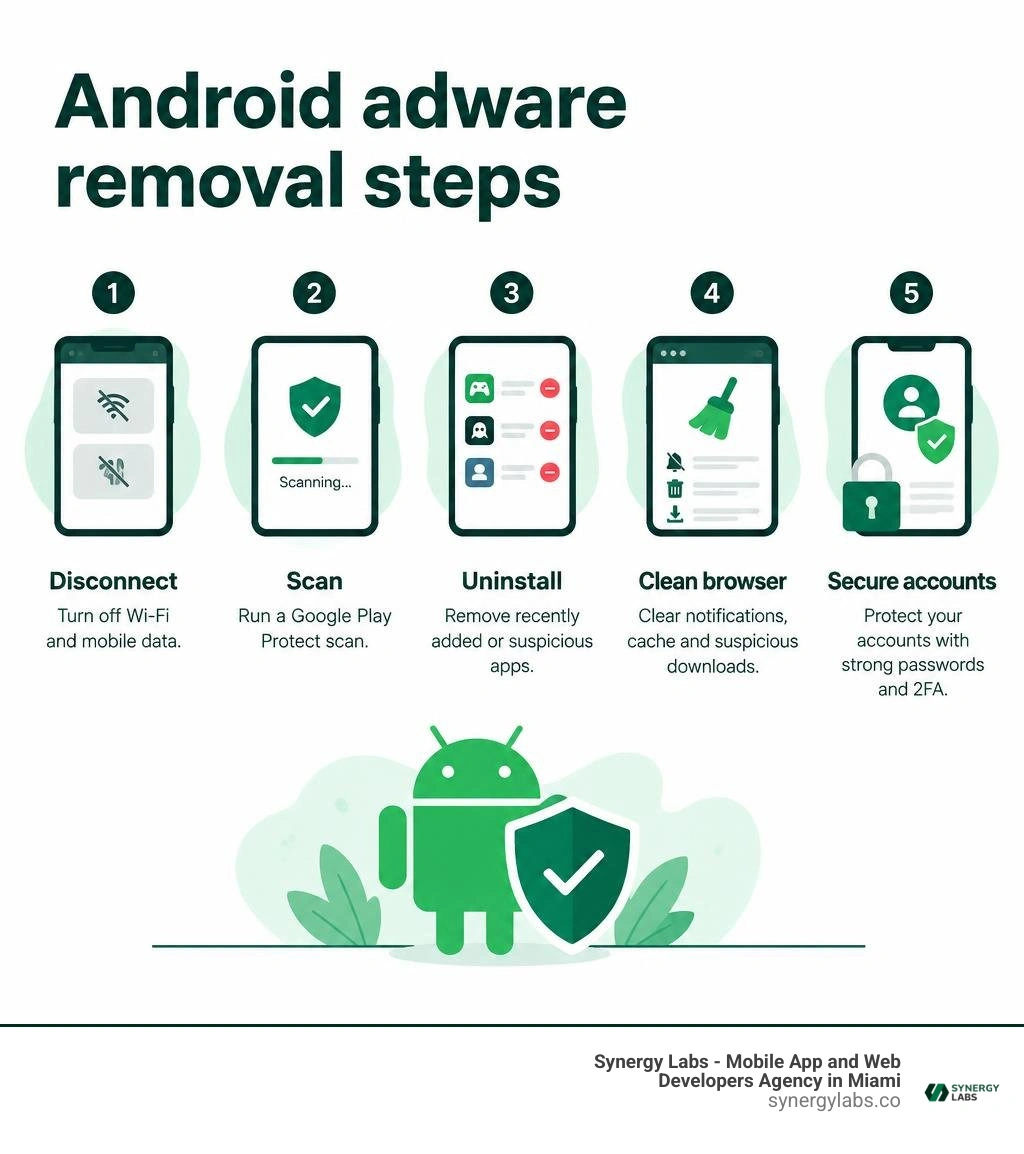
Quick look at adware removal for android:
Understanding Android Adware, PUPs, and Mobile Threats
Mobile security threats span a wide spectrum of software behaviors. Users often label any unwanted screen activity as a virus, but technical categories dictate how software interacts with Android subroutines. Understanding what has taken root on your device determines your recovery strategy.
Adware consists of advertising-supported software designed to display, generate, or download unwanted promotional material. It sits inside a broader classification known as Potentially Unwanted Programs (PUPs) or Potentially Unwanted Applications (PUAs).
While traditional malware executes destructive payloads, PUPs frequently masquerade as helpful utilities—such as flashlight apps, PDF readers, file managers, or battery optimizers. These tools provide baseline functionality while generating aggressive advertising revenue in the background.
Adware can act as an initial entry point for severe exploitation. In 2026, over 14 million mobile malware attacks were cataloged globally. These included roughly 255,000 Android banking trojans, which expanded dramatically following a surge to 1.24 million recorded attacks.
Modern threats blur lines through modular payloads:
- The Kaleidoscope Adware Family: Dominating 28% of all Android adware detections, Kaleidoscope relies on an "evil twin" distribution framework. Legitimate, clean apps submitted to official stores are paired with malicious clones deployed on secondary marketplaces. Once active, the strain executes click fraud and loads full-screen video overlays.
- The Necro Trojan: Slipping past platform defenses, this modular loader infected roughly 10 million devices via mainstream utilities. It executes remote code to run background ad-fraud scripts and establish subscription charges without explicit user consent.
- SpyLoan Campaigns: Accumulating over 8 million installations before mitigation, these predatory utilities offer instant financial loans while harvesting user address books, SMS logs, camera reels, and precise GPS telemetry.
- Aggressive Malvertising Modules: High-frequency ad injectors that hijack browser intents, alter default search engines, and redirect routine browsing to external, affiliate-monetized landing pages.
Implementing comprehensive Android virus protection requires an understanding of how unwanted code compromises underlying system resources.
How Adware Infiltrates Your Device
Android operates on an application sandbox model where each package runs within an isolated environment. Adware breaches or circumvents these security perimeters using several direct distribution vectors:
- Drive-By Downloads and Social Engineering: Users encounter deceptive banners claiming system files are broken, the device is infected, or an update is required. Clicking the prompt triggers a secondary file download (
.apk) outside official channels. - Third-Party Sideloading and Bundling: Repackaged games and utility programs distributed across third-party repositories often package functional app code alongside an obfuscated adware library.
- Permission Abuse via ContentProvider: Modern threats, such as the Vapor family—which recorded over 60 million downloads across 180 campaign packages—use subtle Android components like ContentProvider to maintain background lifecycle hooks without triggering interactive prompts.
- Malvertising Networks: Compromised web ad networks deploy malicious JavaScript scripts that redirect clean browsers to APK payload endpoints or auto-subscribe phone numbers to premium billing gateways.
Common Signs of an Infected Phone
Adware footprints manifest clearly across hardware metrics, user interfaces, and battery consumption profiles. The average recovery timeline from persistent mobile compromises averages 50 days when users fail to identify warning signs early.
- Sudden Battery Depletion: Background ad-fetching, analytics beacons, and script processing cause active battery drops of 10% to 30% during idle standby.
- Severe Cellular Data Spikes: Continuous ad streaming and ad-fraud click verification cause mobile data consumption to climb 30% to 50% beyond baseline averages.
- Overlay Advertisements: Full-screen pop-ups appear over the Android launcher, incoming calls, or during interaction with completely unrelated native applications.
- Thermal Throttling: Hardware runs consistently warm because background threads keep the device's CPU cores awake.
- Browser Disruptions: Native web browsers display altered default homepages, auto-install rogue search engines, or spawn secondary advertising tabs on launch.
Reviewing a detailed guide on fixing advertisement viruses can help you pinpoint visual symptoms and stop them from spreading.
Complete Step-by-Step Guide to Adware Removal for Android
Remediating mobile adware requires a structured process. Rushing to install random cleaner apps often compounds the issue, as many "free memory boosters" are adware utilities themselves.
Using verified mobile security software ensures you eliminate persistent payloads without damaging underlying system partitions.
Safe Mode Diagnostics for Adware Removal for Android
Safe Mode boots the Android operating system with all third-party code, non-essential services, and aftermarket background processes fully suppressed. This allows you to inspect and remove intrusive applications that otherwise intercept touch inputs or block navigation.
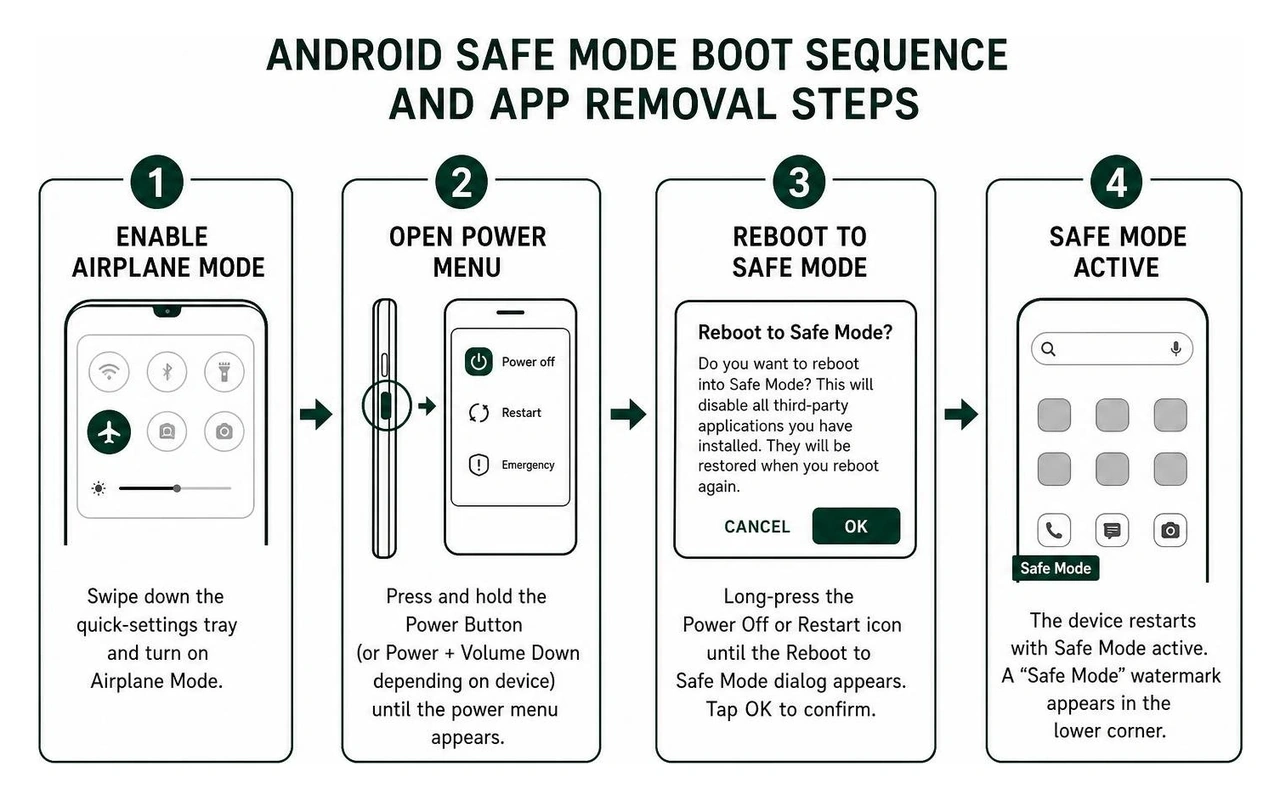
Step 1: Engage Airplane Mode and Enter Safe Mode
- Swipe down the quick-settings tray and enable Airplane Mode to sever command-and-control server access and stop ad downloads.
- Press and hold the physical Power Button (or Power + Volume Down depending on device configuration) until the power menu appears.
- Long-press the on-screen Power Off or Restart icon until the Reboot to Safe Mode dialog appears.
- Tap OK or confirm the reboot. The device will restart, displaying a persistent "Safe Mode" watermark in the lower corner of the display.
Step 2: Uncover Ghost Apps and Blank Identifiers
Adware developers frequently deploy "Ghost Apps"—installations configured with an entirely transparent PNG icon and an invisible unicode space string for a title.
- Open Settings > Apps (or Apps & notifications > See all apps).
- Switch the display filter to sort by Recent Apps or scroll directly to the very top and very bottom of the directory listing.
- Look for entries featuring blank white icons, missing names, or standard system-cloned titles like "Device Health," "System Update Service," or "Android Battery Optimization."
- Tap the rogue entry, select Force Stop, clear its data cache under Storage & cache, and tap Uninstall.
Android includes native diagnostic layers to spot problematic software, but manual verification provides the most thorough cleanup.
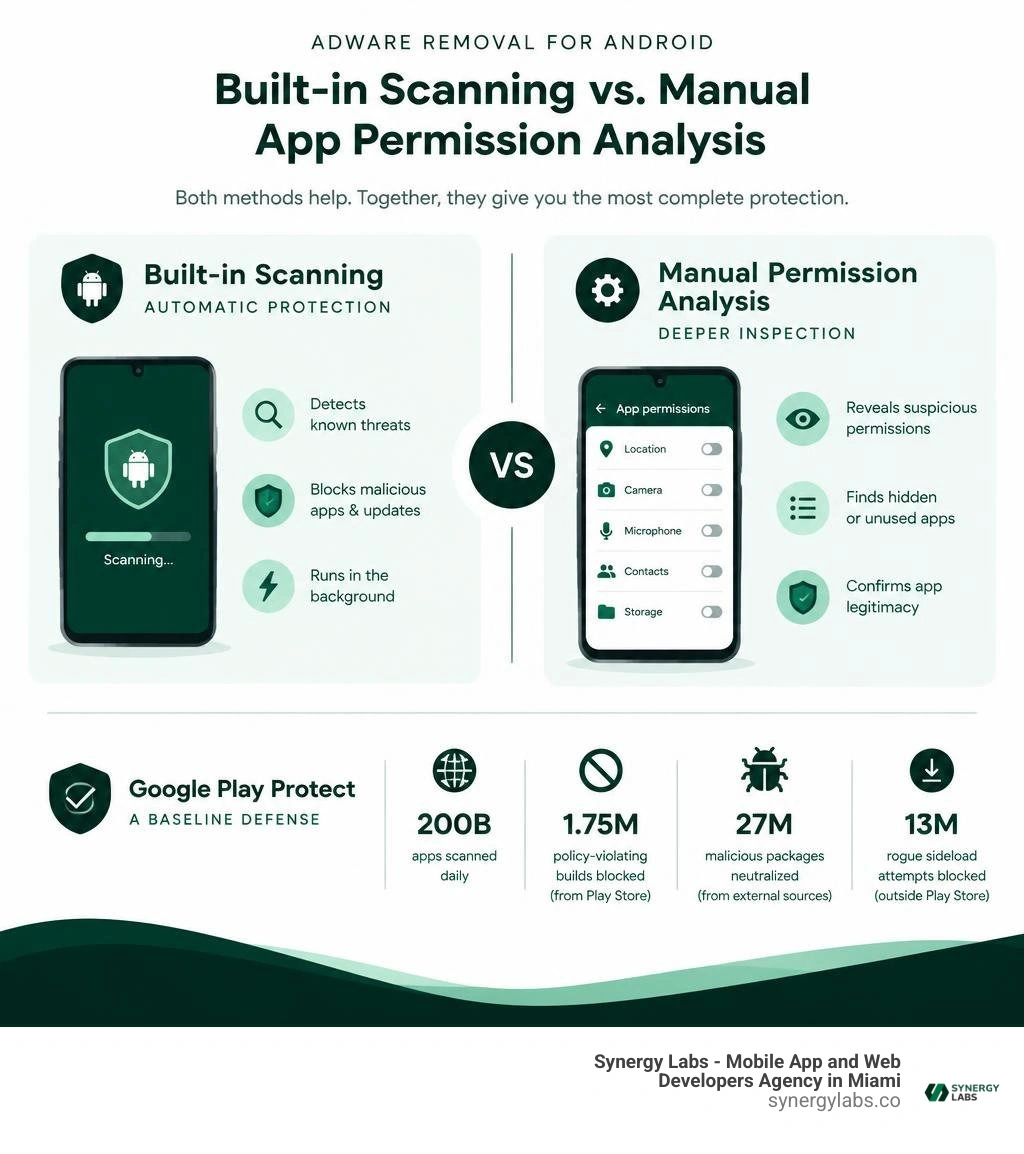
Google Play Protect provides a baseline defensive layer across the operating system:
- Scans approximately 200 billion apps daily across global devices.
- Blocked 1.75 million policy-violating software builds from the Play Store ecosystem in 2026.
- Identified and neutralized 27 million emerging malicious software packages originating from external sources in 2026.
- Blocked 13 million rogue sideload attempts outside the Play Store environment.
While effective against known signatures, zero-day adware packages and evasive campaigns can temporarily slip past automated screening. Combining automated scans with permission audits yields the best results.
Step 3: Revoke Device Administrator and Accessibility Privileges
Malware often modifies system privileges to disable the standard "Uninstall" button.
- Open Settings > Security & privacy > Device admin apps (or search "Admin" in Settings).
- Identify any unauthorized tools sitting with administrative authority (e.g., rogue scanners, flashlight apps, fake players).
- Toggle the permission off and select Deactivate this device admin app.
- Navigate to Settings > Accessibility.
- Check Downloaded apps or Installed services. Adware uses accessibility services to simulate screen clicks, auto-approve pop-up permissions, and prevent users from tapping "Uninstall." Turn off access for any unrecognized app.
- Return to Settings > Apps, locate the package, and proceed with standard uninstallation.
For expanded diagnostic methodologies, refer to step-by-step malware cleanup instructions.
Browser Notification and Cache Sanitization
Many phantom pop-up infections do not stem from installed applications, but from abused Web Push APIs within mobile browsers. Rogue landing pages trick users into clicking "Allow" on push notifications to verify human status or access video content, which then sends ad alerts directly to the notification shade.
Step 4: Clear Web Browser Push Permissions (Google Chrome)
- Launch the Chrome application.
- Tap the three-dot menu icon in the upper-right corner and select Settings.
- Scroll down and open Site settings > Notifications.
- Under the Allowed category, tap on any unrecognized web domain, URL shortener, or advertising address.
- Tap Clear & reset to wipe the domain's notification permissions and cached web storage.
- Return to Site settings > Pop-ups and redirects and ensure the feature is toggled to Blocked.
Step 5: Flush Browser Caches and Purge Download Directories
- Open Settings > Apps > Chrome (and repeat for secondary browsers like Firefox, Samsung Internet, or Opera).
- Select Storage & cache > Clear cache.
- Tap Manage space (or Clear storage) and clear site storage data to strip out persistent tracking scripts and locally stored web payloads.
- Launch your phone's native Files or File Manager app.
- Open the Downloads directory.
- Delete all raw
.apk, .zip, .crx, or unverified media files downloaded during or right before the adware symptoms began.
Advanced Adware Elimination: Handling Stubborn Apps and Factory Resets
Standard uninstallation methods handle the vast majority of threats. However, persistent strains can compromise lower system partitions or persist through recovery mechanisms.
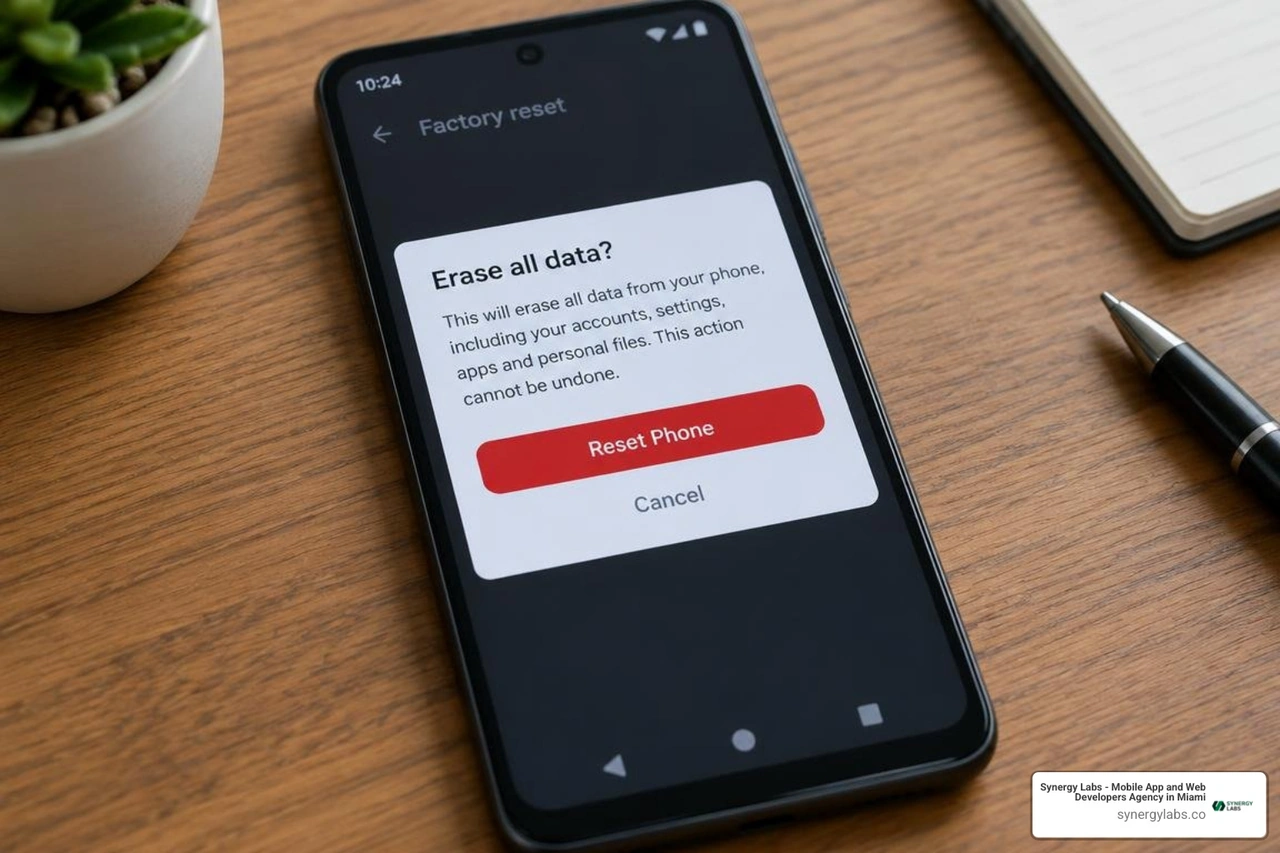
Advanced threats like the xHelper malware family compromised over 45,000 devices by altering system-level components. This allowed the malware to survive standard operating system resets by reinstalling its core components upon reboot.
When dealing with deep infections, deploying a reliable virus scanner for Android phone helps verify partition integrity before taking drastic measures.
A factory reset should be reserved as a definitive resolution when:
- Advertisements persist inside Safe Mode with all third-party software uninstalled.
- Device administrator privileges cannot be revoked due to system software crashes.
- The device's settings menu is inaccessible or locked by malicious scripts.
- Data usage and thermal spikes continue despite complete manual app purges.
Avoiding the "Google Backup Trap"
The most common mistake when factory resetting an infected Android device is choosing automated cloud restore during the initial configuration.
If the rogue package was synced into your Google Account backup profile, the operating system will pull down and reinstall the adware alongside your clean applications.
- Back up critical personal files manually (e.g., photos, documents, address book entries via Google Contacts sync).
- Open Settings > System > Backup (or Google > Backup) and confirm that Apps are excluded from pending cloud snapshots.
- Open Settings > System > Reset options > Erase all data (factory reset).
- Authenticate your screen PIN, pattern, or biometric prompt and select Erase all data.
- Once the device restarts into the out-of-the-box welcome wizard, complete initial language, Wi-Fi, and Google account sign-ins.
- When prompted to "Restore from a cloud backup," select Don't restore or Set up as a new device.
- Reinstall needed applications individually from the Google Play Store, verifying the developer credentials for each tool.
Post-Removal Lockdown and Future Adware Prevention
Removing active adware restores standard device performance. Securing your operating system afterward prevents repeat infections and protects personal data from unauthorized access.
Adware often tracks device telemetry, including advertising IDs, browser caches, and network metadata. Following up cleanup with proactive digital hygiene stops external trackers from reconnecting to your device.
- Activate Ad-Blocking Private DNS: Android supports encrypted DNS-over-TLS at the operating system level. This blocks ad networks and malicious scripts across both apps and web browsers.
- Open Settings > Network & internet > Private DNS.
- Select Private DNS provider hostname.
- Enter a privacy-focused resolving hostname (such as a dedicated ad-filtering private DNS provider) and tap Save.
- Reset Your Android Advertising ID: Adware builds marketing profiles using your device's unique advertising identifier.
- Navigate to Settings > Google > All Services > Ads (or Privacy > Ads).
- Tap Reset advertising ID to scramble historical tracking metrics.
- Tap Delete advertising ID to block apps from compiling future behavioral tracking data.
- Audit "Display Over Other Apps" Permissions:
- Open Settings > Apps > Special app access > Display over other apps.
- Audit the list and turn off permission for any utility, calculator, file manager, or game that does not require overlay functionality.
- Lock Down Sideloading Settings:
- Navigate to Settings > Apps > Special app access > Install unknown apps.
- Ensure every app—including Chrome, WhatsApp, Drive, and your File Manager—is marked as Not allowed.
- Secure Account Credentials:
- Change passwords for sensitive services (Google accounts, primary emails, banking apps) from a clean, secure device.
- Navigate to your Google Account Security Dashboard, review Your devices, and force sign-out on any unrecognized sessions.
- Enable time-based one-time password (TOTP) two-factor authentication across your primary credentials.
For more proactive defensive strategies, explore our best free Android security tips along with insights on how to secure mobile apps from vulnerability exploits.
Frequently Asked Questions About Android Adware
Can adware permanently damage an Android phone?
No. Adware cannot cause direct physical damage to hardware components. However, active adware can accelerate hardware wear.
By running background processes, network requests, and ad rendering engines, it causes the processor to generate heat and forces thermal throttling. This ongoing strain accelerates lithium-ion battery degradation over time, reducing overall battery health.
Is it safe to use free cleaner apps from the Play Store?
Use caution with generic cleaner tools. Many free "Phone Cleaners," "RAM Optimizers," "Battery Boosters," and "CPU Coolers" on the Play Store are adware containers themselves.
These packages display intrusive ads, generate fake "device speed" animations, and request broad permissions—including accessibility and storage access—to harvest analytics data. Stick to native Android storage cleanup tools (like Google Files) and reputable security scanners.
Can adware survive a standard Android factory reset?
In most cases, a factory reset completely removes user-space adware by wiping the active /data partition where downloaded apps reside. However, adware can return if:
- You restore a cloud backup that includes the infected app package.
- The device was rooted and the malware modified the
/system or /vendor partition. - The phone came pre-loaded with supply-chain adware inside factory firmware images (found occasionally on uncertified white-label hardware).
Reclaiming Your Android Device: The Path to Long-Term Security
Removing Android adware requires systematic execution: isolating background processes in Safe Mode, revoking administrator and overlay permissions, clearing browser push notification access, and verifying system integrity. Taking these steps removes unwanted advertisements, restores battery life, and protects your personal data from unauthorized collection.
At Synergy Labs, we engineer custom software with a security-first mindset. When building cross-platform applications, our engineering teams implement secure coding standards, hardened API endpoints, and clean permission structures to protect users and maintain brand integrity.
Whether you need enterprise mobile architecture, system integrations, or scalable cloud backends, we deliver end-to-end development tailored to your timeline.
Our client-first model ensures your projects are delivered securely and cost-effectively:
- Fixed-Budget Model: Clear, transparent pricing with no unexpected cost overruns.
- In-Shore CTO with Offshore Development: Hands-on technical leadership paired with dedicated engineering teams.
- Milestone-Based Payments: Structured disbursement schedules tied directly to verified software deliverables.
Connect with our engineering team at expert mobile app development and security solutions to build, secure, and scale your next mobile platform.


.avif)

.avif)


