React powers over 100M monthly npm downloads — but being popular doesn't make it enterprise-ready out of the box. Here's what large-scale architecture actually requires.
Evaluating React for Enterprise Applications: Architecture vs. Framework
When technical leaders evaluate react for enterprise applications, the conversation often devolves into a simple comparison of UI performance or developer popularity metrics. While React boasts over 100 million monthly npm downloads and consistently high satisfaction ratings, software architects know that popularity alone does not make a tool enterprise-grade.
The fundamental distinction comes down to architecture vs. framework. React is, by design, an unopinionated view library. It handles rendering dynamic UI components efficiently, but it deliberately leaves routing, state orchestration, form validation, and build pipelines to the engineering team. For smaller web builds, this flexibility is a massive advantage. For massive corporate platforms, it means you must intentionally construct your own cohesive software framework around React.
Enterprise React vs Small-Scale Codebases
Building react for enterprise applications requires fundamentally different architectural choices than constructing small-scale web builds. In a startup or single-team environment, a project might contain 20 components, a single global store, and a straightforward directory structure. Developers can easily keep the entire application architecture in their heads.
In contrast, enterprise systems involve distributed teams working across thousands of files and hundreds of shared feature modules over several years. According to enterprise case studies, large organizations frequently manage over 100 single-page application (SPA) modules with teams exceeding 100 engineers working simultaneously.
At this scale, the primary risk isn't rendering speed; it is architectural drift. Without clear boundaries, codebases suffer from tightly coupled domain logic, duplicated API calls, mixed UI concerns, and fragile deployments. To prevent your software investment from turning into technical debt, review our detailed guide on Enterprise App Development Complete Guide 2026.
React vs Angular for Enterprise Software
A frequent question C-suite executives ask us at Synergy Labs is whether to choose React or Angular for large-scale enterprise suites.
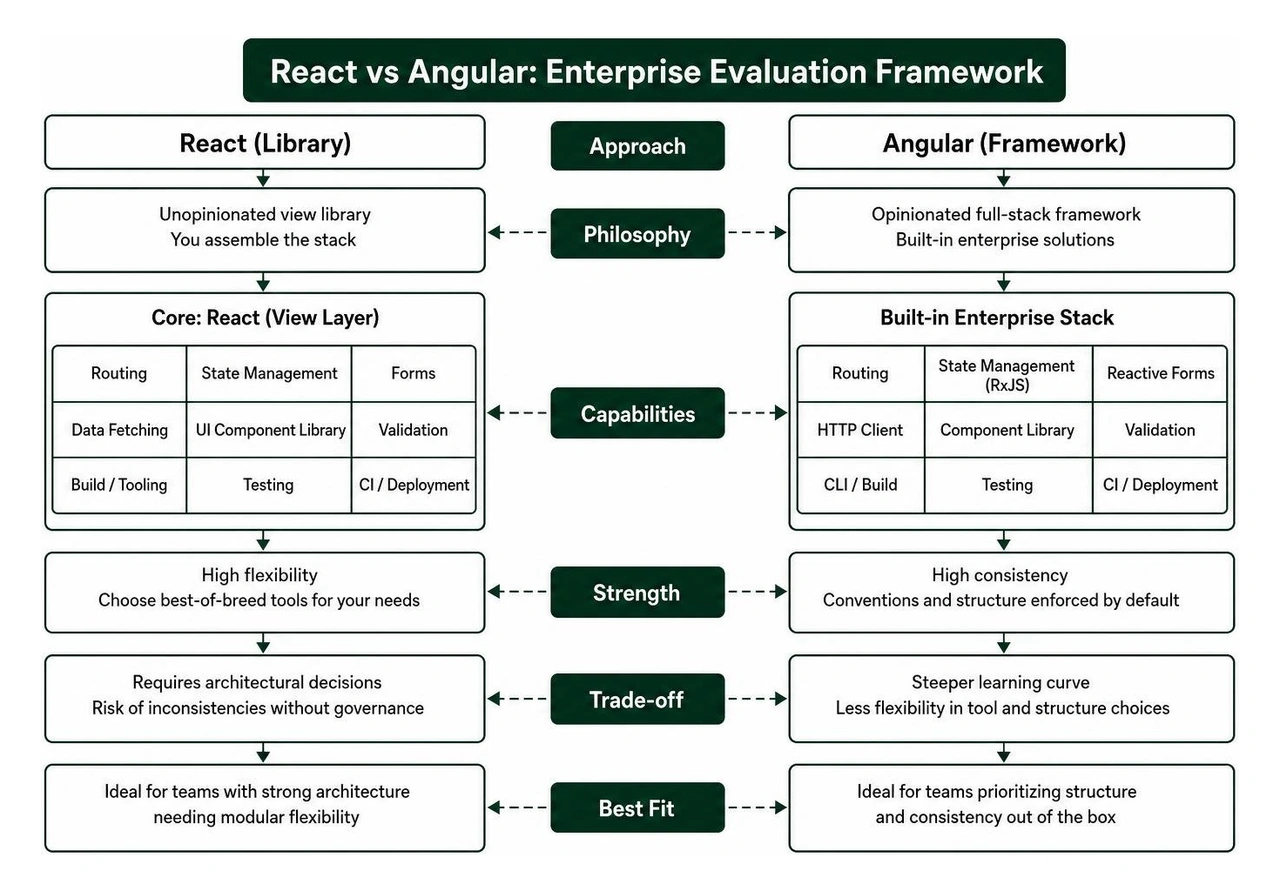
Angular is a complete, highly opinionated framework. It ships with built-in Model-View-Controller (MVC) structures, dependency injection, reactive forms, and modular routing out of the box. For teams lacking dedicated software architects, Angular offers a structured environment that enforces consistency by default. Furthermore, Angular's modern engine uses Incremental DOM compilation to keep memory footprints low.
React operates primarily as the view layer (V in MVC). To match Angular's full enterprise capabilities, a team using react for enterprise applications must assemble a carefully curated ecosystem stack. However, React's unopinionated nature provides unmatched modular flexibility. Teams can select lightweight state tools, custom component engines, and tailored data-fetching libraries that precisely fit complex domain requirements.
Architectural Approach: React Enterprise Stack relies on a modular library ecosystem (Composition), whereas Angular offers a monolithic out-of-the-box framework.
Core Focus: React focuses specifically on declarative view rendering, while Angular handles complete MVC application architecture.
State Management: React leverages ecosystem options (TanStack Query, Zustand, RTK), compared to Angular's built-in Services, RxJS, and Signals.
Form & Validation: React utilizes flexible external libraries (Formik, React Hook Form + Zod), while Angular includes standardized Reactive & Template forms.
Learning & Recruitment: React benefits from high global talent pool availability, whereas Angular has a higher initial learning curve for its full framework.
Real-world production benchmarks show that bundle size differences between the two frameworks are negligible when properly optimized (e.g., React + Redux at ~193kB vs. Angular Ivy at ~140kB). The real choice isn't raw performance, but governance preference: do you want an out-of-the-box system, or do you want to compose a tailored, best-of-breed software stack? For deeper insights into structured enterprise patterns, refer to the Practical Enterprise React Guide.
Composing Next.js vs Modular Stacks in React for Enterprise Applications
When architecting react for enterprise applications, teams must decide between composing a custom single-page application stack (using Vite, TanStack Router, and client-side modules) or deploying an opinionated meta-framework like Next.js 15+.
Next.js has become an industry standard for enterprise deployments by solving essential framework concerns out of the box:
Built-in file-based routing and nested layout engines.
First-class support for React Server Components (RSC) to reduce client JavaScript bundles.
Hybrid rendering modes configured per-route (Static Site Generation, Server-Side Rendering, and Incremental Static Regeneration).
Edge middleware capabilities for localized authentication and instant API routing.
However, composing a custom React stack with client-side tooling remains powerful for internal B2B dashboards and highly dynamic data tools where server-side rendering is unnecessary. Understanding how to weigh these choices is key to long-term performance. Learn more about evaluating technical scalability in our article on What Makes an App Scalable A Technical Guide for Growing Companies.
Scalable Architecture and Folder Structure for Enterprise Teams
Building long-lasting enterprise software requires establishing strict folder conventions early on. When dozens of developers contribute to a codebase, relying on arbitrary folder organization leads to circular dependencies, lost components, and high maintenance costs.
Modular Boundaries and Feature-First Architecture
The standard practice for react for enterprise applications is a domain-driven, "local-first" feature architecture. Rather than grouping files by technical type (placing all components in one folder, all hooks in another, and all styles in a third), enterprise architectures group code by business domain.
By enforcing a local-first co-location rule, everything relevant to a specific feature—its API hooks, local UI components, and TypeScript definitions—lives inside that feature's directory.
Furthermore, applying Atomic Design principles (Atoms, Molecules, Organisms) to your root components/ directory guarantees that foundational design elements remain isolated from complex enterprise business logic. To see how structured architecture aids overall digital evolution, read our guide on Best Practices for Legacy System Modernization in 2026.
Enforcing Standards and Boundaries with Automated Tooling
Manual code reviews cannot reliably catch architectural boundary violations across large engineering organizations. Enterprise teams automate governance using strict static analysis and tooling frameworks.
ESLint Module Boundary Rules: Use ESLint plugins (such as eslint-plugin-boundaries) to restrict cross-feature imports. For instance, code inside features/billing should never directly import private components inside features/analytics. Communication between features must pass through explicit index.ts public contracts.
Automated Generators and Scaffolding: Tools like Nx generators establish standardized code templates for new feature modules, forms, and API hooks across teams instantly.
AI Coding Assistant Rules: Enterprise projects increasingly include canonical context rules (such as AGENTS.md or .cursor/rules) directly within the codebase repository. This ensures AI pair-programmers strictly adhere to internal folder structures, type safety patterns, and naming conventions without context drift.
Standardizing foundational enterprise components can also be accelerated by evaluating battle-tested component ecosystems like the @enterprise-ui-react component library.
Enterprise State Management and Data Architecture
State management is where enterprise React applications often run into issues. A common mistake is dumping all application data—UI toggles, form fields, dynamic user permissions, and raw backend responses—into a single global store like Redux.
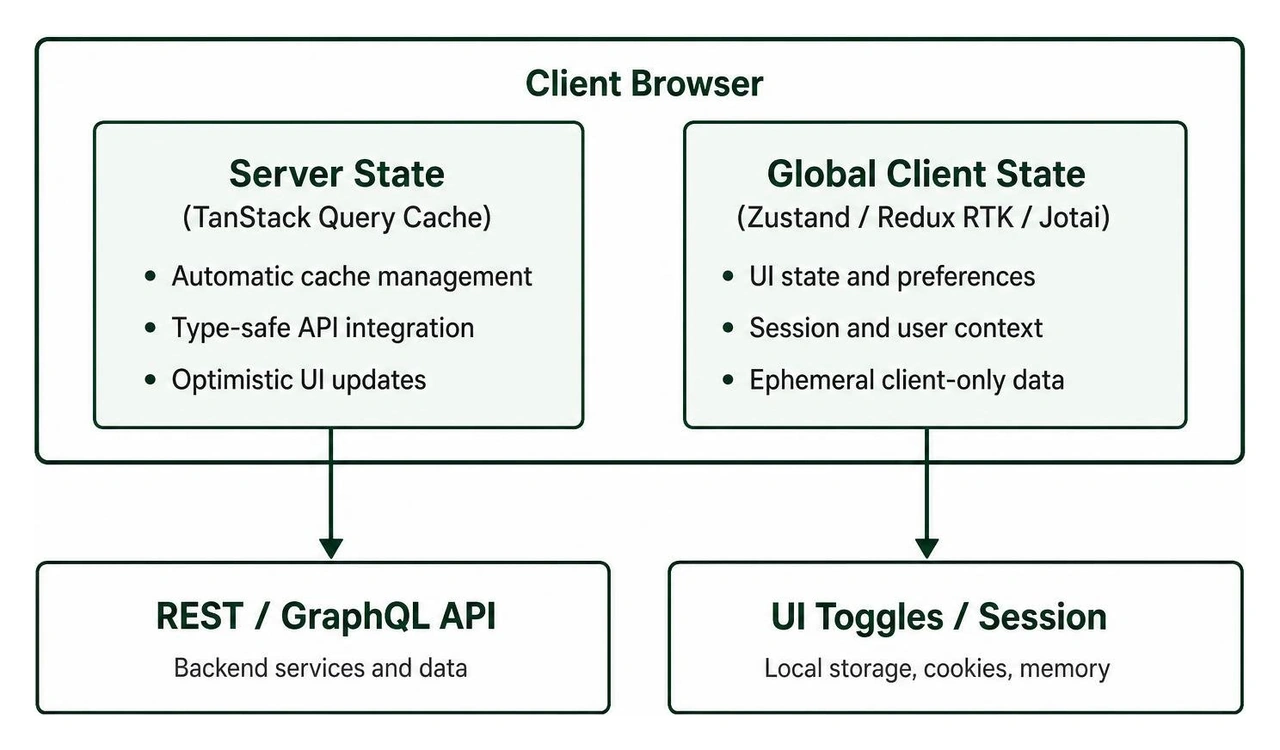
Modern architecture for react for enterprise applications strictly separates Server State (data owned by the backend database) from Global Client State (temporary UI states and session context).
Separating Server State with TanStack Query
Data fetched from remote APIs is not local state; it is an asynchronous cache of backend information. Treating server data as local state forces developers to manually write tedious loading flags, retry routines, normalization schemes, and error handling loops.
TanStack Query (formerly React Query) is the industry-standard solution for server state management in React. It completely decouples remote data operations from UI components.
Automatic Cache Management: Deduplicates concurrent requests, caches response data across app sessions, and invalidates background caches automatically when mutations complete.
Auto-Generated Type-Safe Clients: Enterprise teams pair OpenAPI/Swagger backend definitions with client generators to produce type-safe API fetching hooks automatically.
Optimistic UI Updates: Allows heavy B2B data applications to reflect UI changes instantly while validating operations asynchronously in the background.
Choosing Global State Tools: Redux Toolkit, Zustand, and Jotai
With server state handled separately, true client-only global state becomes surprisingly minimal. Enterprise teams select global state management tools based on structural complexity and team scale:
Redux Toolkit (RTK): Remains a strong, standard choice for massive enterprise applications with complex multi-step transactional workflows. Its strict action-driven patterns, middleware ecosystem, and time-travel debugging provide complete predictability when managed across dozens of engineering teams.
Zustand: A lightweight, high-performance unopinionated state library that has earned widespread enterprise adoption. It relies on simple hooks, uses minimal boilerplate, and supports direct selector subscriptions that eliminate unnecessary re-renders.
Jotai: Uses an atomic state approach ideal for complex, interconnected UIs (such as interactive design tools or real-time analytics dashboards) where independent component state atoms need to be composed dynamically.
Performance Optimization and Dynamic UI Rendering
An enterprise application carrying hundreds of active fields, dynamic data tables, and live analytical updates can easily suffer from rendering lag if performance isn't continuously managed.
Virtualization, Code-Splitting, and Profiling
Performance optimization should never be based on guesswork. Enterprise React development relies on structured measurements and targeted rendering optimizations.
React Profiler Audits: Engineers use the built-in React Profiler to pinpoint hot-paths and eliminate unexpected component render loops before shipping code to production.
Dynamic Code-Splitting and Lazy Loading: Large-scale applications should never load their entire JavaScript payload on initial render. Routes and heavy sub-modules (such as reporting tools, complex chart libraries, and multi-step modal dialogs) are lazy-loaded on demand using React.lazy() and dynamic import() boundaries.
Data Table and List Virtualization: Enterprise dashboards frequently process thousands of data rows. Rendering thousands of DOM nodes simultaneously will degrade browser memory. Using windowing libraries (like tanstack/react-virtual), the browser only renders the visible table items within the active viewport, keeping frame rates locked at 60 FPS regardless of list length.
Targeted Memoization (memo, useMemo, useCallback): Memoization shouldn't be blindly wrapped around every single function or component. Instead, it is strategically applied to expensive computations, deep tree structures, and components that render frequently due to high-frequency upstream state changes.
Enterprise B2B platforms often require dynamic UIs where form schemas, user control privileges, and page layouts are driven by backend metadata configurations rather than hardcoded UI components.
Compound Components Pattern: Encapsulates related UI elements (e.g., dynamic multi-tab accordions, complex search filters) while sharing internal state implicitly. This gives component consumers complete flexibility over rendering layout without exposing complex state mechanics.
Polymorphic Components: Allows generic UI primitives (such as Cards, Buttons, or Navigation Items) to dynamic render underlying HTML tags or nested React Router elements while maintaining 100% type-safe props.
Accessible Headless Primitives: Enterprise applications must satisfy strict digital accessibility standards (such as WCAG 2.2 AA compliance). Building custom component accessibility from scratch is risky. Leading engineering teams build their internal design systems by pairing unstyled, fully accessible headless primitives (such as Radix UI or React Aria) with utility styling frameworks like Tailwind CSS.
Testing Strategies, Micro-Frontends, and Long-Term Scale
A major challenge when managing react for enterprise applications is maintaining development momentum as application complexity expands across multiple autonomous teams.
Scaling Multi-Team Workflows using React for Enterprise Applications
When front-end development scales past 50–100 engineers, a single monolithic frontend application can create CI/CD bottlenecks. Enterprise organizations frequently look to distributed micro-frontend architectures to keep teams independent.
Using tools like Webpack 5 Module Federation or modern runtime module loaders, organizations split massive React builds into decoupled, independently deployable micro-applications:
Independent Release Pipelines: Teams can deploy updates to their specific domain module (e.g., Billing or Analytics) without re-building or re-testing the main shell application.
Runtime Singleton Management: Module Federation coordinates core dependencies (like React, React-DOM, and shared state instances) at runtime, preventing duplicate library loads in the browser.
Decoupled Communication: Micro-frontends communicate strictly through lightweight event-bus mechanisms or dynamic route state changes, preventing tight coupling across separate engineering divisions.
To ensure your deployment and maintenance pipelines stay optimized over the long term, review our specialized services for DevOps App Maintenance Agency.
Refactor-Proof Testing: Unit, Integration, and E2E
A common failure in enterprise software projects is focusing on vanity code coverage metrics (e.g., hitting 95% unit coverage by testing shallow props and internal component implementation details). Tests that break every time an engineer refactors a single HTML tag reduce team velocity without adding safety.
React Testing Library (RTL): Tests components purely from the user's perspective. Instead of inspecting internal state or component props, RTL tests interact with visible text labels, accessible roles (getByRole('button', { name: /submit/i })), and actual DOM outputs.
Mock Service Worker (MSW): Intercepts network calls at the browser worker layer during automated testing runs. This lets developers execute realistic integration tests against actual frontend code flows using mock API data without spinning up expensive backend environments.
Targeted E2E Smoke Tests: End-to-end automation frameworks (such as Playwright or Cypress) cover critical revenue paths—such as user login, multi-step checkout processes, or complex data exports—guaranteeing stable releases across every CI pipeline run.
Frequently Asked Questions About Enterprise React
How do enterprise teams maintain architectural consistency across dozens of developers?
Enterprise teams maintain architectural consistency by automating quality checks rather than relying solely on manual code reviews. They establish strict path aliases, enforce module boundary rules using specialized ESLint plugins, utilize CLI generators (such as Nx) for scaffolding standardized component patterns, and mandate strict static type safety with TypeScript.
Additionally, embedding shared coding guidelines (via rules files like AGENTS.md) directly in repositories ensures that modern AI coding tools write code that adheres strictly to internal company standards.
What state management library works best for multi-team enterprise React codebases?
The most effective state management strategy for multi-team codebases is separating remote server data caching from local client application state.
Using TanStack Query to handle API data caching, retries, and invalidation eliminates the majority of global state complexity. For remaining client-side global state, Zustand is widely favored for its minimal footprint, lack of boilerplate, and high performance. For organizations requiring strict action auditing and structured time-travel debugging across massive multi-team workflows, Redux Toolkit remains an industry standard.
Is React or Angular better suited for complex enterprise applications?
Neither technology is strictly superior; they represent different design philosophies. Angular is an opinionated, out-of-the-box framework that ships complete solutions for routing, dependency injection, and forms, making it ideal for organizations seeking standardized built-in rules.
React is a flexible UI library that allows engineering teams to construct a custom, high-performance tech stack tailored specifically to their domain. React is often favored by enterprises due to its massive global developer ecosystem, highly adaptable component composition patterns, and broad selection of modern tooling.
Accelerating Enterprise React Success with Synergy Labs
Architecting react for enterprise applications demands much more than component design—it requires thoughtful long-term software engineering, type-safe API boundaries, predictable state management, and high-velocity continuous integration. Without clear guardrails, enterprise frontend systems risk becoming brittle and hard to maintain.
At Synergy Labs, we specialize in helping mid-sized and large enterprises build scalable, highly maintainable web applications. Our engineering team brings deep architectural expertise to every project, ensuring your frontend platform is secure, fast, and engineered to scale as your business grows.
Why Enterprise Leaders Partner with Synergy Labs:
Fixed-Budget Execution: Clear, predictable project pricing that eliminates unexpected development cost overruns.
In-Shore CTO Leadership with Senior Offshore Execution: Strategic tech guidance from seasoned in-shore technology leaders paired with highly skilled, cost-effective engineering teams.
Milestone-Based Deliverables: Payment schedules tied directly to verifiable engineering milestones, guaranteeing accountability and on-time execution.
Comprehensive Scale & Modernization: End-to-end engineering capabilities across modern React ecosystems, micro-frontend conversions, and legacy migrations.
Ready to build a reliable, high-performance enterprise React application? Explore our comprehensive App Development Services or contact our senior technology team today to discuss your technical roadmap.




.avif)

.avif)


