HTML5 lets you write once and deploy everywhere — iOS, Android, Windows, macOS, and Linux. Here's how modern frameworks like Electron, Ionic, and Capacitor make it production-ready in 2026.
Why HTML5 Cross-Platform Is the Smartest Way to Build Your Next App
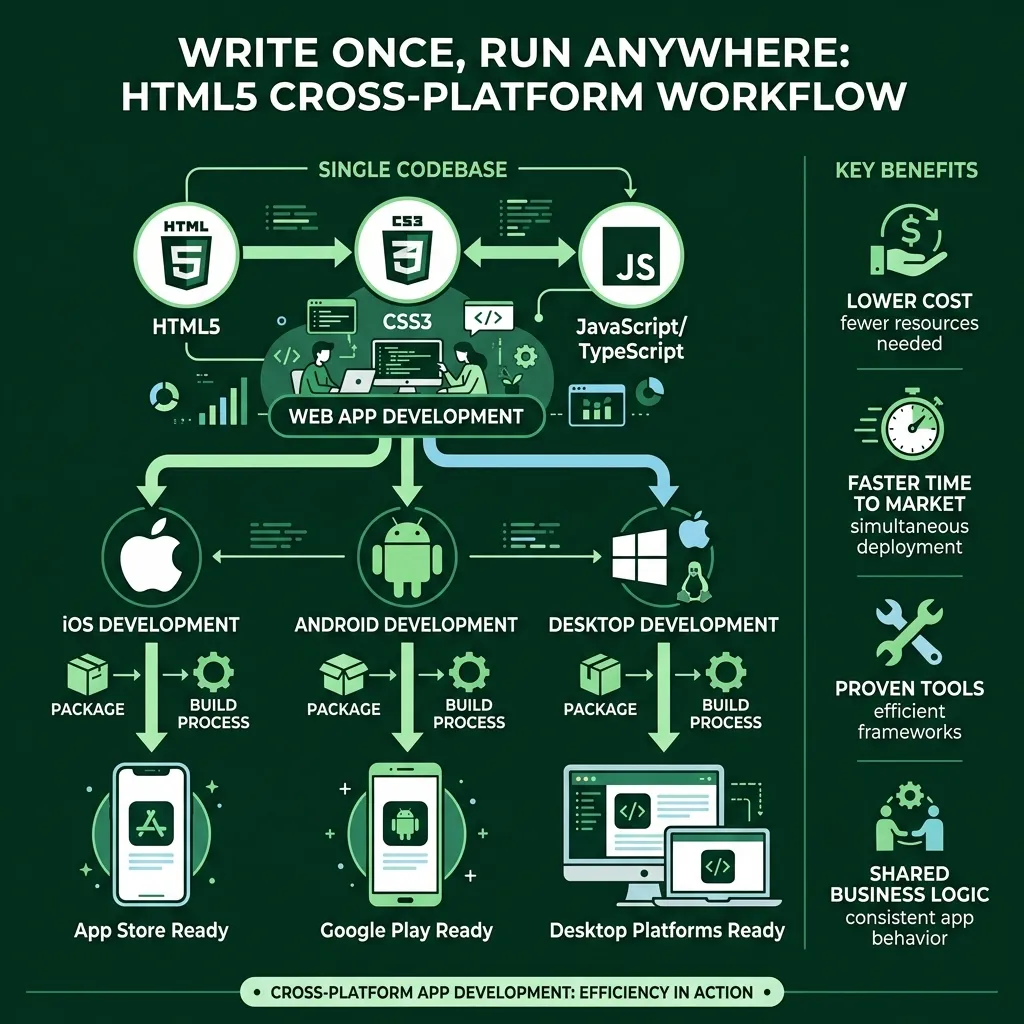
HTML5 cross platform development lets you write your app once and deploy it to iOS, Android, Windows, macOS, and Linux — all from a single codebase.
Here's a quick breakdown of what that means in practice:
One codebase targets all major platforms
Lower cost than building separate native apps for each OS
Faster time to market — ship to every platform simultaneously
Proven tools like Electron, Ionic, and Capacitor handle the heavy lifting
App store ready — HTML5 apps can be packaged and submitted to the App Store, Google Play, Microsoft Store, and Mac App Store
That's the short answer. But if you want to understand how to actually make it work — and avoid the common pitfalls — keep reading.
Building a separate native app for every platform used to be the default. It was expensive, slow, and required entirely different engineering teams. Then came a smarter approach: use the web technologies developers already know — HTML, CSS, and JavaScript — and wrap them in a thin native shell that talks to the device's hardware.
Today, this approach powers some of the most-used software in the world. VS Code, Slack, Discord, and GitHub Desktop are all built with Electron, an HTML5-based desktop framework. Ionic, one of the leading mobile HTML5 frameworks, sees 15 million monthly npm installs and has 49,000 GitHub stars. These aren't small experiments — they're production-grade apps used by millions of people every day.
At Synergy Labs, we've worked extensively with HTML5 cross platform frameworks to help startups launch fast without blowing their budgets on redundant native builds — bringing the right tools together for clean, scalable, multi-platform experiences. If you're a founder trying to move quickly without sacrificing quality, this guide is for you.
The Evolution of html5 cross platform Development
If we hop into our developer time machine and head back to 2010, the landscape was a bit like the Wild West. We had the "PhoneGap era," where the dream of a single codebase first took flight. PhoneGap (which later became Apache Cordova) was the pioneer, providing a way for JavaScript to peek through a "bridge" and talk to native APIs like the camera or accelerometer. Back then, it was revolutionary, though, to be honest, the performance sometimes felt like a turtle running through peanut butter.
Fast forward to 2026, and the ecosystem has matured into a powerhouse. We’ve moved from simple wrappers to sophisticated cross-platform app development service models that offer near-native performance. The core philosophy remains: maintain a single source code for your business logic. This isn't just about mobile anymore, either. Modern Cross Platform & HTML5 solutions are now mission-critical for everything from embedded Linux boards in smart factories to high-end Windows desktops and Android tablets.
The shift has been from "making it work" to "making it shine." Developers no longer have to compromise on the user experience. By leveraging a single source code, we can ensure that the core functionality of an app remains consistent whether a user is accessing it from a browser in New York City or a dedicated desktop app in London.
Why html5 cross platform is the Standard for 2026
By 2026, the debate over "web vs. native" has largely settled into a peaceful coexistence where HTML5 often takes the lead for business and productivity tools. Why? Because the underlying tech has become incredibly robust. Modern desktop applications are often powered by the Chromium engine and Node.js integration, which allows web apps to behave like traditional software.
Massive Reach: You aren't just on the phone; you're everywhere.
Simplified Maintenance: Fix a bug once, and it's fixed for everyone.
Developer Availability: Finding talent skilled in HTML/JS is much easier than finding niche native specialists.
Ecosystem Depth: You get to tap into the massive npm (Node Package Manager) ecosystem.
When you Build cross-platform desktop apps with JavaScript, HTML, and CSS | Electron, you aren't just making a "website in a box." You're building an application that supports native graphical user interfaces, automatic updates, and crash reporting. This stability is why enterprise-grade apps for companies in Austin, TX, or Riyadh, Saudi Arabia, rely on these technologies. These apps are stable, secure, and ready for Mac App Store, Microsoft Store, and even the Snap Store for Linux users.
Mastering the html5 cross platform Ecosystem
Navigating the ecosystem requires knowing which tools to pack in your kit. The Ionic Framework remains a titan in this space. With over 15 million monthly installs and a massive community, it’s the go-to for many cross platform app solutions. Ionic doesn't force you into a corner; it plays well with others, offering deep Angular integration, React support, and Vue.js compatibility. You can even go framework-free if you’re feeling like a purist.
Then there is Capacitor, the spiritual successor to Cordova. It acts as the bridge between your web code and the native OS, making it easier than ever to call native functions. On the desktop side, Electron Forge provides a "batteries-included" toolkit for packaging and distributing your apps. Whether you are a solo dev in Phoenix or a large team in Chicago, these tools provide the scaffolding needed to turn a great idea into a multi-platform reality.
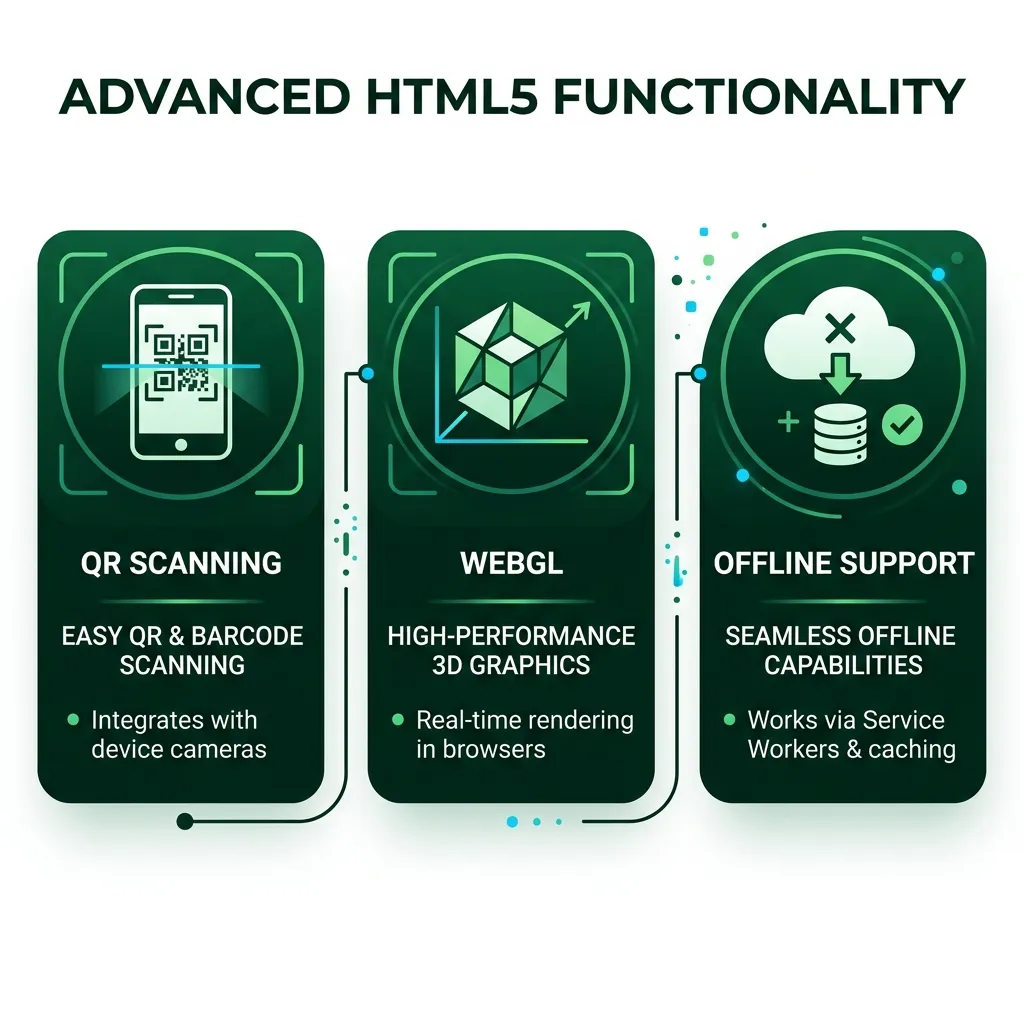
One of the biggest myths about html5 cross platform apps is that they can't handle "hard" tasks. That's simply not true in 2026. Take QR and barcode scanning, for example. Using libraries like Html5-QRCode | html5-qrcode, developers can implement high-performance scanning that works via a webcam on a Mac or the back camera of an Android device.
For real-time data, we use WebSockets and MQTT protocols. This is vital for apps that require instant updates, like a stock ticker or a chat app. If you're building a media-heavy app, understanding Cross-browser audio basics - Media | MDN is essential. You’ll want to support both MP3 and Ogg Vorbis formats to ensure maximum coverage across different browsers. By creating custom playback controls, you ensure your app looks consistent across all devices, avoiding the "default browser player" look that can scream "unprofessional."
Offline support is another area where HTML5 shines. Through Service Workers and local storage, we can build apps that don't just "break" when the Wi-Fi drops out in a subway in NYC. They continue to function, syncing data back to the server the moment a connection is restored.
Bridging the Gap: Handling Native Device Features
The "Secret Sauce" of a great html5 cross platform app is how it handles the "bridge" to native features. In the past, this was the pain point. Today, Capacitor plugins have made this nearly seamless. We can access the camera, filesystem, push notifications, and even biometric authentication (FaceID/Fingerprint) with just a few lines of JavaScript.
Hardware Acceleration: Smooth transitions that use the device's GPU.
Touch-Optimized Gestures: Swiping and pinching that feels "right."
Geolocation: Precise tracking for maps and delivery services.
Device Orientation: Essential for games or specialized utility tools.
This bridge ensures that your app doesn't just sit "on top" of the OS but feels like a part of it. At Synergy Labs, we focus on these native integrations to ensure that a user in San Francisco feels the same level of polish as a user in Dubai.
Custom Controls: Don't use standard HTML buttons; build components that mimic native platform patterns.
Light and Dark Mode: Use CSS variables to respect the user's system settings automatically.
Lazy Loading: Only load the code and assets you need for the current screen.
Tree Shaking: Remove unused code during the build process to keep the app lightweight.
For those building games or high-interaction apps, "sprite recycling" is a pro tip. By reusing image objects instead of creating new ones, you save massive amounts of memory. Using "Arcade physics" within frameworks like Phaser 3 allows for complex movement without the overhead of a full 3D engine. These small optimizations add up, resulting in a smooth 60 (or even 120) frames-per-second experience.
Frequently Asked Questions about HTML5 Apps
Can HTML5 truly create applications that work seamlessly across all platforms?
Yes, absolutely. By using modern wrappers like Electron for desktop and Capacitor for mobile, developers can leverage a single codebase to target Windows, macOS, iOS, and Android with near-native performance. The key is in the implementation — using platform-specific CSS and native bridges ensures the app feels "at home" regardless of the operating system.
How do you handle offline support in HTML5 cross-platform apps?
Offline functionality is primarily implemented using Service Workers, which act as a proxy between the app and the network. They can cache essential assets (HTML, CSS, JS, images) so the app loads instantly. For data, we use LocalStorage or IndexedDB to save user input locally. Once the device is back online, the app can background-sync that data to your server.
What are the main limitations of using HTML5 compared to native development?
While HTML5 is highly efficient for most use cases, it can face performance overhead in extremely resource-intensive tasks, such as high-end 3D gaming or complex real-time video editing. This is because there is a "browser engine" layer between the code and the hardware. However, with the rise of WebAssembly (Wasm) and WebGL, this gap is closing rapidly every year.
The Future of Your Digital Strategy with Synergy Labs
Choosing the right path for your app is a big decision. At Synergy Labs, we don't just build apps; we build business solutions. Whether you are looking for cross platform app solutions in Miami, FL, or need a robust enterprise system in Riyadh, Saudi Arabia, we have the expertise to guide you.
Our model is designed for your success. We provide direct access to senior talent and an in-shore CTO who works closely with our highly skilled offshore development team. This gives you the best of both worlds: world-class strategic oversight and cost-effective development. We operate on a fixed-budget model with milestone-based payments, so you never have to worry about "hidden costs" or projects that never end.
From rapid app launches to user-centered design and robust security, we ensure your 2026 technology trends are not just followed, but mastered.
Ready to turn your vision into a reality?Contact Synergy Labs today to discuss your project and see how we can help you dominate the market with a high-performance, html5 cross platform application. Let’s build something amazing together!


.avif)

.avif)


