Why App-Ray Matters for Deep Android App Security Testing

App-Ray is an automated Android application security-testing platform that scans app builds for security weaknesses, privacy problems, and possible data leaks. For developers, it offers a practical way to test each build in a CI/CD pipeline, review the findings, and fix risks before an app reaches users or an app store.
Its value is in going beyond a basic checklist. App-Ray analyzes an Android app's behavior and risk signals, helping teams spot issues such as unsafe data storage, exposed sensitive information, and risky communications. That makes it useful for startup teams moving fast, app-store providers screening submissions, and organizations that need clearer evidence of mobile security controls.
Over time, automated analysis approaches have grown into a standard component of the broader mobile-application-security ecosystem. The important takeaway for a development team is simple: security testing can happen continuously, not as a last-minute release blocker. Because finding a leak after launch is a far less fun kind of product feedback.
As Director of Product at Synergy Labs, I see automated mobile testing as a core part of delivering apps that can scale without treating user trust as an afterthought.
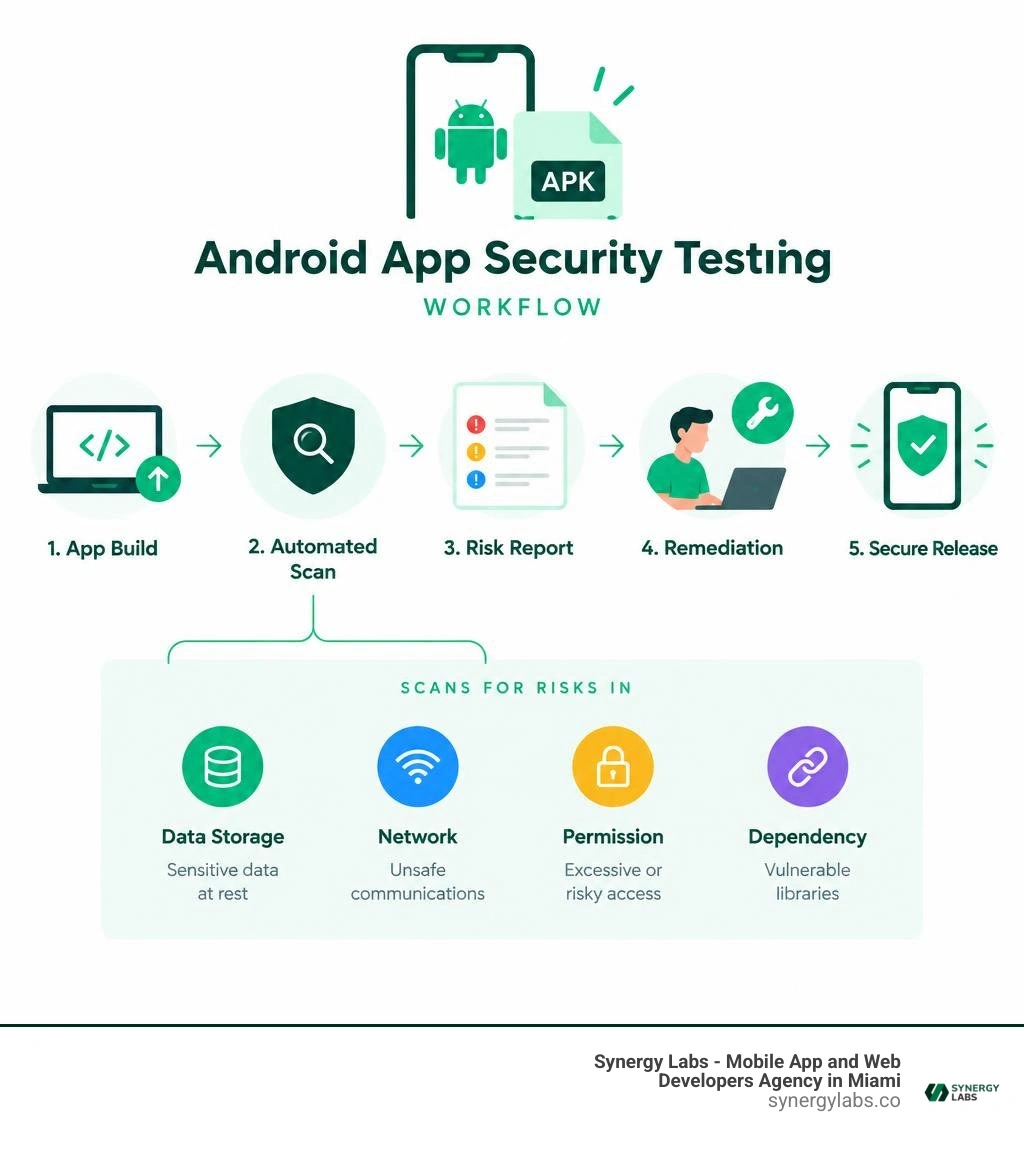
Quick app-ray definitions:
What Is App-Ray and How Does It Work?

App-Ray serves as a purpose-built security testing engine engineered specifically to dissect mobile applications. Unlike conventional desktop vulnerability scanners, it inspects compiled binaries without requiring direct access to source code. This makes it an indispensable asset for enterprise teams auditing third-party software and developers verifying their production-ready Android application packages.
When a compiled package enters the scanning environment, the engine decomposes the binary to analyze its underlying logic, resource allocations, and external library bindings. It evaluates how the code interacts with system services, assesses how data is written to device memory, and monitors outgoing transmission requests. By reviewing these elements simultaneously, the platform flags hidden vulnerabilities, compliance gaps, and unauthorized data leakage points that manual code reviews frequently miss.
Core Capabilities of the App-Ray Scanning Engine
The foundation of the engine rests on a hybrid analysis architecture combining static code inspection with dynamic behavioral tracking. Rather than relying solely on predefined vulnerability signatures, the scanner executes the compiled application in a secure sandbox, observing operational execution paths in real time.
- Static Binary Disassembly: Evaluates compiled byte code to identify architectural flaws, insecure hardcoded variables, and deprecated API implementations.
- Dynamic Behavioral Tracking: Runs the application in an isolated environment to capture runtime memory manipulation, intent spoofing, and background network traffic.
- Third-Party Library Auditing: Evaluates external SDKs and bundled dependencies to verify that secondary libraries do not silently introduce malicious vectors or violate user privacy.
- Cryptographic Validation: Examines encryption protocols, assessing whether keys are generated safely or if weak hashing algorithms compromise stored data.
Learning how to secure mobile apps requires understanding where vulnerabilities originate, and automated binary testing exposes those flaws early in development.
Evolution of Automated Binary Protection
Over the years, the technology behind App-Ray has evolved as part of an expanded mobile application security landscape. This ongoing advancement bridges the gap between automated vulnerability discovery and proactive code protection, combining static detection with advanced binary obfuscation and runtime application self-protection.
As we navigate the enterprise landscape in 2026, mobile security benchmarks require continuous verification across every stage of the software development lifecycle. The fusion of automated dynamic scanning with multi-layered code hardening ensures that modern engineering teams can identify vulnerabilities during development while systematically shielding production binaries from reverse-engineering and live tampering.
Key Features and Vulnerability Detection Capabilities
Mobile security vulnerabilities rarely announce themselves with fanfare; they hide quietly in misconfigured network calls, unprotected local cache files, or overlooked test endpoints. Automated security engines systematically parse these risk factors, delivering structured reporting that allows development teams to remediate threats quickly.
Applying actionable Android security tips in 2026 is much simpler when your continuous integration tools automatically highlight critical flaws on every git push.
Privacy Breach and Data Leak Analysis in App-Ray
Modern privacy standards hold development teams strictly accountable for every piece of personal data handled by an application. The scanning engine maps the precise flow of personally identifiable information across application components to prevent regulatory non-compliance and reputational damage.
The scanner monitors the application lifecycle to detect common privacy breaches:
- Exposed Hardware Identifiers: Tracks unauthorized collection of device serial numbers, IMEI values, or MAC addresses without explicit user authorization.
- Insecure Local Storage: Identifies unencrypted Shared Preferences, unprotected SQLite databases, and world-readable cache directories on external storage.
- Unsanitized Logging: Detects sensitive user inputs, authorization tokens, or session IDs accidentally written to public Android system logs.
- Network Data Leaks: Flags cleartext HTTP calls and endpoints transmitting unencrypted payload data across open internet channels.
Comprehensive quality assurance platforms like APPSRAY highlight how critical continuous performance and security evaluations are for maintaining application stability and consumer trust.
Automated Security Testing and API Integrations
Modern engineering teams move quickly, and manual security reviews can easily create release bottlenecks. Automated scanning platforms solve this friction by exposing robust REST APIs that trigger deep security assessments automatically upon binary generation.
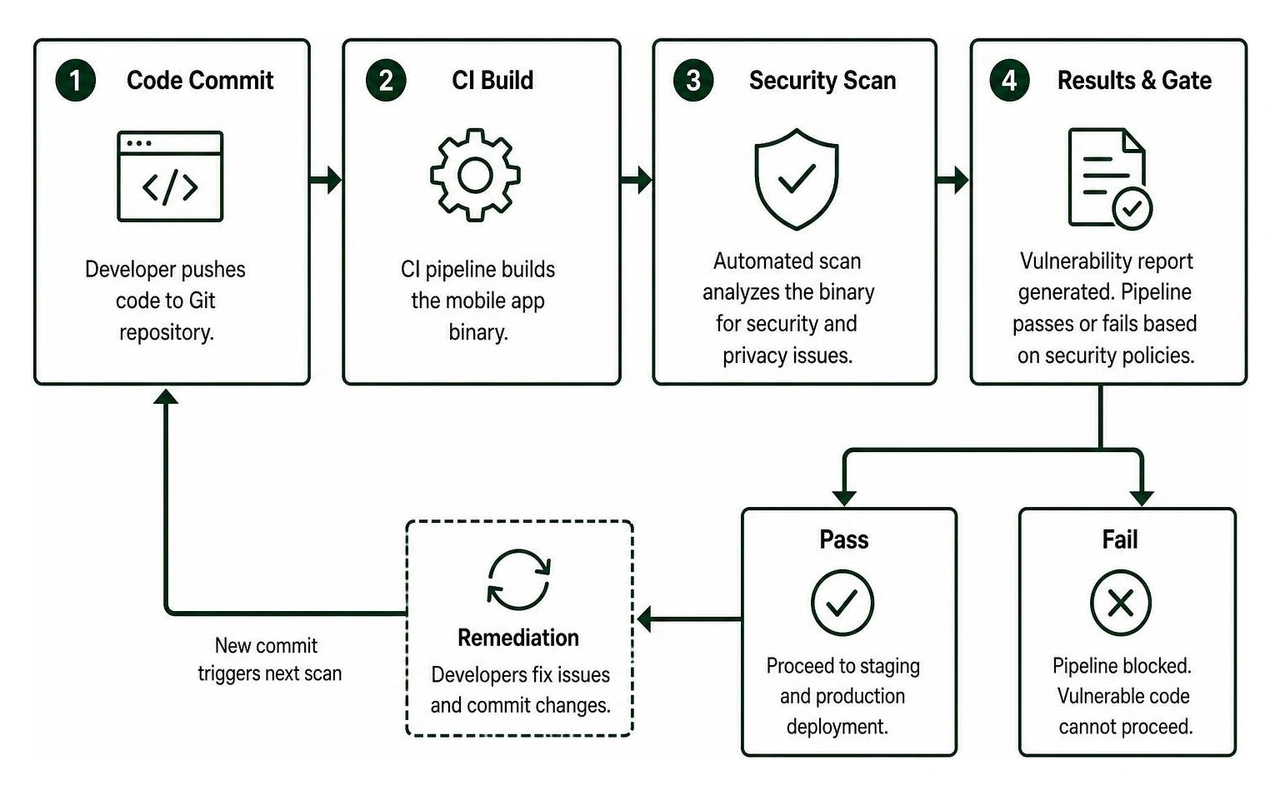
Integrating security testing directly into existing continuous integration pipelines allows engineering teams to implement app security patch maintenance on a rolling schedule. Scans execute against nightly builds, producing instant machine-readable vulnerability reports. When an introduced change breaks a security policy, the pipeline halts the release, preventing vulnerable code from ever reaching staging or production servers.
Developer Workflows and CI/CD Integrations
Integrating security into the deployment pipeline—often called "shifting left"—transforms security from an intimidating final gate into a smooth, routine check. Development teams upload their builds, the scanning engine inspects the package, and engineers receive targeted remediation advice directly inside their issue tracking environments.
Establishing proactive mobile app security protocols early protects your business from costly emergency hotfixes down the road.
Integrating Automated Scans with Bitrise Pipelines
Bitrise serves as a popular continuous integration and delivery platform for mobile engineering teams. Adding automated scanning steps into a Bitrise workflow creates an automated quality gate that protects your master branch from insecure dependencies and unverified code changes.
To integrate automated security checks into a Bitrise workflow:
- Add the security testing step into your target Bitrise workflow immediately after the Android build step finishes compiling your application package.
- Configure your pipeline environment variables with your API authentication keys and target security thresholds.
- Define automated rule triggers to stop the build if the scanner uncovers high-severity vulnerabilities or critical data leaks.
- Route generated diagnostic reports and remediation tickets automatically to designated engineering channels using automated webhooks.
Developers using remote debugging workflows appreciate having precise runtime stack traces and detailed network payloads, as they allow teams to pinpoint and resolve software bugs quickly.
Compliance and Risk Mitigation for Enterprises
For enterprise organizations, automated mobile security testing provides the compliance documentation required by international standards like GDPR, CCPA, and industry-specific regulations. Automated scanning engines verify that applications handle data according to mandated security policies, maintaining an auditable trail of security reports across every released software version.
This automated auditing is especially vital when developing healthcare app security solutions, where handling sensitive patient metrics requires strict compliance with privacy standards and encryption mandates.
Comparing Mobile Security Testing Methodologies
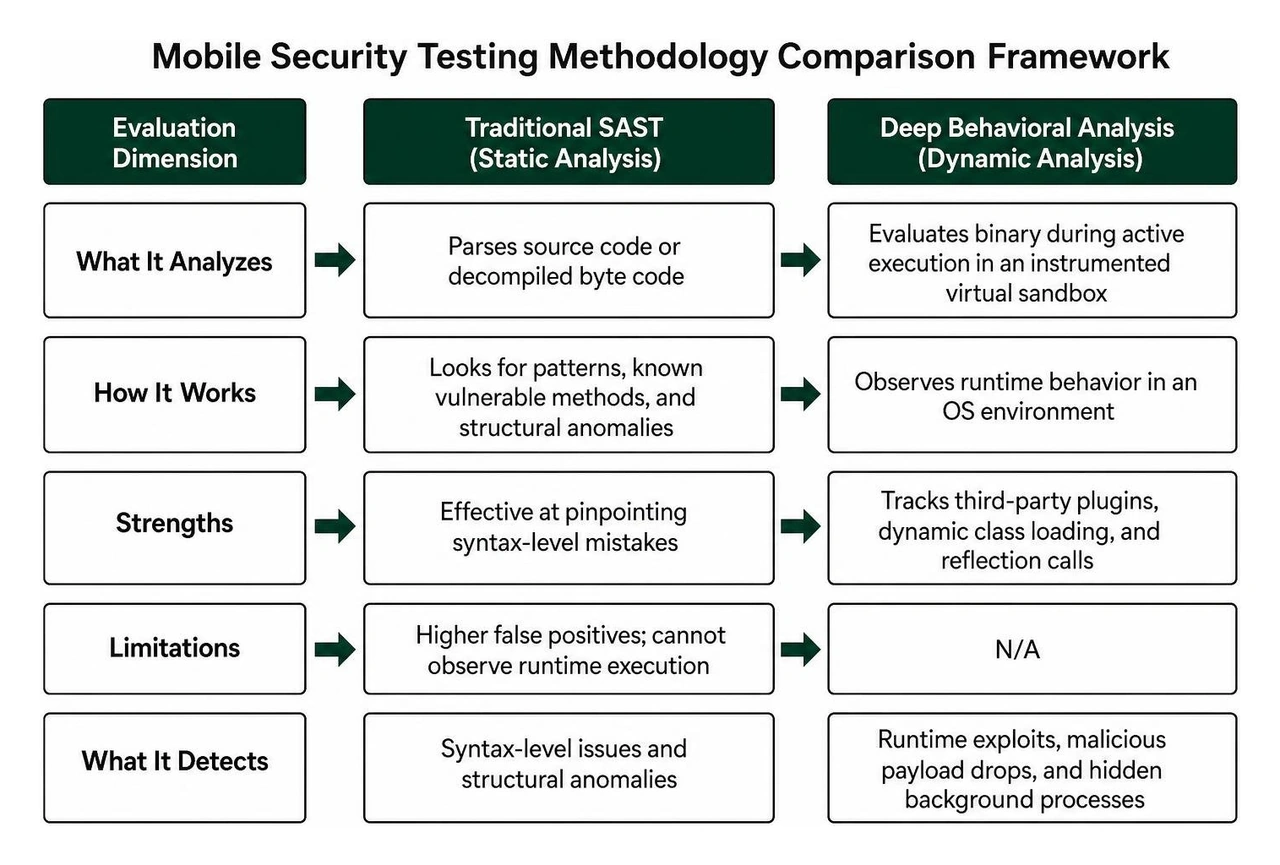
Selecting the right testing framework requires understanding how different analytical methodologies evaluate application risks. Evaluating compiled binaries with dynamic emulation uncovers execution vulnerabilities that static source-code analysis tools routinely overlook.
Deep Behavioral Insights Versus Traditional SAST
Static Application Security Testing (SAST) parses raw source code or decompiled byte code looking for recognizable patterns, known vulnerable methods, and structural anomalies. While effective at pinpointing syntax-level mistakes, SAST tools produce higher rates of false positives because they cannot observe how the code executes in an operational operating system environment.
In contrast, deep behavioral analysis evaluates the binary during active execution within an instrumented virtual sandbox. The engine observes how third-party plugins initialize, tracks dynamic class loading, and monitors reflection calls. This dynamic visibility catches sophisticated runtime exploits, malicious payload drops, and hidden background processes that remain invisible to static code reviews.
Solutions for App Store Providers and Enterprise Teams
The use cases for automated binary analysis extend beyond standard software development teams:
- App Store Operators: Marketplace providers use automated scanning engines to inspect incoming application submissions, verifying that public listings are free from hidden malware, aggressive adware, and invasive data-harvesting modules before publishing.
- Enterprise Procurement Offices: IT security teams evaluate commercial, third-party Android applications prior to approving employee installation on enterprise networks, mitigating supply-chain vulnerabilities.
- Regulatory Auditors: External auditing firms use automated binary testing to independently verify corporate software against international data privacy benchmarks without requiring direct source-code access.
Frequently Asked Questions About Mobile Security Testing
What types of vulnerabilities does automated mobile testing identify?
Automated scanning engines identify broad categories of mobile vulnerabilities, including insecure data storage on device hardware, weak cryptography implementations, exposed API keys, unvalidated input handling, improper session validation, cleartext network communications, and unauthorized background data transmission.
Automated pipeline integrations run security evaluations the moment a new application package builds. By providing developers with immediate feedback and clear remediation instructions, teams resolve security issues during normal sprint cycles rather than scrambling during pre-launch compliance reviews.
Why is dynamic behavioral analysis critical for Android applications?
Dynamic behavioral analysis is essential because compiled Android applications frequently use dynamic class loading, code reflection, and obfuscated third-party SDKs. Observing the application execute inside an instrumented environment reveals how the software behaves in real time, exposing hidden vulnerabilities that static code analysis cannot detect.
Building Resilient Mobile Products with Synergy Labs
Maintaining an airtight mobile security posture requires moving beyond reactive bug-hunting to establish a proactive development lifecycle. Automated code scanning, dynamic binary evaluation, and continuous integration pipelines ensure that modern mobile applications delight end users while protecting sensitive corporate assets and proprietary data.
At Synergy Labs, we engineer secure, scalable mobile and web applications designed to perform smoothly from day one. Our development approach features a transparent fixed-budget model, direct oversight from an in-shore CTO paired with a talented engineering team, and milestone-based payments that ensure your software is delivered on schedule, within scope, and without surprises.
Whether you are designing a cross-platform mobile app or need to reinforce your enterprise software infrastructure, our senior engineers are ready to bring your vision to life. Explore our specialized app development services today to build secure, world-class mobile experiences your users can trust.


.avif)

.avif)


