The average data breach cost $4.88M in 2024 — and for most apps, delayed patches are the open door. Here's how to stay ahead of vulnerabilities without slowing down your product.
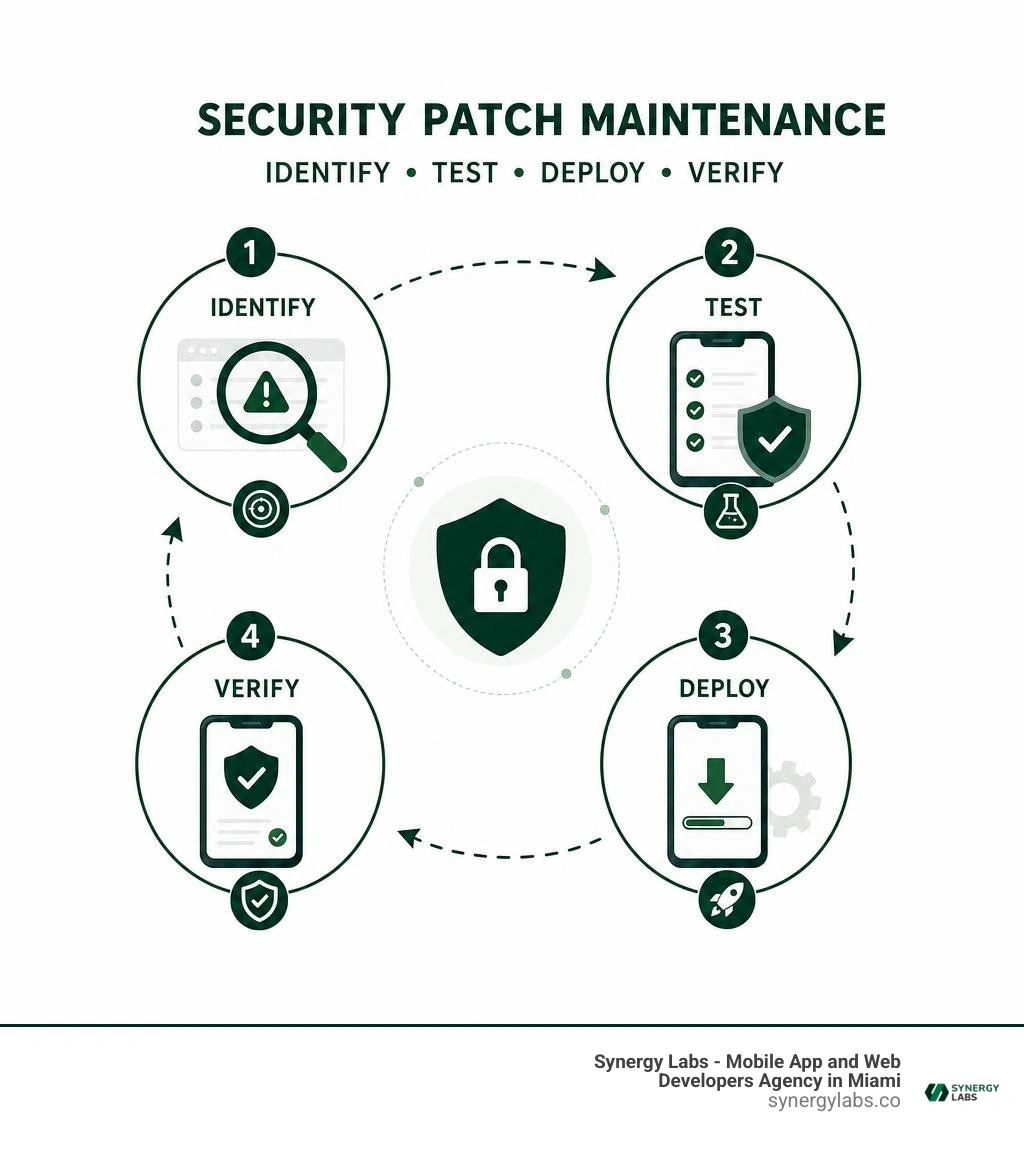
App security patch maintenance is the ongoing work of finding, testing, deploying, and confirming fixes for security flaws in a mobile app, its backend, and the third-party code it relies on. It keeps known vulnerabilities from becoming an easy way into customer data, accounts, or business systems.
A quick rule of thumb:
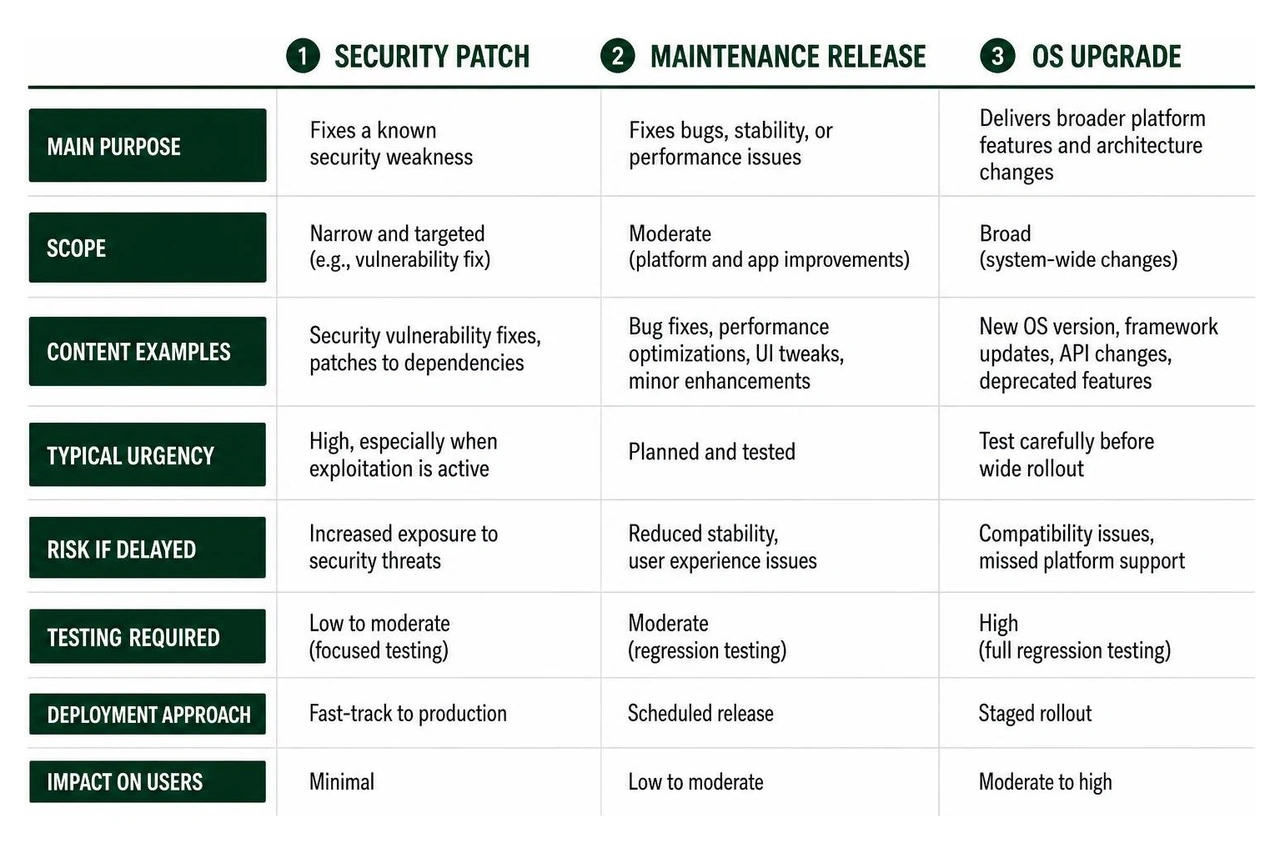
Security patch: Fixes a known security weakness. Typical urgency is high, especially when exploitation is active.
Maintenance release: Fixes bugs, stability, or performance issues. Planned and tested.
OS upgrade: Delivers broader platform features and architecture changes. Test carefully before wide rollout.
Patching is not glamorous. Neither is locking the office door. Both become very important when someone tries to get in.
The stakes are real: the average global cost of a data breach was $4.88 million in 2024. For a startup moving fast, delayed patches can also mean disrupted releases, lost user trust, compliance exposure, and expensive incident response. A security fix is often far less disruptive than recovering after an attacker has already found the gap.
At Synergy Labs, we treat patch maintenance as part of product ownership, not a task to save for a quiet month that never arrives. As Director of Product, I will walk through how teams can keep mobile apps secure while protecting the speed and user experience that growth depends on.
Security Patch vs. Maintenance Release vs. OS Upgrade
To manage software lifecycles effectively, engineering teams must clearly differentiate between update types. Treating every release as a generic update creates operational confusion, leading either to delayed critical security fixes or rushed operating system updates that break production applications. We group software updates into three distinct classifications based on technical scope and risk profile.
A security patch serves a single purpose: closing verified security vulnerabilities in existing code. It isolates security fixes from feature additions or major code refactoring. A maintenance release, on the other hand, combines routine platform bug fixes, performance optimizations, and non-security UI polish. Finally, an OS upgrade represents a complete system overhaul that introduces modern framework APIs, deprecates older system libraries, and modifies foundational platform permissions.
Understanding these boundaries is core to enterprise Mobile App Security. While a major platform overhaul requires deep regression testing, routine security patches carry minimal functional risk and should move swiftly into production.
Categorizing Patch Types and Platform Risk
When evaluating updates across mobile application stacks, risk assessment dictates deployment speed. We split updates into three operational tiers:
Security Maintenance Releases (SMRs): These updates isolate critical vulnerability fixes without altering core business logic or system APIs. Because they carry minimal operational deployment risk, SMR updates should bypass extended feature testing cycles and be deployed immediately.
Maintenance Releases (MRs): These bundles combine general software bug fixes with minor feature updates. Because functional logic changes, they carry a small risk of introducing unintended software regressions, requiring targeted regression testing before wide deployment.
Operating System Upgrades (OS Upgrades): Major platform versions introduce revised permission models, altered background execution rules, and deprecated hardware interfaces. Deploying without thorough testing in controlled environments often leads to unexpected application crashes or feature breakages.
By categorizing updates by technical risk, engineering leads avoid holding back critical security fixes while waiting to test unrelated feature updates.
Android Security Patch Levels and OEM Integration
In the mobile ecosystem, verifying whether a physical device or runtime environment is protected against disclosed vulnerabilities requires inspecting its security patch level. The Android Security Bulletin—August 2026 outlines how platform maintainers coordinate security releases using standardized string date properties, such as ro.build.version.security_patch.
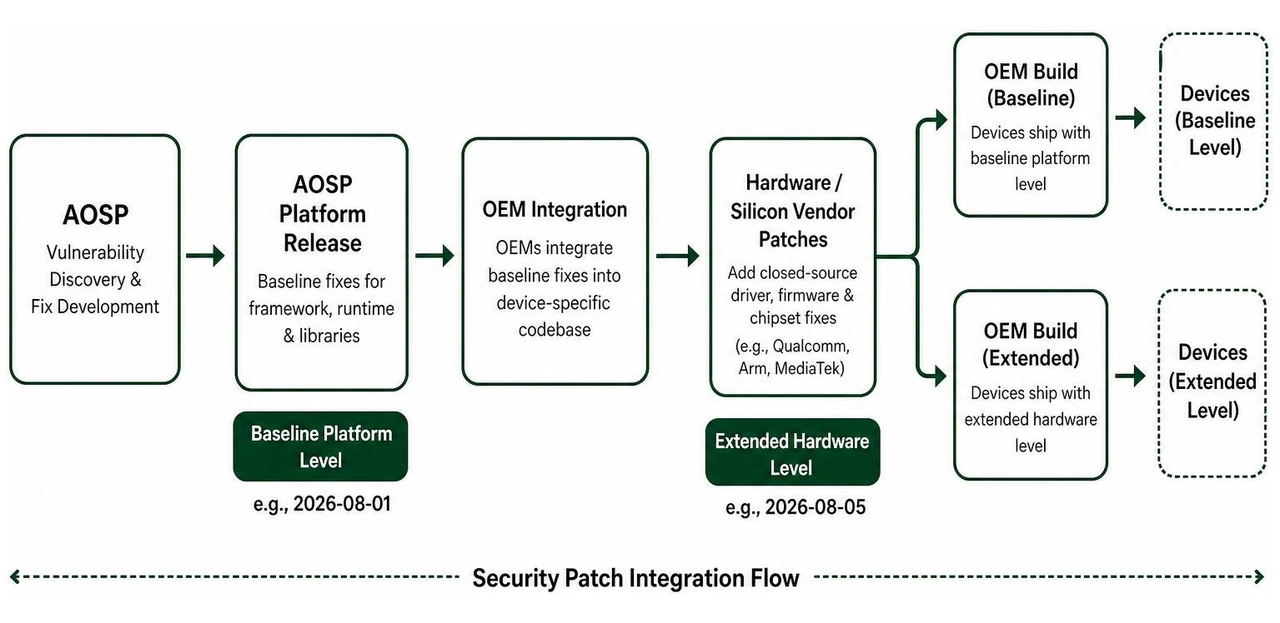
The Android Open Source Project (AOSP) employs a dual security patch level system to give hardware original equipment manufacturers (OEMs) deployment flexibility:
Baseline Platform Level (e.g., 2026-08-01): Addresses core system framework, Android runtime, and software library vulnerabilities.
Extended Hardware Level (e.g., 2026-08-05): Incorporates the baseline platform fixes along with closed-source hardware driver, display, display controller, and chipset vendor patches (such as those from major component and chipset suppliers).
OEMs integrate base platform fixes with their proprietary interface layers and vendor-specific exposures before releasing over-the-air updates. This multi-layered structure ensures that custom UI frameworks receive critical kernel and security fixes without disrupting device-specific hardware drivers.
The Strategic Value of App Security Patch Maintenance
In modern software architecture, security patch management is a foundational pillar of governance and risk mitigation. Proprietary applications depend heavily on third-party libraries, software development kits (SDKs), and open-source packages. When security researchers publicly report a Common Vulnerabilities and Exposures (CVE) entry, malicious actors immediately attempt to reverse-engineer the disclosed fix to build automated exploit scripts.
Failing to maintain a disciplined approach to app security patch maintenance leaves software systems open to automated scanning tools that seek out known vulnerabilities.
Mitigating Financial and Regulatory Consequences
The financial consequences of unpatched vulnerabilities extend far beyond emergency developer support. Unpatched systems expose organizations to severe regulatory fines under frameworks such as GDPR, HIPAA, and PCI-DSS, while also risking catastrophic data loss and brand damage.
To understand the financial exposure of delaying security maintenance, organizations can calculate potential operational costs using a standard industry formula:
For example, an enterprise managing 1,000 active instances that experiences an attack requiring 8 hours of emergency system recovery per instance at a blended rate of $70 per hour faces $560,000 in direct operational remediation costs alone:
1,000 devices × 8 hours × $70/hour = $560,000
This calculation excludes regulatory penalties, legal liabilities, and loss of revenue. Proactive maintenance investments predictable under App Maintenance Costs represent a fraction of the cost of recovering from a public security incident.
Overcoming Business Objections to App Security Patch Maintenance
Engineering managers often encounter internal business resistance when requesting dedicated maintenance windows for security patching. Executives often express concern that brief application downtime or scheduled maintenance releases present higher operational risk than an unverified vulnerability.
We counter these objections using a practical threat assessment model:
Risk = Likelihood × Impact
When a software vendor or open-source community issues a public security patch, the likelihood of an attempted exploit spikes dramatically. Automated scanning botnets scan the internet within hours of public vulnerability disclosures. While delaying a patch avoids a brief scheduled maintenance window, it exponentially increases the probability of an unmitigated breach. Long-term temporary workarounds, such as adjusting web application firewall rules, often fail during routine infrastructure updates when forgotten rules are accidentally overwritten. Permanent code remediation through regular patch maintenance remains the safest approach.
Best Practices for Implementing App Security Patch Maintenance
Establishing an effective maintenance routine requires structured vulnerability assessment, clear cloud division of duties, and continuous deployment workflows.
Prioritizing Vulnerabilities with CVSS and Threat Intelligence
Not all security bugs require immediate production deployment. Teams should evaluate incoming vulnerabilities using the Common Vulnerability Scoring System (CVSS) combined with real-time threat intelligence.
Critical Severity (CVSS 9.0 – 10.0): Vulnerabilities allowing Remote Code Execution (RCE) or unauthenticated access without user interaction. These require immediate emergency patching within 24 to 48 hours.
High Severity (CVSS 7.0 – 8.9): Issues involving Elevation of Privilege (EoP) or significant Information Disclosure (ID). These should be remediated within scheduled weekly sprint cycles.
Medium to Low Severity (CVSS 0.1 – 6.9): Local denial-of-service or minor path traversal flaws that require complex user interaction. These are bundled into routine monthly maintenance cycles.
Combining CVSS metrics with active exploit feeds ensures developers focus immediately on actively targeted zero-day flaws rather than spending critical time on low-impact edge cases.
Cloud vs. On-Premises Patch Responsibilities
Determining who is responsible for applying security updates depends directly on your infrastructure deployment model:
On-Premises Infrastructure: The enterprise maintains full responsibility for every layer, from physical server firmware and hypervisors to operating systems, middleware, and final application code binaries.
Infrastructure as a Service (IaaS): The cloud vendor secures the physical host, virtualization layer, and underlying hardware infrastructure. The enterprise remains responsible for updating virtual machine operating systems, runtime frameworks, databases, and custom application code.
Platform as a Service (PaaS): The cloud provider manages operating system updates, database engine releases, and runtime security patches. The application team focuses solely on updating application logic, SDK dependencies, and third-party libraries.
Software as a Service (SaaS): The SaaS vendor handles all underlying security maintenance, system patches, and infrastructure hardening. The client manages only user access controls, API authentication tokens, and account configurations.
Understanding this shared responsibility model prevents critical gaps where both internal operations teams and cloud providers assume the other is applying security updates.
Automation Tools in App Security Patch Maintenance
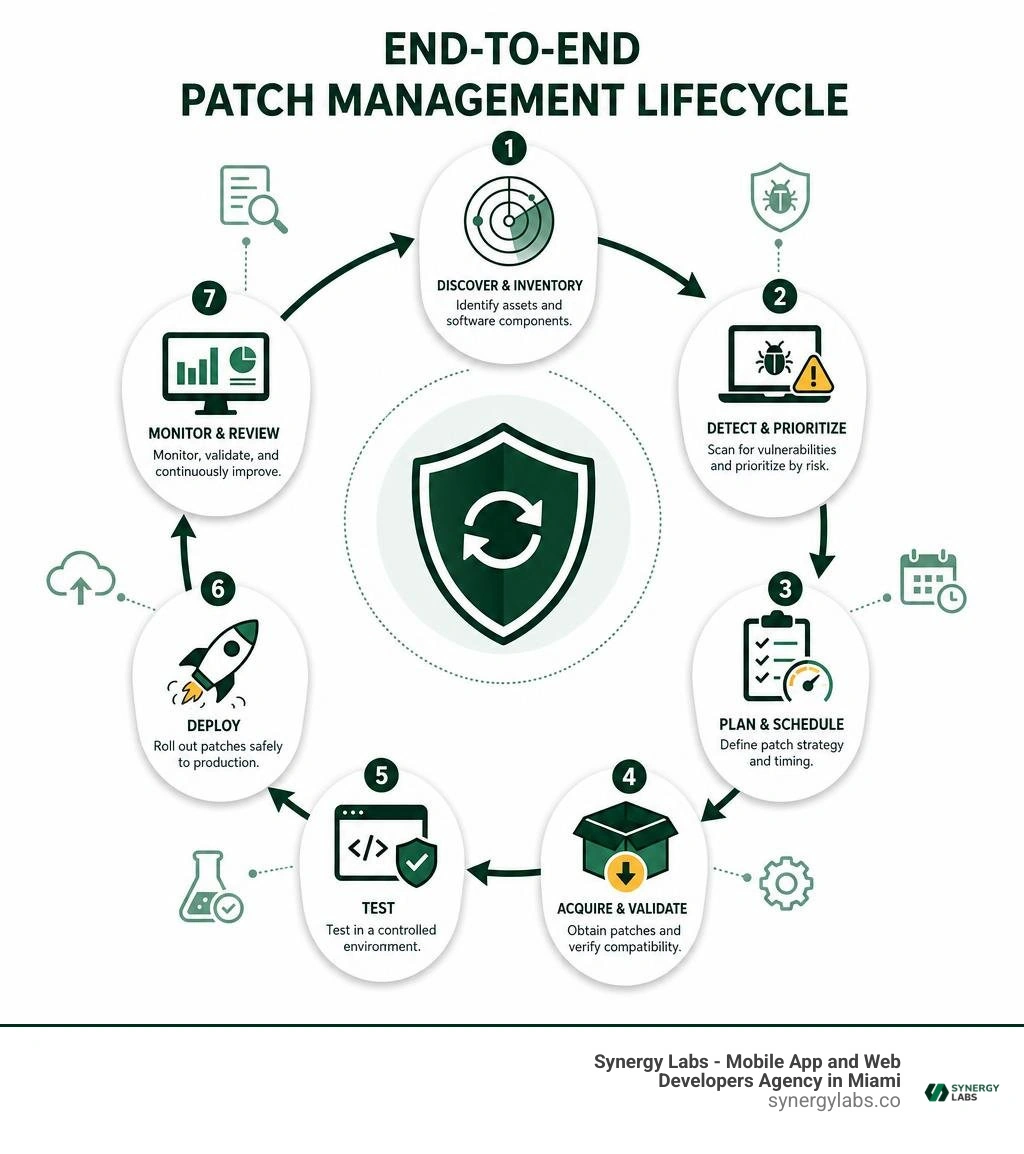
Manual patch management scales poorly across modern enterprise systems. Incorporating automated vulnerability scanning into Continuous Integration and Continuous Deployment (CI/CD) pipelines ensures security issues are detected and remediated before reaching production.
When designing secure development pipelines, follow the guidelines outlined in How to Secure Mobile Apps. Automated dependency checkers scan external code components during every build cycle, flagging out-of-date or vulnerable packages instantly. Automated test suites validate core feature functionality after updates are merged, and staged canary deployments push security patches to a small percentage of users first to catch unexpected edge cases before full production rollout.
Integrating automated security workflows dramatically cuts vulnerability window times and minimizes human error during deployment.
Building an Enterprise Patch Management Policy
A effective security maintenance framework relies on clear operational policies. Organizations must move away from ad-hoc patching and adopt structured asset tracking, continuous vulnerability monitoring, and rigorous pre-deployment verification.
Asset Inventory and Threat Intelligence Monitoring
An organization cannot patch software assets it does not actively track. Maintaining a centralized asset inventory across mobile apps, backend API endpoints, microservices, and third-party SDK dependencies is essential.
Maintain an updated Software Bill of Materials (SBOM) for all mobile client applications and microservices.
Track external dependencies using automated software composition analysis (SCA) tools to monitor for emerging open-source vulnerabilities.
Subscribe directly to primary vendor security advisories, such as official August 2026 security patch updates, to prepare maintenance builds ahead of public consumer releases.
Maintaining detailed visibility over software dependencies allows engineering teams to react instantly when a critical vulnerability is disclosed in a shared library or system framework.
Staging, Testing, and Verification
Deploying untested security patches directly to production environments risks introducing operational disruptions or application instability. Robust maintenance policies enforce strict validation stages before public release.
First, test incoming patches within isolated staging environments that mirror production API configurations and system permissions. Second, run automated regression test suites alongside targeted manual sanity checks to confirm business logic remains intact. Finally, perform post-deployment vulnerability scans using host-level and network inspection tools to confirm the applied patch successfully remediated the security flaw.
Establishing clear staging procedures through professional App Maintenance Services ensures applications stay secure without sacrificing system reliability or performance.
Frequently Asked Questions
What is the main difference between a security patch and a maintenance release?
A security patch exclusively addresses verified security vulnerabilities and security flaws within existing application code, carrying minimal functional risk to enable fast deployment. A maintenance release combines routine software bug fixes, UI adjustments, and performance tweaks, requiring broader regression testing to prevent unexpected software issues.
How often should organizations perform app security patch maintenance?
Organizations should maintain a predictable monthly patch schedule for routine dependency updates and vendor security bulletins. However, when critical zero-day vulnerabilities or high-severity CVEs with active exploits are discovered, teams must deploy emergency patches within 24 to 48 hours outside standard release cycles.
How do Android security patch levels verify device safety?
Android security patch levels display the exact date string up to which a device has received security fixes (such as 2026-08-01). By comparing this build string against public Android Security Bulletins, users and IT administrators can confirm whether a device contains the latest protections against disclosed platform vulnerabilities.
Partnering with Synergy Labs for Continuous Security and Resilience
Effective app security patch maintenance requires disciplined execution, continuous vulnerability tracking, and modern development workflows. As mobile operating systems evolve and security threat vectors become more sophisticated, leaving mobile applications unmonitored creates severe financial, regulatory, and operational exposure.
At Synergy Labs, we help growing startups and global enterprises keep mobile applications secure, stable, and performant. Our delivery model combines fixed-budget guarantees, hands-on leadership from an in-shore CTO, and specialized offshore development teams to deliver enterprise-grade engineering at competitive rates. Through transparent, milestone-based payments, our partners maintain full control over release schedules while ensuring their mobile products remain fully protected.




.avif)

.avif)


