Why You Need a Dedicated Virus Scanner for Android Phone in 2026
The best virus scanner for Android phone protection combines real-time malware detection, low battery overhead, and proactive web filtering. Leading options include Bitdefender Mobile Security for lightweight cloud-based scanning, AVG AntiVirus for real-time network defense and Wi-Fi audits, ESET Mobile Security for in-depth storage diagnostics and USB OTG scanning, and Malwarebytes Mobile Security for AI-powered scam and ransomware blocking. While native tools detect common threats, dedicated scanners provide vital heuristic defense against zero-day exploits and malicious sideloaded APKs.
Android runs on billions of devices globally, commanding over 70% of the worldwide mobile operating system market share. That massive scale makes it the prime target for cybercriminals developing sophisticated adware, ransomware, banking trojans, and credential-stealing spyware. As our phones handle everything from corporate communications to banking transactions, the impact of a compromised device can be catastrophic.
Mobile threats rarely present themselves with flashing red warning screens. Instead, they operate silently in the background, exfiltrating personal data, recording user activity, or hijacking compute power for ad fraud schemes. Utilizing dedicated software helps uncover stealthy background telemetry before irreversible damage occurs. To keep your handheld devices protected, reviewing the Best Free Android Security Tips 2026 is a vital starting point for layered defense.
Warning Signs of an Infected Device
Recognizing the subtle red flags of malware allows you to neutralize threats before sensitive financial credentials or identity details leak. Malicious payloads often leave behavioral footprints on your device:
- Unwanted Pop-Up Ads: Full-screen intrusive ads appearing on your home screen or over other applications indicate aggressive adware.
- Unrecognized App Installations: Finding icons on your app drawer that you never intentionally downloaded from an app marketplace.
- Unusual Data Consumption: Unexpected spikes in your monthly mobile data usage caused by malware transmitting stolen data to command-and-control servers.
- Rapid Battery Drain and Overheating: Malicious processes running unconstrained background compute loops that cause thermal throttling and battery depletion.
- Message Forwarding Fraud: Contacts reporting that they received strange SMS messages or chat links originating from your mobile number.
- Browser Hijacking: Persistent homepage changes in Chrome, unexpected redirect URLs, or unauthorized extensions injected into your browsing sessions.
Safeguarding against these vulnerabilities requires an understanding of core Mobile App Security standards, especially when granting runtime permissions to new utilities.
Built-in Android Security vs. Third-Party Scanners
Android includes a native security shield known as Google Play Protect. It analyzes billions of apps daily across the global ecosystem, checking applications upon installation and scanning your local catalog periodically. For users who only download widely verified applications directly from Google Play, Play Protect provides a respectable baseline.
However, native protection has inherent limitations when defending against novel threats:
- Zero-Day Exploit Detection: Zero-day threats represent malware strains that have not yet been cataloged in Google's central definitions database. Independent third-party security suites often deploy proactive heuristic scanning engines to identify suspicious behavior rather than relying strictly on known signatures.
- Sideloaded APK Files: Installing APK files directly from third-party application stores or web downloads bypasses standard marketplace vetting, increasing the likelihood of executing malicious code.
- Real-Time Web and Network Protection: Comprehensive third-party Mobile Security Software monitors active network connections, blocking deceptive phishing links, man-in-the-middle attacks on public Wi-Fi, and malicious scripts inside browsers before they execute.
Top Android Antivirus Apps Reviewed and Compared
When selecting a dedicated antivirus scanner, independent test results provide objective benchmarks. Testing authorities like AV-Test and MRG Effitas measure mobile security apps across strict criteria, evaluating real-time threat detection rates, usability, false positives, and impact on battery longevity.

AVG AntiVirus: Real-Time Scanning and Network Defense
AVG AntiVirus stands as one of the most widely deployed security platforms on the platform, with over 100,000,000 people already installed AVG’s antivirus mobile security apps. The software has earned 25 new awards in the last two years, adding to hundreds since 1991.
- Lab Performance: In lab tests, AVG AntiVirus detected 100% of all viruses it had prior knowledge of, and 99% of all viruses it had no prior knowledge of (zero-day attacks by new viruses).
- Core Features: The app provides real-time scanning for apps, files, and settings, backed by an encrypted Photo Vault to secure private media.
- Network Defense: Includes a built-in Wi-Fi security scanner that tests the cryptographic strength of wireless routers before your phone sends sensitive packets across the local subnet.
- Platform Availability: You can install AVG AntiVirus & Security - Apps on Google Play directly on devices running Android 8.0 or higher.
While the free version provides robust threat detection, it does feature in-app promotional upgrades. Users seeking an uncluttered interface can opt for the premium tier to unlock automated app locking and uninterrupted background scanning.
Bitdefender Mobile Security: Cloud-Based Speed and Precision
Bitdefender Mobile Security is an 8-time winner of AV-Test’s 'Best Android Security Product', renowned for its feather-light system footprint. Rather than bogging down system memory with hefty virus signature libraries, Bitdefender offloads threat evaluations to the cloud.
- Cloud Threat Detection: Files and APK metadata are processed instantly via secure cloud lookup servers, delivering near-instant scanning speeds without draining processing cycles.
- Battery Optimization: Because resource-heavy computational analysis runs remotely, your device experiences negligible battery consumption during continuous background monitoring.
- Integrated Scam Alert: Analyzes incoming text messages and notifications, intercepting malicious phishing links before you tap them.
- Installation: Access the suite via Bitdefender Mobile Security - Apps on Google Play or download the standalone cloud-only client through Bitdefender Antivirus - Apps on Google Play.
ESET Mobile Security: Choosing a Fast Virus Scanner for Android Phone
ESET Mobile Security is rated 4.8 / 5 by over 1 million ESET users on Google Play, reflecting outstanding user satisfaction and consistent diagnostic performance. It caters to users who desire granular control over their security architecture.
- Storage and Peripheral Diagnostics: Beyond standard app sweeps, ESET features a unique USB On-The-Go (OTG) scanner that actively examines flash drives, hard drives, and SD cards connected to your phone.
- Dual Scan Profiles: Offers a rapid Smart Scan for newly installed apps and high-risk directories alongside an In-Depth Scan that combs every byte of physical storage.
- Proactive Anti-Phishing: Integrates directly with your browsers via accessibility hooks to prevent credential capture on spoofed payment portals and login pages.
- Direct Access: Download the utility directly through ESET Mobile Security Antivirus for devices running modern Android distributions.
Malwarebytes Mobile Security: AI-Powered Scam Protection
Malwarebytes Mobile Security for Android won the Android 360° award, detecting all malware samples in the latest MRG Effitas third party test. It focuses heavily on stopping modern social engineering and ransomware vectors.
- AI Scam Guard: An intelligent detection engine that screens suspicious text messages, chat notifications, and links in real time to prevent financial fraud.
- Next-Gen Privacy VPN: Integrates a high-speed VPN powered by the modern WireGuard protocol, delivering encrypted data transit with lower CPU overhead compared to legacy OpenVPN protocols.
- Zero-Telemetry Logging: Malwarebytes enforces a strict no-logging architecture, ensuring your browsing habits and network telemetry are never harvested or sold.
- Adware Remediation: Excels at locating deeply buried adware modules that display unwanted ads over system navigation menus.
Essential Features to Look for in Mobile Security Suites
Modern Android security suites have evolved far beyond basic signature matching. When evaluating a security platform for your personal or workplace phone, look for these advanced protection layers:

- Real-Time File and App Shielding: Automated on-install scans that intercept malicious binaries before they unpack their payload onto device storage.
- Anti-Ransomware Engines: Heuristic behavioral monitors that block unauthorized background attempts to encrypt personal documents and photos.
- Web and Phishing Protection: Active link filtering that prevents browsers and messaging apps from loading blacklisted URLs.
- App Privacy Auditing: Diagnostic tools that highlight which installed applications possess excessive runtime permissions, such as continuous microphone access or background location tracking.
- Biometric App Locking: The ability to secure sensitive banking, business, and messaging apps behind biometric barriers. Implementing tools to Lock Android Phone with Fingerprint provides immediate protection against unauthorized physical access if your device is left unattended.
Physical device loss represents a major data security vulnerability. Comprehensive mobile security packages integrate hardware tracking and remote mitigation features to keep your information safe if your phone is lost or stolen:
- Precision GPS Tracking: Pinpoint the geographic coordinates of your device via a secure cloud dashboard.
- Remote Lock and Data Wipe: Remotely lock access to the operating system or trigger a factory wipe of internal storage to protect enterprise data. You can configure options to Remote Lock Android Phone to prevent bad actors from extracting files over USB debugging.
- SIM Card Removal Alerts: Automated SMS or email alerts dispatched to backup contacts whenever the physical SIM tray is ejected or a new carrier profile is registered.
- Intruder Camera Traps: Silent front-camera capture that photographs individuals entering incorrect PIN codes, uploading the image directly to your security portal.
Permissions Management and User Privacy
Antivirus software requires specific elevated Android permissions to inspect system operations and block malicious scripts. Understanding why these permissions are requested helps ensure you are granting access safely:
- Accessibility Services API: Enables security suites to read text displayed inside web browsers to detect phishing URLs and malicious overlay windows.
- Device Administrator Privileges: Required to enable anti-theft capabilities, preventing malicious users or rogue apps from uninstalling the security tool without your master PIN.
- Call Screening and SMS Access: Necessary for modules that block known fraud rings, spam calls, and malicious smishing links.
- All Files Access (Storage): Essential for in-depth malware engines to comb local folders, download caches, and external SD cards for hidden malicious payloads.
Always verify that the application you download comes from a verified developer account with transparent data encryption policies and zero-telemetry commitments.
Step-by-Step Guide to Removing Android Malware for Free
If your device exhibits erratic behavior or an antivirus scan confirms the presence of malicious software, follow this systematic remediation process to clean your operating system without paying for recovery services:
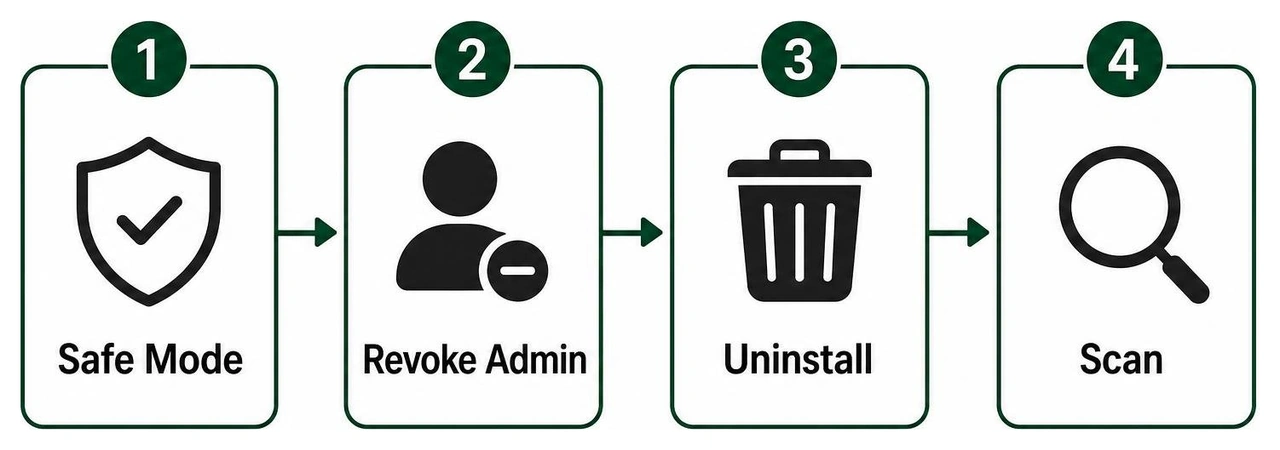
Reboot into Safe Mode:
- Press and hold your phone's physical Power button until the power options menu appears.
- Long-press the Power Off or Restart icon until the "Reboot to Safe Mode" prompt appears.
- Tap Confirm. Safe Mode disables all third-party apps from executing at boot, preventing malware from defending itself.
Revoke Malicious Device Administrator Privileges:
- Navigate to Settings > Security & Privacy > More Security Settings > Device Admin Apps (menu titles may vary slightly depending on your manufacturer).
- Look for unfamiliar applications holding administrator status.
- Select the suspicious app and tap Deactivate or Revoke.
Uninstall the Offending Applications:
- Open Settings > Apps > See All Apps.
- Sort through the list for apps you do not remember installing, particularly generic names like "System Update", "Flash Player", or utilities with blank white icons.
- Tap the application and select Uninstall. If the uninstall button is grayed out, ensure you properly revoked its Device Administrator privileges in Step 2.
Clear Browser Cache and Storage:
- Open Settings > Apps > Chrome (or your default browser).
- Tap Storage & Cache, then tap Clear Cache and Manage Space > Clear All Data. This removes malicious redirect scripts, rogue notification permissions, and persistent tracking tokens.
Execute a Clean-Up Antivirus Scan:
- Reboot your phone normally to exit Safe Mode.
- Launch your installed mobile security scanner (such as AVG, Bitdefender, ESET, or Malwarebytes).
- Run a comprehensive In-Depth Scan to confirm that all registry hooks, temp folders, and secondary APK fragments have been eradicated.
In rare instances where deeply embedded malware or rootkits survive initial uninstallation, execute these advanced remediation steps:
- Audit Google Play Protect: Open the Google Play Store, tap your profile avatar, navigate to Play Protect > Settings, and ensure both "Scan apps with Play Protect" and "Improve harmful app detection" are toggled on.
- Perform a Google Account Security Checkup: Visit
myaccount.google.com/security-checkup from a separate computer to revoke access from unrecognized mobile sessions and update your two-factor authentication keys. - Execute a Factory Data Reset: If rogue pop-ups or unauthorized background connections persist, backup your essential photos and contacts to cloud storage, then navigate to Settings > System > Reset Options > Erase All Data (Factory Reset). A clean wipe permanently restores factory firmware integrity.
Frequently Asked Questions About Android Antivirus
Does Android have a built-in virus scanner, and is it sufficient?
Yes, Android comes equipped with Google Play Protect, which continuously monitors your applications against a centralized repository of known malicious signatures. While Play Protect provides an adequate foundational security layer for users who strictly download mainstream applications from the official Play Store, it can fall short against sophisticated zero-day threats, advanced network-level phishing schemes, and sideloaded APK files downloaded from external web repositories. Installing a verified third-party security scanner provides layered heuristic protection and proactive web shielding.
Are free Android virus scanners safe despite extensive permission requests?
Reputable free security applications from established developers (such as Bitdefender, AVG, and ESET) are safe to use. They require elevated permissions—including Accessibility Services and Device Administrator access—to monitor real-time browser traffic, detect phishing links, and execute anti-theft remote lockouts. However, never download unknown, generic "flashlight" or "memory booster" cleaners that demand wide device access, as untrusted utilities frequently harvest personal data for advertising networks.
What should I do if my phone still shows malware symptoms after a scan?
If your phone continues to display aggressive pop-ups, drain battery rapidly, or direct you to unwanted web pages after completing an antivirus scan:
- Boot your phone into Safe Mode to isolate background processes.
- Check the Device Admin Apps menu in your Settings to ensure no hidden software has locked itself into your system profile.
- Clear the cache and storage data across all web browsers installed on your phone.
- If erratic behavior continues, perform a complete Factory Data Reset after securing your critical files to eradicate persistent malware.
Fortifying Your Mobile Experience with Modern Security Architecture
Maintaining mobile security requires a combination of automated scanning tools and safe browsing habits. Regularly updating your Android operating system, keeping Google Play Protect enabled, vetting application permissions, and utilizing a trusted virus scanner will keep your personal data and digital identity secure against evolving cyber threats. For a deeper breakdown of top-performing protective utilities, explore our guide on the Best Free Virus Protection for Android Phone.
At Synergy Labs, we understand that building resilient digital ecosystems requires security to be baked into software from day one. As an elite mobile app and web development agency, we partner with visionary founders and enterprises to design custom, highly scalable, and ironclad mobile applications.
Whether you are launching a consumer mobile app or engineering an enterprise-grade cloud platform, our unique delivery model provides direct access to senior technical talent. We pair you with an in-shore CTO while leveraging our high-performance offshore development team, ensuring your product is built with world-class architecture at maximum cost efficiency. With our predictable fixed-budget model and milestone-based payments, we ensure your projects are completed on schedule, within scope, and without financial surprises.
Ready to bring your mobile product vision to life with industry-leading security and design? Connect with the engineering team at Synergy Labs today to schedule your architectural consultation.


.avif)

.avif)


