

Mobile App Security Is No Longer Optional — Here's What You Need to Know

Mobile app security refers to the strategies, tools, and practices used to protect mobile applications — and the data they handle — from threats like hacking, reverse engineering, malware, and unauthorized access.
Quick answer: What is mobile app security?
- What it protects: User data, app code, backend systems, and device integrity
- Who needs it: Every developer and business with a mobile app
- Core practices: Encryption, secure authentication, code obfuscation, RASP, certificate pinning, and regular security testing
- Key standard: OWASP Mobile Application Security Verification Standard (MASVS)
- Biggest risks in 2026: Insecure credential storage, supply chain vulnerabilities, weak authentication, and insecure APIs
Here's a number that should get your attention: 60% of mobile apps leak sensitive data, and the average cost of a mobile data breach now sits at $4.88 million. Yet 100% of developers still lean on operating system security alone — even though 100% of them admit it isn't enough.
Mobile usage is only accelerating. Over 90% of the global internet population goes online via a mobile device, and nearly 51% of all online time in the US happens on mobile. More users means a bigger target. More apps means more attack surface.
And the threats are keeping pace. Mobile app attacks increased by 55% in Q1 2026. Vulnerabilities exist in 91% of iOS apps and 95% of Android apps. This isn't a niche concern for large enterprises — it's a survival issue for any business with a mobile presence.
At Synergy Labs, our team has hands-on experience building and securing mobile applications across industries where mobile app security is non-negotiable — from fintech to healthcare to consumer platforms. We've seen what separates apps that earn user trust from those that become cautionary tales.
Simple guide to mobile app security terms:
- application lock in iphone
- find my phone
- remote lock android phone
Why Mobile App Security is Critical in 2026
In 2026, the mobile landscape is rapidly evolving, highly competitive, and incredibly hostile. The days when a basic HTTPS connection and a prayer were enough to secure an app are long gone. Today, mobile apps are the primary touchpoint for everything from managing life savings to controlling smart home grids. As we detail in our Enterprise Mobile App 2026 Ultimate Guide, enterprise mobile security has shifted from a post-development checklist to a foundational architecture requirement.
When an app is breached, the fallout is rarely limited to a single leaked password. The consequences cascade rapidly:
- Financial Ruin: Beyond direct theft, regulatory fines under frameworks like GDPR, HIPAA, or PCI-DSS 4.0 can easily cripple a growing company.
- Irreparable Reputational Damage: Trust takes years to build but microseconds to lose. If users discover their private conversations or banking details are compromised, they will delete your app and move to a competitor without hesitation.
- Intellectual Property Theft: Attackers routinely reverse-engineer unprotected binaries to copy proprietary algorithms, bypass monetization models, or repackage and publish cloned apps filled with malware.
Government and municipal systems are also recognizing this critical need. For instance, initiatives like the NYC Secure Mobile App · NYC311 highlight how major metropolitan hubs are deploying specialized security apps to protect citizens from public Wi-Fi threats, rogue networks, and device-level exploits. Whether you are building civic tech, a localized platform like the Miami-Dade County Mobile Apps system, or a high-performance corporate tool, maintaining absolute data integrity is the baseline expectation of the modern user.
Common Vulnerabilities and Evolving Threats
To build a secure defense, you must first understand how modern threat actors think. Hackers do not just look for open doors; they look for structural fractures in your application's architecture.

Some of the most prominent threats we actively defend against include:
- Reverse Engineering and Binary Tampering: If your app binary is not obfuscated, an attacker can decompile it back to highly readable source code. They can then identify hardcoded API keys, bypass premium feature gates, or inject malicious payloads before sideloading the app back onto third-party stores. This is one of the most Common Mobile App Development Mistakes and How to Avoid Them.
- Insecure Data Storage: Developers often make the mistake of storing sensitive data (like session tokens, PII, or credentials) in local storage, unencrypted databases, or standard shared preferences. If a device is lost, stolen, or compromised by malware, this data is ripe for the taking.
- Insecure APIs and Broken Backend Communications: A mobile app is essentially an interactive frontend that communicates with backend servers. If your APIs lack rate limiting, strict input validation, or robust authorization checks, attackers can bypass the client-side UI entirely and query your database directly.
- Software Supply Chain Risks: Modern apps rely heavily on third-party SDKs, frameworks, and open-source libraries. A single vulnerability in a popular tracking, analytics, or payment library can compromise your entire user base.
The OWASP Mobile Top 10 and Mobile App Security
To help developers navigate this complex threat landscape, the Open Worldwide Application Security Project (OWASP) maintains a definitive list of the most critical security risks. The OWASP Mobile Top 10 serves as an industry-standard baseline for evaluating an app's security posture.
By referencing the Mobile Application Security - OWASP Cheat Sheet Series, we can pinpoint and mitigate the core categories that dominate mobile-related breaches:
- M1: Insecure Credential Storage: Storing user credentials, PINs, or long-lived session keys in plaintext or easily decryptable formats on the local device.
- M2: Supply Chain Vulnerabilities: Inheriting security flaws by utilizing unvetted third-party SDKs, outdated libraries, or insecure open-source dependencies.
- M3: Insecure Authentication: Relying on weak client-side authentication checks, failing to enforce multi-factor authentication (MFA) for sensitive actions, or using easily guessable session identifiers.
- M7: Inadequate Binary Protections: Failing to implement code obfuscation, anti-debugging routines, root/jailbreak detection, or checksum validation, which allows attackers to reverse-engineer and modify the app.
- M8: Security Misconfiguration: Leaving debugging mode enabled in production builds, requesting excessive device permissions that violate the principle of least privilege, or exposing sensitive endpoints via insecure configurations.
Standardizing Protection: OWASP MASVS, MASWE, and MASTG
To move beyond reactive firefighting, the global developer community relies on a unified, proactive security framework. The OWASP Foundation provides an integrated suite of standards designed to guide mobile application security from initial design to final penetration testing:
- OWASP MASVS (Mobile Application Security Verification Standard): This is the industry-standard benchmark that defines strict security requirements for mobile apps. It establishes traceable, platform-agnostic controls across key categories like storage, cryptography, authentication, network communication, platform integration, and code resilience.
- OWASP MASWE (Mobile Application Security Weaknesses Enumeration): A structured catalog of common architectural and coding weaknesses. It helps developers understand why certain patterns fail, bridging the gap between high-level requirements and concrete software flaws.
- OWASP MASTG (Mobile Application Security Testing Guide): The ultimate technical manual for security analysts and penetration testers. It outlines the exact tools, methodologies, and test cases required to verify compliance with MASVS controls.
Selecting the Right MAS Testing Profiles for Mobile App Security
Because a simple calendar app does not require the same level of defense-in-depth as a global banking application, OWASP organizes its verification controls into tailored profiles. According to the MAS Testing Profiles - OWASP Mobile Application Security, organizations should run threat modeling sessions to determine which profile matches their app's risk profile:
- MAS-L1 (Baseline Security): Recommended for all mobile applications. It assumes that the underlying mobile operating system's security controls are intact and that the primary user is not malicious. It focuses on standard secure coding practices, data protection, and secure network protocols.
- MAS-L2 (Advanced Security): Designed for apps handling highly sensitive data, such as medical records or financial transactions. MAS-L2 assumes a hostile environment where the device itself may be compromised (e.g., rooted or jailbroken) and implements defense-in-depth controls to protect data even under OS-level compromise.
- MAS-R (Resilience Against Reverse Engineering and Tampering): This profile focuses specifically on protecting client-side intellectual property, proprietary algorithms, and preventing app cloning or unauthorized repackaging. It is typically combined with L1 or L2 (e.g., MAS-L2+R) for high-stakes apps like mobile games with virtual economies, digital rights management (DRM) clients, or banking apps.
- MAS-P (Baseline Privacy): A dedicated profile focusing on data minimization, user consent, secure tracking practices, and compliance with global privacy regulations.
Best Practices for Securing Mobile Code and Data
Securing a mobile app requires a multi-layered, platform-specific approach. You cannot rely on a single defensive measure; instead, you must build concentric circles of security around your code and your data.

1. Secure Local Storage
Never store raw sensitive data on the device. When local storage is unavoidable, leverage platform-specific, hardware-backed secure storage solutions.
- For Android, utilize the Android Keystore System to generate and manage cryptographic keys. As highlighted in the Security checklist | Android Developers, developers should use hardware-backed key storage (such as StrongBox KeyMint) on compatible devices to ensure cryptographic keys cannot be extracted even if the operating system kernel is compromised. Developers can also refer to the deep architectural insights in the Android Security Paper 2023 to understand how Verified Boot and hardware-enforced sandboxing protect local data.
- For iOS, store all sensitive tokens, credentials, and cryptographic keys in the iOS Keychain, which is isolated from standard app sandboxes and can be configured to require biometric authentication before access.
2. Modern Encryption Standards
Always encrypt data at rest using strong, industry-standard algorithms like AES-256-GCM (Galois/Counter Mode), which provides both confidentiality and data integrity. For data in transit, enforce TLS 1.3 with modern AEAD cipher suites, and completely disable legacy, vulnerable protocols like SSLv3, TLS 1.0, and TLS 1.1.
3. Certificate Pinning
To prevent Man-in-the-Middle (MitM) attacks—where an attacker intercepts or alters communications between the app and your backend—implement certificate pinning. This practice hardcodes the expected server certificate, public key, or trust anchor directly within the app. If the app detects an unexpected certificate (even one signed by a trusted root Certificate Authority), it immediately terminates the connection.
Note: Always design a robust certificate rotation strategy and ship backup pins. Failing to plan for certificate expiration can brick your application overnight.
4. Code Obfuscation and App Shielding
Make your binary a nightmare for reverse engineers to read. Use tools like ProGuard, R8, or specialized commercial compilers to:
- Obfuscate class, method, and variable names into meaningless strings.
- Flatten control flow to confuse decompilers.
- Encrypt sensitive strings and API endpoints within the code.
5. Runtime Application Self-Protection (RASP)
Deploy RASP mechanisms to allow your app to actively defend itself in real-time. A robust RASP implementation can:
- Detect if the app is running on a rooted or jailbroken device and safely terminate execution or restrict access to sensitive features.
- Detect active debuggers, reverse-engineering tools (like Frida or Cycript), or emulator environments.
- Verify the app's digital signature at runtime to ensure it has not been repackaged or tampered with.
For a deeper dive into selecting the right security tools, read our comprehensive analysis of the best Mobile Security Software currently leading the industry.
Integrating Security into the DevSecOps Pipeline
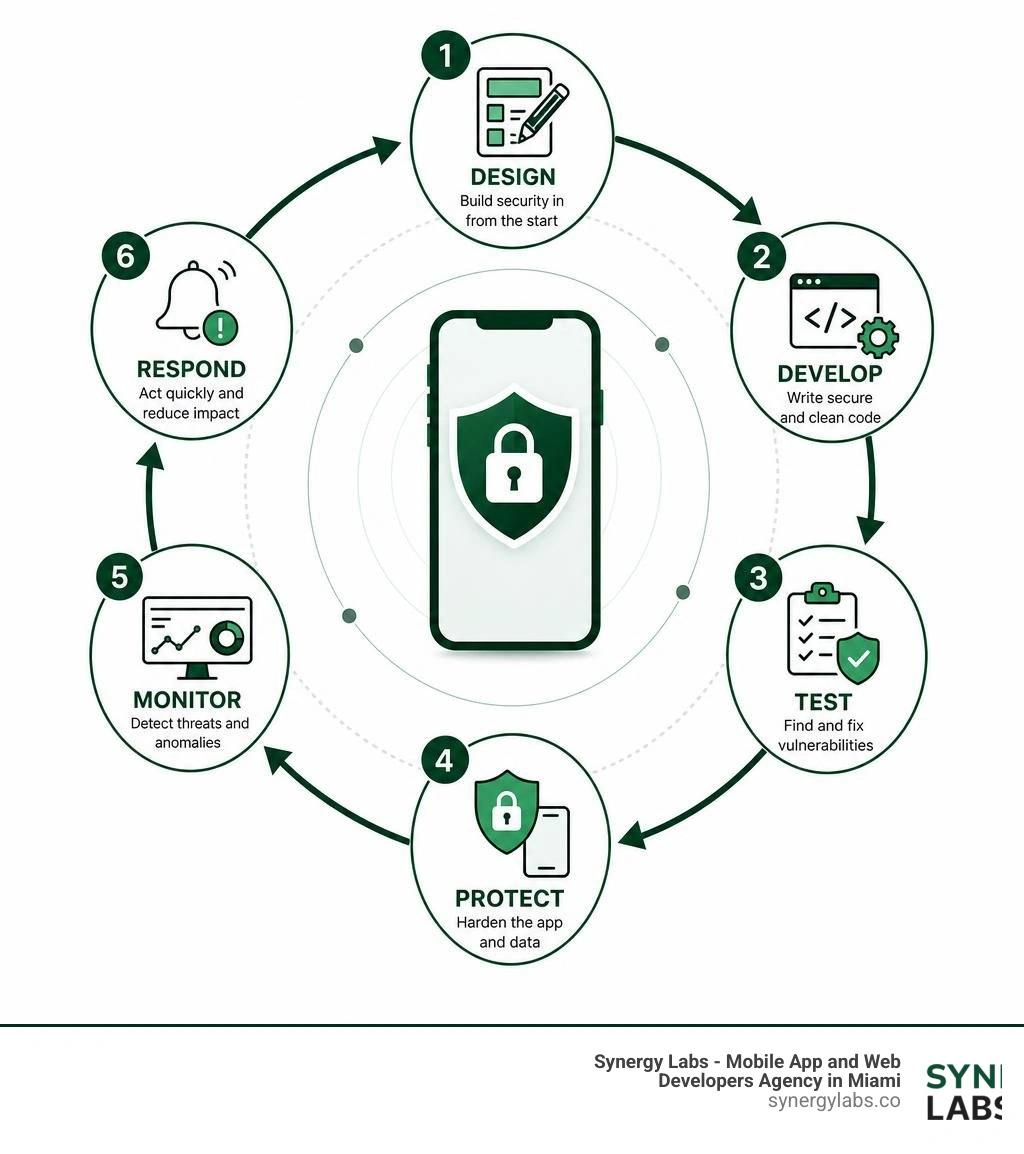
Security is not a final coat of paint you apply right before launching your app on the App Store or Google Play. It must be woven into the very fabric of your Software Development Lifecycle (SDLC) from day one. In our Enterprise App Development Complete Guide 2026, we emphasize that modern high-performing engineering teams operate under a DevSecOps model, where security checks are fully automated within the Continuous Integration and Continuous Deployment (CI/CD) pipeline.
[Design & Threat Modeling] ──> [Secure Coding] ──> [Automated SAST/SCA] ──> [DAST & Interactive Testing] ──> [Manual Pentesting] ──> [Production Monitoring & RASP]An optimized DevSecOps pipeline for mobile development includes several automated and manual checkpoints:
- Static Application Security Testing (SAST): Automated scanners analyze your source code, bytecode, or compiled binaries during every pull request. SAST tools quickly identify hardcoded API keys, insecure cryptographic algorithms, and structural vulnerabilities before the code is even merged.
- Software Composition Analysis (SCA): Scans your project's dependency tree to flag known vulnerabilities in third-party libraries, SDKs, and open-source packages, preventing supply chain attacks.
- Dynamic Application Security Testing (DAST): Tests the compiled application in a running state (typically on emulators or physical test devices). DAST tools simulate real-world attacks, probing network endpoints, evaluating session management, and observing runtime memory behavior.
- Manual Penetration Testing: While automation is incredible for catching low-hanging fruit, it cannot replace human creativity. Engaging certified security experts for annual manual penetration testing is essential to discover complex logic flaws, authorization bypasses, and multi-step exploit chains.
- Continuous Post-Deployment Monitoring: Once your app is live, monitor real-time security telemetry. Track unexpected crashes, RASP alerts, and suspicious API traffic patterns to detect and mitigate active zero-day exploits before they escalate into widespread breaches.
Frequently Asked Questions about Mobile App Security
Are mobile apps safer than web applications?
There is no simple "yes" or "no" answer, as both environments face unique threat models. However, mobile applications benefit from robust, built-in platform-level security features that web browsers lack:
- Sandboxing: Mobile operating systems isolate each app in its own sandbox, preventing malicious apps from reading or modifying another app's data.
- Biometric Hardware Support: Mobile apps can directly leverage secure local hardware (like Apple's Secure Enclave or Android's StrongBox) to enforce biometric authentication (Face ID/Touch ID) without sending sensitive biometric data to a server.
- App Store Vetting: Before an app reaches a user, it must pass automated and manual security reviews conducted by Apple and Google, reducing the distribution of outright malicious software.
That said, mobile apps carry unique client-side execution risks. Unlike web apps, where the core business logic remains secure on your servers, a mobile app's binary is downloaded directly to the user's device. If an attacker has physical possession of the device, they can decompile, analyze, and attempt to manipulate the app's code in ways that are impossible with a standard web application.
What is the difference between SAST and DAST in mobile testing?
SAST and DAST are complementary testing methodologies that look at your app from completely different angles:
- SAST (Static Application Security Testing):
- How it works: Analyzes the raw source code, configuration files, or compiled binaries without executing the app.
- When it's run: Early in the development cycle (inside the IDE or during code compilation).
- What it finds: Hardcoded credentials, insecure API calls, lack of input validation, and structural coding flaws.
- DAST (Dynamic Application Security Testing):
- How it works: Evaluates the application while it is actively running on a device or emulator.
- When it's run: Later in the SDLC, typically on release-candidate builds.
- What it finds: Insecure session management, runtime memory leakage, broken backend API endpoints, and vulnerabilities exposed during network transit.
How does certificate pinning protect mobile communications?
Certificate pinning prevents Man-in-the-Middle (MitM) attacks by restricting which cryptographic certificates are accepted by your mobile application.
In a standard HTTPS connection, the mobile app trusts any certificate signed by a root Certificate Authority (CA) pre-installed on the device's operating system. However, if an attacker compromises a root CA, or if a user installs a malicious root certificate (common on corporate networks or compromised devices), an attacker can intercept and decrypt all network traffic between your app and your backend.
With certificate pinning, you hardcode the cryptographic fingerprint (hash) of your specific server's public key or certificate directly into your app's code. When the app connects to your server, it verifies that the certificate presented matches the pinned fingerprint. If there is a mismatch, the app immediately drops the connection, protecting your user's data from exposure.
Securing Your Digital Future: Partnering for Secure Mobile Innovation
Building a mobile app that is beautiful, fast, and secure requires a rare combination of design intuition, engineering excellence, and deep cybersecurity expertise. In today's hyper-connected, high-risk environment, you cannot afford to treat security as an afterthought.
At Synergy Labs, we specialize in creating custom, scalable mobile applications that are secure by design. From our primary hub in Miami, Florida, to our global offices in London, New York, San Francisco, Chicago, Riyadh, and Dubai, we help organizations build robust digital solutions that earn user trust and comply with the world's strictest regulatory frameworks. Whether you are navigating complex financial regulations as detailed in our guide on Building Fintech Apps in New York: Compliance and Innovation, or scaling enterprise infrastructure as discussed in our look at Chicago's Competitive Edge: Building Secure Enterprise Apps in the Midwest, we have the experience to guide you.
Why Choose Synergy Labs?
- Personalized, Senior-Led Service: No layers of management or junior hand-offs. You get direct access to senior technical talent and an in-shore CTO who understands your business goals and guides your project's security architecture.
- The Best of Both Worlds: We pair an experienced, local, in-shore CTO with an elite offshore development team. This unique model allows us to deliver top-tier, enterprise-grade engineering at a highly competitive price point.
- Fixed-Budget Model: We don't believe in surprise bills or runaway costs. We scope your project meticulously and deliver on a transparent, fixed-budget basis.
- Milestone-Based Payments: You only pay as we deliver. Our milestone-based payment structure ensures that every phase of your app's development—from initial threat modeling to final penetration testing—is completed to your exact specifications before you move to the next step.
Don't let security vulnerabilities stand between your business and mobile innovation. Let's build something secure, scalable, and built to last.
Get in touch with the Synergy Labs team today for a free security consultation or explore our comprehensive Synergy Labs App Development Services to see how we can bring your mobile vision to life.