Why You Need a Dedicated Android Antivirus in 2026

In 2026, Android devices need dedicated antivirus protection because Google Play Protect alone cannot reliably stop the surge of sophisticated mobile malware, including banking Trojans, spyware, and ransomware that bypass baseline system filters. A dedicated virus scanner for Android phone actively checks binaries against massive threat-intelligence clouds before malicious code executes, especially when you sideload apps or test third-party SDKs outside the primary marketplace.
Modern smartphones carry everything from personal banking details to proprietary corporate data. As Android continues to hold the dominant share of the global mobile operating system market, it naturally remains the prime target for cybercriminals. Industry estimates show mobile malware attacks surging substantially year over year, with threats evolving from simple adware into sophisticated banking Trojans, covert spyware, and ransomware. Apple CEO Tim Cook once famously noted that Android has 47 times more malware than iOS—and while modern Android sandboxing has improved dramatically, the sheer volume of emerging threats warrants careful attention.
While Google Play Protect monitors your installed applications around the clock, it often struggles against rapid zero-day variants and sophisticated smishing campaigns. Furthermore, many enterprise environments and high-risk workflows involve testing third-party software development kits (SDKs) or sideloading application packages outside the primary marketplace. These unverified installation vectors can easily bypass baseline system filters. Using a dedicated virus scanner provides an active line of defense, checking binaries against massive threat-intelligence clouds before malicious code executes.
Independent cybersecurity testing laboratories highlight this performance gap. In evaluations conducted by AV-Comparatives and AV-TEST, top-tier mobile security engines consistently achieve near-perfect detection benchmarks. For instance, in comprehensive lab tests, leading engines like Bitdefender, ESET, and Trend Micro detected 100% of tested malware samples without generating a single false positive, while Avast and AVG achieved 100% detection with only two false flags. For a deeper understanding of threat landscapes, exploring our Android Virus Protection Ultimate Guide provides valuable context on how modern threats operate.
Essential Android Antivirus Features to Look For
Choosing a security solution requires evaluating key tools that address the specific infection vectors targeting mobile devices. A robust security application should offer:
- Real-Time App and File Scanning: Automatically checks every incoming APK, download, or app update before it can run.
- Web and Anti-Phishing Protection: Blocks malicious websites, deceptive credential-harvesting portals, and spoofed payment gateways in browsers and messaging apps.
- SMS and Communication Scam Shields: Analyzes incoming text messages and links delivered via messaging apps to prevent smishing attacks.
- App Lock and Biometric Guarding: Allows you to place sensitive apps—such as banking tools or internal administrative dashboards—behind a PIN or fingerprint challenge.
- Anti-Theft Tools: Enables remote locating, locking, siren activation, and data wiping if your hardware is lost or stolen.
- Permission Auditing: Highlights apps requesting excessive or invasive capabilities, such as persistent background location or silent SMS access.
Understanding these features is essential for everyday phone users and mobile engineers learning how to secure mobile apps against unauthorized data leakage.
A frequent concern among smartphone owners is that running continuous background security will quickly drain the battery and slow down the device. Fortunately, modern security architecture has evolved beyond the resource-heavy local scanning engines of the past.
High-end smartphones in 2026 often pack up to 24 GB of RAM, a massive leap from early computing hardware. However, mobile operating systems aggressively manage battery life by throttling background tasks. Leading security suites handle this by offloading heavy computational tasks to the cloud. Instead of storing vast databases of signature definitions directly on your phone's storage, the app calculates lightweight cryptographic hashes of newly installed files and queries a remote threat database.
This cloud-first approach allows on-install scanners to operate with minimal CPU overhead, preserving battery longevity while delivering real-time verdicts. As teams design robust software, integrating sound mobile app security principles ensures that security scanners and client applications run harmoniously without performance bottlenecks.
Top Mobile Security Apps Compared: Free vs. Premium

Selecting the right security app depends on your risk profile, budget, and desired feature set. Several established security applications consistently lead the industry in lab test detection scores, user satisfaction, and system efficiency. Review our best mobile security software guide 2026 along with our curated breakdown of the best free security apps for Android to evaluate options across different threat environments.
Here is how the top mobile security apps stack up:
- Bitdefender Mobile Security & Antivirus: Widely regarded as an industry standard, Bitdefender has claimed AV-TEST's "Best Android Security Product" award 8 times. In AV-Comparatives testing, its engine achieved a flawless 100% malware detection rate with zero false positives. The premium suite features real-time scam alerts, app anomaly detection, call blocking, anti-theft controls, and a lightweight 200 MB daily VPN quota. It maintains a 4.7-star rating from over 506,000 reviews on Google Play. You can check out Bitdefender Antivirus – Apps on Google Play for its streamlined, zero-configuration free scanner.
- ESET Mobile Security: Backed by decades of NOD32 security research and over 70 VB100 awards, ESET offers exceptional malware protection. It scored a perfect 100% detection rate without false positives in AV-Comparatives reviews. Notable features include Payment Protection for mobile banking, proactive Anti-Theft with SIM-guard technology, an Adware Detector, and a unique USB On-The-Go scanner that checks connected flash drives. Download ESET Mobile Security Antivirus – Apps on Google Play or review the developer overview for Antivirus for Android with App Lock and Anti-Theft | ESET.
- AVG AntiVirus & Security: With more than 100 million downloads and a 4.6-star rating from over 7.85 million reviews, AVG remains one of the most widely deployed security tools on Android. It achieved a 100% detection rate in lab testing and features an integrated Wi-Fi network scanner, Photo Vault, Permission Advisor, App Lock, and automated Hack Alerts to notify you if your credentials appear in data breaches. You can inspect the listing for AVG AntiVirus & Security - Apps on Google Play.
- Avast Mobile Security & Avast One: Trusted by hundreds of millions globally, Avast's scanning engine detected 100% of tested threats in lab evaluations. Its modern Avast One: Antivirus, Security - Apps on Google Play client pairs virus protection with AI-powered Scam Guardian tools, a Network Inspector, and a high-performance VPN. The classic suite, Avast Antivirus & Security, provides deep device auditing and web shield capabilities.
- TotalAV Antivirus & Security: TotalAV combines reliable malware scanning with robust utility tools. Earning strong marks from independent labs (scoring 17.5/18 in AV-TEST evaluations), it integrates an ad blocker capable of eliminating disruptive mobile web ads alongside real-time malicious URL blocking. Review the package at TotalAV Antivirus & Security - Apps on Google Play.
Evaluating the Best Free Security Scanners
For users seeking simple protection without ongoing costs, free security applications offer capable on-demand and on-install scanning. Tools like Bitdefender Antivirus Free focus solely on core malware defense: they run quietly in the background, utilize cloud lookups, and automatically inspect newly installed applications without requiring complex configuration.
However, free applications come with trade-offs. Many free tools, such as the entry-level tiers of AVG and Avast, rely on advertising or prompt users to upgrade. Furthermore, advanced proactive safeguards—such as automated SMS phishing filters, real-time web protection across all browsers, and scheduled background sweeps—are generally reserved for paid versions. Choosing a free phone antivirus is an excellent starting point, provided you understand the boundaries of free-tier coverage.
Premium Subscriptions and Advanced Security Suites
Upgrading to a paid security subscription transforms an on-demand scanner into a complete mobile defense suite. Premium tiers typically bundle unlimited VPN access to secure open Wi-Fi connections, automated identity theft monitors that scour breach databases for your email and credit card numbers, and banking-grade payment shields that isolate financial transactions.
When managing multiple family devices or enterprise hardware fleets, understanding the Android Antivirus Licensing Model can help you select multi-device bundles that secure Android, iOS, macOS, and Windows hardware under a single subscription.
How to Detect and Remove Malware from an Android Device
If your Android device begins behaving erratically, quick action can prevent data theft and credential compromise. Common indicators of malware infection include:
- Unexplained spikes in cellular data usage.
- Rapid battery depletion and persistent device overheating when idle.
- Invasive pop-up advertisements appearing on your home screen or over other apps.
- Unfamiliar applications appearing on your device that you did not install.
- Frequent system crashes or sudden changes to your default browser and search engine.
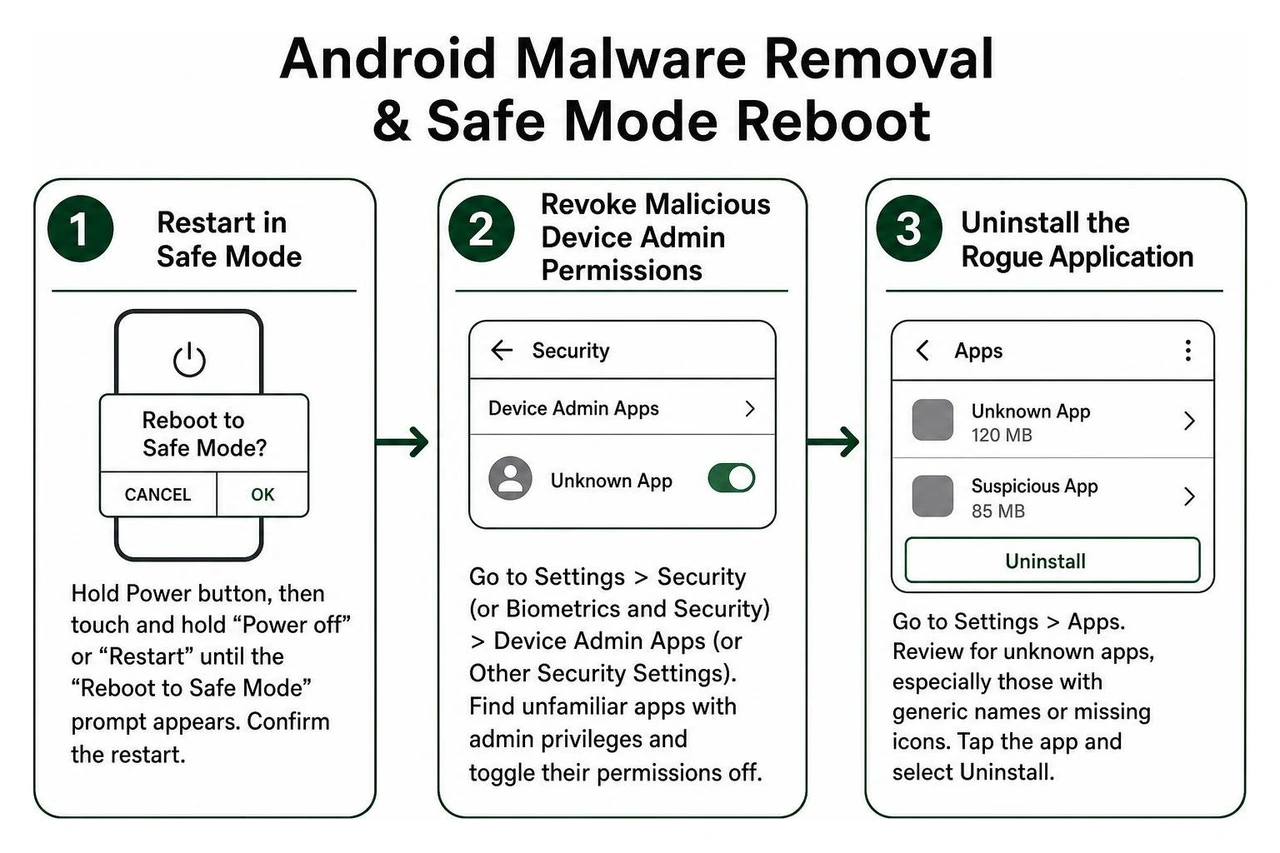
If you suspect an active infection, follow this step-by-step isolation and remediation process:
- Restart in Safe Mode: Press and hold your device's Power button, then touch and hold the "Power off" or "Restart" icon until the "Reboot to Safe Mode" prompt appears. Confirm the restart. Safe Mode disables all third-party applications, preventing malware from running or defending itself.
- Revoke Malicious Device Admin Permissions: Navigate to Settings > Security (or Biometrics and Security) > Device Admin Apps (or Other Security Settings). Look for unfamiliar applications with administrative privileges. Toggle their permissions off immediately.
- Uninstall the Rogue Application: Go to Settings > Apps. Review the list for apps you do not recognize, particularly those with generic names or missing icons. Tap the application and select Uninstall.
- Clear Browser Storage and Cache: Open Settings > Apps > Chrome (or your default browser) > Storage. Tap Clear Cache and Clear Data to remove malicious redirects and cached scripts.
- Perform a Deep Antivirus Scan: Boot your phone normally, update your chosen security app, and execute a full system sweep to identify residual tracking files.
For additional recovery tools, explore our guide on the best apps to get rid of viruses and read our practical Best Free Android Security Tips 2026 to harden your device against future intrusion.
Frequently Asked Questions About Mobile Protection
Do Android phones need third-party security beyond Google Play Protect?
While Google Play Protect provides a solid baseline layer of defense, it primarily focuses on apps hosted within the Google Play Store. It offers limited protection against sophisticated smishing attempts, zero-day malware campaigns, and network-level eavesdropping on unencrypted public Wi-Fi. If you sideload development builds, connect to enterprise networks, or handle sensitive financial data, adding a dedicated security app provides essential real-time web filtering and behavioral anomaly detection.
What is the most effective way to eliminate an active infection?
The most reliable approach is to boot the phone into Safe Mode, revoke any suspicious Device Administrator rights, and uninstall the offending application through the system settings. Following up with a comprehensive scan using a reputable security suite ensures all hidden secondary payloads are removed. If persistent rootkits or system-level malware resist removal, performing a full factory reset provides a clean slate.
Does running real-time scanning significantly drain device battery?
Modern security suites utilize cloud-assisted threat telemetry, meaning your phone sends file signatures to remote scanning servers rather than performing processor-heavy local computations. As a result, top-rated security apps consume less than 1% to 2% of your battery during typical daily operations.
Securing Your Mobile Ecosystem with Synergy Labs
Maintaining mobile security requires a comprehensive approach that combines smart user habits, trusted security tools, and well-architected applications. While selecting the best free virus protection for Android phone shields your personal hardware, building software that users can trust requires security-first engineering from day one.
At Synergy Labs, we help startups, enterprises, and ambitious founders design and build high-performance mobile and web applications with enterprise-grade security built directly into every layer. With offices in Miami, San Francisco, New York City, Chicago, Austin, Phoenix, Hartford, London, Dubai, Doha, and Riyadh, we deliver premier digital products tailored to global standards.
Our development approach pairs an in-shore CTO with an experienced development team to ensure direct access to senior technical leadership throughout your project. By utilizing a transparent fixed-budget model and milestone-based payments, we ensure your mobile builds are delivered on schedule, within scope, and without unexpected financial surprises. Contact Synergy Labs today to bring your mobile product vision to life securely and efficiently.


.avif)

.avif)


