The Evolving macOS Threat Landscape in 2026

Mac users need dedicated antivirus apps because modern infostealers and zero-day threats routinely bypass native tools like XProtect and Gatekeeper, which rely on known signatures and code-signing checks rather than behavioral analysis. For over a decade, macOS enjoyed a reputation as an impenetrable fortress. In reality, that perceived invulnerability was largely due to a smaller market share compared to Windows. As Apple laptops and desktops expanded across enterprises, startup engineering teams, and creative agencies, malicious actors took notice. In 2026, macOS is a primary, high-value target for sophisticated cybercrime rings.
Recent security telemetry reveals that 11% of all threats encountered on macOS systems are active malware, with the rest comprising aggressive adware, potentially unwanted applications (PUAs), and intrusive trackers. The fundamental nature of these attacks has shifted dramatically. Threat actors no longer focus on noisy, file-corrupting viruses designed to crash your system. Instead, they engineer stealthy information stealers that quietly harvest credentials, browser sessions, cryptographic keys, and cloud tokens.
The Rise of Infostealers: AMOS, Poseidon, and CloudChat
Modern macOS threats are spearheaded by modular infostealers. Chief among them is Atomic Stealer (AMOS), along with its aggressive offshoot Poseidon and rogue utilities like CloudChat. These payloads are designed specifically to exploit how macOS stores sensitive application data:
- Keyring and Keychain Extraction: Bypassing standard user prompts through spoofed system dialogues to dump encrypted passwords and certificates.
- Browser Session Hijacking: Extracting autofill data, cookies, credit card profiles, and active session tokens from Chromium-based browsers, Safari, and Firefox.
- Crypto Wallet Interception: Targeting browser extensions and local wallet databases to sweep private keys and seed phrases within milliseconds of execution.
- Local Configuration Harvesting: Locating SSH credentials, AWS tokens, VPN configuration profiles, and environment variables stored across developer directories.
These threats often bypass conventional gatekeeping by using fake updates (such as malicious disk images disguised as web browser or productivity tool installers), search engine malvertising, and social engineering. Just as modern software teams prioritize proactive mobile app security when deploying customer applications, Mac owners must apply the same layered scrutiny to their personal workstations.
Built-in macOS Defenses vs Third-Party Antivirus Apps for Mac
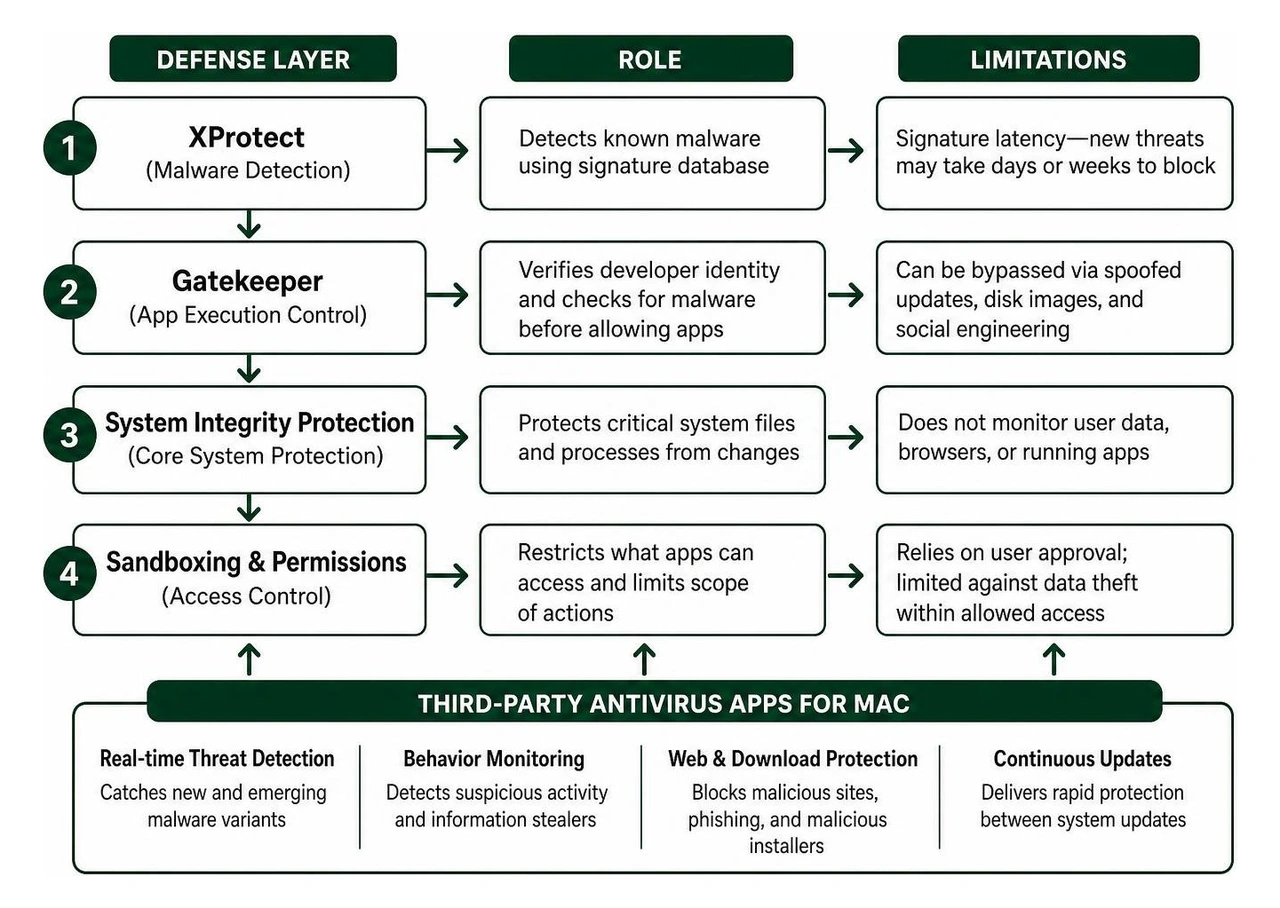
Apple engineers have baked several impressive defense mechanisms into macOS, including XProtect, Gatekeeper, and System Integrity Protection (SIP). Understanding where these built-in safeguards excel—and where they fall short—is crucial for assessing your risk.
The Limits of Native macOS Security
Apple's built-in defenses provide a solid baseline, but they were never designed to act as an all-encompassing, zero-day threat prevention suite:
- XProtect Signature Latency: XProtect operates primarily on known signature databases. When a new infostealer variant or a polymorphic binary appears, it can take days or weeks for Apple to push updated definitions via system updates.
- Gatekeeper Bypasses: Gatekeeper checks for developer code-signing certificates and notarization. However, attackers regularly use stolen enterprise developer certificates or exploit zero-day execution flaws to trick Gatekeeper into allowing unsigned binaries.
- Absence of Heuristic and Behavioral Analysis: Built-in macOS protections generally do not evaluate process behavior in memory. If a signed utility suddenly attempts to scan your local drive for cryptocurrency wallets or secret API keys, native tools rarely intercept the action.
- Zero Protection Against Phishing and Social Engineering: Native macOS tools do not inspect outbound network packets or evaluate suspicious URLs before you type in your single sign-on (SSO) credentials.
- No Cross-Platform Sanitization: macOS ignores dormant Windows payloads inside shared folders or email attachments, leaving connected PC networks vulnerable.
Recognizing these gaps, university and enterprise security teams—such as those following endpoint security guidelines from UT Austin—mandate supplemental active scanning solutions to maintain continuous endpoint hygiene.
Essential Features to Look for in Modern Mac Security Software
Selecting effective security software for your Mac means looking beyond simple on-demand virus scanners. The ideal security suite functions as a lightweight, background guardian that catches malicious activity before it reaches your filesystem.

When evaluating modern software suites, prioritize the following capabilities:
- Continuous Real-Time Inspection: Background file monitoring that inspects new downloads, mounted DMGs, and modified binaries before they execute.
- Behavioral and Heuristic Detection Engines: AI-driven scanners that flag anomalous activity, such as unauthorized background screen recording, rapid file encryption, or abnormal memory injection.
- Dedicated Ransomware Shields: Protected folders (such as Documents, Pictures, and Time Machine backups) that prevent unauthorized encryption or deletion by unknown background scripts.
- Low System Resource Overhead: Modern protection must leverage native Apple Silicon APIs to maintain battery life and avoid CPU throttling.
- Integrated Vulnerability and Patch Auditing: Automated detection of out-of-date third-party apps, similar to the rigor required for enterprise app security patch maintenance.
Key Capabilities of Modern Antivirus Apps for Mac
Advanced security packages combine multiple detection layers into an integrated engine:
- Network-Level Traffic Inspection: Scrutinizes inbound and outbound connections to block unauthorized data exfiltration toward known command-and-control (C2) servers.
- Cross-Platform Payload Eradication: Quarantines Windows executables (.exe, .bat, .dll) and script payloads (.ps1, .vbs) to prevent your Mac from acting as a carrier within mixed-device enterprise networks.
- Cloud-Assisted Threat Intelligence: Queries secure global threat feeds in real time, validating file reputations without waiting for local definition updates.
- Automated Quarantine Protocols: Safely isolates malicious binaries into encrypted sandboxes to prevent accidental execution during cleanup. Selecting the right tools from the best apps to get rid of viruses guarantees your storage drives remain free of hidden backdoors.
Free vs Paid Antivirus Apps for Mac
Deciding between a complimentary scanner and a commercial subscription depends on your threat profile and daily workflow:
- Free Mac Scanners: Typically provide on-demand file and folder scanning. They are helpful for post-incident triage and occasional sanity checks. However, free versions often lack real-time background protection, phishing filters, and automated definition updates.
- Paid Mac Security Suites: Provide persistent, always-on shields, automated zero-day heuristic defenses, web tracking blocks, integrated VPN connections, and ransomware locks. For power users, distributed engineering teams, or anyone using their computer alongside enterprise mobile security software, a commercial license provides continuous peace of mind.
How to Tell If Your Mac Is Infected and What Steps to Take
Because modern malware is engineered to stay hidden, infections rarely display obvious skull-and-crossbones warnings. Instead, infections manifest as subtle system anomalies and performance degradations.
Common Symptoms of a macOS Infection
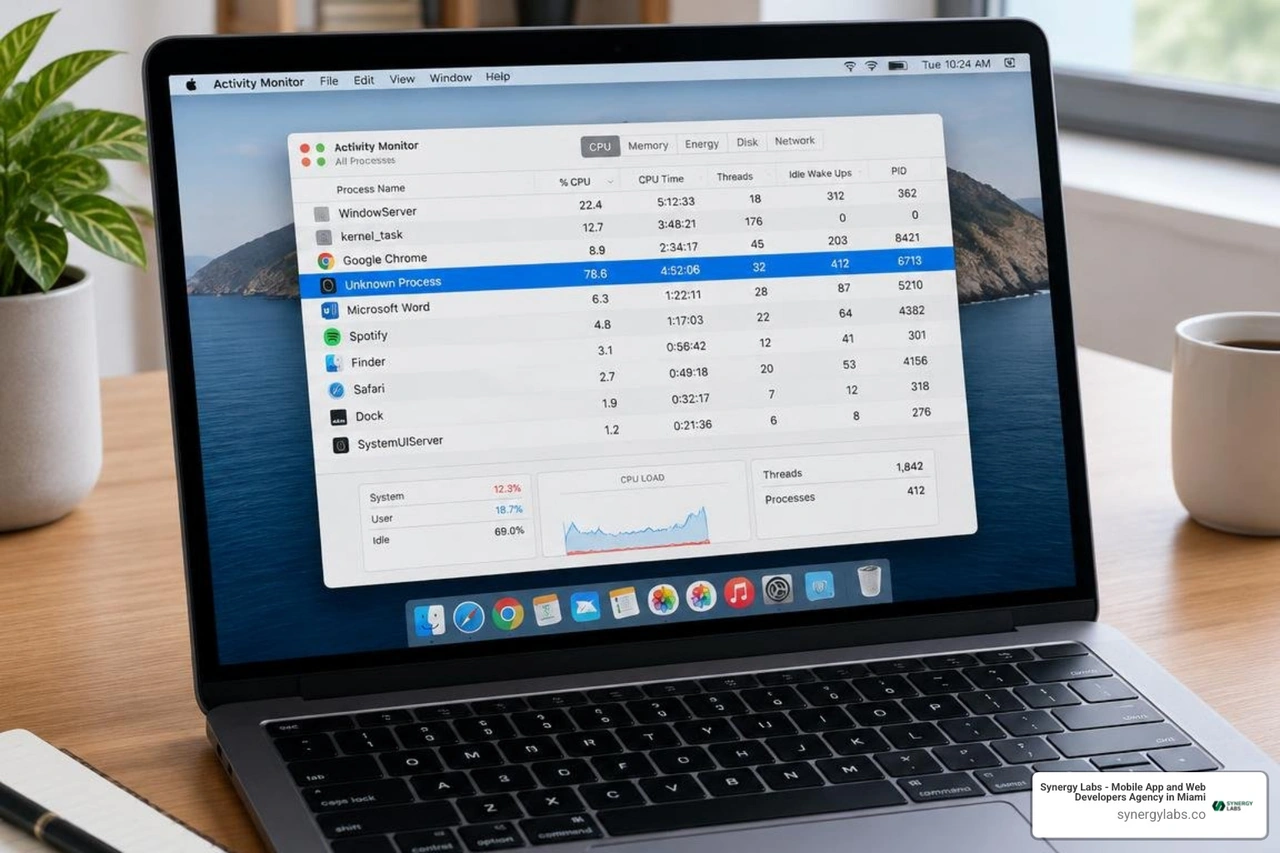
- Sudden Performance Throttling: The Mac experiences unexpected CPU spikes, memory leaks, or thermal throttling when no intensive tasks are running.
- Browser Hijacking and Unauthorized Redirects: Search queries in Safari, Chrome, or Firefox are redirected through unknown intermediary domains, or unwanted browser extensions reappear after deletion.
- Suspicious Background Daemons: macOS Activity Monitor displays unfamiliar processes consuming significant CPU or sending periodic network requests to unknown IP addresses.
- Spontaneous Configuration Profiles: Unknown configuration profiles appear under System Settings > Privacy & Security > Profiles, granting rogue apps elevated system management permissions.
- Unexpected Permissions Prompts: Frequent macOS alerts asking for Accessibility, Full Disk Access, or Screen Recording permissions from obscure utilities.
If you suspect your Mac has been compromised, follow this structured incident response plan:
- Disconnect from the Network: Immediately disable Wi-Fi and unplug Ethernet connections to prevent active data exfiltration or secondary payload downloads.
- Review Installed Profiles: Navigate to
System Settings > Privacy & Security > Profiles and delete any profiles you did not explicitly install. - Inspect Login Items and Launch Daemons: Check
System Settings > General > Login Items to remove unauthorized background tasks. - Execute an In-Depth Malware Scan: Run a comprehensive scan using a verified antivirus solution to isolate malicious files into quarantine.
- Revoke Session Tokens and Rotate Credentials: Using a separate, clean device, log out of all active web sessions, change passwords, and cycle API tokens and SSH keys.
- Apply System Updates: Install the latest macOS updates to patch known operating system and WebKit vulnerabilities.
For developers and founders managing distributed software ecosystems, understanding how to secure mobile apps and developer workstations is critical to maintaining a clean security posture across your entire tech stack.
Frequently Asked Questions About Mac Security
Do Macs really need dedicated security software if Apple updates regularly?
Yes. While Apple regularly releases updates for macOS, these patches focus on known system vulnerabilities and signature-based cataloging via XProtect. Zero-day threats, polymorphic malware, and fast-moving phishing campaigns often exploit the operational window between when an exploit emerges and when Apple publishes a patch. Dedicated antivirus software provides active behavioral analysis, catching anomalous file modifications and blocking credential exfiltration before an official operating system patch is deployed.
Can Mac security software detect Windows-specific malware?
Yes. High-quality Mac security solutions scan for and eliminate Windows malware strains. While a Windows-targeted executable (.exe) cannot directly run on macOS, your Mac can unknowingly store and transmit infected attachments, shared network files, or USB drive payloads to Windows colleagues and clients. Maintaining cross-platform detection prevents your Mac from acting as a digital carrier in mixed environments.
No, provided you use an optimized, modern security application. Older antivirus suites occasionally caused performance drops due to unoptimized file system hooking. Modern security suites designed for Apple Silicon (M1/M2/M3/M4 chips) operate as lightweight background system extensions, consuming negligible RAM and CPU cycles while achieving top scores in independent AV-Comparatives and AV-Test benchmarks.
Building a Resilient Digital Foundation with Synergy Labs
Relying on outdated security assumptions leaves your Mac, your personal identity, and your business assets exposed to modern infostealers and web-based threats. Protecting your digital environment requires combining modern security software, disciplined credential hygiene, and prompt operating system updates into an active defense strategy.
When your team is ready to build resilient, enterprise-grade software products that stand up to modern digital threats, partner with the engineering team at Synergy Labs. We specialize in end-to-end mobile and web app development, combining top-tier product strategy with uncompromising security standards.
With our predictable fixed-budget model, an in-shore CTO with an offshore dev team, and milestone-based payments that ensure projects are completed efficiently, we ensure your software projects launch rapidly, scale smoothly, and run securely. Discover how our custom software development services can bring your next digital product to life.


.avif)

.avif)


