Find the Best Free Security Apps for Android in 2026
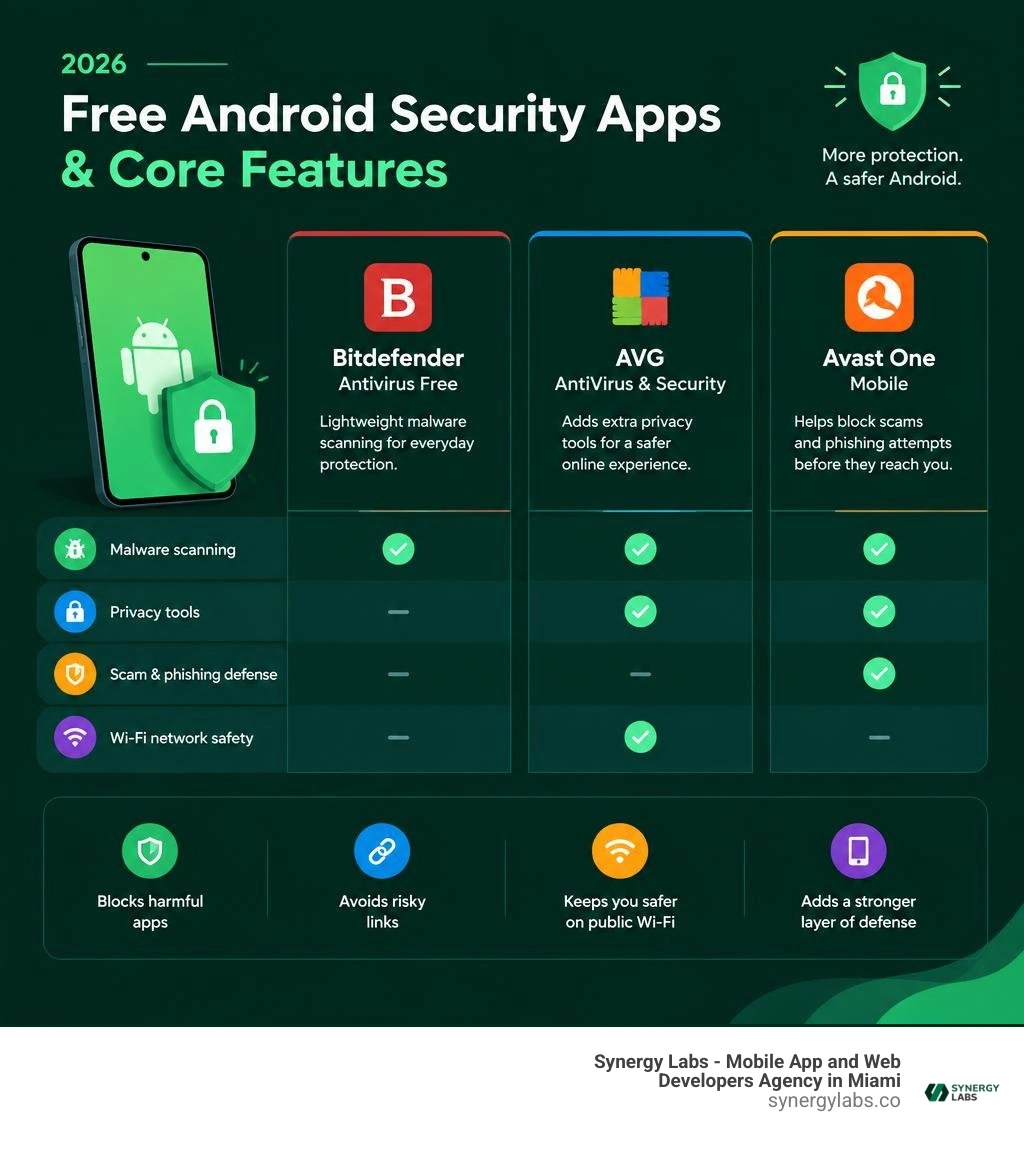
The best free security apps for Android in 2026 are Bitdefender Antivirus Free for lightweight malware scanning, AVG AntiVirus & Security for extra privacy tools, and Avast One Mobile for scam and phishing defenses. These apps can add useful protection against harmful apps, risky links, and unsafe Wi-Fi networks without requiring a subscription.
Google Play Protect is a solid first layer, but it is not a complete security plan for everyone. If you install APKs, use public Wi-Fi, manage business accounts on your phone, or receive lots of text-message links, finding the best virus protection for android phone setups can provide a reliable second line of defense.
Free tools do come with trade-offs. Some show ads, collect data for app functions, limit VPN access, or push paid upgrades a little too eagerly. When choosing the best mobile security software, it is crucial to understand how modern mobile security software interacts with system permissions and device performance.
As Director of Product at Synergy Labs, I look at mobile security through the same lens as app quality: protect users early, keep friction low, and never trust an app just because it has a convincing icon.
Google Play Protect vs. Third-Party Antivirus: Is Built-In Security Enough?
Every modern Android phone ships with Google Play Protect enabled by default. It runs quietly in the background, checks apps against Google's database before you download them, and scans your device periodically for known bad actors. For a casual user who only downloads top-tier apps from the official Play Store and never clicks on questionable links, Play Protect provides a solid baseline.
However, modern cyber threats rarely arrive with a warning label. Mobile malware grew significantly in sophistication throughout 2026. Attackers increasingly deploy polymorphic code, banking trojans, locker ransomware, and smishing attacks designed to bypass basic static checks.
Here is where Google Play Protect leaves notable gaps:
- Sideloaded APK Files: If you download APKs from third-party application stores or direct web links, Play Protect does not always perform deep behavioral analysis before the package executes.
- Real-Time Phishing and Malicious URLs: Smishing (SMS phishing) and malicious links inside messaging apps often go unchecked until a malicious download actually starts.
- Unsecured Public Wi-Fi Networks: Play Protect offers zero network-level inspection to warn you if someone is attempting an eavesdropping attack on open coffee shop networks.
- Zero-Day Heuristics: Dedicated security firms deploy massive threat intelligence engines that identify zero-day behavioral anomalies faster than broad OS-level scanners.
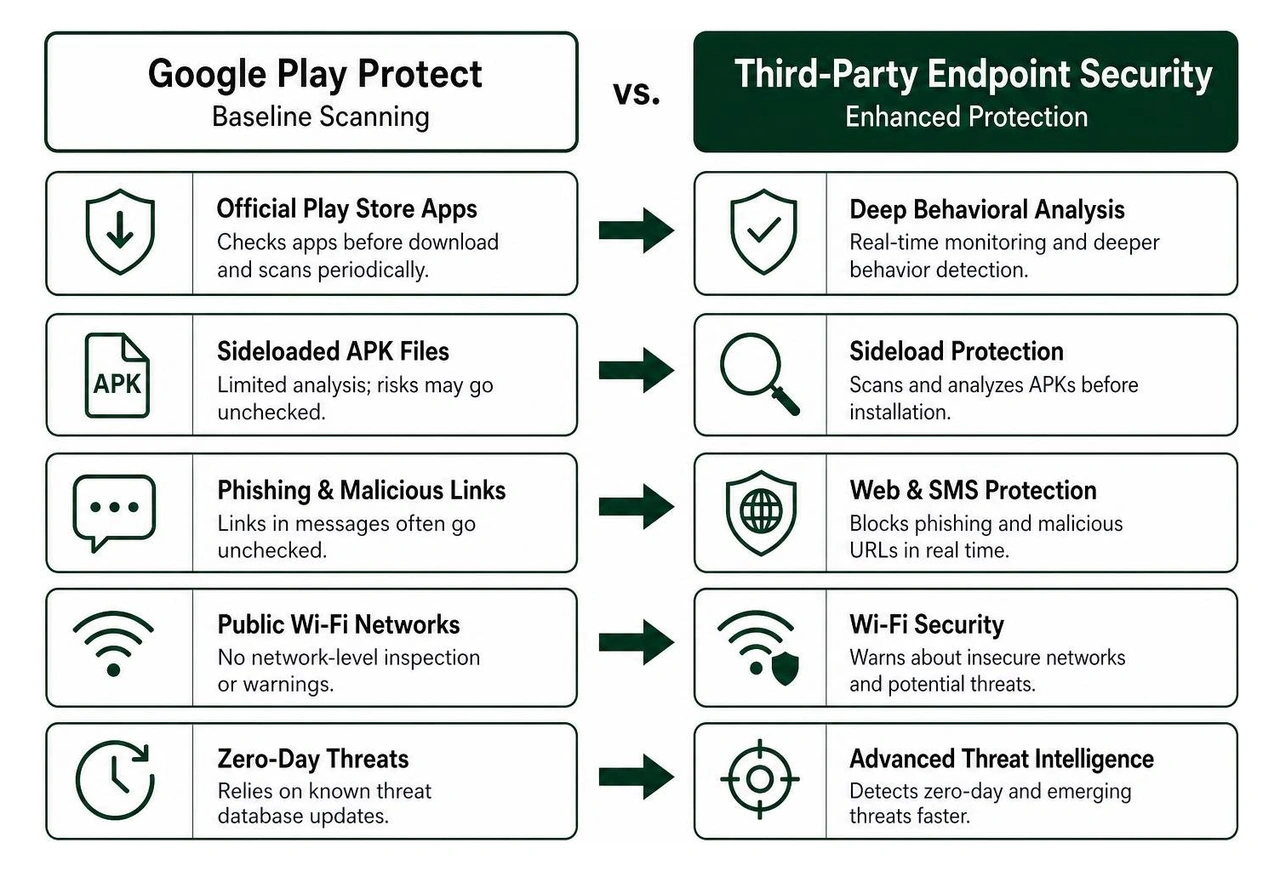
While Play Protect acts as an indispensable foundation, pairing it with specialized software creates true defense-in-depth. If you want a complete breakdown of device hardening, explore our Android virus protection guide to safeguard your operating system against deeper attack vectors.
The Best Free Security Apps for Android Reviewed for 2026
To evaluate the top free security tools available on Android, we analyzed detection accuracy, impact on hardware resources, independent lab results from testing authorities like AV-TEST, and real-world usability. When we design and engineer products at Synergy Labs, we understand that any software running background processes must balance robust performance with battery conservation.
The following standalone applications represent the most dependable free options currently available on Google Play.
Bitdefender Antivirus Free: Zero-Config Cloud Protection
Bitdefender Antivirus Free is the ideal tool for users who want industry-leading threat detection without bloat, ads, or battery drain. Unlike heavy security suites that install multiple background services, Bitdefender relies almost entirely on cloud-based scanning.
- AV-TEST Performance: Bitdefender earned a perfect 18/18 score on AV-TEST evaluations for Android, independently certified to catch more than 99% of all mobile malware threats.
- Zero Configuration: There are no complicated menus or background daemons to tweak. You install it, run an initial scan, and let it work.
- On-Install Scanning: Whenever you download a new application or sideload an APK, Bitdefender instantly checks the file metadata against its cloud engine before allowing execution.
- Resource Footprint: Because signature processing takes place on remote servers, the app has virtually zero impact on your phone's battery life or system RAM.
- User Reception: With over 10M+ downloads on Google Play and an impressive 4.7-star rating from over 306,000 reviews, it remains a favorite for minimalist device protection.
If you prefer a clean setup that silently defends your phone without constant notifications, grab Bitdefender Antivirus on Google Play.
AVG AntiVirus & Security: All-in-One Defense Suite
For users who want a feature-packed security toolkit without paying upfront, AVG AntiVirus & Security provides a comprehensive suite of utilities. AVG is backed by decades of threat intelligence and holds an AV-TEST score of 18/18 on Android.
- Massive Community Validation: Over 100,000,000 people have installed AVG’s antivirus mobile security apps, maintaining a stellar 4.6 rating from 7.85 million reviews on Google Play.
- Real-Time Malware Engine: Continuously scans downloaded files, installed applications, and device memory for active threats, adware, and trojans.
- Integrated Wi-Fi Analyzer: Inspects public Wi-Fi networks for encryption weaknesses, DNS hijacking, and rogue hotspots before you transmit sensitive login details.
- Privacy Tools: Includes an encrypted Photo Vault to hide personal media behind a PIN, pattern, or biometric lock, alongside an App Lock feature for banking and messaging applications.
- Hack Alerts: Monitors your linked email addresses and warns you if your credentials appear in known public data leaks.
While the free version is supported by in-app ads and occasional prompts to upgrade, the core security tools remain completely functional. You can download AVG AntiVirus & Security on Google Play to activate its multi-layered protection suite.
Avast One Mobile: Standout Features in the Best Free Security Apps for Android
Avast One Mobile represents a modern redesign of classic antivirus software, focusing heavily on AI-assisted threat detection and holistic online privacy. Avast's threat intelligence network blocks an average of over 14,000 cyberattacks every minute across the globe, providing massive telemetry data to power mobile defenses.
- AI Scam Guardian: Automatically flags suspicious text messages, fraudulent incoming phone calls, and phishing attempts sent via chat apps before you interact with them.
- Web Shield & Phishing Blocker: Blocks dangerous URLs, malicious redirects, and fake login pages while you browse in Chrome or other mobile browsers.
- Built-in VPN Service: Provides encrypted browsing traffic to protect your data across unsecured public networks, making it a rare inclusion for a free security suite.
- Storage and Junk Cleaner: Identifies hidden system cache, orphaned data, and duplicate files to restore device storage.
- Community Standing: The app enjoys a 4.8 / 5 rating from over 7.02 million users on Google Play, reflecting exceptional stability and threat remediation.
If you are looking for a powerful virus scanner for Android phone security that addresses both on-device files and web-based scams, Avast One Mobile delivers an exceptional free tier.
TotalAV Mobile Security: Essential Malware Defense
TotalAV Antivirus & Security has grown into a widely used utility, amassing over 10M+ downloads and a 4.2 rating from 167,000 reviews on Google Play. It earned a competitive 17.5/18 score on AV-TEST for Android, demonstrating strong detection capabilities across real-world malware samples.
- Data Breach Checker: Allows users to enter their email addresses to check whether their passwords have been exposed in recent corporate database compromises.
- Malicious Link Defense: Integrates with your browser to intercept dangerous URLs and block known phishing domains.
- QR Code Security Scanner: Analyzes QR codes before opening embedded links to prevent drive-by download attacks.
- Ad & Tracker Blocking: Helps reduce intrusive mobile browser advertising and limits trackers that monitor your browsing behavior.
While TotalAV provides strong baseline scanning and data breach alerts, keep in mind that several advanced features operate on a limited trial model, requiring a clear look at your daily feature requirements. Check out TotalAV Antivirus & Security - Apps on Google Play to see if its specific toolset fits your workflow.
Free vs. Paid Mobile Security: Features, Privacy, and Trade-Offs
When choosing between free and paid Android security solutions, understanding the underlying business model is critical. Software development requires sustained infrastructure, malware analysis labs, and ongoing definition updates.
Free antivirus tools typically monetize through:
- Displaying banner and interstitial advertisements within the app dashboard.
- Promoting premium tier subscriptions with advanced features.
- Capping daily data allotments on bundled services like virtual private networks.
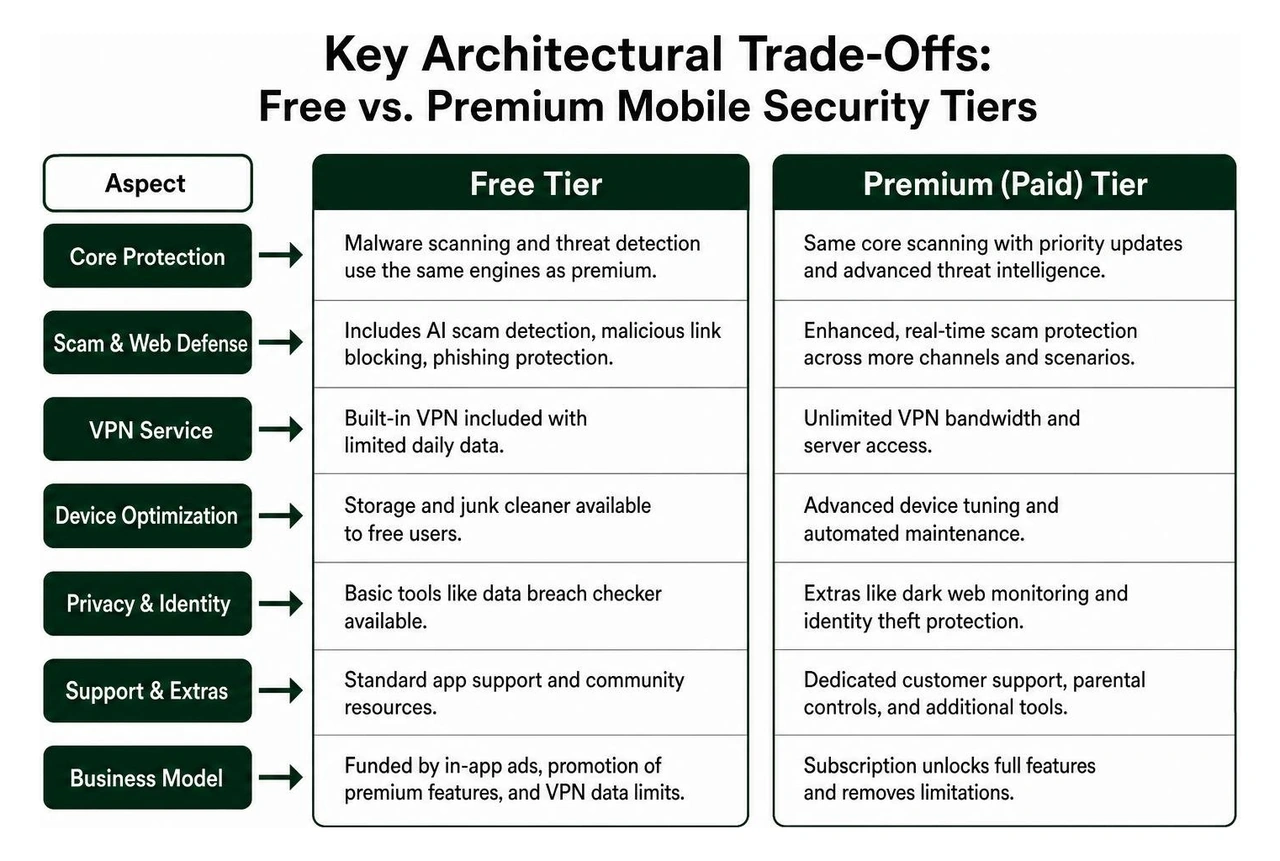
Paid subscriptions generally unlock unlimited VPN bandwidth, identity theft insurance, automated dark web monitoring, parental controls, and dedicated customer support channels. However, if your primary goal is detecting malicious APKs and blocking dangerous domains, top-rated free apps use the exact same underlying scanning engines as their premium counterparts.
To stay fully protected without spending money, check out our practical best free android security tips for 2026 to harden your device through native configuration settings.
How to Choose the Best Free Security Apps for Android Without Hidden Risks
Not every application claiming to be a "Free Antivirus" on Google Play is safe to install. Rogue developers frequently disguise adware, battery drainers, and data harvesters as system optimization tools.
To protect your personal data, follow these verification rules before installing any security tool:
- Stick to Established Security Vendors: Only download security applications developed by companies with verified threat research divisions (such as Bitdefender, AVG, or Avast).
- Avoid Generic Names: Steer clear of apps with generic titles like "Super Speed Antivirus", "Master Phone Cleaner 2026", or "Virus Sweeper Pro". These apps often flood your lock screen with intrusive ads and harvest diagnostic logs.
- Inspect Requested Permissions: A malware scanner needs storage permissions to examine files, but it does not need access to your microphones, call logs, or camera unless you explicitly enable a feature like anti-theft photo capture.
- Audit Background Network Traffic: Ensure the app uses secure data transmission (SSL/TLS encryption in transit) and maintains a clear, readable privacy policy regarding third-party data sharing.
When engineering secure enterprise software, our team follows strict privacy-by-design frameworks. Learn more about how we implement hardened protocols by reading our breakdown on how to secure mobile apps.
A common worry among Android users is whether security software will drain battery life, consume excessive background RAM, or make the phone feel sluggish.
Older security tools relied heavily on local signature databases that required continuous background file hashing. In 2026, modern scanners utilize cloud lookup engines. When a file or app is downloaded, the scanner computes a lightweight cryptographic hash (such as SHA-256) and queries the vendor's cloud servers in milliseconds. This modern architecture reduces local CPU strain to negligible levels.
To install and configure your security app safely:
- Download Directly from Google Play: Never download a security utility as an unverified APK from an online forum or file-sharing site.
- Run an Initial Deep Scan: Once installed, run a comprehensive manual scan while connected to your home Wi-Fi network to establish a clean baseline.
- Configure Anti-Theft Tools: If your app offers anti-theft capabilities, set up device administration features properly. You can review our dedicated guide on remote locking an Android phone to learn how remote wipe and geolocation tracking work during an emergency.
- Disable Unnecessary Persistent Notifications: If promotional pop-ups or status alerts become noisy, head to Android Settings > Apps > [Your Security App] > Notifications and toggle off non-critical marketing channels while leaving threat alerts active.
Frequently Asked Questions About Android Antivirus Software
Does Google Play Protect eliminate the need for an antivirus app?
Google Play Protect serves as an essential built-in security layer, but it does not catch every emerging threat. It lacks aggressive anti-phishing protection for external messaging apps, offers no Wi-Fi vulnerability scanning, and provides less real-time heuristic analysis for sideloaded files. Installing a dedicated free tool bridges these specific security gaps.
Can free Android security software safely eliminate ransomware?
Yes. Top-tier free security software shares the same detection databases and threat engines as paid commercial suites. If a ransomware trojan or malicious APK is identified, the app isolates the file in a secure quarantine environment, revokes its active execution permissions, and prompts you to delete the malicious payload completely.
Do mobile security apps consume excessive battery and storage?
Modern security applications built by reputable vendors have minimal impact on battery life and storage. By moving threat definitions and signature analysis to cloud servers, these apps eliminate the need to store massive local databases or run high-intensity CPU calculations locally on your mobile processor.
Power Up Your Digital Security with Synergy Labs
Protecting your mobile device with reliable, free security software ensures your personal data, credentials, and digital lifestyle remain secure against evolving cyber threats. As mobile threats grow more sophisticated in 2026, proactive defense is no longer optional—it is a fundamental requirement.
At Synergy Labs, we bring that same rigorous, security-first mindset to every custom software product we build. We are a premier mobile app and web development agency committed to helping startups, enterprises, and ambitious founders transform complex ideas into robust, scalable digital solutions.
When you partner with Synergy Labs, you benefit from:
- Direct Senior Talent & In-Shore CTO Leadership: Collaborate directly with seasoned technology leaders backed by an elite global development team.
- Predictable Fixed-Budget Model: Transparent, clear estimates that eliminate cost overruns and unexpected development expenses.
- Milestone-Based Payments: You only pay as tangible, high-quality development milestones are achieved and verified.
- Rapid, Secure App Launches: We focus on human-centered design, modern architectures, and military-grade security standards from day one.
Ready to build your next breakthrough mobile application or secure your digital enterprise? Explore our custom mobile app development services and get in touch with our team at Synergy Labs today!


.avif)

.avif)


