React Native's component model and large ecosystem make it a strong foundation for social apps — the real work is in the real-time architecture underneath.

Learning to build a social media app with React is a timely skill. With 4.89 billion active social media users in 2024 and a market projected to grow 26.2% annually, the demand for innovative social apps is immense.
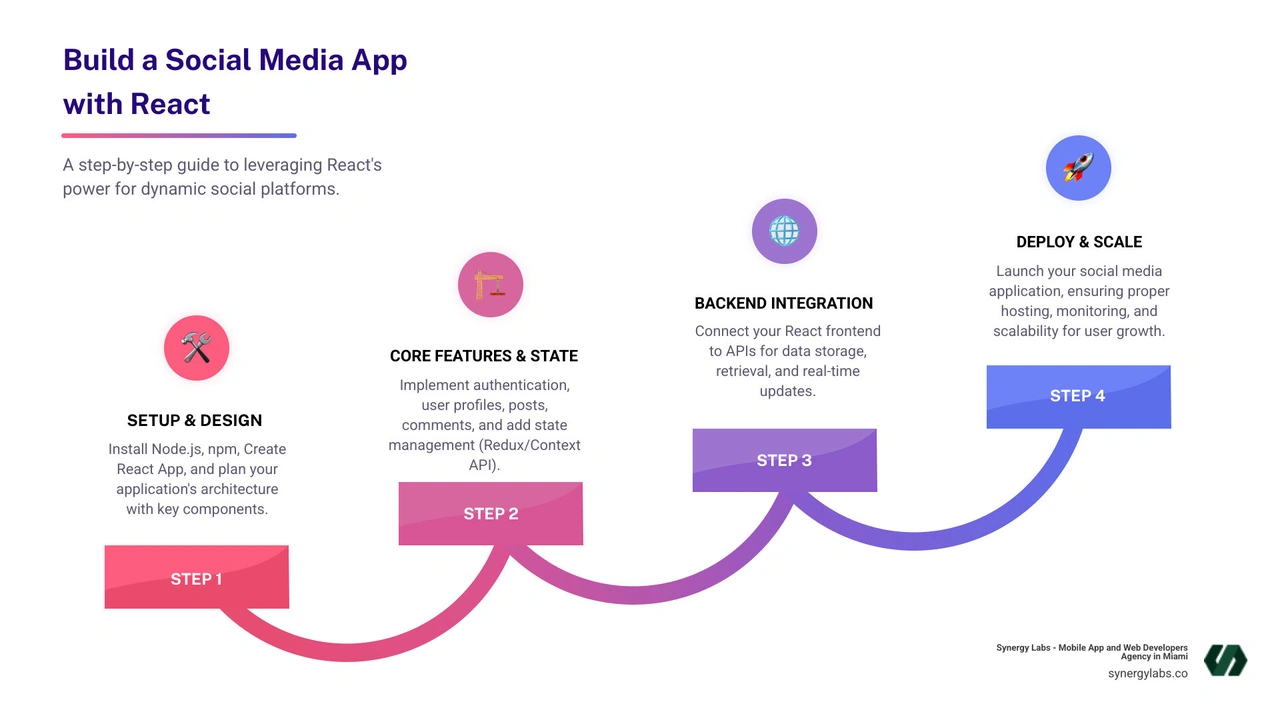
Here's a high-level overview of the process:
- Set up your development environment: Install Node.js, npm, and Create React App.
- Design your app architecture: Plan components for profiles, feeds, and posts.
- Implement core features: Build authentication, posting, and commenting systems.
- Add state management: Use Redux or Context API for global app state.
- Integrate backend services: Connect to APIs for data and real-time updates.
- Deploy and scale: Launch your app with proper hosting and monitoring.
React's component-based architecture is ideal for creating reusable UI, managing complex state, and scaling your application. At Synergy Labs, we've seen how the right technical approach is critical for success. This guide will walk you through every step, from initial setup to advanced features like real-time updates.
When you decide to build a social media app with React, you're choosing a framework that powers some of the world's most successful social platforms. Here's why it's an excellent choice.
React's component-based architecture allows you to create self-contained, reusable UI elements like profile cards, post components, or comment threads. This modular approach simplifies development, as you can build and test each piece independently. Updating a single component, like a "Like" button, automatically applies the change everywhere it's used, saving time and reducing errors.
Performance is a key advantage, thanks to the Virtual DOM. Instead of re-rendering the entire page on every change, React updates a lightweight copy in memory and calculates the most efficient way to apply changes to the actual browser DOM. This results in a snappy, responsive user experience, even with dynamic feeds and constant interactions.
Scalability is built into React's design. Its modular nature and ability to handle complex state management mean you can add new features like stories or live streaming as your user base grows without needing a complete overhaul. This aligns with the principles of 4 Key Benefits of Cross-Platform Development: Reaching Wider Audiences Efficiently.
Finally, React boasts a massive community and rich ecosystem. The official React documentation is excellent, and millions of developers contribute tutorials, solutions, and open-source libraries. With tools like Redux for state management and React Native for mobile development, you can extend your web app to iOS and Android, sharing a significant portion of your codebase. This ecosystem provides a solid foundation to build a remarkable social media app.
The Blueprint: Core Features and Application Architecture
Before you build a social media app with React, creating a blueprint of features and architecture is essential. A clear plan saves significant time on refactoring and debugging later.
Key Features to Implement
A successful social app needs a core set of features that facilitate connection and sharing.
- User Profiles: Digital identities with a profile picture, username, bio, and a gallery of posts.
- News Feed: A dynamic stream of content from followed accounts and friends.
- Post Creation: An intuitive interface for users to share text, photos, or videos.
- Likes and Comments: Interaction tools that turn static content into conversations.
- Real-time Notifications: Instant alerts for new likes, comments, or messages to keep users engaged.
- Friendship/Follow System: The mechanism that defines how users connect with each other.
- Direct Messaging: A private space for one-on-one or group conversations.
For your MVP (Minimum Viable Product), focus on user profiles, a basic news feed, post creation, and likes. This lean approach helps validate your idea quickly.
Best Practices for Structuring Your React App
A well-organized file structure is crucial for maintainability.
components: A directory for reusable UI elements like Button, Avatar, and Modal.pages: For top-level views like HomePage, ProfilePage, and LoginPage.services: To handle API calls (authService.js, postService.js), separating logic from UI.state: A dedicated folder for your Redux or state management logic (store, actions, reducers).utils / helpers: For shared functions like date formatters or validation helpers.
This clean architecture supports a better developer experience, which is foundational to The Importance of User Experience (UX) in Mobile App Design.
UI/UX Design Considerations
A great user experience is non-negotiable.
- Responsive, Mobile-First Design: Ensure your app looks and works perfectly on all devices, prioritizing the mobile experience.
- Intuitive Navigation: Users should be able to find what they need without confusion, using clear menus and logical flows.
- Engaging Interactions: Use visual feedback and smooth animations to make interactions feel rewarding.
- UI Frameworks: Leverage libraries like Material-UI or Tailwind CSS to build professional-looking interfaces efficiently.
Good design creates an experience that feels natural and enjoyable. For more on this, see our guide on Mobile App Design Optimization.
It's time to turn our blueprint into a working application. This section provides the fundamental steps to build a social media app with React.

Setting Up the Foundation
First, set up your development environment. Ensure you have Node.js and npm installed. Then, use Create React App to bootstrap your project, which handles complex configurations for you.
npx create-react-app my-social-appcd my-social-appnpm start
This command creates your project, steers into the directory, and starts the development server. Next, install essential libraries:
- React Router: For navigation (
npm install react-router-dom). - Axios: For making HTTP requests to your backend (
npm install axios). - UI Library: For styling, consider Material-UI (
npm install @mui/material @emotion/react @emotion/styled) or Tailwind CSS.
This setup is the launchpad for your application. For more on this process, see our guide: From Idea to Launch: A Step-by-Step Guide to Developing Your First Mobile App.
Implementing User Authentication and Authorization
Security is paramount. Authentication verifies a user's identity, while authorization controls their access. Start by building registration and login forms with robust input validation.
For session management, JSON Web Tokens (JWT) are a standard choice. After a successful login, the server issues a JWT, which the React app stores and includes in subsequent API requests to authenticate the user. Use this system to create protected routes that are only accessible to logged-in users.
To improve user experience, consider adding social login options. Backend-as-a-Service (BaaS) platforms can simplify the implementation of social logins by handling the complex OAuth flows.
Integrating State Management with Redux
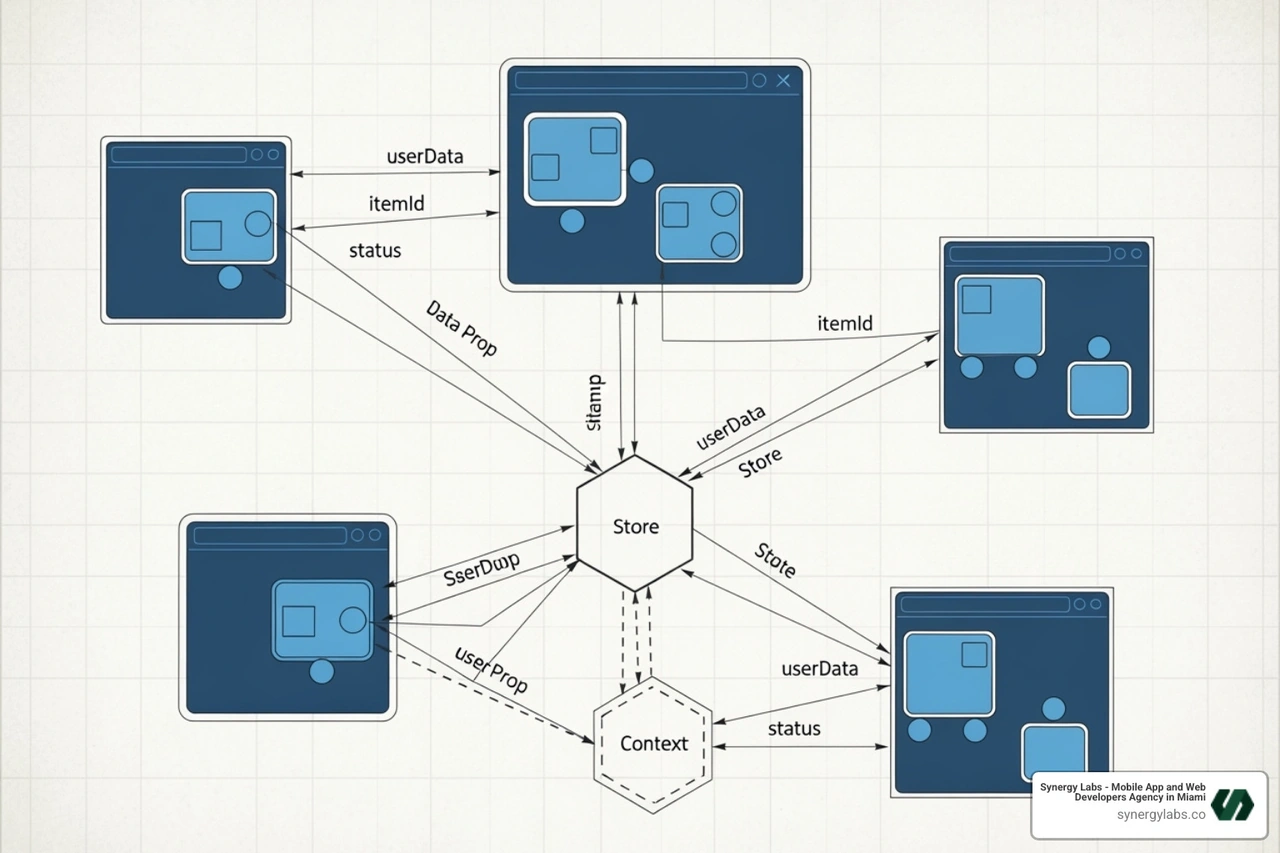
As your app grows, managing state across components becomes complex. Redux provides a centralized "store" for your application's state, preventing "prop drilling" and making data flow predictable.
We recommend Redux Toolkit, the modern, streamlined way to use Redux. Install it with npm install @reduxjs/toolkit react-redux.
You'll define a central store and create "slices" to manage state for specific features like posts or authentication.
// Example of a Redux store configurationimport { configureStore } from '@reduxjs/toolkit';import postsReducer from '../features/posts/postsSlice';import authReducer from '../features/auth/authSlice';export const store = configureStore({ reducer: { posts: postsReducer, auth: authReducer, },});
In your components, use the useSelector hook to read data from the store and useDispatch to send actions that update the state.
Backend Integration and API Consumption
Your React frontend needs a backend to store data and handle business logic.
- Node.js with Express is a popular choice, allowing for a full-stack JavaScript environment. Pair it with a database like MongoDB (for flexibility) or PostgreSQL (for relational data).
- Backend-as-a-Service (BaaS) platforms are excellent for rapid development and MVPs, as they handle servers, databases, and authentication for you.
Your frontend will communicate with the backend via a RESTful API. You'll use Axios to make authenticated requests to endpoints like GET /api/posts or POST /api/posts.
// Example of an authenticated API call with Axiosasync function fetchPosts(token) { const response = await axios.get('/api/posts', { headers: { Authorization: `Bearer ${token}` } }); return response.data;}
For early development, use dummy APIs like https://dummyapi.io/data/v1/post to build your UI before the backend is complete.
Advanced Functionality and Common Challenges
With the core features in place, you can improve the user experience with advanced functionality and address common development problems.

Achieving Real-Time Updates with WebSockets
To make your app feel truly dynamic, implement real-time updates. While traditional HTTP requests require the client to ask for new data, WebSockets create a persistent, two-way connection between the client and server. This allows the server to push updates instantly for features like live notifications, real-time feed updates, and chat messaging.
A library like Socket.IO can be used on your Node.js backend to manage these connections. On the client, you listen for events and update your state accordingly, often by dispatching an action to your Redux store.
// Example of client-side Socket.IO integrationimport { useEffect } from 'react';import io from 'socket.io-client';import { useDispatch } from 'react-redux';import { postAdded } from '../features/posts/postsSlice';const socket = io('http://your-server.com');function RealtimeComponent() { const dispatch = useDispatch(); useEffect(() => { // Listen for a 'newPost' event from the server socket.on('newPost', (post) => { dispatch(postAdded(post)); // Add the new post to the Redux store }); // Clean up the connection when the component unmounts return () => socket.disconnect(); }, [dispatch]); return null; // UI is rendered based on Redux state}
This approach is far more efficient than polling and creates the seamless experience users expect from modern social apps.
Overcoming Common Development Problems
Building a large-scale application comes with challenges. Here’s how to address them:
- State Management Complexity: As features grow, state can become tangled. Adhere strictly to a state management pattern like Redux, organizing state logically into slices to maintain predictability.
- Performance Optimization: Social media feeds can be resource-intensive. Use techniques like code splitting with React.lazy() and Suspense, lazy loading images and components, and virtualization (
react-window) for long lists to ensure a smooth experience. - Application Scaling: Design your backend for growth. Use auto-scaling cloud services, a Content Delivery Network (CDN) for assets, and implement smart caching strategies to handle traffic spikes.
- Security Vulnerabilities: Always validate and sanitize user input. Enforce HTTPS, securely hash passwords, and manage authentication tokens carefully to protect user data.
Proactively addressing these issues is key. For more, see our guide on Common Mobile App Development Mistakes and How to Avoid Them.
Here are answers to common questions about building social platforms with React.
The timeline depends heavily on the complexity of the features, team size, and experience.
- MVP (Minimum Viable Product): With core features like profiles, posting, and a basic feed, expect a timeline of 3 to 6 months. This is the recommended starting point, as detailed in The Benefits of Building a Minimum Viable Product (MVP) First.
- Expanded Feature Set: Adding real-time messaging, notifications, and video support typically extends the timeline to 6 to 9 months.
- Full-Featured Platform: A complex app with AI-driven features, live streaming, and advanced analytics can take 9 to 12+ months.
Yes, using React Native. It allows you to leverage your React skills to build native mobile apps for both iOS and Android from a largely shared codebase. This approach accelerates development and ensures a consistent user experience.
React Native provides access to native device features like the camera, push notifications, and GPS, resulting in a high-performance app that feels truly native, not like a wrapped website. For most social media functions, its performance is excellent. To learn more about mobile development approaches, read our guide: Hybrid App or Native App: Which One is Right for Your Business?.
There is no single "best" backend; the right choice depends on your project's needs.
- Backend-as-a-Service (BaaS): These platforms are excellent for MVPs and rapid development. They handle authentication, a real-time database, and hosting, allowing you to focus on the frontend. It's great for getting to market quickly but can become costly at scale.
- Node.js/Express: For maximum control and scalability, a custom backend with Node.js and Express is a strong choice. Paired with a database like MongoDB (for flexibility) or PostgreSQL (for data integrity), this full-stack JavaScript approach gives you complete control over performance and security, though it requires more initial setup.
The best strategy is to choose a backend that matches your current needs and allows for future growth.
We've covered the essential roadmap to build a social media app with React, from initial setup and core features to advanced real-time functionality. React's component-based architecture and performance make it an ideal choice for creating the dynamic, engaging experiences that define modern social platforms.
You now have the technical foundation to tackle user authentication, state management with Redux, backend integration, and performance optimization. While building a social media app is an ambitious project, it is absolutely achievable with the right approach and tools. The market's explosive growth leaves plenty of room for innovative ideas.
However, turning technical knowledge into a polished, scalable, and user-loved product is a significant challenge. It requires not just coding expertise but a deep understanding of user experience, security, and scalability—details that separate good apps from great ones.
At Synergy Labs, we specialize in changing ambitious visions into reality. We've helped launch successful social platforms by partnering with clients, providing direct access to senior developers who have steerd these challenges before. We don't just build apps; we build communities.
Ready to turn your vision into a phenomenal social media app? Explore our app development services and let's discuss how we can accelerate your journey from concept to launch.


.avif)

.avif)


