Google Play Protect is a solid baseline — but it won't catch phishing links, scam texts, or sideloaded APKs. Here's which free security app actually fits how you use your phone.
Choose Lightweight Android Protection That Matches Your Risk
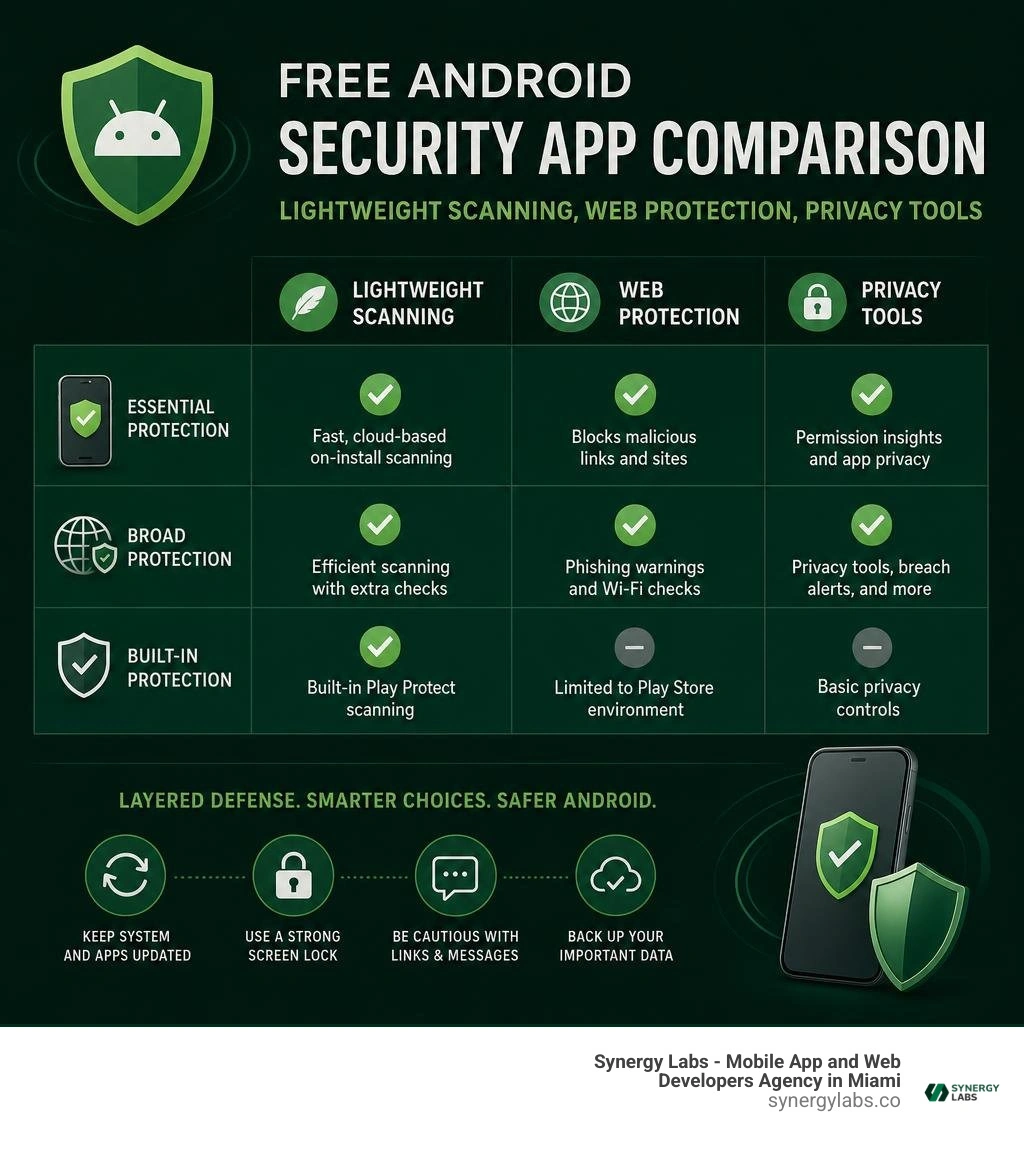
For most people, Bitdefender Antivirus Free is the best free security app for Android phone use when speed and battery life matter most. Its cloud-based, on-install scanning is designed to catch malicious apps without keeping a large signature database on your device.
Choose a broader free suite such as Avast, AVG, or Avira if you also want tools like phishing warnings, Wi-Fi checks, permission reviews, or breach alerts. Just expect more upgrade prompts and background activity.
Google Play Protect is a solid baseline, especially if you only use Google Play. But it is not a complete shield against phishing links, scam texts, risky QR codes, or APKs installed from outside the Play Store. No app can replace updates, a strong screen lock, and healthy skepticism of a "you won a free phone" pop-up.
The best choice is the one that protects the ways you actually use your phone without turning it into a slow, noisy security dashboard. As Director of Product at Synergy Labs, I focus on security that supports a smooth mobile experience rather than getting in the way of it.
Essential Protection Capabilities to Demand from Mobile Security Tools
When vetting cybersecurity tools for Android, we must look past marketing buzzwords and evaluate how the underlying engine operates. Mobile threats have evolved far beyond basic virus payloads; today, threats arrive as intrusive adware, malicious banking Trojans, aggressive spyware, and sophisticated zero-day exploits delivered via messaging apps or malicious web redirects.
To keep your mobile device resilient without crippling its system resources, any standalone application you install should deliver several core protection capabilities:
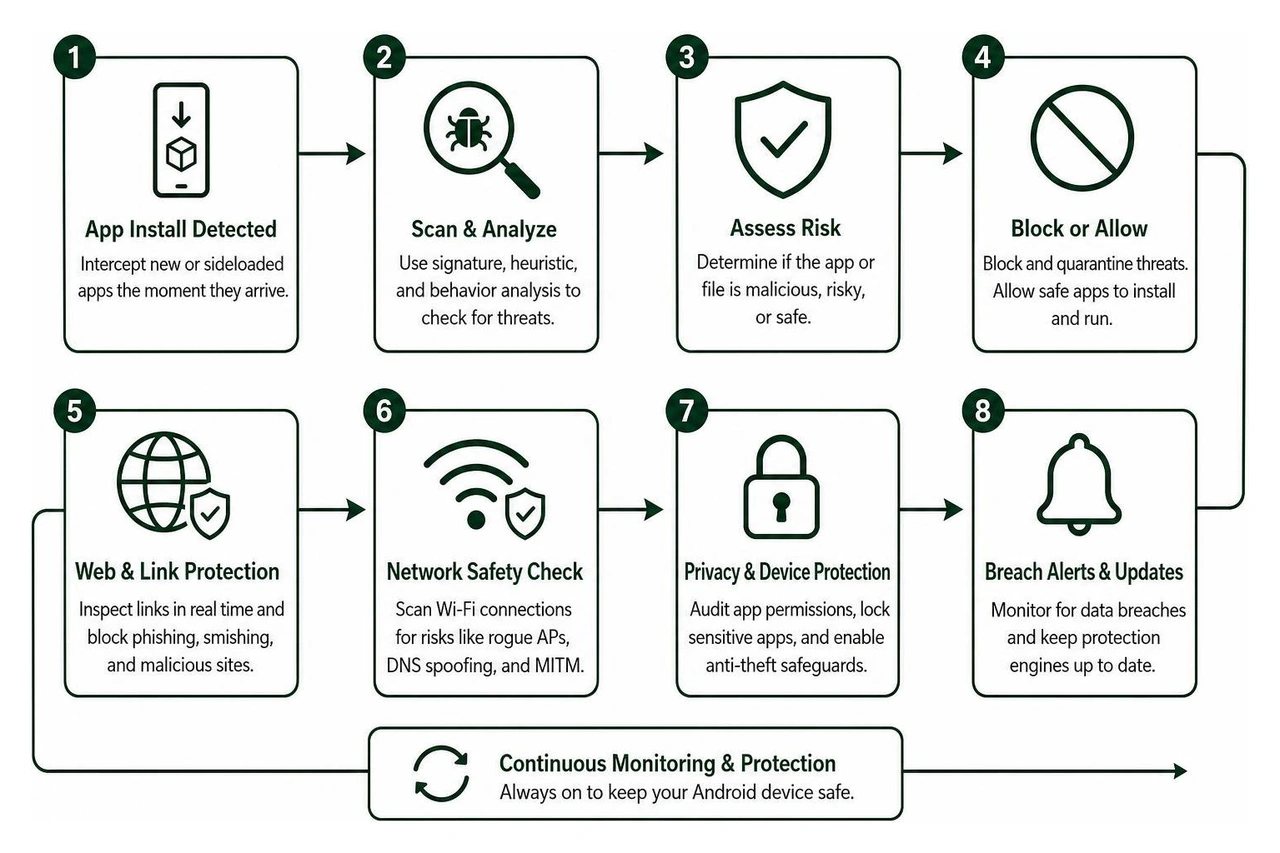
On-Install and Pre-Execution Scanning: A competent security tool must intercept new applications the second they arrive on your storage. Modern Android security suites use Android foreground service permissions to detect package installation events immediately. This ensures that any sideloaded application or downloaded payload is scanned against active threat databases before you open it for the first time.
Heuristic and Behavioral Analysis: Static virus definitions alone are no longer sufficient. Heuristic detection models inspect application code patterns and execution behaviors to identify zero-day threats and polymorphic malware that have not yet been logged in global signature databases.
Phishing, Smishing, and Malicious URL Blocking: Most modern mobile breaches do not start with a compromised app package—they begin with a deceptive link sent over SMS, WhatsApp, or an email message. Modern mobile security engines leverage the Android Accessibility Service API to inspect browser links in real time, preventing you from navigating to credential-harvesting landing pages.
Device Access and Physical Loss Protections: Software security and physical security go hand in hand. If you share your phone with others or lose your device, features like biometric app lockers let you lock android phone with fingerprint authentication to restrict access to banking, gallery, and messaging applications. Complementing this, remote tracking tools allow you to locate or remote lock android phone hardware if it goes missing.
Network Inspection for Public Wi-Fi: When connecting to unverified wireless networks in airports, hotels, or cafes, a built-in network scanner checks for rogue access points, DNS spoofing, and man-in-the-middle vulnerabilities before you transmit sensitive logins.
Data Breach Credential Monitoring: Routine identity checks scan your primary email address against known public breach dumps, warning you instantly if your credentials have been compromised online.
Permission Auditing: An integrated privacy auditor categorizes your installed apps based on their requested access to high-risk permissions—such as background location, microphone, camera, contacts, and SMS storage—helping you revoke unnecessary privileges.
Ranking the Best Free Security App for Android Phone Options in 2026
Choosing the best mobile defense depends on balancing multi-layered threat prevention with system speed. In our best mobile security software guide 2026, we emphasize selecting security software that safeguards your personal data without causing memory bottlenecks or battery drain.
Below is an exhaustive breakdown of the top free Android security applications available in 2026, evaluated across threat detection effectiveness, feature depth, and device overhead.
Bitdefender Antivirus Free
Bitdefender Antivirus remains our top recommendation for users who want zero-friction, set-it-and-forget-it protection. Backed by an engine that has earned Bitdefender Mobile Security an 8-time winner title of AV-Test's 'Best Android Security Product' award, the free edition delivers industry-leading malware detection rates catching over 99% of targeted mobile threats.
Lightweight Cloud Detection: Instead of storing massive, battery-draining virus signature files locally on your phone's internal storage, Bitdefender processes scans through in-the-cloud scanning technology. This minimizes RAM overhead and eliminates noticeable battery impact.
Autopilot Zero-Configuration: The app requires zero manual setup. Once installed, it runs quietly in the background using foreground service hooks to catch package installation events and automatically scan newly installed or updated APK files.
On-Demand Storage Scans: Users can initiate deep on-demand manual scans across local and expandable storage anytime with a single tap to verify file integrity.
Ad-Free User Experience: Unlike many freemium competitors that bombard users with pop-ups, Bitdefender Antivirus Free maintains a clean, distraction-free interface without third-party advertising networks.
Trade-Offs: The free tier focuses strictly on core malware and virus scanning. Advanced proactive modules—such as real-time web phishing shields, SMS scam alerts, biometric app locking, and automated anti-theft remote wipe—are reserved for the paid Bitdefender Mobile Security tier.
Avast One and Avast Mobile Security
Trusted globally by over 435 million people, Avast provides two popular freemium mobile options: the modern Avast One: Antivirus, Security - Apps on Google Play all-in-one suite and the classic Avast Antivirus & Security app (boasting over 100 million installs and a 4.6-star rating across more than 7.28 million reviews).
Comprehensive Threat Defense: The engine pairs 24/7 background real-time file and app shields with Smart Scan functionality to isolate trojans, adware, and spyware before execution.
AI-Powered Web Guard: By utilizing the Android Accessibility Service API, Avast inspects URLs across active web browsers in real time to intercept credential phishing scams and fraudulent e-commerce portals.
Network Inspector & Speed Diagnostics: Includes built-in tools to scan connected public Wi-Fi networks for encryption weaknesses, coupled with integrated network speed testing utilities.
Encrypted Photo Vault: Provides a secured, PIN- or biometrically protected digital locker where users can hide sensitive photos away from standard gallery apps (limited to 10 photos in the free tier).
Storage Optimization: Features cache-cleaning utilities to clear residual junk files and recover system storage space.
Trade-Offs: The free tiers are ad-supported and feature frequent prompts to upgrade to premium subscriptions. Real-time web shields can occasionally cause minor browser latency or network timeouts with specific third-party media applications.
AVG AntiVirus & Security
With over 100 million downloads and a strong 4.6-star rating from 7.83 million reviews on the Google Play Store, AVG AntiVirus & Security - Apps on Google Play offers a feature-rich cybersecurity and device maintenance toolkit on a proven scanning engine.
Real-Time Malware Scanning: Scans apps, games, files, and incoming downloads for malicious processes, automatically quarantining suspicious binaries.
Hack Alerts: Monitors user-submitted email addresses against global database leaks, notifying you if your login credentials have been exposed in third-party service breaches.
Web Guard & Scam URL Filtering: Continuously monitors active web traffic to block known phishing sites and fraudulent links before sensitive data is entered.
Wi-Fi Security Scanner: Analyzes the security posture and encryption standards of public wireless networks before you transmit sensitive financial logins.
Device Maintenance Utilities: Bundles a storage cleaner to remove cached junk files alongside a Wi-Fi upload/download speed analyzer.
Trade-Offs: The free version displays video and banner ads post-scan and frequently promotes premium upgrades. Aggressive web protection can occasionally intercept traffic for niche apps, requiring occasional whitelisting in system settings.
Data Breach Monitoring: Allows users to run comprehensive checks across personal email accounts to uncover leaked passwords from compromised platforms.
Biometric and PIN AppLock: Enables users to lock individual applications—such as banking, gallery, and messaging tools—behind personal security codes or fingerprint authentication.
QR Code Security Scanner: Scans and verifies QR codes before opening destinations, protecting users from automated malicious URL redirections and malicious payloads.
Device Storage Cleanup: Includes duplicate photo and video removers to clear up local storage capacity.
Trade-Offs: While identity breach checking, QR scanning, and basic device utilities are accessible in the free tier, real-time background malware shielding and integrated VPN services require upgrading to an active trial or paid subscription.
Evaluating Ecosystem Safety and Free Antivirus Trade-Offs
Securing an Android device requires understanding the dynamic between native operating system defenses and third-party security apps. As we highlight in our work on mobile app security, mobile operating systems utilize robust sandboxing architectures. This sandboxing prevents standard applications from tampering with other apps' isolated data environments unless specific elevated permissions are granted.
Is Google Play Protect Enough or Do You Need the Best Free Security App for Android Phone?
Google Play Protect serves as the default baseline security engine for certified Android hardware. It automatically scans apps uploaded to the Google Play Store and performs regular checks on apps installed on your device.
For a user with low-risk digital habits—someone who strictly downloads top-rated apps from the official Play Store, uses modern hardware receiving regular security patches, and avoids suspicious links—Google Play Protect provides adequate basic protection.
However, Google Play Protect exhibits notable blind spots compared to a dedicated, top-tier third-party security app:
Weak Phishing and Web Scam Defense: Play Protect primarily evaluates app binaries. It offers limited protection against malicious browser redirects, scam SMS links (smishing), or fraudulent phishing portals encountered inside messaging apps.
Reactive vs. Proactive Protection: Independent testing labs show that Play Protect relies heavily on known malware signatures and app store reputation data. It frequently lags behind third-party engines when intercepting novel zero-day malware or dynamically obfuscated payloads.
Unprotected Network Activity: Play Protect does not monitor public Wi-Fi networks for man-in-the-middle exploits or DNS manipulation.
External Sideloading Risks: If you install APKs from third-party app stores, developer forums, or browser downloads, relying solely on native protection leaves your device vulnerable. In these situations, exploring the best free virus protection for android phone alternatives becomes essential to maintain pre-execution package inspection.
How to Choose the Best Free Security App for Android Phone for Your Daily Habits
Selecting the right tool comes down to matching software capabilities with how you use your phone every day:
The Minimalist (Prioritizes Speed & Battery): If your primary goal is clean, background malware protection without ads, notifications, or performance slowdowns, select Bitdefender Antivirus Free. Its cloud signature offloading preserves hardware responsiveness.
The Public Traveler (Prioritizes Network Safety): If you frequently connect to public Wi-Fi at airports, train stations, and coffee shops, choose Avast One or AVG AntiVirus. Their integrated Wi-Fi inspectors and Web Guard modules help prevent network eavesdropping and malicious redirects.
The Multi-App Power User (Prioritizes Physical & App Privacy): If your phone is frequently shared with friends, family, or colleagues, tools with robust biometric app lockers like TotalAV or AVG allow you to restrict access to sensitive applications.
Understanding how to secure mobile apps involves treating third-party antivirus software as just one layer of your overall digital hygiene.
Frequently Asked Questions About Android Security Apps
Will running a free security app slow down my Android phone or drain battery?
Well-architected security applications like Bitdefender Antivirus Free utilize in-the-cloud scanning technology, checking application hashes against remote servers rather than storing heavy virus signature databases on your local hardware. This design keeps RAM and battery consumption negligible.
Broader suites that run continuous background features—such as real-time Wi-Fi monitors, accessibility-based web shields, and junk cleaners—can consume slightly more system resources. To optimize battery longevity, you can adjust your device's background battery optimization settings and schedule full storage scans for times when the phone is connected to a charger.
Are free Android antivirus apps safe or do they collect personal data?
Reputable security vendors provide transparent Data Safety disclosures on the Google Play Store, detailing that telemetry data, app activity, and device identifiers are encrypted in transit. However, some lower-tier or rogue "cleaner" and "booster" apps harvest personal information, track user behavior, and flood notification bars with aggressive ads.
Always stick to established, certified cybersecurity vendors, review required permissions carefully, and avoid installing unverified utilities that request unnecessary access to your camera, contacts, or location.
Can a free security app protect against mobile ransomware and phishing?
Yes, provided the app incorporates real-time URL inspection and heuristic monitoring. Free tools that integrate with the Android Accessibility Service API can inspect URLs across supported web browsers, blocking known phishing sites, malicious redirects, and credential harvesting forms before they load.
Furthermore, engines with on-install scanning can intercept ransomware payloads hidden inside APK files immediately upon download, quarantining malicious binaries before they execute and attempt to encrypt your local files.
Build Resilient Mobile Experiences with Synergy Labs
Maintaining robust mobile security requires a multi-layered approach: keeping your operating system updated, practicing smart permission hygiene, using biometric authentication, and running dependable endpoint protection software.
At Synergy Labs, we understand that security must be foundational, not an afterthought. As a premier mobile app and web development agency, we specialize in building enterprise-grade, secure, and highly scalable cross-platform applications for startups and leading enterprises worldwide.
When you partner with us, you get direct access to top-tier technical leadership through our unique engagement model:
In-Shore CTO with Dedicated Offshore Dev Teams: Enjoy seamless communication, strategic guidance, and technical oversight from an experienced in-shore CTO, backed by the execution speed and cost-efficiency of elite global developers.
Predictable Fixed-Budget Model: Eliminate financial surprises with clearly scoped deliverables tailored to your product roadmap.
Milestone-Based Payments: Maintain complete control over your capital with payments tied strictly to verified progress and product milestones.
Whether you are looking to architect a secure enterprise mobile application from scratch or fortify your existing digital products against emerging cybersecurity threats, our senior engineering team is ready to help.


.avif)

.avif)


