Cross-platform development can cut your build costs by 30–40% — but the right tool depends on your performance needs, team skills, and how far shared code can actually take you.
Why Mobile App Development Software Cross Platform Matters in 2026
Mobile app development software cross platform lets teams build iOS and Android apps from a shared codebase instead of creating and maintaining two separate apps.
For a startup with a tight budget and a fast launch date, that can be a major advantage. Cross-platform development can reduce the cost of building for both mobile platforms by up to 30-40%, while making it easier to release features at the same time.
Best for: Startups, MVPs, customer apps, internal tools, and products that need iOS and Android reach quickly
Leading options: Flutter, React Native with Expo, Kotlin Multiplatform, Ionic, .NET MAUI, Uno Platform, and NativeScript
Main benefit: Shared code, faster releases, and lower maintenance effort
Main trade-off: Some apps still need native Swift or Kotlin code for demanding graphics, strict security controls, or heavy on-device AI
What to compare: Your team's skills, UI needs, native integrations, performance targets, security requirements, and long-term support
The old view that cross-platform apps are automatically slower or less polished is outdated. Modern tools such as Flutter's Impeller renderer and React Native's New Architecture have narrowed the gap substantially. The right tool is not always the most popular one, though. It is the one that fits the product you need to ship, support, and scale.
I’m the Director of Product at Synergy Labs, and this guide will help you compare the practical strengths and limits of today’s leading cross-platform tools.
Explore more about mobile app development software cross platform:
What is Mobile App Development Software Cross Platform Architecture?
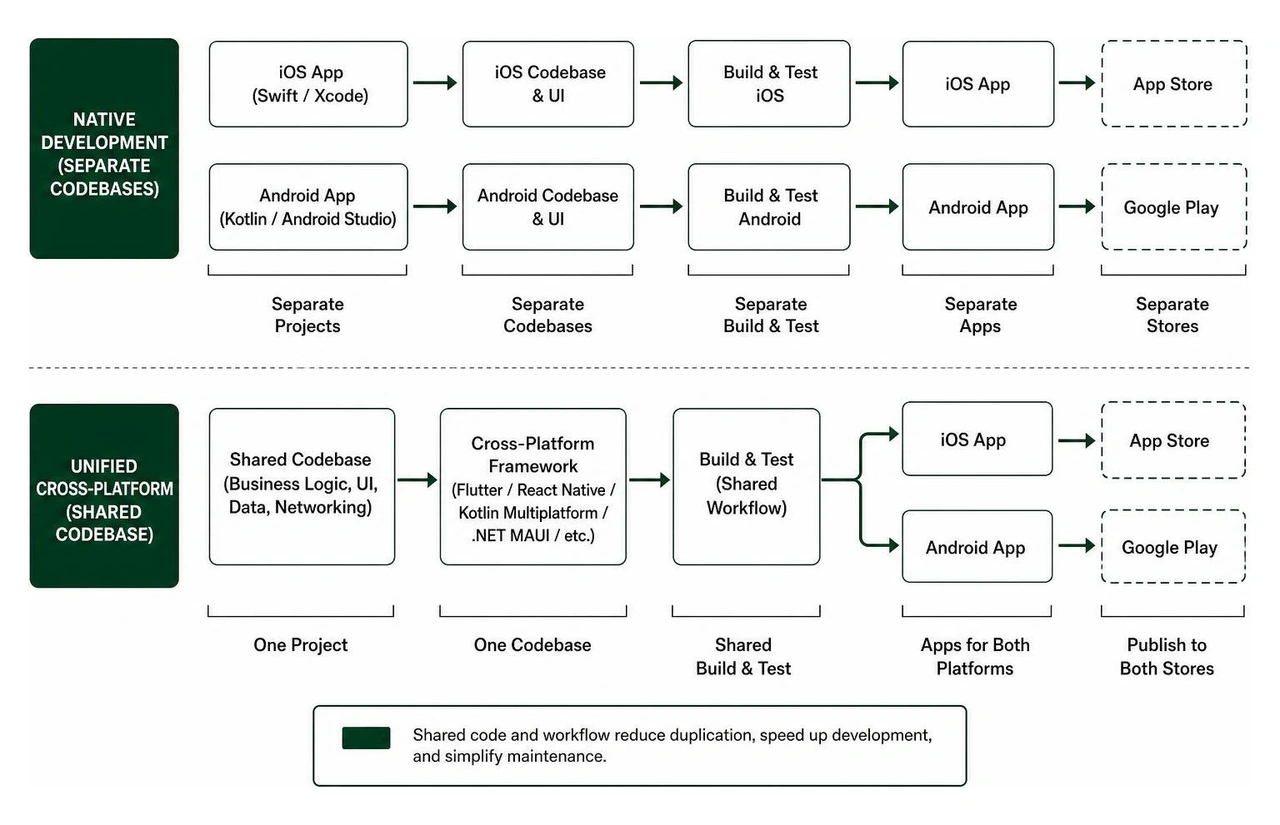
A cross-platform mobile app development framework provides software development kits (SDKs), libraries, and runtime engines designed to compile or render mobile software across multiple operating systems—primarily iOS and Android—from a unified codebase.
Traditionally, software engineering teams had to maintain two completely separate projects: one written in Swift or Objective-C targeting Apple iOS using Xcode, and another written in Kotlin or Java targeting Google Android using Android Studio. This legacy approach meant doubling engineering headcount, duplicating business logic, managing disparate bug trackers, and dealing with fragmented release schedules.
By adopting modern mobile app development software cross platform suites, companies unify their business logic, database management, network handling, and user interface designs into a single repository. Shared code coverage typically reaches 70% to 95%, which cuts initial engineering costs by up to 30-40% and drastically reduces long-term operational overhead.
Key structural differences between native and cross-platform architecture include:
Business Logic Sharing: Pure native apps isolate logic per OS, whereas cross-platform architectures allow teams to write core business algorithms, data validation, and API networking once.
Rendering Pipeline: Native apps rely on OS-specific platform widgets. Cross-platform framework engines either bridge to native UI controls (React Native, NativeScript), draw custom pixels directly to a GPU canvas (Flutter), or display components via standard WebViews and Web Components (Ionic).
Hardware Access: While native apps access hardware sensors directly via platform APIs, cross-platform software uses native bridges, language bindings, or specialized plugin interfaces to communicate with device cameras, Bluetooth, GPS, and biometric authentication chips.
Comparing Top Cross-Platform Mobile Frameworks in 2026
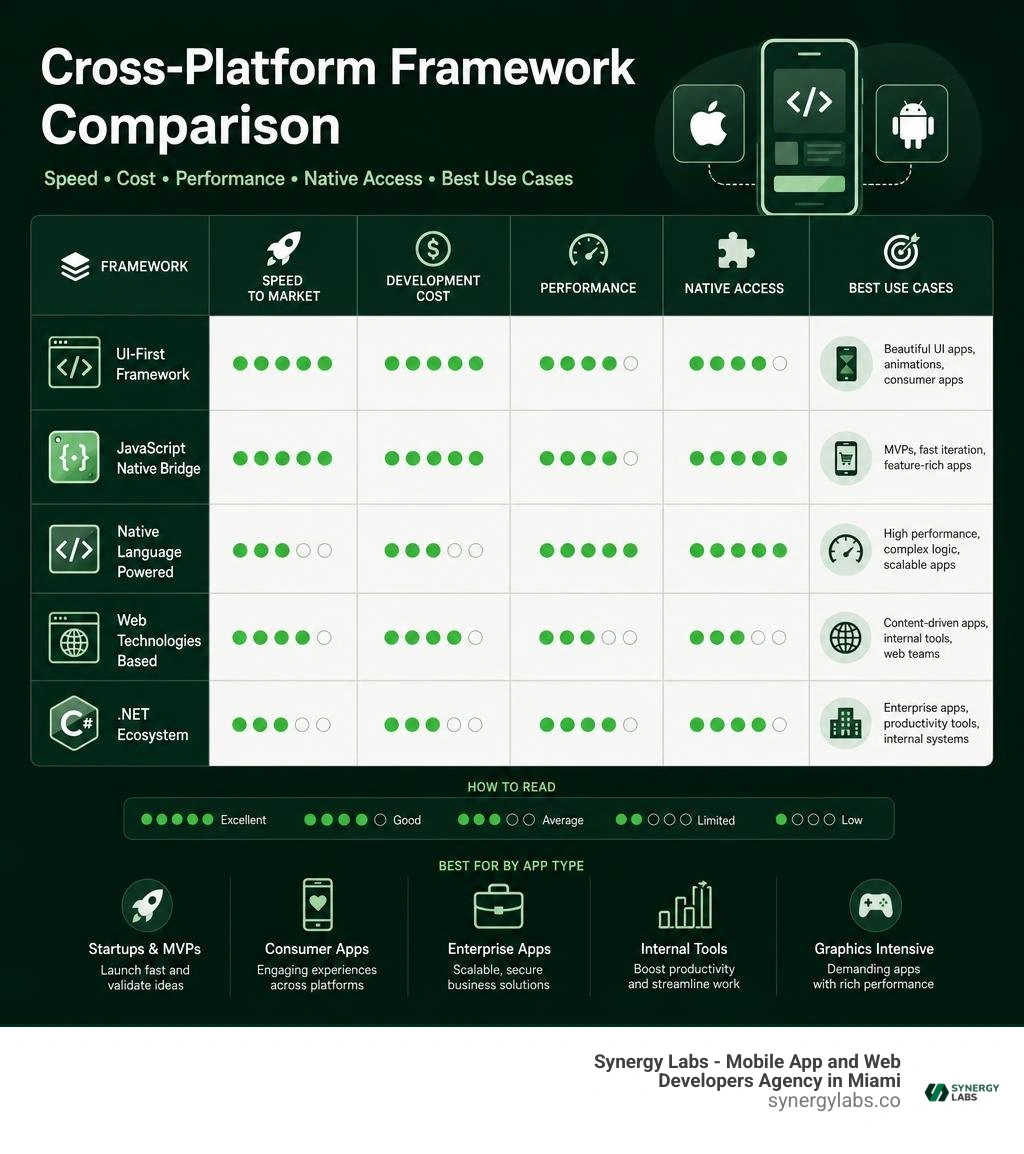
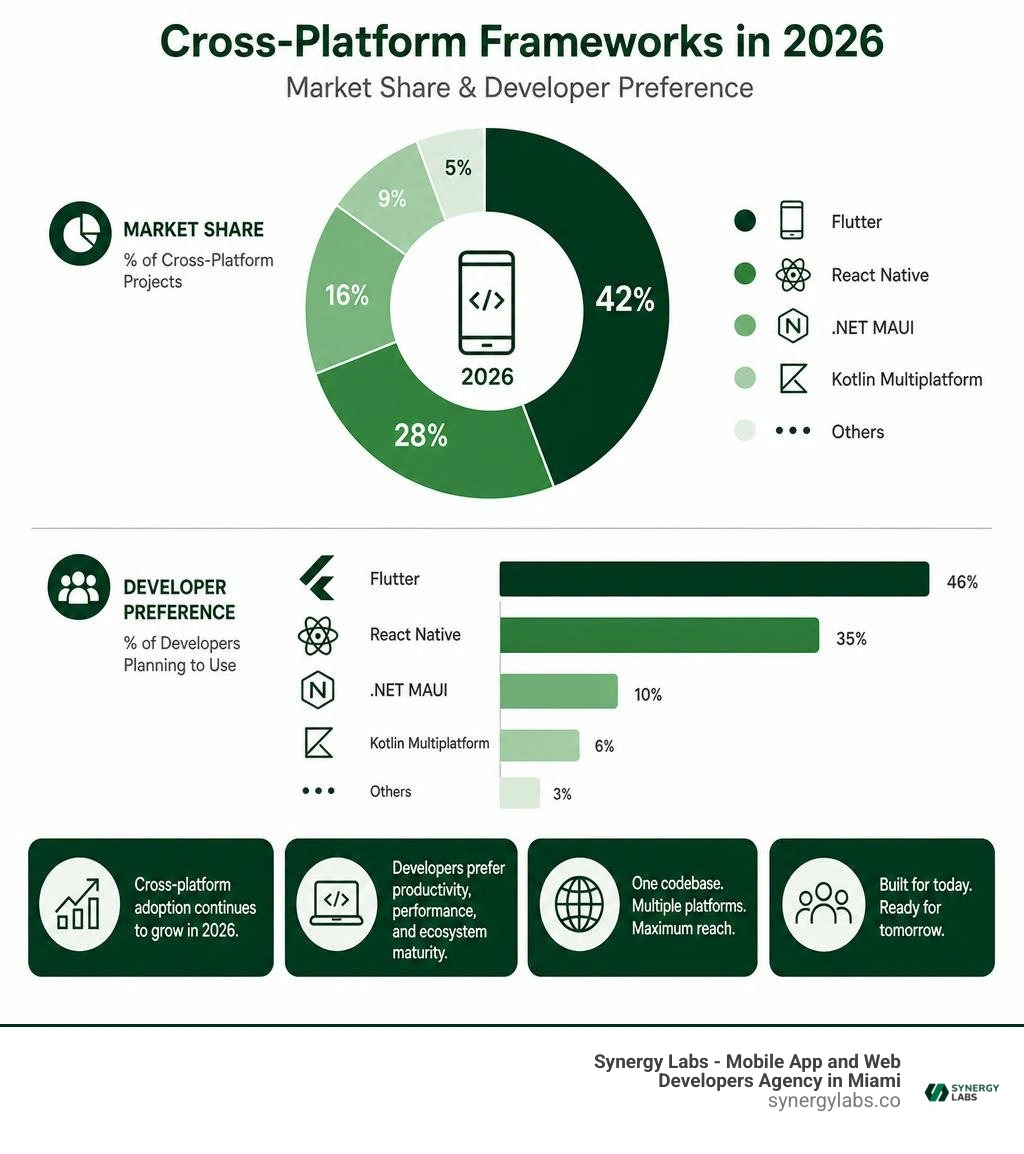
Choosing the ideal mobile app development software cross platform solution requires evaluating market adoption, architectural trade-offs, programming language alignment, and ecosystem maturity. The cross-platform ecosystem in 2026 offers distinct framework options tailored to different development paradigms and business goals.
Evaluating Flutter and React Native as Mobile App Development Software Cross Platform Leaders
Flutter and React Native remain the dominant forces in cross-platform mobile development, together controlling the majority of modern commercial implementations.
Flutter (Powered by Google)
Flutter holds approximately 46% of the cross-platform market and leads developer popularity with over 170,000 GitHub stars. Powered by the Dart programming language, Flutter compiles directly to native ARM or Intel machine code as well as WebAssembly and JavaScript.
Instead of relying on native operating system widgets, Flutter renders every pixel itself using its Impeller hardware-accelerated rendering engine. This guarantees complete visual consistency across iOS, Android, web, desktop, and embedded displays.
Key Flutter features and highlights:
High Performance: Eliminates bridge overhead by compiling ahead-of-time (AOT) to machine code, enabling smooth 60Hz to 120Hz animations.
Stateful Hot Reload: Allows engineers to modify code and view UI updates instantly in emulator windows without losing application state.
Rich Package Ecosystem: Supported by thousands of community plugins on pub.dev, covering camera access, geolocation, secure storage, and payment gateways.
Real-World Enterprise Adoption: Trusted by global platforms including Google Pay, eBay, BMW, and major financial engines.
React Native, introduced by Meta, leverages JavaScript and TypeScript to let web developers transition into mobile app creation effortlessly. Used in production by major applications including Microsoft Office, Skype, Xbox Game Pass, Facebook, and Instagram, React Native remains an industry staple.
React Native operates by invoking actual native iOS (UIKit) and Android (View) components under the hood, ensuring that user interfaces look and feel completely native to the underlying operating system.
React Native technical enhancements in 2026:
New Architecture (Fabric & TurboModules): Replaces the legacy asynchronous JavaScript bridge with direct C++ JSI (JavaScript Interface) bindings, delivering synchronous, low-latency communication between JavaScript and native platform threads.
Hermes Engine: Pre-compiles JavaScript into optimized bytecode during build time, lowering memory footprints and drastically reducing application startup times.
Broad Web Ecosystem Alignment: Enables seamless reuse of popular JavaScript state management libraries, utility frameworks, and testing tools.
Kotlin Multiplatform and Modern NativeScript Solutions
For engineering teams seeking native UI fidelity combined with cross-platform code efficiency, Kotlin Multiplatform and NativeScript offer powerful alternatives.
Kotlin Multiplatform (KMP)
Promoted to Stable by JetBrains in late 2023 and officially supported by Google at Google I/O 2024 for sharing business logic between Android and iOS, Kotlin Multiplatform (KMP) takes a unique approach. Unlike frameworks that mandate a shared rendering layer, KMP allows developers to share as much or as little code as they wish—focusing primarily on shared data models, networking, business rules, and offline databases.
Highlights of Kotlin Multiplatform:
Native UI Retention: Developers can write shared business logic in Kotlin while retaining pure Swift/SwiftUI for iOS user interfaces and Jetpack Compose for Android UI.
Compose Multiplatform: Expands KMP capabilities by offering shared UI rendering across Android, iOS, desktop, and web for teams desiring complete UI unification.
Zero Runtime Bridge Penalty: Compiles shared Kotlin directly into native iOS framework binaries (Objective-C/Swift compatible) and native Android DEX files.
NativeScript
NativeScript enables developers to build 100% native cross-platform applications using TypeScript, JavaScript, or web frameworks like Angular and Vue.js. Unlike bridge-based solutions, NativeScript provides direct, real-time access to 100% of native iOS and Android APIs without requiring wrapper plugins or custom native bridges.
Web-focused and enterprise C# organizations also have specialized mobile app development software cross platform suites tailored to their existing tech stacks.
Ionic Framework: Standard technologies include TypeScript, HTML5, CSS, and Web Components with a WebView / Native Capacitor Containers primary render approach. Best suited for web developers, PWAs, and enterprise line-of-business apps.
.NET MAUI: Standard technologies include C#, XAML, and .NET 8/9 with Native OS Controls mapped from C#. Best suited for enterprise C# teams and Windows desktop expansion.
Uno Platform: Standard technologies include C#, XAML, and WinUI / Markup with Native UI controls & WebAssembly canvas. Best suited for cross-platform desktop, web, and mobile C# unified tools.
Ionic Framework
Ionic is an open-source mobile UI toolkit based on standard Web Components. With 52,000+ GitHub stars, Ionic allows developers to create cross-platform mobile apps and Progressive Web Apps (PWAs) using web standards alongside framework wrappers like Angular, React, and Vue. Mobile hardware access is delivered through Capacitor plugins. Learn more by visiting ionic-team/ionic-framework and reviewing our detailed guide on HTML5 Cross-Platform.
.NET MAUI & Uno Platform
Microsoft's .NET MAUI (Multi-platform App UI) represents the evolution of legacy Xamarin. It enables C# developers to target iOS, Android, macOS, and Windows from a single project structure. If you are migrating legacy C# apps, reference our Xamarin App Development Guide 2026. Meanwhile, Uno Platform extends WinUI and .NET codebases to WebAssembly, Linux, iOS, and Android, offering visual "Hot Design" capabilities and AI tooling.
Deep-Dive on Expo and Cloud-Based EAS Workflows
When evaluating React Native today, it is essential to look closely at Expo. Recommended directly by Meta’s core team, Expo has evolved into the standard production framework for React Native development.
Over 80% of React Native developers build with Expo, generating more than 4 million npm downloads weekly and holding over 48,000 GitHub stars.
Expo eliminates legacy development friction through several core innovations:
Continuous Native Generation (CNG): In modern Expo SDK versions, developers no longer commit fragile android/ or ios/ native folders to version control. Running npx expo prebuild generates pure, native project structures on demand based on declarative configuration files (app.json) and config plugins.
Expo Modules API: Writing custom, highly performant native plugins using modern Swift and Kotlin is straightforward, eliminating legacy Objective-C/Java bridging code.
Expo Router: Brings file-based routing and automatic deep linking to cross-platform mobile apps, matching modern web routing paradigms while rendering native platform navigation stacks.
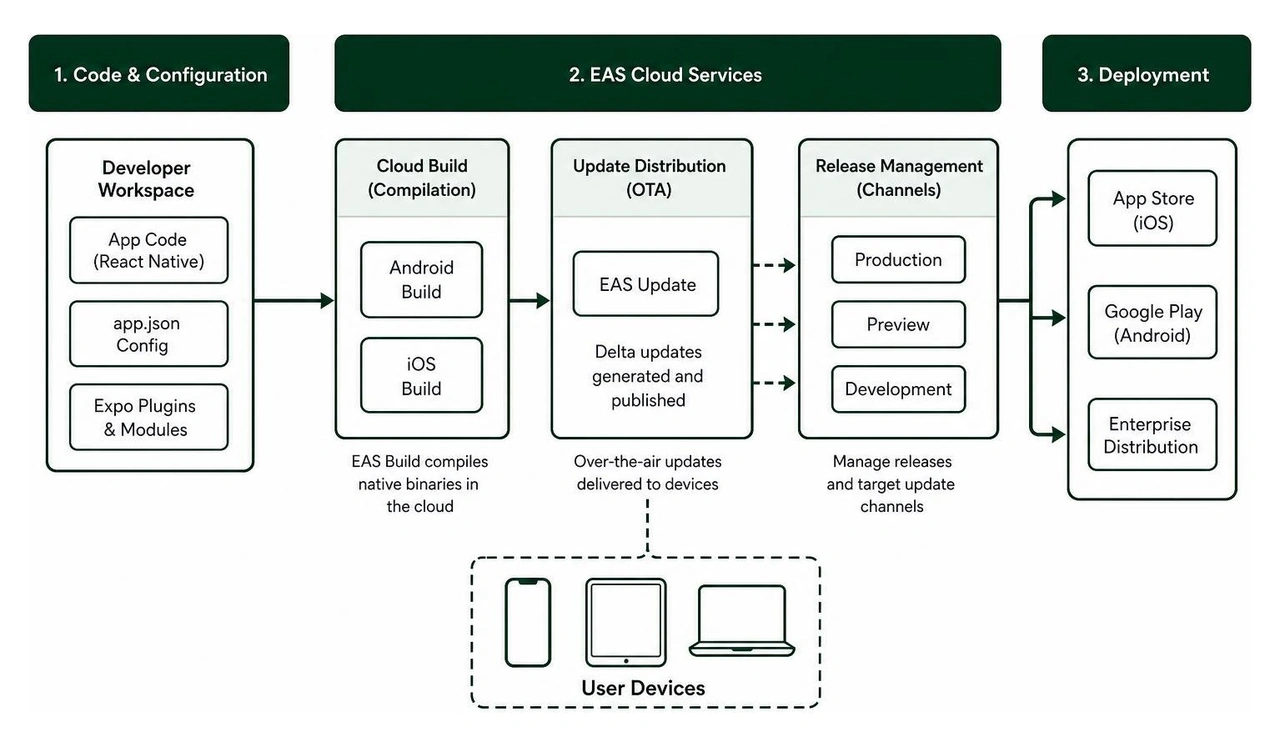
Expo Application Services (EAS) further enhances app maintenance:
EAS Build: Compiles native iOS binaries (.ipa) and Android bundles (.aab) in dedicated cloud environments. Developers on Windows or Linux workstations can build production-ready iOS apps without requiring local macOS hardware or Xcode setups.
EAS Update: Enables over-the-air (OTA) JavaScript and asset updates. Critical hotfixes can be pushed directly to users' devices in under 90 seconds, bypassing lengthy app store review queues for non-native bug fixes.
EAS Submit: Automates deployment directly to Apple App Store Connect and Google Play Console from automated CI/CD pipelines.
A common myth is that Expo is only suitable for simple prototypes or hackathons. In reality, modern Expo apps compile to the exact same native platform code as pure Swift or Kotlin builds. Out of the box, Expo supports over 100 production-ready modules, including secure hardware storage, biometrics, camera controls, push notifications, in-app purchases, and background location tracking. Explore official tools at https://expo.dev/.
Strategic Evaluation and Trade-Offs for App Developers
Selecting the optimal mobile app development software cross platform tool requires analyzing project constraints, business goals, and security profiles.
Key Selection Criteria for Mobile App Development Software Cross Platform Software
To select the right tool, engineering leads and business stakeholders should weigh seven critical factors:
Team Expertise: Match the framework language to your current team's skillset. Web development teams using JavaScript/TypeScript excel with React Native and Expo. C# engineers thrive in .NET MAUI or Uno, while teams familiar with Kotlin adapt quickly to Kotlin Multiplatform or Flutter (Dart).
Vendor Reliability & Long-Term Support: Assess who backs the framework. Frameworks backed by industry leaders like Google (Flutter, KMP), Meta (React Native), and Microsoft (.NET MAUI) ensure active maintenance and regular updates.
UI Customization Requirements: If your product requires exact pixel-identical custom branding across all devices, Flutter’s custom GPU rendering engine is ideal. If your users expect strict native OS platform styling, React Native or KMP are strong fits.
Security & OWASP Compliance: Evaluate support for secure storage, SSL pinning, and root detection. Enterprise banking and healthcare mobile applications must ensure full OWASP Mobile Top 10 compliance.
Framework Maturity & Native Access: Confirm that active plugins exist for specialized native hardware requirements (e.g., custom Bluetooth LE peripherals, NFC chip readers, external thermal sensors).
Educational Materials & Ecosystem Support: Robust documentation, community forums, and comprehensive package registries reduce developer onboarding times.
Total Cost of Ownership: Factor in dev setup, cloud build systems, third-party library licenses, and long-term maintenance costs.
On-Device AI, ML Integration, and Native Performance Thresholds
As mobile apps increasingly integrate artificial intelligence, choosing between cloud AI and local machine learning models impacts framework selection.
When integrating cloud-based AI APIs (such as OpenAI, Anthropic, or cloud vector databases), cross-platform software handles network requests, stream parsing, and interface rendering with ease.
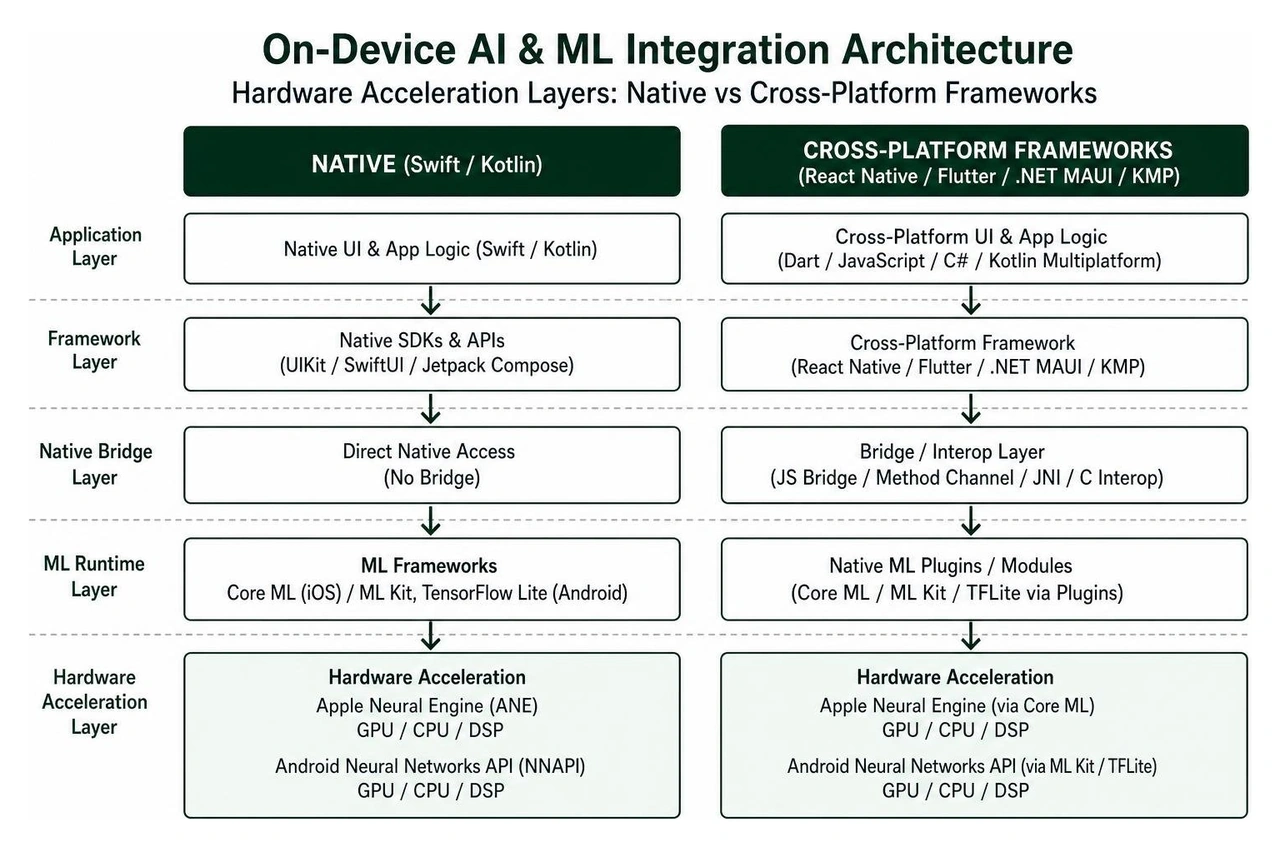
However, when applications execute latency-sensitive on-device machine learning—such as real-time camera object tracking, local Large Language Model (LLM) execution, or complex AR/VR spatial processing—direct hardware access becomes essential:
Native On-Device ML: Swift and Kotlin interact directly with Apple Neural Engine (via CoreML) and Android Neural Networks API (via ML Kit / TensorFlow Lite) without abstraction layers, minimizing latency and battery strain.
Cross-Platform On-Device ML: Modern frameworks access hardware acceleration via C++ bindings or specialized native modules. React Native JSI and Flutter FFI allow developers to execute C++ tensor operations directly on device GPUs and NPUs.
For apps requiring intensive real-time GPU compute, heavy audio/video stream processing, or deep system-level hardware integrations, pure native development remains a strong option. Read our comprehensive analysis on Hybrid App or Native App: Which One is Right for Your Business for more details.
The Future of Cross-Platform Development
The cross-platform ecosystem continues to mature, driven by advancements in rendering pipelines, native interop architectures, and developer tooling:
Impeller Rendering Architecture: Flutter's default rendering engine on iOS and Android eliminates runtime shader compilation stutter, delivering consistent 60Hz to 120Hz frame rates for demanding UIs.
React Native New Architecture Adoption: Complete migration to Fabric renderers and TurboModules provides synchronous native calls, direct C++ integration, and simplified multi-threading.
Official Android & iOS KMP Alignment: Google’s ongoing commitment to Kotlin Multiplatform for shared Android/iOS business logic makes KMP a go-to choice for modular mobile architectures.
AI-Assisted Development Workflows: Frameworks are embedding LLM documentation standards (e.g., Expo's llms.txt integration) and visual design suites (e.g., Uno Platform's visual canvas) to speed up code generation.
Frequently Asked Questions About Cross-Platform Tools
Can cross-platform frameworks achieve true native performance parity?
Yes, modern cross-platform frameworks have largely closed the performance gap for standard commercial applications. Flutter compiles directly to native ARM machine code, while React Native's New Architecture uses C++ JSI bindings to communicate synchronously with native OS components without bridge latency. Unless an app requires extreme GPU rendering, complex 3D gaming, or low-level driver manipulation, cross-platform performance is virtually indistinguishable from pure native code.
Is Expo only suitable for building simple app prototypes?
No, that is a common misconception stemming from legacy Expo releases. Modern Expo is production-grade software used by major enterprises worldwide. With Continuous Native Generation (npx expo prebuild) and the Expo Modules API, developers can add arbitrary custom Swift and Kotlin code without restriction. Combined with cloud builds and instant over-the-air (OTA) updates via EAS, Expo provides a complete end-to-end framework for production apps.
When should a team choose native development over a cross-platform tool?
Native development (Swift/UIKit/SwiftUI for iOS and Kotlin/Jetpack Compose for Android) remains the preferred option when building apps that rely heavily on specialized system capabilities. This includes mobile games requiring high-end 3D graphics engines, apps with heavy on-device ML/AI models, low-latency audio processing tools, complex Bluetooth driver interfaces, or applications requiring strict OS-level hardware security integrations (such as high-security banking software).
Choosing the Right Cross-Platform Partner for Your 2026 App Launch
Modern mobile app development software cross platform tools give businesses an efficient path to launch scalable, high-performing mobile applications across iOS and Android. By reusing business logic, unifying design systems, and leveraging automated cloud workflows, companies can cut development costs by up to 30-40% while delivering simultaneous, high-quality releases.
Whether you choose Flutter, React Native with Expo, Kotlin Multiplatform, or .NET MAUI, aligning your project requirements with the right framework architecture is key to long-term success.
At Synergy Labs, we help startups, mid-market businesses, and global enterprises build, ship, and scale production-ready mobile applications. We pair you with an in-shore CTO with an offshore dev team to combine top-tier strategic leadership with cost-effective engineering execution. To provide full financial clarity, we operate on a fixed-budget model backed by milestone-based payments that ensure projects are completed efficiently, on schedule, and without unexpected costs.



.avif)

.avif)


