Xamarin's cross-platform convenience comes with a security tradeoff — unzipping an APK exposes compiled .dll files that can be reverse-engineered into near-readable C# code in seconds.
Understanding Xamarin Architecture and Primary Threat Vectors
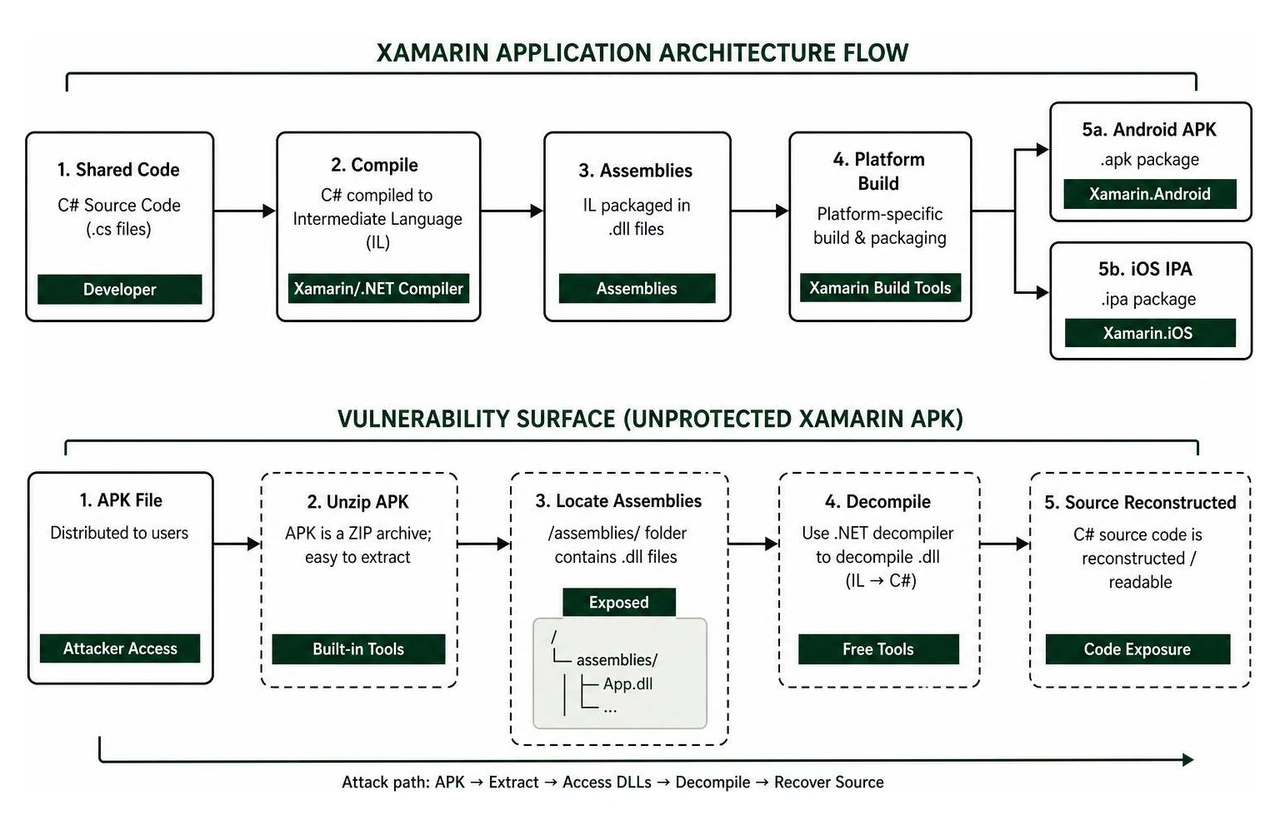
To build truly secure Xamarin app solutions, we must first understand how Xamarin compiles and package apps differently than purely native platforms. Whether you build using Xamarin.Android, Xamarin.iOS, or Xamarin.Forms, the framework allows developers to write shared C# code that targets multiple operating systems. However, this architectural convenience introduces specific security considerations.
When a standard native Android app is compiled, Java or Kotlin code is converted into Dalvik executable bytecode (.dex files). Native iOS apps compile Swift or Objective-C directly into machine code binaries. Xamarin takes a different approach. It compiles C# source code into Intermediate Language (IL) code, which is packaged inside standard Dynamic Link Libraries (.dll files).
Native vs Cross-Platform Xamarin Vulnerabilities
In an unprotected Xamarin Android APK file, these compiled .dll files reside directly inside the /assemblies/ directory of the application package. An attacker does not need high-level hacking tools to access them; unzipping the APK file reveals the assemblies folder. Using freely available .NET decompilers, a bad actor can reconstruct nearly readable C# source code from these raw IL assemblies in seconds.
This ease of reverse engineering reveals crucial intellectual property, backend API end-points, internal data structures, and any hardcoded credentials or encryption keys left inside the codebase.
While Xamarin.iOS uses Ahead-Of-Time (AOT) compilation to convert assemblies into native ARM binaries, decompilation risks still exist via native disassemblers, symbol exposure, and memory inspection. Furthermore, cross-platform apps rely heavily on interop bridges to communicate between C# managed code and native operating system APIs. If an attacker hooks into these bridge layers using dynamic execution frameworks, they can intercept sensitive parameters as they pass between the managed environment and the native OS.
Understanding these vulnerabilities allows us to design proactive defenses. For a broader perspective on mobile risk frameworks, read our guide on Mobile App Security.
Implementation of Secure Xamarin App Solutions
Protecting cross-platform applications requires a multi-layered defense strategy. Relying on a single line of defense—such as simple variable renaming—leaves an application exposed to automated disassembly engines and dynamic inspection tools.
Obfuscation and Hardening Techniques for Secure Xamarin App Solutions
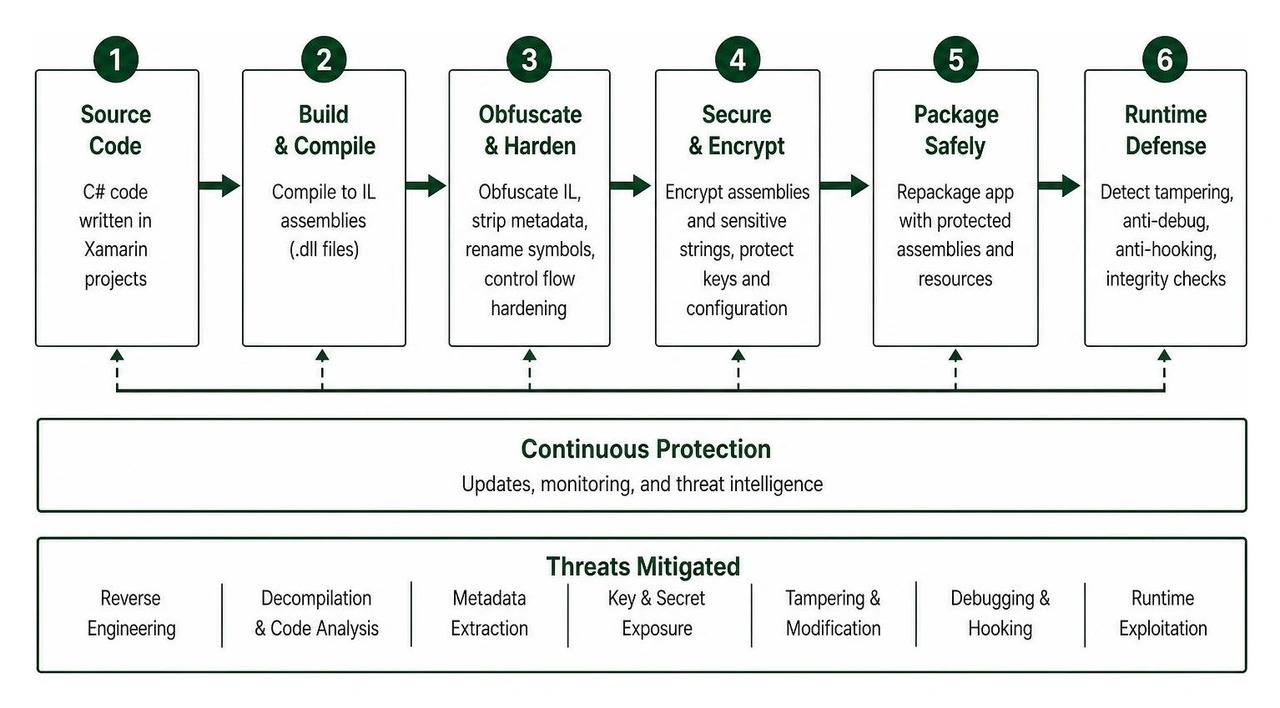
Code hardening forms the baseline of secure Xamarin app solutions. Because compiled .NET assemblies contain rich metadata that helps decompilers reconstruct source logic, we must transform this metadata into a chaotic maze before release packaging.
Effective assembly hardening combines several complementary operations:
Name Mangling: Renames classes, methods, properties, and parameters to non-printable, ambiguous, or unicode characters, breaking reverse-engineering tools while preserving execution pathways.
Control Flow Flattening: Rewrites straight-line logic into complex conditional loops and state machines. The software functions identically, but decompilers present reverse engineers with unreadable spaghetti code.
Constant & String Encryption: Encrypts strings, API keys, endpoints, and SQL queries stored in code binaries. Decryption occurs dynamically in memory only when required.
Metadata Scraping: Removes unnecessary symbols, debug headers, and source file paths from the final compiled assemblies.
Integrating build-time obfuscation via MSBuild tasks ensures that every Release build automatically applies these protections before final packaging, ensuring development workflows remain seamless.
Dynamic Protection and Monitoring
Static code hardening prevents passive code inspection, but runtime threats require active defenses. Dynamic instrumentation tools allow attackers to inject scripts into running application memory, bypass client-side checks, hook C# methods, and inspect variables live.
Runtime Application Self-Protection (RASP) equips a Xamarin application to monitor its own execution environment continuously:
Anti-Debugging: Detects if a managed or native debugger is attached to the app process. If identified, the app safely terminates execution or disables sensitive functions.
Hooking Detection: Scans memory space for hooked native function pointers or modified assembly instructions introduced by dynamic instrumentation frameworks.
Environment Integrity Checks: Verifies whether the app is executing on a compromised, rooted, or jailbroken device by checking for illegal binaries (such as su binaries or jailbreak substrates) and unexpected directory access rights.
App Tampering Verification: Computes dynamic cryptographic checksums of executable assemblies at runtime to ensure the application binary has not been modified or re-signed.
Discover detailed steps for building layered runtime controls in our practical post on How to Secure Mobile Apps.
Network Layer Hardening and Man-in-the-Middle Prevention
Securing code execution on the device matters little if data in transit is intercepted. Man-in-the-Middle (MITM) attacks occur when an attacker inserts themselves between the Xamarin app and backend server APIs—often using proxy tools and traffic interceptors combined with installed custom root certificates.
Out of the box, Xamarin delegates HTTP networking tasks to underlying OS system proxies. Without custom security constraints, an attacker who convinces a user to trust a malicious root certificate can inspect and alter all encrypted HTTPS traffic seamlessly.
To prevent traffic inspection:
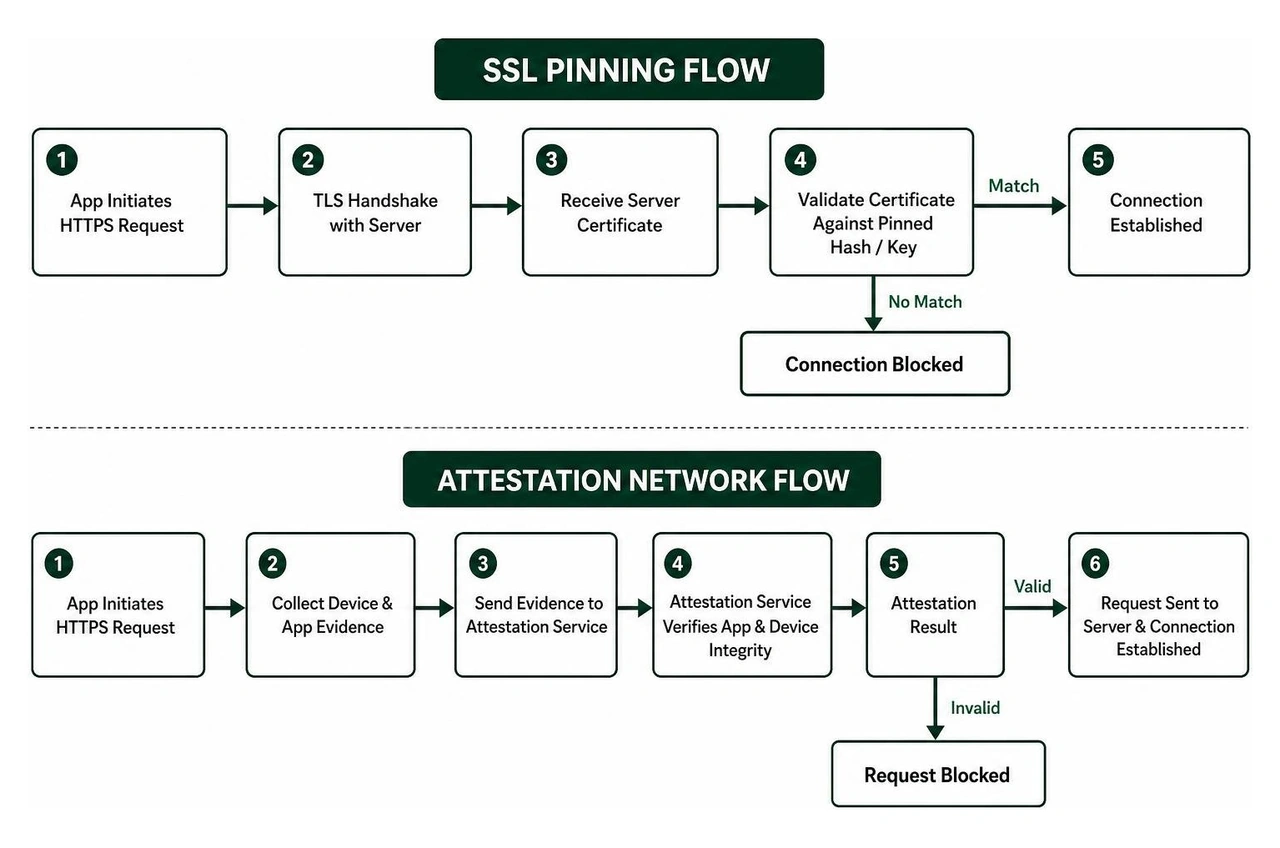
SSL / TLS Certificate Pinning: Hardcodes expected public key hashes or server certificate fingerprints directly inside the app. During TLS handshakes, the application compares the server's certificate against these pinned hashes, instantly dropping connections that use unexpected or proxy-injected certificates.
Certificate Transparency Checks: Validates that public certificates presented by endpoints appear in public, append-only certificate transparency logs, guarding against rogue certificate authorities.
Dynamic App Attestation: Uses cryptographic attestation services to verify that network requests originate strictly from an untampered, genuine instance of your app running on authentic physical hardware.
Advanced Mobile Protections for Enterprise and Location Data
Enterprise applications and location-critical software (such as field service tools, asset trackers, or financial platforms) face operational security challenges beyond standard consumer apps. Bad actors often attempt to deceive location services or extract sensitive corporate data.
Spoofing Detection and Emulator Blocking in Location-Based Apps
Location spoofing allows bad actors to manipulate device GPS coordinates using mock location software or desktop virtualizers, bypassing geo-fencing protections or committing fraud.
When building location-aware Xamarin applications, standard location APIs provide tools to detect fake location data on Android and iOS devices.
Beyond inspecting mock provider properties, location-critical apps should verify whether they are running inside an emulator or virtualized sandbox:
Hardware Attribute Scanning: Inspects platform properties such as device build board, product identifiers, and hardware models for string indicators like "goldfish", "sdk_gphone", or "vbox86".
Low-Level System Files Inspection: On Android, apps can inspect system files like /proc/cpuinfo directly via standard C# file streams to check CPU architecture flags unique to emulators vs physical ARM chipsets.
Enterprise MAM SDKs and Micro VPN Integration
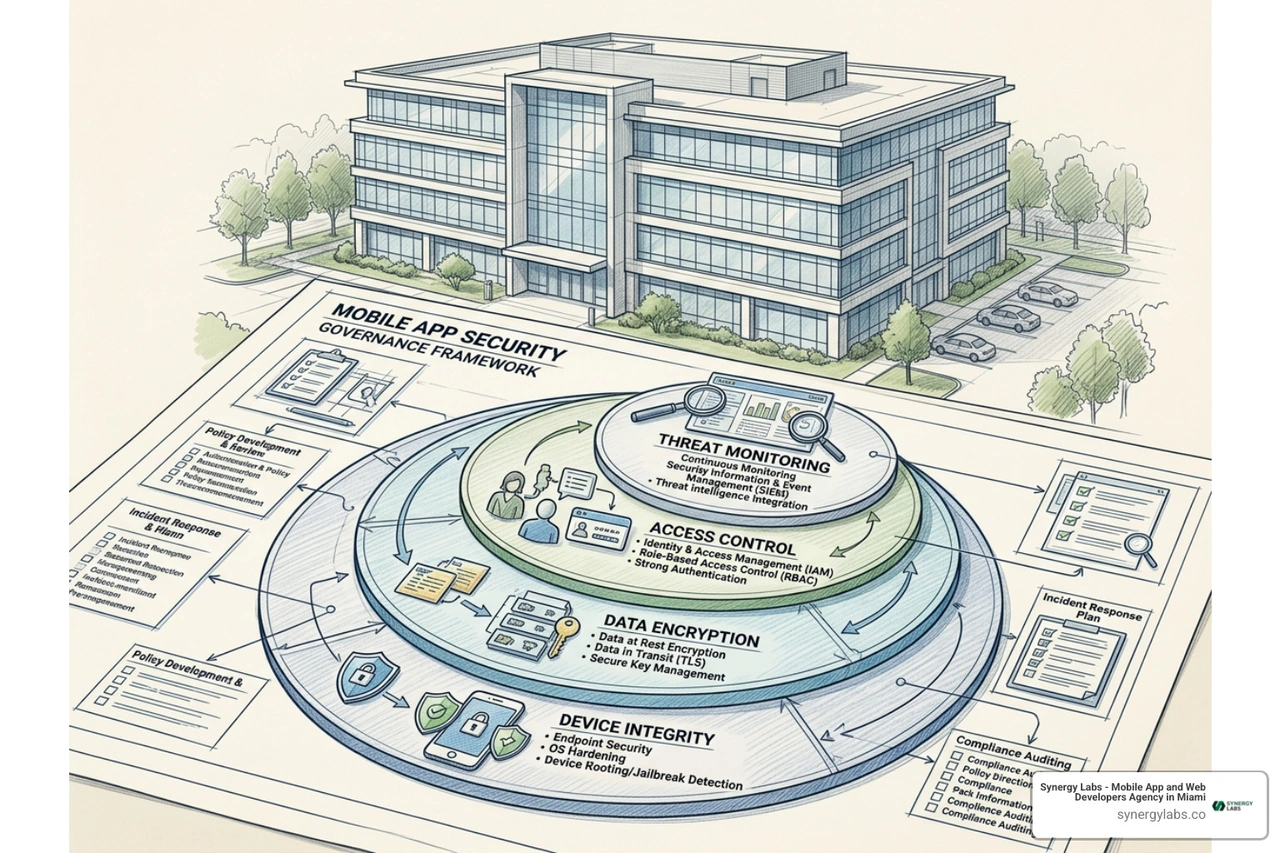
Enterprise deployments require protecting corporate data even when employees use unmanaged personal devices (Bring Your Own Device / BYOD). Mobile Application Management (MAM) controls enforce security at the app level without requiring complete Mobile Device Management (MDM) enrollment.
By integrating enterprise SDKs directly into your Xamarin projects, enterprises can enforce high-level governance:
Data Loss Prevention (DLP): Blocks screenshot capture, disables OS clipboard copy/paste functions, and prevents saving application attachments to personal local storage.
Dynamic Authentication: Requires biometric or corporate PIN validation every time the application comes to the foreground.
Integrating enterprise MAM SDKs or micro VPN solutions allows enterprise apps to communicate back to corporate intranet services through secure, dedicated per-app tunnels. This removes the overhead of device-wide VPN connections while preserving user privacy on personal devices.
App hardening and network security mean little if dynamic tokens, local databases, or operational files sit exposed on client storage. Likewise, modern apps depend heavily on external libraries, creating supply chain attack surfaces.
Secure Storage Best Practices and Migration Pathways
Never store auth tokens, private keys, or personal identifiable information (PII) in plain text, standard SharedPreferences (Android), or NSUserDefaults (iOS). Secure storage requires platform-backed cryptographic hardware protection.
Android: Uses the Android KeyStore provider to store master encryption keys securely, encrypting local application data via EncryptedSharedPreferences.
iOS: Secures sensitive key-value pairs inside the system Keychain using platform hardware enclave backed SecRecord entitlement groups.
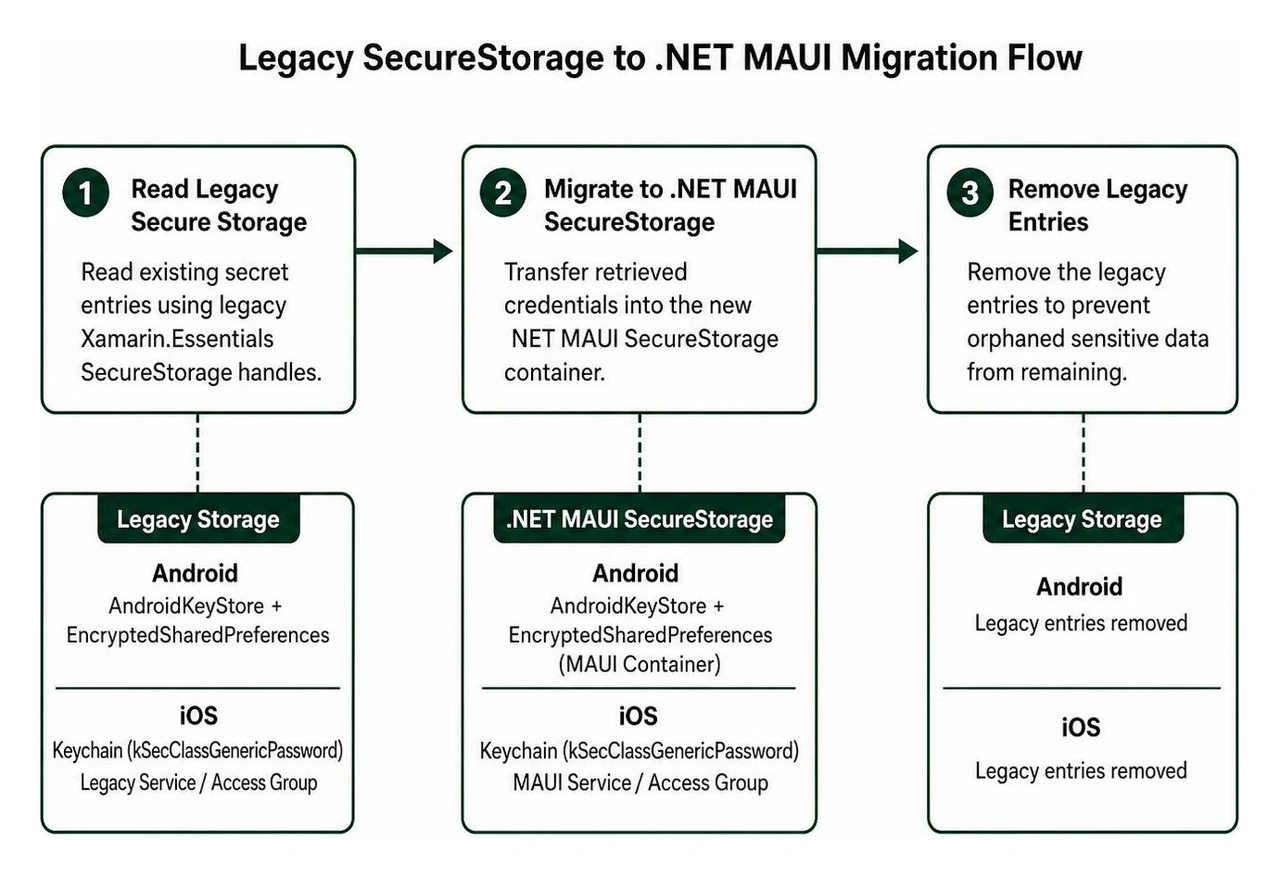
When migrating older applications from legacy Xamarin.Essentials.SecureStorage to .NET MAUI SecureStorage, developers must account for storage location changes across platform upgrades.
Because target preference file names and encryption service container handles differ between legacy Xamarin and modern .NET MAUI environments, applications undergoing migration must implement backward-compatible reader helpers. This ensures existing users remain authenticated without data loss:
Read existing secret entries using platform-specific legacy secure storage handles.
Transfer retrieved credentials into the new .NET MAUI SecureStorage container.
Remove the legacy entries to prevent orphaned sensitive data from remaining on client storage.
Supply Chain Protection and CI/CD Security Integration
Cross-platform projects rely extensively on third-party NuGet packages to accelerate development. However, outdated or compromised third-party dependencies represent a primary vector for supply chain attacks.
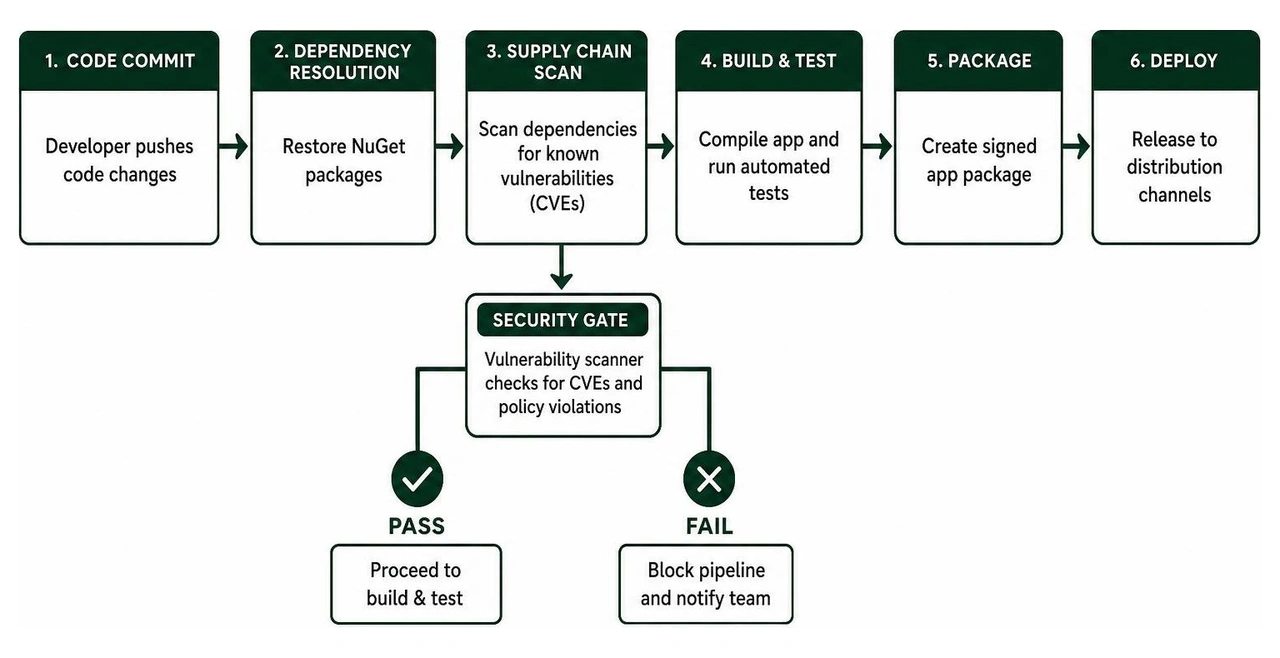
Establishing supply chain defenses requires embedding security automation directly into continuous integration and delivery (CI/CD) pipelines:
Automated Package Auditing: Integrates package vulnerability scanners into build scripts to flag assemblies containing known Common Vulnerabilities and Exposures (CVEs) prior to release compilation.
Offline Security Processing: Configures build tools and obfuscation software to process security operations locally or on dedicated build servers. This avoids transmitting raw application binaries to third-party cloud processing services.
Balancing Performance and Protection: Security controls should not degrade user experience. Intensive operations—such as heavy control flow obfuscation or dynamic memory validation—should target high-value operational logic rather than performance-critical UI rendering loops.
To maintain long-term app safety without breaking functionality, check our reference guide on App Security Patch Maintenance.
Security Solutions Architecture Comparison
Evaluating and choosing the right security architecture for your Xamarin projects depends on target platform environments, security requirements, and deployment complexity:
Basic Obfuscation (Name Mangling & String Encryption): Minimal performance impact; easy CI/CD integration; defends against casual decompilation; suitable for standard consumer applications.
Full Application Shielding (RASP, Anti-Tampering, Flow Obfuscation): Low performance impact when configured properly; moderate build-pipeline integration effort; defends against sophisticated reverse engineering, Frida hooking, and debuggers; essential for financial, healthcare, and IP-sensitive apps.
Enterprise MAM / Micro VPN Integration: Low runtime overhead; requires specialized enterprise infrastructure configuration; prevents clipboard data leaks and enables per-app enterprise tunneling; ideal for corporate BYOD environments.
Dynamic Attestation & Certificate Pinning: Minimal network latency overhead; requires ongoing API endpoint configuration; stops server fraud, bot traffic, and MITM inspection; essential for transactional API endpoints.
Frequently Asked Questions About Xamarin Security
How do attackers reverse engineer unprotected Xamarin applications?
Attackers extract the application package (.apk or .ipa file), locate the /assemblies/ directory, and extract the compiled C# Dynamic Link Libraries (.dll files). Because managed intermediate language (IL) code retains structural metadata, standard decompilers can reconstruct the original source code, API keys, and app business logic if left unencrypted.
How do developers detect fake GPS locations and emulators in Xamarin?
Developers can inspect the IsFromMockProvider property on Xamarin.Essentials.Geolocation coordinates to identify spoofed location updates. To detect emulators, developers inspect hardware build properties or read system files like /proc/cpuinfo on Android to identify virtual CPU signatures.
How can enterprise app features like screenshot blocking be implemented in Xamarin?
Enterprise controls like screenshot blocking and clipboard restrictions can be integrated using Microsoft Intune MAM SDKs or by applying platform-specific window flags in native platform projects (such as setting WindowManagerFlags.Secure in Android's main activity).
Partnering with Synergy Labs for Battle-Tested Mobile Security
Securing mobile applications requires balancing rigorous code hardening, real-time threat detection, and seamless user experiences. At Synergy Labs, we specialize in architecting, hardening, and modernizing enterprise cross-platform applications across Xamarin and .NET MAUI platforms.
Whether you are seeking to audit an existing Xamarin codebase, implement advanced dynamic protections, or migrate seamlessly to modern cross-platform frameworks, our senior engineering teams deliver tailored enterprise solutions built around your business goals.
Why Leading Brands Build with Synergy Labs
Fixed-Budget Model: Eliminate cost overruns with transparent, fixed-budget project scopes.
Senior Tech Leadership: Collaborate directly with an in-shore CTO with an offshore dev team to drive technical excellence, quality, and high-value delivery.
Milestone-Based Payments: Milestone-based payments ensure projects are completed efficiently without compromising code integrity or security.
Ready to protect your mobile assets with proven secure Xamarin app solutions? Explore our full range of enterprise development capabilities at Synergy Labs Services or contact our team today to schedule an expert technical consultation.




.avif)

.avif)


