Best Apps to Get Rid of Viruses: Fast Mobile Protection
The best apps to get rid of viruses on Android include Bitdefender Mobile Security, Avast Antivirus & Security, AVG AntiVirus & Security, and TotalAV Mobile Security. Install only from a trusted app store, run a full scan, remove or quarantine anything flagged, then turn on real-time and web protection.
For iPhones, traditional antivirus scanning is limited by iOS security rules. The smart move is to use trusted security tools for phishing warnings and unsafe Wi-Fi, remove suspicious profiles or apps, update iOS, and reset the device if problems continue.
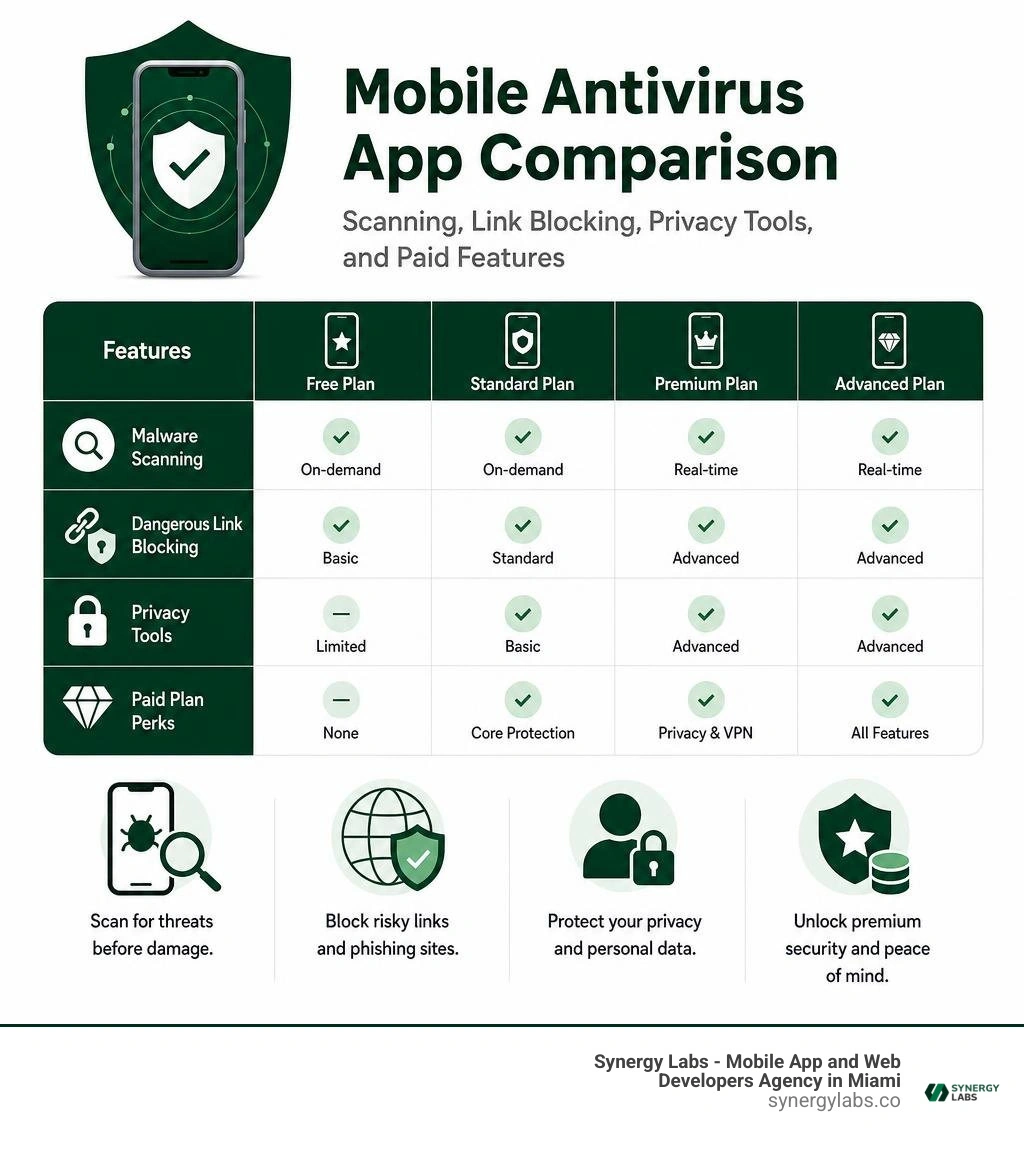
A good mobile security app does more than hunt for malware. It can check new apps, block dangerous links, flag risky permissions, and warn you before a scam becomes an expensive surprise. Free versions can handle basic scans, while paid plans often add real-time protection, VPN access, identity alerts, and stronger privacy controls.
I am the Director of Product at Synergy Labs, where we build secure mobile experiences and help teams make practical security choices without slowing down their products.
Easy best apps to get rid of viruses word list:
Common Signs Your Device Is Infected with Malware
Mobile threats have evolved far beyond the clumsy popups of the early internet. Today, malicious code is engineered to run stealthily in the background, harvesting user credentials, mining cryptocurrency, or silently funneling your private data across the web. While modern operating systems feature robust sandboxing, zero-day vulnerabilities and aggressive adware still slip through the cracks. Identifying an infection early is crucial before a minor performance hitch turns into severe identity theft.

When malicious software hijacks your system resources, your phone usually drops several subtle and not-so-subtle hints. Watch out for these red flags:
- Unexplained Battery Drain: If your smartphone drops from 100% to 20% by lunchtime without heavy screen time, rogue processes might be running non-stop in the background.
- Sudden Overheating: A phone resting on your desk should feel cool to the touch. If it feels like a freshly toasted bagel while idle, background malware is pushing your CPU and GPU to their limits.
- Persistent Pop-up Ads: Invasive, full-screen ads appearing outside your web browser—such as on your home screen or lock screen—are a classic symptom of hidden adware.
- Mysterious Data Spikes: Malware often communicates with remote Command and Control (C2) servers to transmit exfiltrated files or download secondary payloads, leading to unexpected surges in cellular data usage.
- Lagging and System Freezes: When a malicious trojan consumes your device's memory, everyday navigation stutters, apps crash unexpectedly, and typing suffers from noticeable input lag.
- Unauthorized App Permissions and New Apps: Stumbling upon unfamiliar app icons on your home screen or noticing that a simple calculator app has requested access to your SMS and camera permissions is a severe indicator of compromise.
If your device exhibits two or more of these symptoms, running a dedicated scan using a reputable phone antivirus utility is your necessary first line of defense.
The Best Apps to Get Rid of Viruses on Mobile Devices
Mobile security platforms rely on real-time scanners, cloud heuristics, and behavioral anomaly detectors to identify and eliminate threats. Below are the top-rated security tools engineered to scrub your device clean of malicious programs while safeguarding your digital privacy.
Bitdefender Mobile Security
Bitdefender Mobile Security stands out as an industry powerhouse, consistently earning top detection marks in AV-Test evaluations. Bitdefender utilizes cutting-edge cloud-based threat intelligence, meaning the actual file metadata analysis happens on remote servers rather than choking your phone's processor.
Key capabilities include:
- Feather-Light Cloud Scanning: Detects viruses, ransomware, adware, and trojans with zero system lag and virtually no battery drain.
- App Anomaly Detection: Actively monitors the behavioral patterns of installed applications to identify zero-day threats before they execute harmful commands.
- Web & Scam Protection: Analyzes browsing sessions and SMS links, instantly blocking phishing websites and malicious domains.
- Integrated Call Blocking: Uses community-driven spam intelligence to screen out predatory phone scams and unwanted robocalls.
- Anti-Theft and App Lock: Secures individual applications behind biometric prompts and provides remote wipe capabilities if your hardware goes missing.
Avast Antivirus & Security
With hundreds of millions of global installations, Avast Antivirus & Security delivers a comprehensive security suite that balances antivirus capabilities with deep user privacy controls. It excels at root-level trojan removal and continuous network defense.
Core features include:
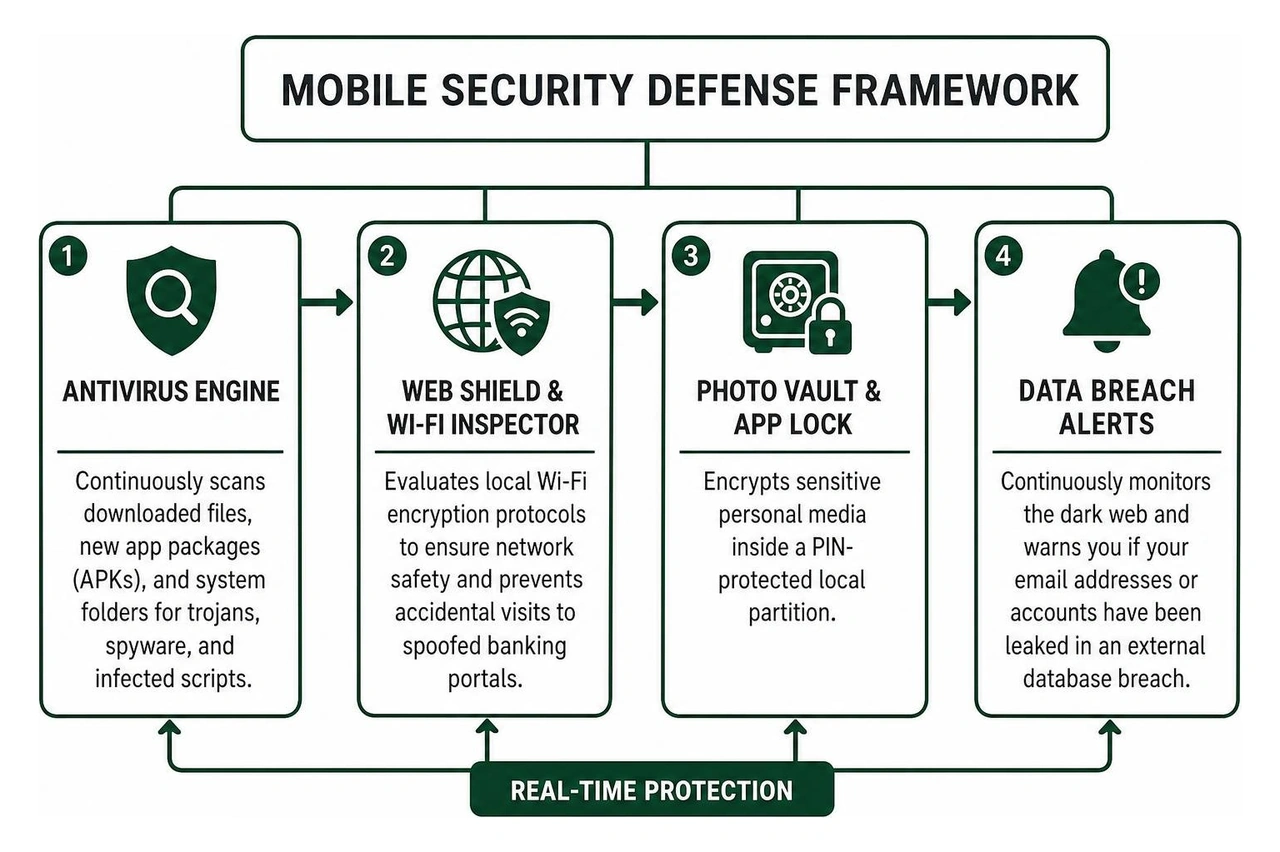
- Antivirus Engine: Continuously scans downloaded files, new app packages (APKs), and system folders for trojans, spyware, and infected scripts.
- Web Shield & Wi-Fi Inspector: Evaluates local Wi-Fi encryption protocols to ensure network safety and prevents accidental visits to spoofed banking portals.
- Photo Vault & App Lock: Encrypts sensitive personal media inside a PIN-protected local partition.
- Data Breach Alerts: Continuously monitors the dark web and warns you if your email addresses or accounts have been leaked in an external database breach.
AVG AntiVirus & Security
Developed by the same parent cybersecurity group as Avast, AVG AntiVirus & Security offers a straightforward interface backed by aggressive scanning technology. It provides robust defense for users who want complete visibility into what their installed apps are doing behind closed doors.
Core features include:
- Real-Time Virus & Malware Scanner: Evaluates applications and storage drives on install and on-demand to neutralize malicious executables.
- Permissions Advisor: Breaks down complex system permissions, highlighting which apps have unnecessary access to your microphone, location, contact list, and camera.
- Hack Alerts: Delivers notifications if any of your online accounts tied to your mobile email address appear in credential dumps.
- Junk Cleaner Tool: Sweeps away redundant cache files, obsolete temporary storage, and leftover installer packages to free up system memory.
TotalAV Mobile Security
TotalAV Antivirus & Security is engineered as an all-in-one mobile protection utility, combining virus removal, network privacy, and identity tracking into an intuitive dashboard.
Core features include:
- Smart Device Scan: Rapidly identifies malicious apps, dangerous system configurations, and privacy leaks in a single unified sweep.
- WebShield Phishing Protection: Intercepts malicious URLs, fake login interfaces, and zero-day scam pages across multiple mobile browsers.
- QR Code Security Scanner: Automatically inspects embedded links in QR codes prior to opening them, preventing physical-to-digital drive-by malware downloads.
- Wi-Fi Checker: Scans public networks at airports, hotels, and cafes to alert you if a connection lacks robust encryption or is vulnerable to man-in-the-middle attacks.
Top Full-Featured Suites: Best Apps to Get Rid of Viruses with Deep Protection
When searching for the best apps to get rid of viruses, power users often benefit from full-featured security suites that go beyond basic file removal. Comprehensive security suites incorporate multi-layered defense frameworks:
These full suites use signature databases updated hourly alongside heuristic scanning engines to catch polymorphic malware—code that subtly alters its structure to bypass traditional file filters. In addition, deep behavioral monitors evaluate whether a legitimate app suddenly attempts to access background accessibility services or read out-of-band one-time passwords (OTPs). For an in-depth breakdown of multi-device security suites, take a look at our best mobile security software guide 2026.
Lightweight Security Scanners: Best Apps to Get Rid of Viruses Without Battery Drain
If you own an entry-level smartphone or simply want an unobtrusive utility that operates without background bloatware, lightweight cloud scanners are an exceptional alternative. Instead of storing massive malware signature libraries directly on your internal storage, these tools compute lightweight cryptographic hashes (like SHA-256) of your installed applications and check them against cloud repositories in milliseconds.
The result is lightning-fast on-install and on-demand scanning with virtually no memory footprint or perceptible battery draw. They focus strictly on threat eradication, skipping resource-heavy extras like integrated photo cleaners, ram boosters, and battery managers that often cause more system friction than they solve.
Key Features to Look For in Virus Removal and Security Apps
With hundreds of utilities available in official app repositories, selecting the right tool can feel overwhelming. Focus on these core components when evaluating any mobile security package:

- High Detection Rate from Independent Labs: Look for apps validated by independent testing organizations such as AV-Test and AV-Comparatives with certified 99%+ detection rates against real-world threats.
- Real-Time On-Install Scanning: A scanner that only operates when you remember to press a button leaves you exposed. Real-time background monitors intercept APKs and app updates the precise second they arrive on your device.
- Phishing and Web Shield Protections: Most mobile malware enters devices via deceptive phishing links in SMS, messaging platforms, or social media rather than direct hacks. A reliable web shield blocks malicious domains before your browser renders them.
- App Permission Auditor: A clear permission manager that unmasks apps requesting overreaching privileges—such as a flashlight tool demanding access to your contacts or SMS read access.
- Transparent Privacy Policy: Verify that the antivirus provider maintains a strict zero-log policy for your browsing traffic and does not monetize your behavioral data through third-party ad brokers. Ensuring sound mobile app security means the app protecting your phone must be just as trustworthy as the operating system itself.
Free vs. Paid Antivirus Apps: Understanding the Trade-Offs
Both free and premium antivirus utilities have their place in personal cybersecurity. Understanding their structural differences helps you decide which tier meets your digital risk profile.
- Scanning Engines: Both tiers generally share the exact same underlying malware detection engines and cloud signature databases, meaning a free scan is just as effective at detecting a known trojan as a paid scan.
- Automation and Scheduling: Free tiers often require you to manually trigger scans, whereas premium versions run automated, continuous background sweeps without manual intervention.
- In-App Advertising: Free tools are frequently monetized through banner ads, interstitial promotional screens, or push notifications urging you to upgrade, which some users find disruptive.
- Supplementary Privacy Features: Premium subscriptions unlock advanced toolkits, including unlimited encrypted VPNs, biometric app lockers, identity theft monitors, dark web surveillance, and dedicated anti-ransomware guards.
- Customer Support: Paid licenses include direct access to dedicated technical support desks if you encounter resilient malware that resists automated deletion.
For a deeper dive into cost-free defense strategies, explore our guide on the best free virus protection for Android phone.
How to Prevent Future Malware Infections on Your Phone
Eliminating active malware from your phone is only half the battle; maintaining long-term digital hygiene is what keeps threats off your hardware permanently.
- Stick to Official App Marketplaces: Only download applications from the Google Play Store or Apple App Store. While malicious apps occasionally slip through screening filters, side-loading unchecked APKs from third-party forums or file-sharing websites increases your infection risk dramatically.
- Keep Your Operating System and Apps Updated: Security patches address known system exploits that malware developers use to gain elevated root permissions. Always install system and security updates as soon as they become available.
- Exercise Extreme Permission Hygiene: Treat every permission prompt with skepticism. If an app requests access to your location, camera, microphone, or accessibility services without an obvious functional reason, deny the request or delete the app.
- Beware of Phishing Links and Smishing: Never click links inside unsolicited SMS messages, direct messages, or suspicious emails claiming your bank account is locked or a delivery package is delayed. Always navigate directly to official platforms manually.
- Use Encrypted Virtual Private Networks (VPNs): When connecting to unencrypted public Wi-Fi hotspots in coffee shops or airports, always route your traffic through a trusted VPN to prevent local network snooping.
- Enable Multi-Factor Authentication (MFA): Protect all critical accounts using hardware security keys or authenticator apps rather than relying solely on easily intercepted SMS-based two-factor codes.
Frequently Asked Questions About Mobile Virus Removal
How do mobile antivirus apps detect and remove active malware?
Mobile antivirus tools utilize a multi-step detection engine. When you execute a scan, the software extracts the cryptographic hash of each application and compares it against a comprehensive database of known malicious code. To catch brand-new threats, modern scanners employ heuristic analysis and cloud sandboxing, which inspect an application's source structure and permission demands for suspicious behavioral anomalies. If a file matches a malicious footprint, the antivirus isolates the payload into a secure quarantine sandbox, strips its execution privileges, clears associated caches, and prompts the user to uninstall the malicious application permanently.
Can iPhones get viruses, and do iOS devices require antivirus cleaners?
Due to Apple's strict "walled garden" architecture, iOS apps operate inside sandboxes that strictly prevent them from interacting with or reading the data of other apps or the core operating system. Because of this restriction, traditional antivirus engines cannot scan your file system on iOS. However, iPhones can still be compromised through phishing links, malicious web exploits, rogue configuration profiles, malicious calendar subscriptions, and unencrypted networks. Security apps on iOS focus primarily on web protection, phishing link detection, rogue network warnings, and identity leak surveillance rather than traditional file scanning.
Are free antivirus apps safe to use on smartphones?
Yes, legitimate free antivirus applications provided by recognized cybersecurity vendors (such as Bitdefender, Avast, and AVG) are completely safe and effective for on-demand scanning. However, users should steer clear of obscure, no-name "booster" or "cleaner" tools flooding app stores. Untrusted security apps often masquerade as cleaners while serving intrusive adware, harvesting personal data, or tricking users into overpriced recurring subscriptions. Always verify developer credentials, check independent lab scores, and read user privacy policies before installing any security tool.
Build Safe, Scalable Mobile Solutions with Synergy Labs
Keeping personal devices free of digital infections requires vigilance, sound hygiene, and reliable security software. For businesses and technology leaders, however, mobile protection starts much earlier—at the very foundational architecture of the applications you bring to market. When you build mobile experiences for your customers, baking in enterprise-grade security protocols, robust data encryption, and resilient API safeguards from day one is non-negotiable.
At Synergy Labs, we specialize in building top-tier, cross-platform mobile apps that combine stunning user-centered design with impenetrable digital security. Whether you are launching a brand-new digital product or upgrading an existing platform, our team delivers predictable, top-tier engineering through our transparent fixed-budget model, direct access to an in-shore CTO alongside a world-class offshore development team, and milestone-based payments that ensure your software is completed efficiently and securely.
Ready to bring your next mobile project to life with world-class security built into every line of code? Reach out to Synergy Labs today to start your digital transformation!


.avif)

.avif)


