

Flutter Software Development: One App, Multiple Platforms

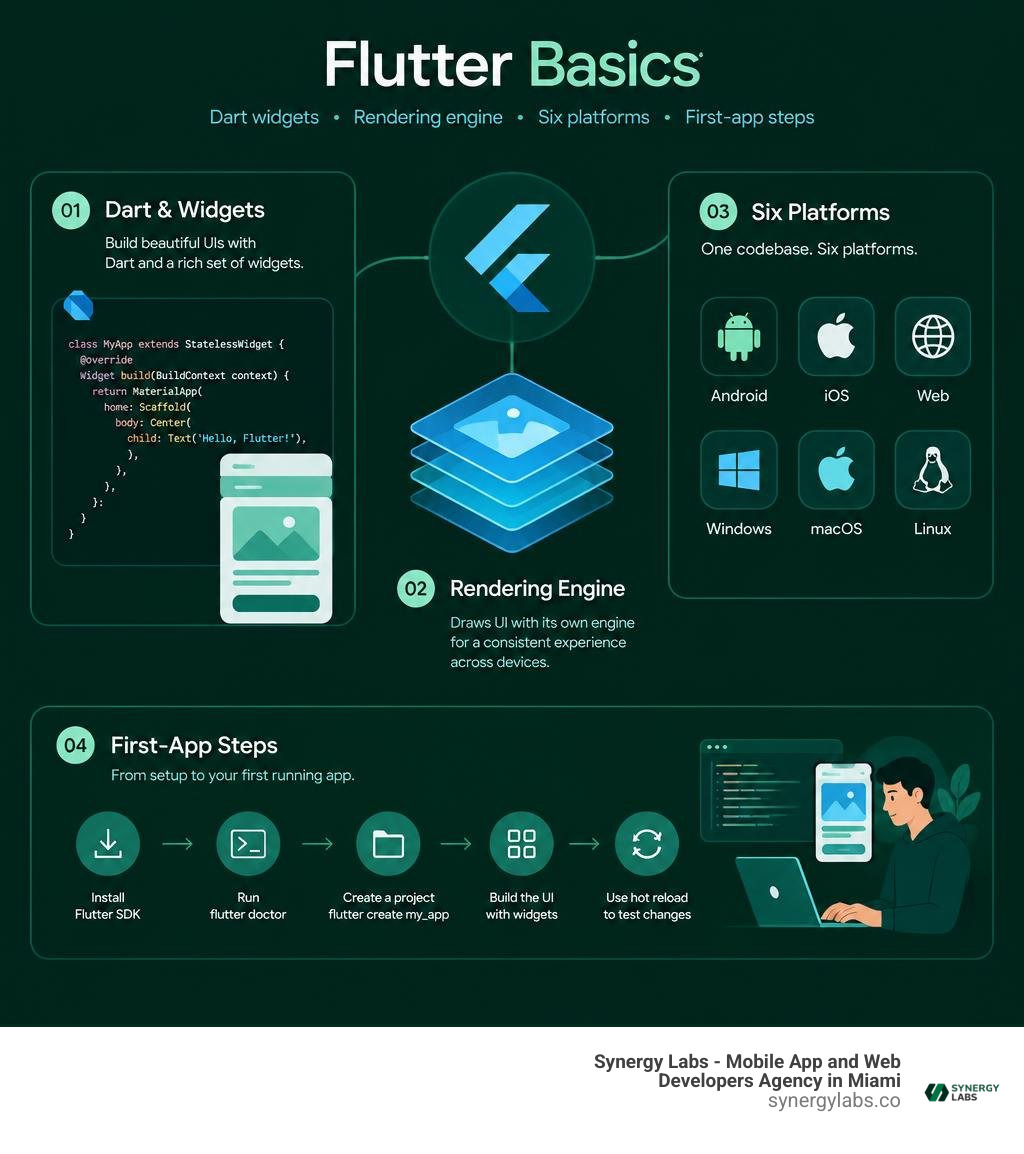
Flutter software development uses Dart and a shared codebase to build apps for iOS, Android, the web, Windows, macOS, and Linux. To get started, install the Flutter SDK, run flutter doctor to check your setup, then create a project with flutter create my_app. Build the screen with widgets and use hot reload to test changes while the app runs.
Flutter draws much of its interface with its own rendering engine, which helps keep the design consistent across devices. You can still adapt layouts and controls to suit each screen. As director of product at Synergy Labs, I'll guide you through the architecture, first-app workflow, and trade-offs that matter when planning a launch.
Core Architectural Foundations of Flutter Software Development
To understand why Flutter has reshaped modern engineering teams, we have to look past the surface-level UI and explore its underlying mechanics. Historically, cross-platform tools relied on web wrappers or dynamic JavaScript runtime bridges that translated generic UI calls into native platform views. While clever, bridging introduces serialization overhead and layout inconsistencies that can cause interface stutter during intensive user interactions.
Flutter takes a completely different path. Created by Google and publicly previewed as "Project Sky" back in 2015 before reaching version 1.0 in late 2018, Flutter bypasses native OEM interface components entirely. Instead, it operates much like a high-performance 2D video game engine. Flutter packages its own rendering subsystem, system services, and widget definitions directly into the compiled application binary. It computes layout boundaries, calculates composited rendering layers, and paints raw pixels directly onto a canvas provided by the host operating system.
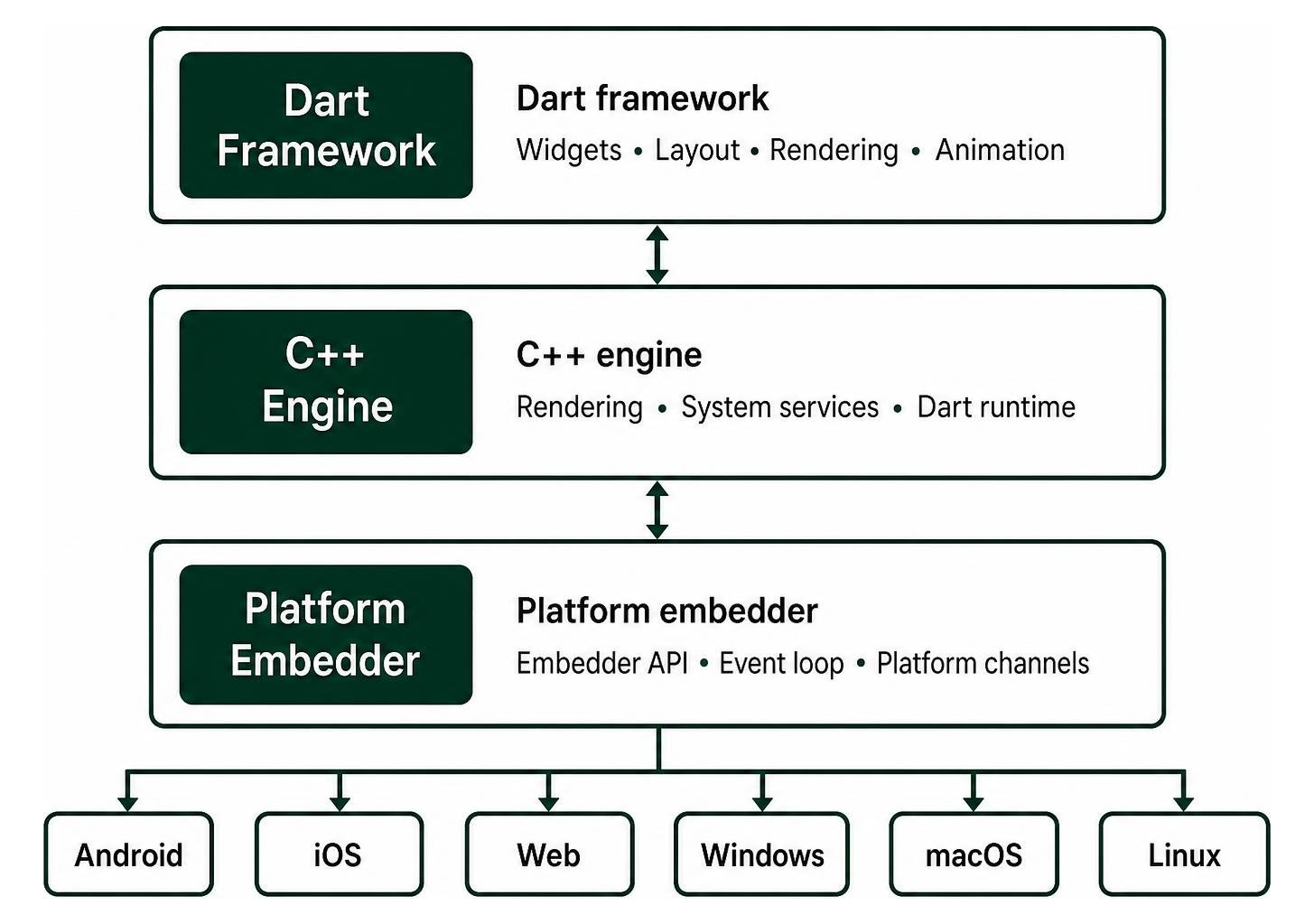
This architectural model gives engineering teams exact pixel control across every target screen. When developing software with Flutter, the layout engine executes three primary phases: building the widget tree, calculating render objects through parent-child constraints, and painting graphics layers directly to the platform window. This approach eliminates runtime layout discrepancies between operating systems and guarantees visual parity. Teams building cross-platform app development Flutter solutions can deploy complex custom typography, vector graphics, and intricate transitions knowing the final output looks identical across devices.
Dart Language and Sound Null Safety
Flutter applications are written in Dart, an object-oriented language developed by Google. Dart is tailored specifically for client-side user interface development, pairing rapid developer feedback with production runtime execution.
Dart uses a dual-compilation pipeline:
- Just-In-Time (JIT) Compilation: During local software development, Dart compiles code dynamically using a virtual machine. This architecture powers Flutter's sub-second stateful hot reload, letting developers inject new code modifications into a running application without destroying memory state or forcing a full rebuild.
- Ahead-Of-Time (AOT) Compilation: When building release binaries for production, Dart compiles source code directly into optimized machine code (ARM and x86_64 instructions) for mobile and desktop, or compiles down to JavaScript and WebAssembly for modern browsers.
Dart also enforces sound null safety. By distinguishing between nullable and non-nullable types at the type-system level, Dart catches potential null dereference bugs during development rather than crashing at runtime. The language's generational garbage collection is optimized for short-lived UI layout objects, allocating and reclaiming memory quickly so rendering pipelines run smoothly. For detailed syntax specifications and framework libraries, explore the official Flutter documentation.
Rendering Engine Evolution: Skia to Impeller
The core rendering engine of Flutter is written in C++ and handles text layout, file input/output, network protocols, accessibility tree generation, and graphic composition.
For several years, Flutter used Google's Skia 2D graphics library. While Skia provided strong rendering fidelity, it generated graphics shaders just-in-time while the user interacted with the app. On graphics-intensive transitions or initial animations, this runtime shader compilation could cause frame drops known as shader compilation jank.
To eliminate frame jank and maintain smooth 60 to 120 FPS frame rates, the Flutter engineering ecosystem introduced Impeller, a modern rendering runtime built from the ground up to replace Skia.
Impeller achieves ultra-smooth performance by:
- Precompiling Shaders: Impeller precompiles all vertex and fragment shaders during application build time rather than compiling them on the user's device at runtime.
- Explicit GPU API Targeting: It leverages modern low-level graphics APIs directly, using Metal on iOS and macOS, and Vulkan on modern Android devices (with an OpenGL fallback for legacy hardware).
- Direct Canvas Drawing: Impeller allows developers to bypass standard high-level layout widgets to render custom shapes, vector graphics, and particle systems straight to a low-level graphics canvas.
With updates leading into 2026, including releases like Flutter 3.47.0, Impeller serves as the default rendering engine across iOS and modern Android platforms, providing reliable performance for dynamic enterprise applications.
Widget Tree Hierarchy: Stateless vs Stateful
In Flutter software development, widgets are the primary building blocks of an application. The framework favors deep composition over inheritance. Rather than configuring a single monolithic element with dozens of styling properties, you combine simple, focused widgets into nested visual structures.
Every visual element—from layout columns, structural cards, and padding containers to gestures and themes—is a widget. Flutter manages these structures through a three-tree architecture:
- Widget Tree: Lightweight, immutable blueprints that describe the current UI configuration.
- Element Tree: The structural backbone managing lifecycles and binding widgets to underlying render objects.
- RenderObject Tree: The low-level operational nodes responsible for computing sizing constraints, calculating hit-testing zones, and painting pixels to screen buffers.
Flutter splits components into two primary widget types:
- StatelessWidget: Used when the interface depends entirely on external configuration data passed into its constructor and never changes internally during its lifecycle. Examples include static icons, labels, and fixed layout decorators. Because they are immutable, Flutter builds and discards them with negligible memory overhead.
- StatefulWidget: Used when visual presentation updates dynamically based on user input, received network payloads, or internal timers. A
StatefulWidgetdelegates its presentation logic to a persistentStateobject that survives widget rebuilds. CallingsetState()notifies the framework that internal variables have changed, scheduling a rebuild of the widget's subtree.
To respect platform design languages out of the box, Flutter includes two comprehensive design libraries: Material Design widgets (aligning with Google's design system) and Cupertino widgets (mirroring Apple's iOS styling conventions). You can mix and match both design systems across platforms or adapt them dynamically based on the host operating system.
Step-by-Step Tutorial: Creating Your First Multiplatform Flutter App
Now that we have covered Flutter's core architecture, let's look at how to build a working, state-driven multiplatform app. In this walkthrough, we will configure your local environment, initialize a clean project structure, compose a responsive UI layout, and implement reactive state management. For further guided modules, refer to the step-by-step Flutter tutorial.

Setting Up the Environment and Tooling
Before creating your project, you must install the core SDK and configure your local toolchain.
- Download the Flutter SDK: Download the latest stable release for your host operating system and extract the archive to an accessible directory on your system disk.
- Configure System Environment Variables: Append the
bindirectory of your extracted Flutter SDK folder to your operating system's globalPATHenvironment variable. This step allows you to execute commands from any terminal session. Verify Your Installation: Open your terminal and run the verification command:
This utility inspects your operating system, identifies missing dependencies, and reports the status of your Android SDK, Xcode build tools, browser targets, and connected physical devices.
- Install IDE Extensions: Visual Studio Code, Android Studio, and IntelliJ IDEA offer dedicated Flutter and Dart extensions. These extensions provide intelligent code completion, real-time widget hierarchy inspection, and one-click debugging.
For detailed platform-specific prerequisites, follow the complete guide to install and set up Flutter.
Initializing and Structuring a Flutter Software Development Project
To create a new application, open your terminal, navigate to your desired workspace directory, and execute the creation command:
The --org parameter sets the reverse-domain identifier for your project, which is used to generate package IDs for the Apple App Store and Google Play Store. Following Effective Dart guidelines, project names must always use lowercase_with_underscores (snake_case).
When project generation finishes, open the newly created directory. You will find a clear, predictable folder layout:
lib/: The core directory where your Dart code resides. The entry point of the entire application islib/main.dart.pubspec.yaml: The project configuration manifest. You use this file to manage third-party dependencies, configure font assets, declare image directories, and define semantic version numbers.android/,ios/,web/,windows/,macos/,linux/: Dedicated host folders containing platform-specific wrapper projects, native build files, application icons, and permissions configurations.test/: Contains automated unit, widget, and integration test suites.
To explore real-world architectural setups and clean folder organization strategies, see our top Flutter app development guide.
Composing UI Layouts and Managing Reactive State
Let's look at how Flutter builds layouts and coordinates UI updates using clean state management.
Open pubspec.yaml and add the provider package under the dependencies block. This package is an industry-standard, lightweight state management solution:
Save the file and run flutter pub get in your terminal to fetch the package.
Next, open lib/main.dart and replace its contents with the code below. This example demonstrates widget composition, dynamic theming, and reactive state distribution using ChangeNotifier:
In this implementation, the CounterState class holds our business logic and data. When the button triggers context.read<CounterState>().increment(), the method increments _count and calls notifyListeners(). The HomeScreen listens to state changes via context.watch<CounterState>(), triggering a clean rebuild of the affected text without resetting the surrounding application state.
Multiplatform Deployment, Cloud Integration, and Accessibility
A modern software workflow needs to handle more than mobile phone screens. Flutter provides built-in tools to deliver responsive interfaces, connect to scalable cloud infrastructure, and maintain software accessibility standards across every target environment.

Targeting Six Platforms with Adaptive UI Architecture
Flutter compiles a single codebase across six targets: iOS, Android, web browsers, macOS, Windows, and Linux. However, a quality multiplatform application must feel natural on each screen, rather than stretching a mobile layout across a desktop monitor.
To deliver great user experiences across diverse screen sizes:
- Adaptive Constraints: Use
LayoutBuilderandMediaQueryto evaluate viewport dimensions dynamically. For example, show a mobile-friendly bottom navigation bar on compact screens, and switch to a wideNavigationRailor persistent side navigation drawer on desktop displays. - Pointer and Keyboard Input: Support multi-modal inputs, including touch gestures, mouse wheel scrolling, hover events, and keyboard shortcuts on desktop and web deployments.
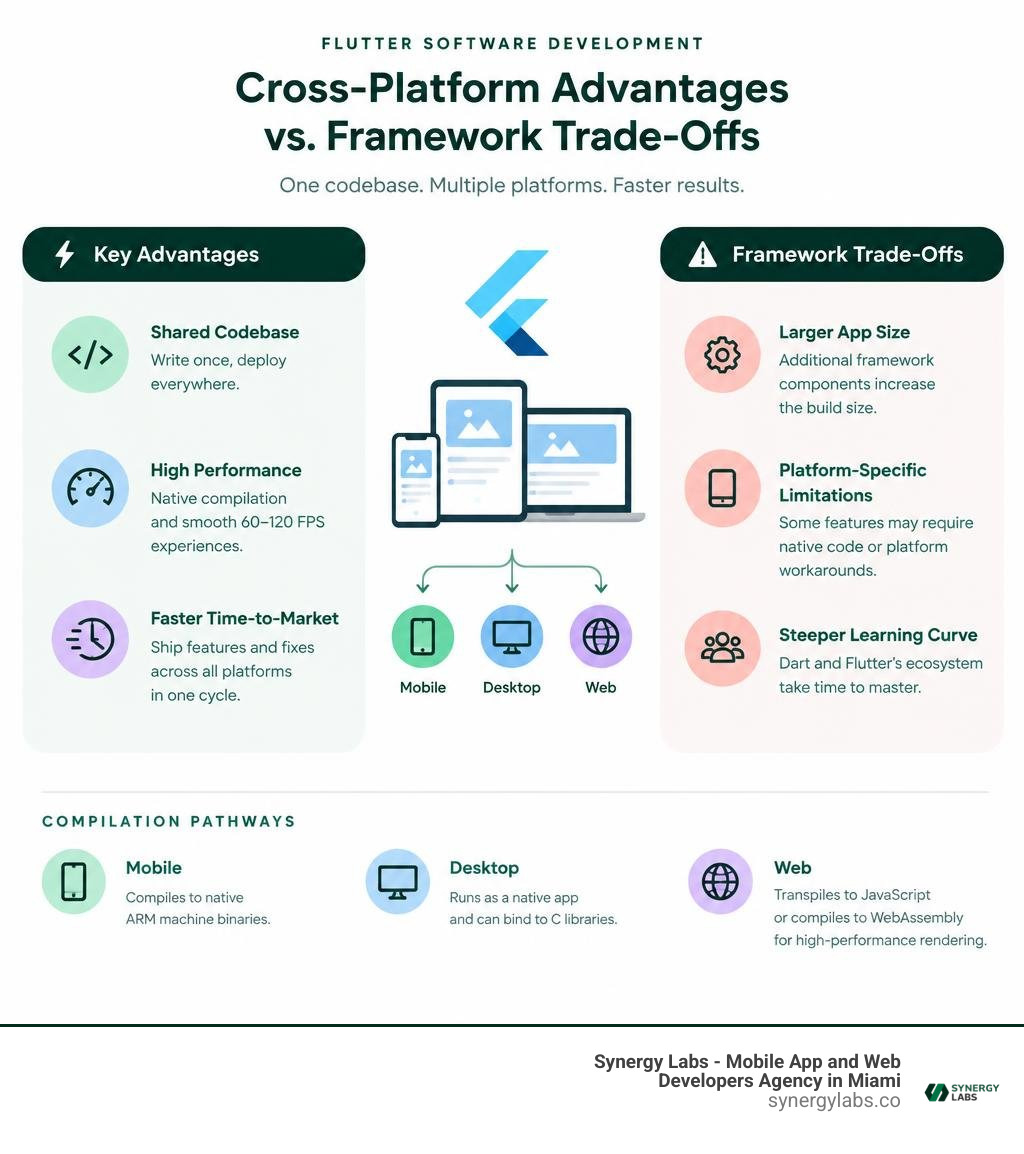
- Compilation Pathways: Mobile applications compile directly to native ARM machine binaries. Desktop platforms run as native desktop applications that can bind directly to C libraries. Web deployments transpile to JavaScript or compile directly to WebAssembly (Wasm), offering high-performance canvas rendering inside modern browsers.
If your team is working with browser deployments inside specialized IDE configurations, read our walkthrough on Android Studio Flutter web development. For native desktop configurations and platform channels, review the official guide to build for and integrate with multiple platforms.
Integrating Backend Cloud Services with AWS Amplify
Front-end applications need reliable cloud backends to handle authentication, persistence, and data synchronization. AWS Amplify for Flutter offers native libraries designed to bridge client-side applications with cloud infrastructure:
- User Authentication (Amazon Cognito): Set up secure user registration, multi-factor authentication (MFA), and social login federation across mobile, desktop, and web clients with minimal boilerplate.
- Real-Time Data APIs (AWS AppSync & GraphQL): Query and mutate cloud data models while subscribing to live WebSocket data streams.
- Amplify DataStore: An offline-first data management framework. Client applications read and write data to an encrypted local database. When network connectivity is available, DataStore automatically syncs changes with the cloud and resolves data conflicts behind the scenes.
- Secure Cloud Storage (Amazon S3): Upload, download, and manage user assets, media, and documents using secure, signed URLs.
This modular architecture lets development teams build scalable, cloud-connected products while keeping their core client code clean and maintainable.
Best Practices for Flutter Software Development Workflows
To maintain clean code quality and high team velocity across large projects, adopt these industry best practices:
- Use Stateful Hot Reload: Use hot reload to iterate quickly on UI components and test layouts without losing your current application state or resetting active form inputs.
- Leverage Flutter DevTools: Monitor memory allocation graphs, inspect rendering performance, track widget rebuild frequencies, and identify layout issues using the visual DevTools suite.
- Build for Accessibility: Add
Semanticswrappers andsemanticsLabelproperties to text, buttons, and visual graphics. This practice helps screen readers on iOS (VoiceOver) and Android (TalkBack) pronounce abbreviations and compound phrases correctly. - Manage Dependencies Cleanly: Source reliable, community-tested packages from
pub.dev. For a curated list of reliable tools and packages, review our breakdown of the best Flutter plugins app dev 2026.
Evaluating the Advantages and Trade-Offs of Flutter
Choosing a core technology framework requires weighing its benefits against its limitations. Flutter provides distinct operational advantages, but engineering teams should evaluate where it excels and where it introduces specific trade-offs.
Key Benefits for Engineering Velocity and UI Consistency
- Shared Codebase: Teams can write and maintain business logic, data models, animations, and UI layouts once, deploying simultaneously to mobile, web, and desktop.
- High Performance: Because Flutter compiles directly to native machine code and draws via Skia or Impeller, applications run at consistent 60 to 120 FPS frame rates without JavaScript bridging bottlenecks.
- Faster Time-to-Market: Features, bug fixes, and design updates launch across all target platforms in a single release cycle, cutting ongoing maintenance costs.
- Comprehensive Widget Library: With hundreds of pre-built Material Design and Cupertino components available out of the box, teams can prototype and assemble production-grade layouts quickly.
- Rich Ecosystem: The open-source
pub.devpackage registry provides tested, community-backed integrations for Bluetooth communication, camera handling, local SQLite storage, biometric security, and cloud APIs.
To evaluate cross-platform options for an upcoming release, read our comparison on Flutter vs React Native: which framework is right for your 2026 project.
Current Framework Limitations and Edge Cases
- Initial Binary Size: Because Flutter bundles its C++ rendering engine, foundational framework classes, and core fonts directly into the compiled app binary, minimal "Hello World" builds have a larger baseline footprint than simple native-only templates.
- Host OS Build Dependencies: While Flutter uses a single codebase, building final binaries for iOS and macOS strictly requires an Apple computer running Xcode due to Apple's SDK licensing requirements.
- Complex Platform Interop: When an application requires cutting-edge OS capabilities that lack a pre-built community plugin, developers must write custom native code using
MethodChannelor Dart FFI (Foreign Function Interface) in Swift, Kotlin, or C++. - Web SEO and Content Indexing: Flutter web excels at complex browser-based dashboards, SaaS portals, and interactive tools. However, for static, text-heavy landing pages that prioritize traditional search engine content scraping, server-rendered HTML frameworks remain better suited.
Frequently Asked Questions About Flutter App Development
How does Flutter achieve near-native performance across platforms?
Flutter achieves near-native performance because it compiles Dart directly into native machine code (ARM and x86_64 instructions) using an Ahead-Of-Time (AOT) compiler. It bypasses native OEM interface bridges entirely, painting pixels directly to the host device's screen using high-performance graphics engines like Impeller and Skia.
What is the difference between Stateless and Stateful widgets?
A StatelessWidget is an immutable component whose visual layout depends solely on its initial constructor parameters; it does not change its configuration once drawn. A StatefulWidget maintains an internal mutable State object that survives redraw cycles. Calling setState() informs Flutter that internal data has updated, prompting the framework to rebuild only the affected branch of the widget tree.
How does stateful hot reload accelerate multiplatform delivery?
Stateful hot reload uses Dart's Just-In-Time (JIT) compilation model during development to inject modified source code files directly into the active Dart Virtual Machine in under a second. It updates visual layouts, colors, and business logic without restarting the application or wiping existing memory state (like form inputs or active navigation routes).
Accelerate Your Multiplatform Roadmap with Synergy Labs
Building and scaling cross-platform applications requires deliberate architecture, clean codebases, and senior technical leadership. Whether you are launching an early-stage MVP or modernizing an enterprise system across iOS, Android, web, and desktop, choosing the right framework is only the first step—executing with the right team determines your long-term success.
At Synergy Labs, we specialize in high-performance cross-platform mobile app development. We provide direct access to senior talent, giving you dedicated technical leadership without the management overhead. Our delivery model pairs an in-shore CTO who guides your technical strategy with an offshore development team that builds quickly and cost-effectively.
We operate on a transparent fixed-budget model tied to milestone-based payments. You only pay as clear, tangible engineering goals are hit, keeping your product roadmap on time, within scope, and aligned with your budget.
If you're ready to turn your product vision into high-performing software that launches everywhere at once, schedule a consultation with our senior engineering team at Synergy Labs today.