

How to Unlock Your iPhone 11 Safely
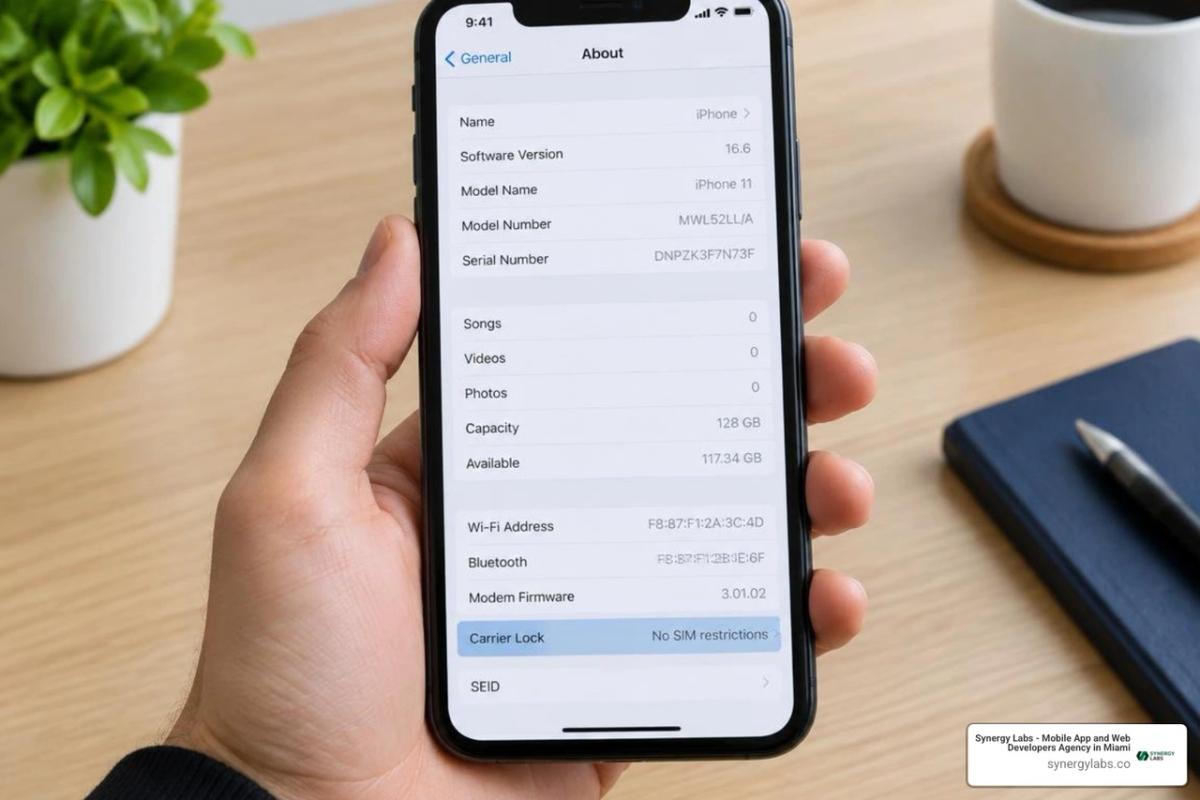
To unlock your iPhone 11 for another carrier, open Settings > General > About and check Carrier Lock. If it says No SIM restrictions, your phone is already unlocked. Otherwise, ask your current carrier to unlock it. Once the carrier confirms, connect to Wi-Fi and activate a new SIM or eSIM. Apple's unlock guide has the full steps.
If you're locked out of the screen instead, you need to reset your passcode—not request a carrier unlock. An Activation Lock tied to an Apple Account is a separate issue.
As director of product at Synergy Labs, I'll walk you through the right path for each lock so you can avoid an unnecessary reset.
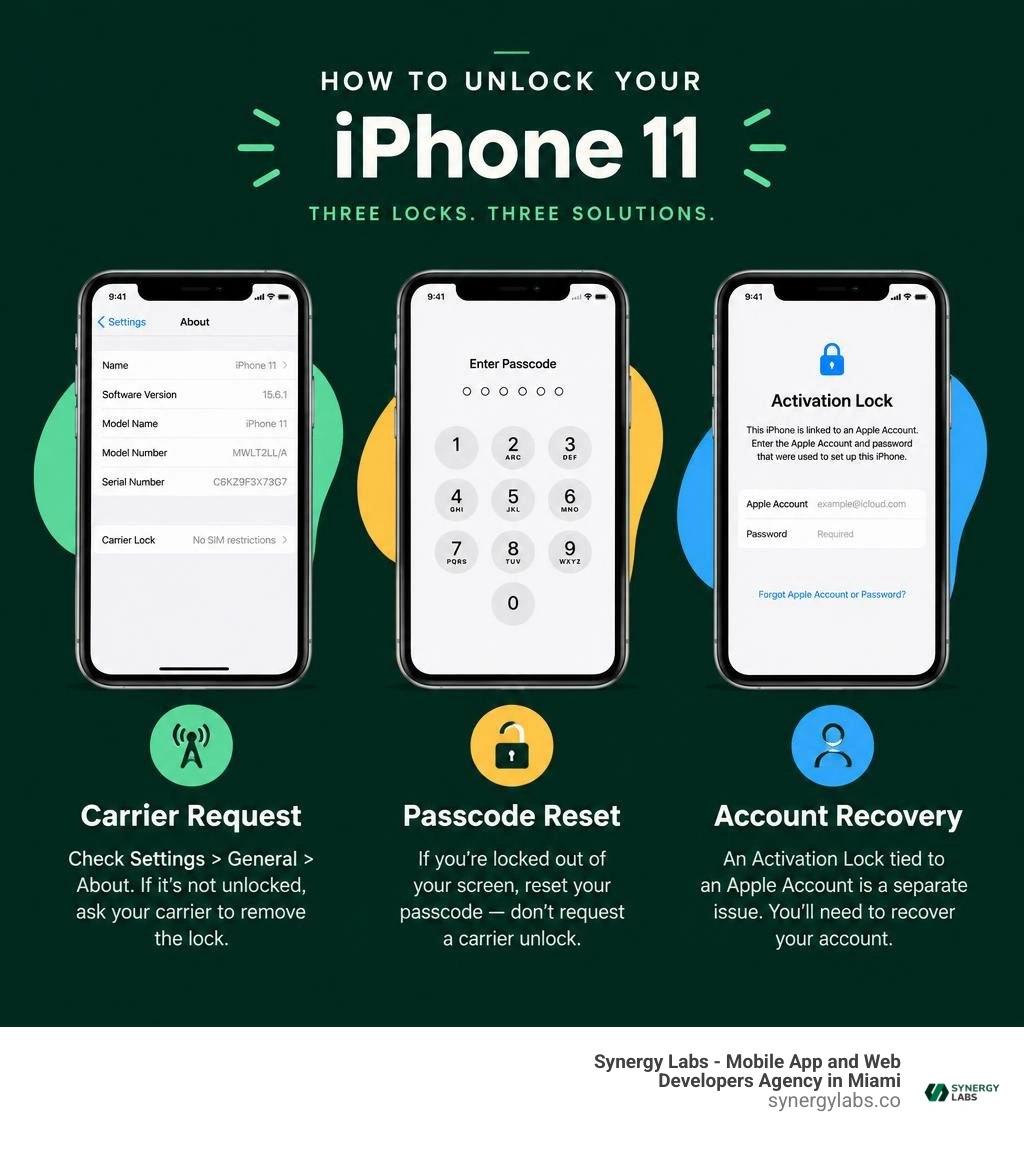
Quick how do i unlock my iphone 11 terms:
Understanding Lock Types: Carrier Lock vs. Passcode vs. iCloud Activation Lock
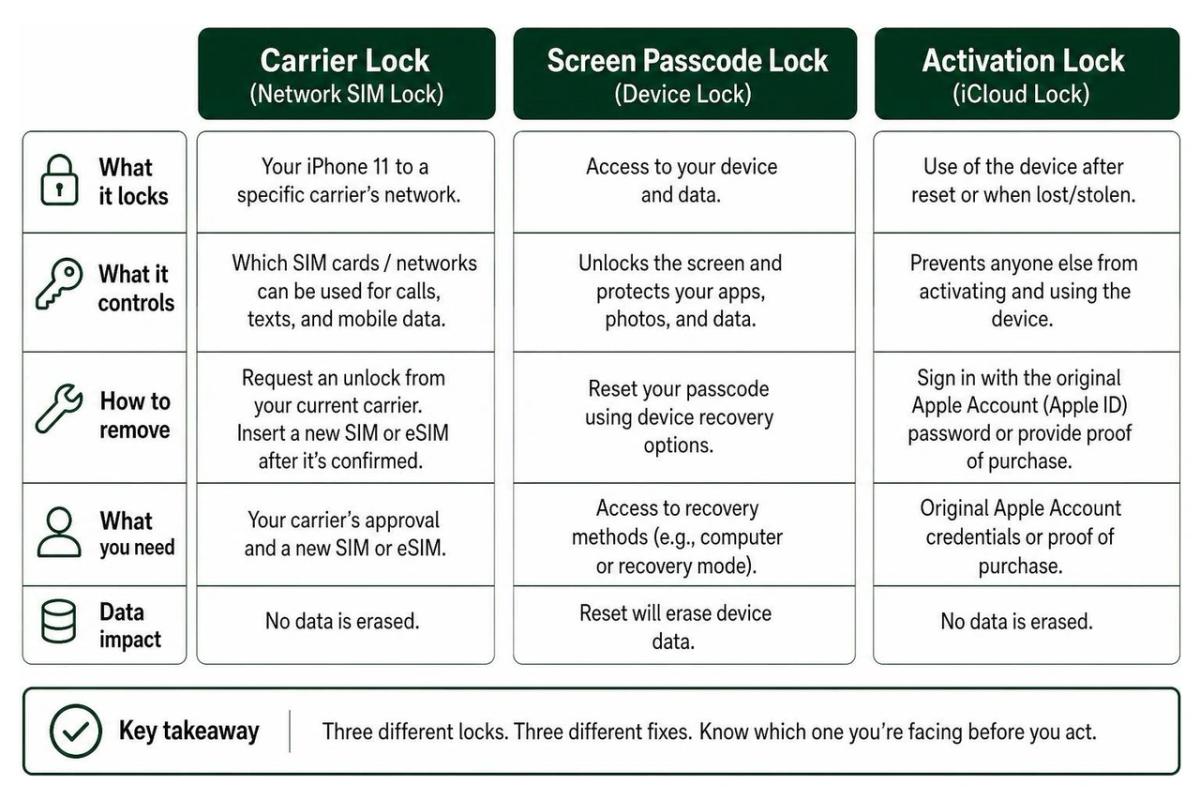
Before taking any technical action, we must diagnose which digital deadbolt is standing between you and your phone. In modern mobile ecosystems, the word "locked" refers to three completely separate security layers. Confusing them can lead to wasted hours or accidental data erasure.
- Carrier Lock (Network SIM Lock): This restriction ties your hardware to a specific cellular service provider (such as AT&T, Verizon, or T-Mobile). When an iPhone 11 is carrier-locked, inserting a SIM card from a different network generates an error. Removing this lock does not wipe your apps, photos, or messages; it simply enables your cellular baseband to authenticate on competing networks.
- Screen Passcode Lock: This is your device-level security barrier composed of a 4-digit code, 6-digit code, alphanumeric password, or Face ID authentication. If you enter the wrong credentials repeatedly, iOS initiates a progressive security lockout. Managing this lockout requires local device recovery and wiping the forgotten credentials. To explore broader mobile protection strategies, review our article on how to lock phone settings properly, or consult the official Apple device wake and unlock guide.
- iCloud Activation Lock: Built directly into Apple's Find My infrastructure, Activation Lock prevents unauthorized use of a lost or stolen device. It links the device's unique hardware identifier directly to an Apple Account (Apple ID) on Apple's centralized activation servers. Even a complete factory reset cannot bypass Activation Lock without the authentic Apple ID password or original proof of retail purchase.
How to Check if Your iPhone 11 Is Carrier-Locked
Finding out whether your iPhone 11 is tied to a single network takes less than thirty seconds inside iOS settings:
- Open the Settings app on your iPhone 11.
- Tap General, then tap About.
- Scroll down to locate the Carrier Lock field.
- If the field reads No SIM restrictions, your iPhone 11 is fully unlocked and ready to accept any compatible nano-SIM or eSIM from any global network provider.
- If you see a carrier name (such as "AT&T," "T-Mobile," or "Verizon") or the status says "SIM locked," your device is restricted to that carrier's network.
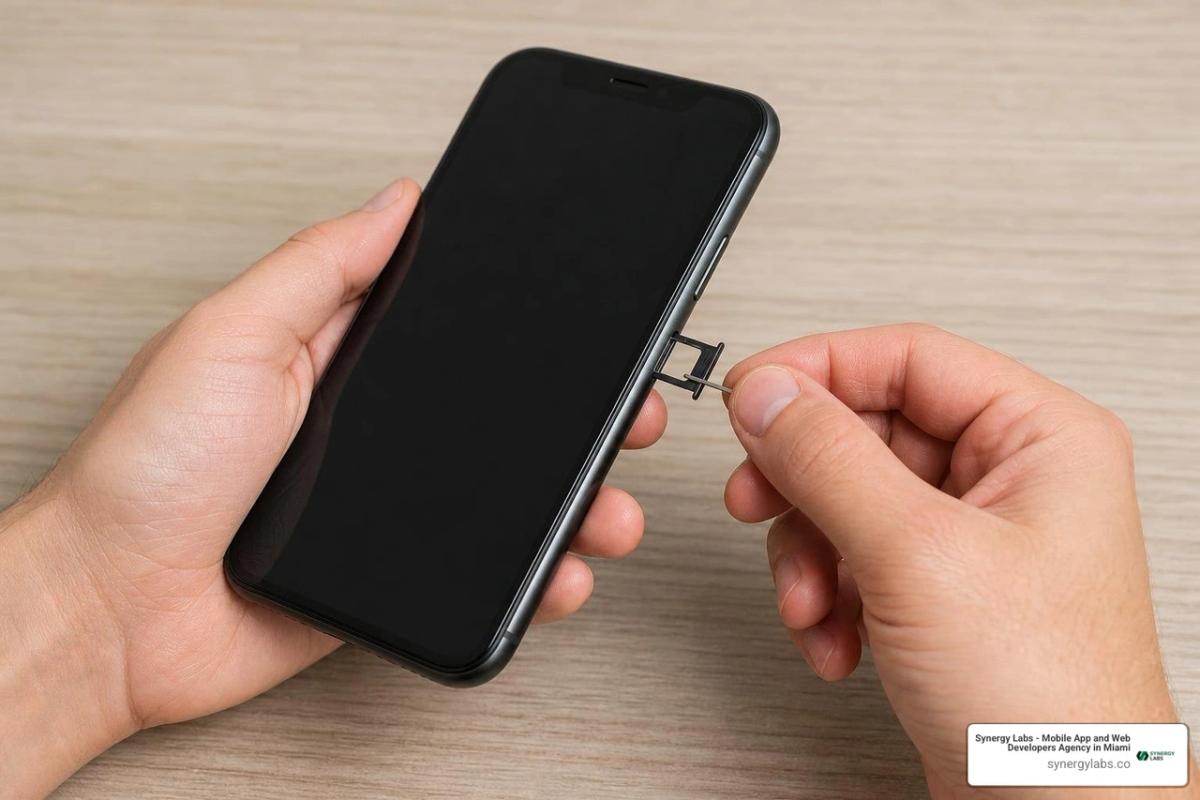
Alternatively, you can perform a physical SIM swap test. Power off the device, eject the SIM tray using a paperclip or SIM-eject tool, insert an active nano-SIM from a different carrier, and turn the device back on. If the phone connects to the network, displays signal bars, and lets you place a call, it is carrier-unlocked. If an on-screen alert states that the SIM is not supported, the device remains carrier-locked.
When Locked Out of the Screen: How Do I Unlock My iPhone 11 Passcode?
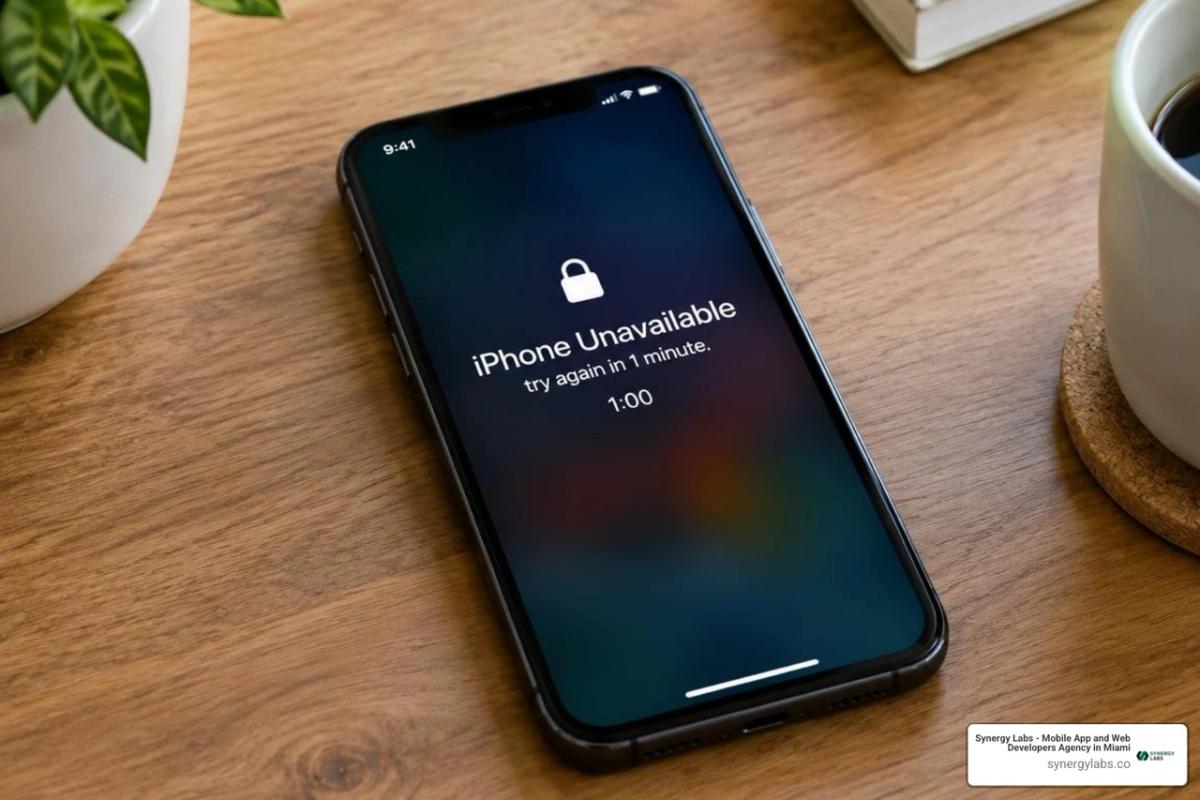
Entering an incorrect passcode too many times results in the "iPhone Unavailable" or "Security Lockout" screen. If you find yourself in this situation, there are reliable recovery routes depending on your operating system version and available equipment.
If you recently updated your passcode within the last 72 hours on modern iOS versions, Apple provides a temporary passcode reset window. After several failed attempts, tap the Forgot Passcode? prompt in the bottom corner of the screen and select Enter Previous Passcode. This feature allows you to use your previous, remembered passcode to regain immediate entry without wiping personal files.
If you do not have that option, you can reset the device using on-screen account authorization:
- Tap Forgot Passcode? on the lock screen.
- Tap Start iPhone Reset to confirm.
- Enter your Apple ID password when prompted to sign out of your Apple Account.
- Choose whether to keep or remove your active eSIM profiles, then confirm the wipe. Once the reset finishes, restore your data from an iCloud or local computer backup.
If the on-screen reset option is unavailable or the device lacks an active Wi-Fi connection, you must use Recovery Mode with a computer:
- Connect your iPhone 11 to a Mac (using Finder) or a Windows PC (using Apple Devices or iTunes) via a USB cable.
- Press and quickly release the Volume Up button.
- Press and quickly release the Volume Down button.
- Press and hold the Side button continuously. Keep holding the Side button even when you see the Apple logo—do not release it until the recovery mode screen (a computer icon and cable) appears on the display.
- In Finder or iTunes on your computer, locate the connected iPhone. When the prompt appears asking whether to Update or Restore, click Restore.
This process downloads fresh iOS firmware, wipes the forgotten passcode, and lets you restore your data from a backup. For in-depth recovery walkthroughs, read our disabled iPhone unlock guide 2026 or review methods for setting a secure phone lock password.
Carrier Methods: How Do I Unlock My iPhone 11 for Any Network?
Official carrier unlocking does not involve entering secret PIN codes on an iPhone keyboard, modifying firmware, or running baseband exploit tools. Instead, an iPhone network unlock is processed entirely server-side.
When a carrier approves your unlock request, they submit an authorization ticket to Apple's centralized activation servers. The next time your iPhone 11 contacts Apple's servers—over Wi-Fi, cellular activation, or through a computer—the device downloads an updated activation policy. This process removes all carrier restrictions permanently and involves zero data loss. For broader multi-platform unlocking insights, check out our unlock locked phone complete guide 2026 alongside official Apple Support guidelines.
Official Eligibility Requirements for Major Carriers in 2026
Every mobile network enforces clear terms of service before authorizing a server-side unlock ticket. In 2026, the standard consumer criteria across tier-one providers include:
- AT&T: The iPhone 11 must be fully paid off with no remaining installment balances or early termination charges. The account must be in good standing with no past-due balances, and the device cannot be flagged as lost, stolen, or involved in fraud. For AT&T Prepaid (GoPhone) devices, the hardware must have completed at least 6 months of continuous paid active service before it qualifies for an unlock.
- T-Mobile: Postpaid devices must be fully paid off and must have been registered and active on the T-Mobile network for a minimum of 40 consecutive days. Prepaid T-Mobile devices require at least 365 days of active service on the account, or more than $100 in total account refills since initial activation.
- Verizon: Policy updates in 2026 have shifted standard procedures. Postpaid iPhones purchased on installment plans unlock once the device is completely paid off or the financing contract reaches completion. Prepaid devices remain locked until reaching their designated carrier tenure criteria, provided the device has not been flagged on any industry blacklist.
How Do I Unlock My iPhone 11 with AT&T, T-Mobile, or Verizon?
To request your official carrier unlock, gather your 15-digit IMEI number by dialing *#06# in the Phone app or checking Settings > General > About. Then, follow the carrier-specific steps:
- AT&T: Visit the official AT&T Device Unlock portal online. Select Unlock your device, enter your 15-digit IMEI, and provide your account details. Submit the form, open the confirmation email sent by AT&T, and click the verification link within 24 hours. AT&T typically approves and processes requests within 1 to 2 business days.
- T-Mobile: Log in to your T-Mobile account dashboard via a web browser or the T-Life app. Navigate to your device settings, select your iPhone 11, and review the Device Unlock Status. If marked eligible, submit the unlock request directly through the portal, or contact T-Mobile customer support via phone or chat to initiate the server push.
- Verizon: If your iPhone 11 is fully paid off and has not unlocked automatically, log in to your My Verizon account, locate your active device details, and submit an unlock inquiry, or dial
*611from your device to speak with customer care.
For additional carrier-specific procedures, consult practical carrier unlock instructions and our how do I unlock my iPhone reference guide.
Completing the Carrier Unlock with or Without a New SIM Card
Once your carrier confirms that the unlock request has been approved, you must trigger your iPhone 11 to contact Apple's activation servers to download its new profile.
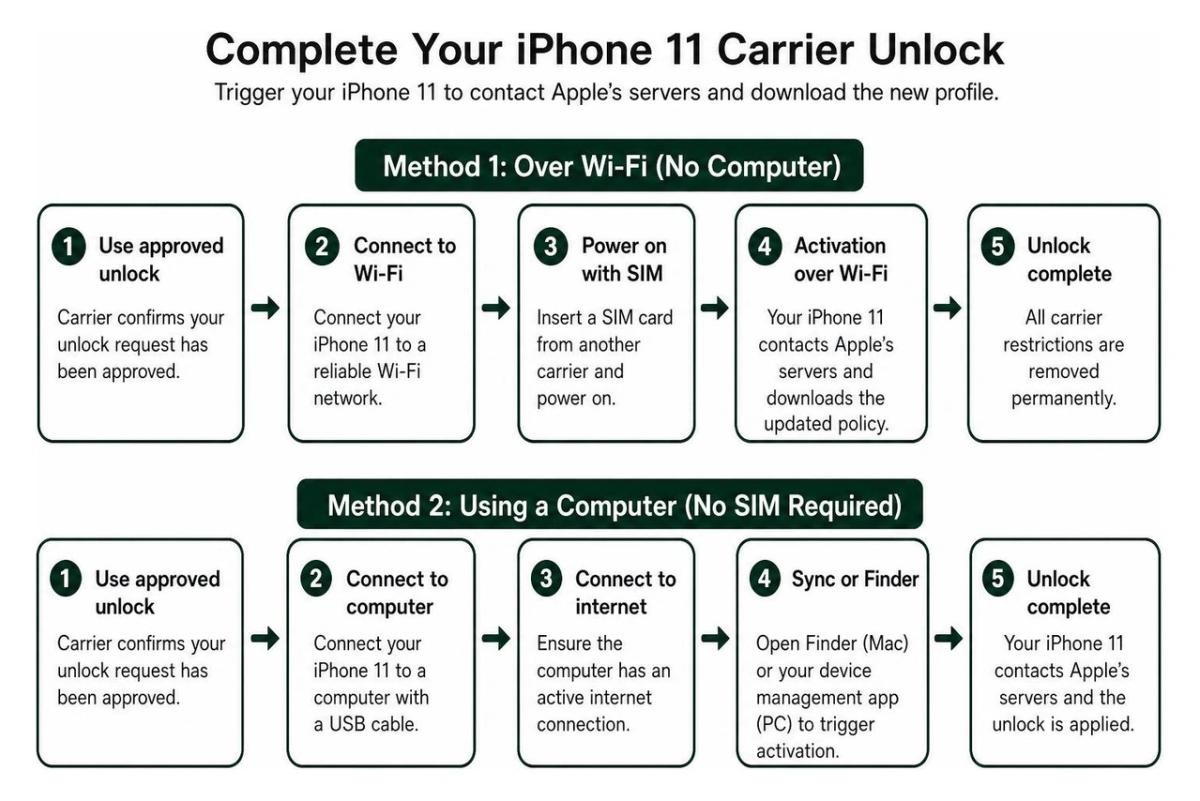
Method 1: If You Have a SIM Card from Another Carrier
- Power down your iPhone 11.
- Use a SIM ejector tool to pop open the SIM tray on the right side of the phone.
- Remove the old carrier's SIM card and insert the new nano-SIM from your alternative carrier.
- Close the tray and power on the iPhone 11.
- Connect to an active Wi-Fi network. The iPhone will automatically display an "Activation Required" screen, contact Apple servers, verify the updated policy, and jump straight to your home screen.
Method 2: If You Are Activating via eSIM
- Connect your iPhone 11 to Wi-Fi.
- Go to Settings > Cellular > Add eSIM.
- Scan the QR code provided by your new carrier or follow the on-screen carrier transfer prompt. Once downloaded, the activation ticket applies automatically.
Method 3: If You Do Not Have a New SIM Card Yet
- Make a full backup of your iPhone 11 using iCloud, Finder on macOS, or iTunes on Windows.
- Go to Settings > General > Transfer or Reset iPhone, tap Erase All Content and Settings, and complete the on-screen steps.
- Once the iPhone restarts and displays the "Hello" screen, follow the setup prompts, connect to Wi-Fi, and select Restore from iCloud Backup or Restore from Mac/PC. During this initial activation handshake, the device pulls down the updated carrier-free status.
For more device troubleshooting methods, read our walkthrough on how can you unlock a locked iPhone.
Troubleshooting Lock Issues and Safe Practices
Completing an unlock is usually seamless, but unexpected errors can occasionally disrupt the process. Following secure troubleshooting practices prevents system lockouts and keeps your hardware running reliably.
Resolving "SIM Not Supported" and Activation Errors
If you insert a new carrier's SIM card and see an alert stating "SIM Not Supported" or "The SIM card inserted in this iPhone does not appear to be supported under the activation policy," work through these troubleshooting steps:
- Verify Carrier Processing Completion: It often takes 24 to 48 hours for a carrier's approval ticket to fully propagate across Apple's worldwide activation servers. If you just received confirmation minutes ago, wait a short while and restart your device.
- Force a Network Profile Handshake: Connect your iPhone 11 to a stable Wi-Fi network. Navigate to Settings > General > Transfer or Reset iPhone > Reset and select Reset Network Settings. This clears cached carrier profiles, restarts the cellular baseband, and forces the phone to check for updated network permissions.
- Sync via Mac or PC: Connect the iPhone 11 to a computer using a genuine Lightning-to-USB cable. Open Finder (macOS) or iTunes (Windows). When the computer recognizes the iPhone, it contacts Apple activation servers directly and pushes the new carrier authorization ticket to the device.
- Escalate to Carrier Support: If the error persists after 48 hours, contact the original carrier's technical tier. Confirm that the exact 15-digit IMEI was entered into their backend database without typos.
When managing specialized internal permissions or multi-user enterprise environments, you can also explore how to configure an application lock in iPhone to keep individual apps secure even when the device is shared.
Legality, Warranty, and Third-Party IMEI Services
Under the United States Unlocking Consumer Choice and Wireless Competition Act, consumers have a clear legal right to unlock mobile devices they own once all contractual obligations, payment plans, and carrier service agreements are fulfilled.
- Hardware Warranty Protection: Official carrier unlocking operates purely through server-side whitelisting. Because it requires no hardware modifications or operating system tampering, it preserves your Apple hardware warranty.
- iOS Update Persistence: Because your unlocked status is recorded in Apple's master activation database, you can safely update iOS versions, restore factory defaults, or wipe the device without ever losing your carrier freedom.
- Third-Party IMEI Services vs. Official Channels: Paid third-party unlock websites often claim to unlock any device for a fee. However, these services can be unpredictable. Many charge non-refundable fees while simply submitting the same free carrier forms you can access yourself. Furthermore, no third-party service can legally or technically remove an iCloud Activation Lock or clean a device that has been blacklisted due to unpaid balances or theft reports. Always start with your official carrier portal for a secure and free unlock.
Frequently Asked Questions About Unlocking iPhone 11
Will unlocking my iPhone 11 erase all my personal data?
A carrier network unlock does not erase any personal data, applications, photos, or device settings. The unlock simply updates your device's network activation profile in the background over Wi-Fi.
The only scenario where data loss occurs is if you are resolving a forgotten lock screen passcode or performing a factory reset fallback because you lack a secondary SIM card. In those cases, having an up-to-date iCloud or local computer backup ensures you can restore every file immediately after the reset.
Can Apple unlock my iPhone 11 from a carrier lock?
Apple cannot unlock a carrier-locked iPhone 11. Even if you visit an Apple Retail Store or contact Apple Support directly, Apple representatives do not have the contractual or administrative authority to release a carrier lock.
Carrier locks are owned and controlled exclusively by your cellular network provider. Only your carrier can authorize and submit the unlock request to Apple's activation database. Once the carrier submits that approval ticket, Apple's servers automatically deliver the updated profile to your iPhone 11.
Will my iPhone 11 stay unlocked after future iOS updates?
Yes. Official carrier unlocks are permanent. When your carrier approves the unlock, your iPhone 11's unique IMEI is permanently reclassified as "unlocked" in Apple's global activation architecture.
You can download future iOS updates, perform factory resets, or transfer your device to another user without re-locking the phone to the original network.
Unlocking Full Potential: Secure Mobile Innovation with Synergy Labs
Navigating mobile security architectures, device management frameworks, and carrier ecosystems is essential for everyday smartphone freedom—and it is just as vital when building world-class digital products. At Synergy Labs, we engineer custom, scalable, and highly secure mobile and web applications designed to perform flawlessly across every hardware environment and network configuration.
Whether you are launching an enterprise mobile application, modernizing your digital infrastructure, or implementing enterprise-grade mobile security protocols, our engineering team brings deep technical expertise to your roadmap. We partner closely with founders and technology leaders across our offices in Miami, San Francisco, New York City, Austin, Chicago, Hartford, Phoenix, London, Dubai, Doha, and Riyadh to build intuitive, high-impact software.
When you work with Synergy Labs, you get:
- Predictable Budgeting: A transparent fixed-budget delivery model that eliminates scope creep and guarantees cost certainty.
- Senior Technical Leadership: Direct collaboration with an in-shore CTO with an offshore dev team to turn your technical vision into market-ready reality.
- Milestone-Driven Delivery: Structured, milestone-based payments tied directly to tangible deliverables, ensuring every phase is completed efficiently and on schedule.
To explore how our engineering practices protect mobile assets and user privacy, review our guide to mobile security software, explore our services, or browse our client success stories in the Synergy Labs portfolio. Ready to build your next mobile app? Connect with Synergy Labs today to kick off your project.