

Best Free Security Apps for iPhone in 2026

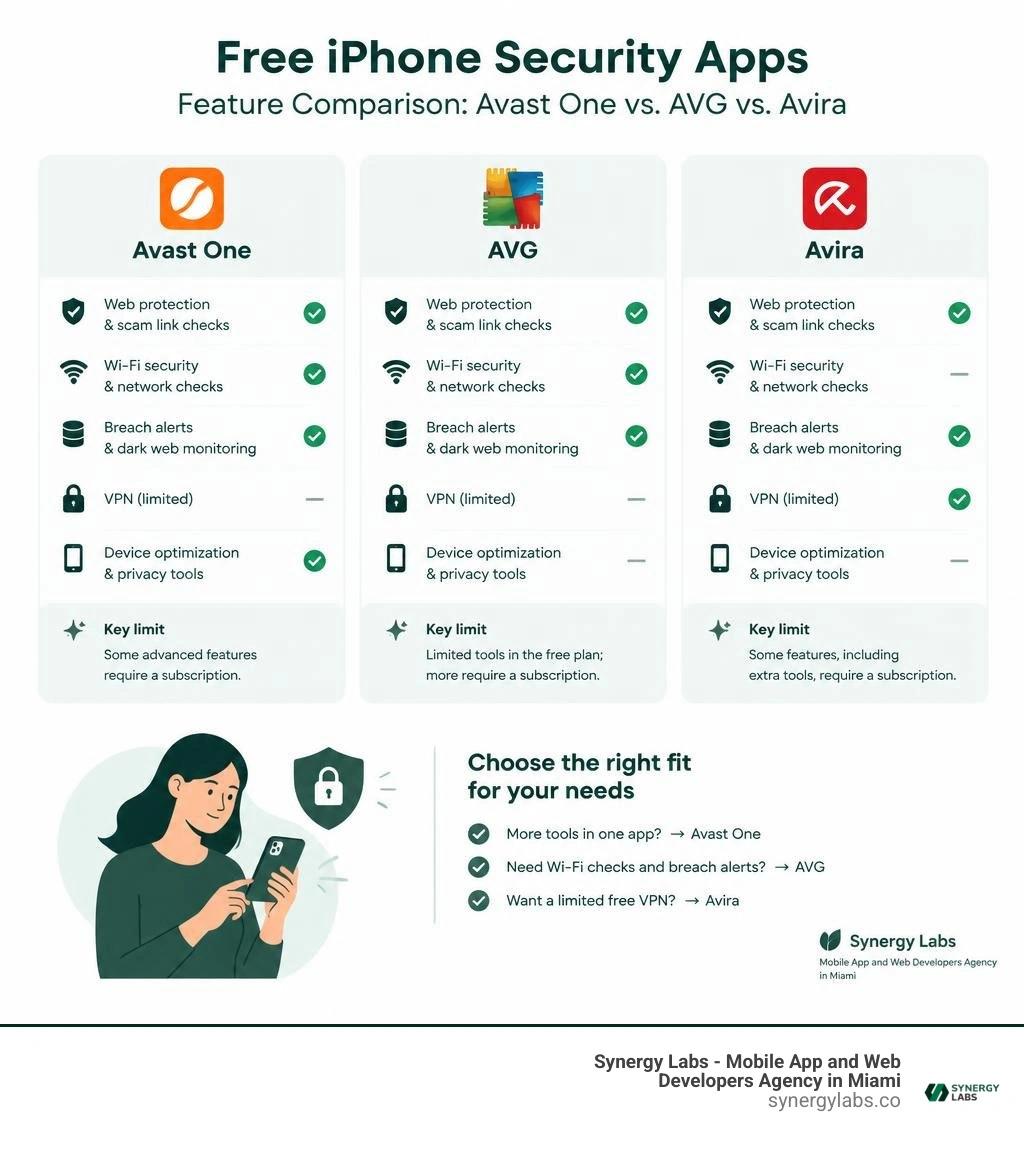
Avast One is a strong free starting point if you want several iPhone security tools in one app. Try AVG Mobile Security for Wi-Fi checks and breach alerts, or Avira Mobile Security if a limited free VPN matters most. Check each app's current free features before you install; some protections require a subscription.
You don't need a traditional antivirus scan on an iPhone. Apple's app isolation prevents security apps from scanning inside other apps. The useful extras are tools that help spot scam links, check networks, and warn you when account details appear in a breach.
I'm the director of product at Synergy Labs, and I'll help you find the free features worth using.
Key best free security app for iphone vocabulary:
- best mobile security software
- best virus protection for android phone
- best free virus protection for iphone
Do iPhones Really Need Antivirus and Security Apps in 2026?
A persistent myth in consumer tech claims that Apple hardware is completely impervious to cyber threats. While iOS remains one of the most secure consumer operating systems on the planet, believing your device is invincible creates a dangerous false sense of security.
Apple equips iPhones with world-class defenses, including hardware-backed encryption via the Secure Enclave and strict permission models. However, modern cybercriminals rarely bother attempting to write traditional file-based viruses for iOS. Instead, they target the user directly through social engineering, malicious web links, compromised network routers, and deceptive configuration profiles.
To understand why you might want additional software, consider what traditional phone antivirus suites actually do versus what an iOS security suite provides. On an iPhone, security software acts less like an all-seeing file scanner and more like a vigilant digital detective guarding your network perimeter, web browser, and personal data.
Understanding Apple's Sandbox Architecture
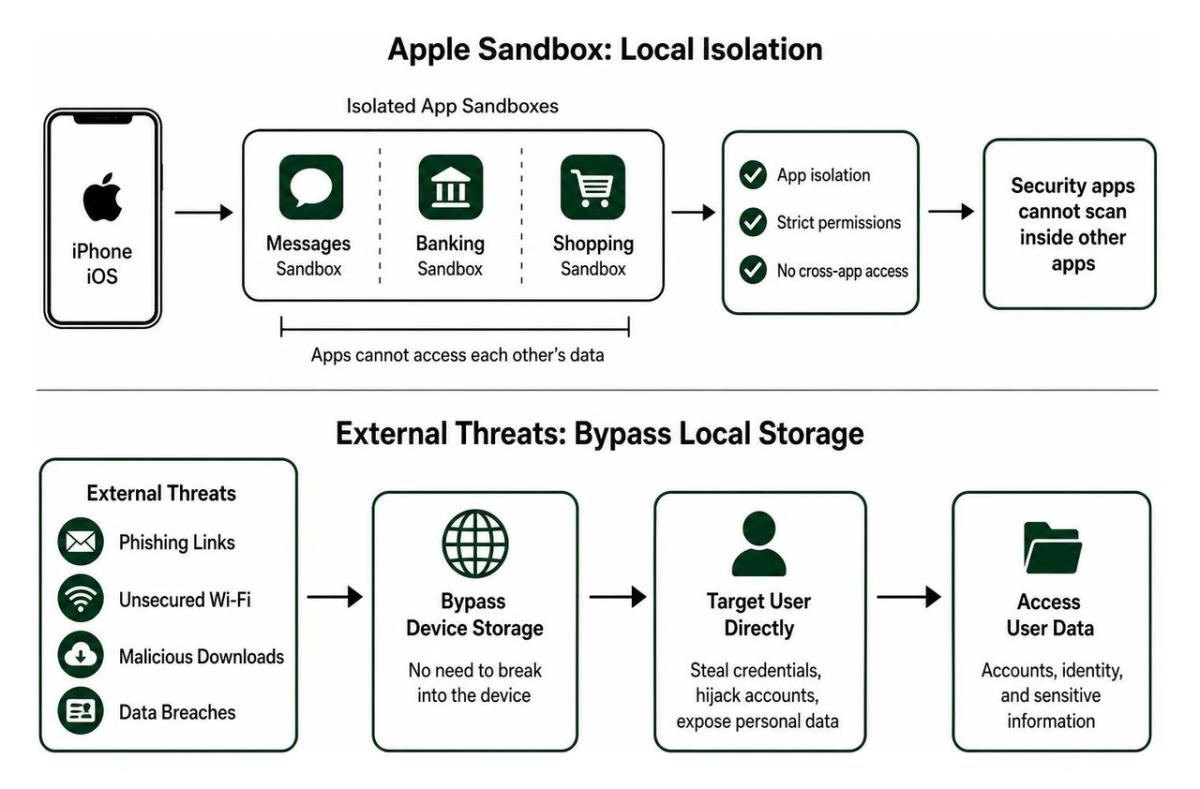
The reason traditional viruses cannot execute on an iPhone comes down to Apple's sandbox architecture. In iOS, every application lives inside its own isolated digital container—a sandbox.
- App Isolation: An app cannot read, modify, or inject code into another app's memory or dedicated file storage.
- Mandatory Code Signing: Apple enforces strict digital signatures on all executables, ensuring that unverified code cannot run.
- Kernel-Level Protections: The operating system core restricts unauthorized hardware or memory access.
- No System-Wide File Scanning: A third-party security tool cannot perform deep system scans across other apps because iOS denies it permission to peek outside its own sandbox.
As detailed in independent testing guides like Best Antivirus Apps for iPhone 2026: What Actually Works, this architecture prevents classic trojans and worms from spreading across your device. However, it also means that security apps must focus on network traffic, web filtering, and identity monitoring rather than file cleanup.
Emerging iOS Cyber Threats: Phishing, Spyware, and Unsecured Wi-Fi
Because attackers cannot easily break through Apple's sandbox, they focus on vectors that operate outside device storage. In 2026, mobile threats focus heavily on remote manipulation and credential harvesting.
- Smishing and Phishing: Fraudulent text messages and emails disguise themselves as bank alerts, parcel delivery updates, or password resets to capture your credentials.
- Man-in-the-Middle (MitM) Attacks: Insecure public Wi-Fi networks in airports or coffee shops allow bad actors to snoop on unencrypted data exchanges.
- Malicious Configuration Profiles: Deceptive websites prompt users to install custom mobile device management (MDM) profiles that reroute traffic or compromise device settings.
- Zero-Click Spyware: Highly sophisticated exploits target messaging or browser vulnerabilities without requiring user interaction.
Maintaining strong mobile app security requires layering proactive threat detection over Apple's native baseline defenses.
What to Look for in the Best Free Security App for iPhone
When evaluating security tools, avoid any utility that claims to clean your iPhone of thousands of hidden viruses. These are marketing gimmicks designed to mislead consumers. Instead, look for utilities that provide practical, network-level and identity-focused capabilities.
A high-performing security suite should provide:
- Real-Time Web Filtering: Prevents you from loading confirmed phishing pages or fraudulent payment portals.
- Wi-Fi Network Inspector: Analyzes local networks for weak router encryption, DNS hijacking, and man-in-the-middle vulnerabilities.
- Data Breach and Leak Alerts: Constantly scans dark-web databases to alert you if your email addresses or passwords appear in public credential dumps.
- Encrypted Photo Vault: Allows you to store private images behind a secondary biometric or PIN lock.
- Lightweight Battery Footprint: Operates silently in the background without draining your battery or hogging system resources.
How the Best Free Security App for iPhone Blocks Phishing and Smishing
Phishing remains the single most common threat to iPhone users. Modern security suites combat this by acting as a protective barrier between your device and the internet.
Using Safari content blocker extensions and local VPN-based packet inspectors, these apps analyze outgoing web requests in real time. If you tap a link inside a deceptive text message, the app evaluates the URL against a global, continuously updated database of malicious domains. If the site is flagged as fraudulent, the browser blocks access before the page can load your credentials.
Many modern suites also integrate AI-driven scam assistants that analyze the linguistic patterns of incoming text messages, filtering out spam before it lands in your primary inbox. This offers practical peace of mind without compromising device performance.
Free VPN and Wi-Fi Inspection Capabilities
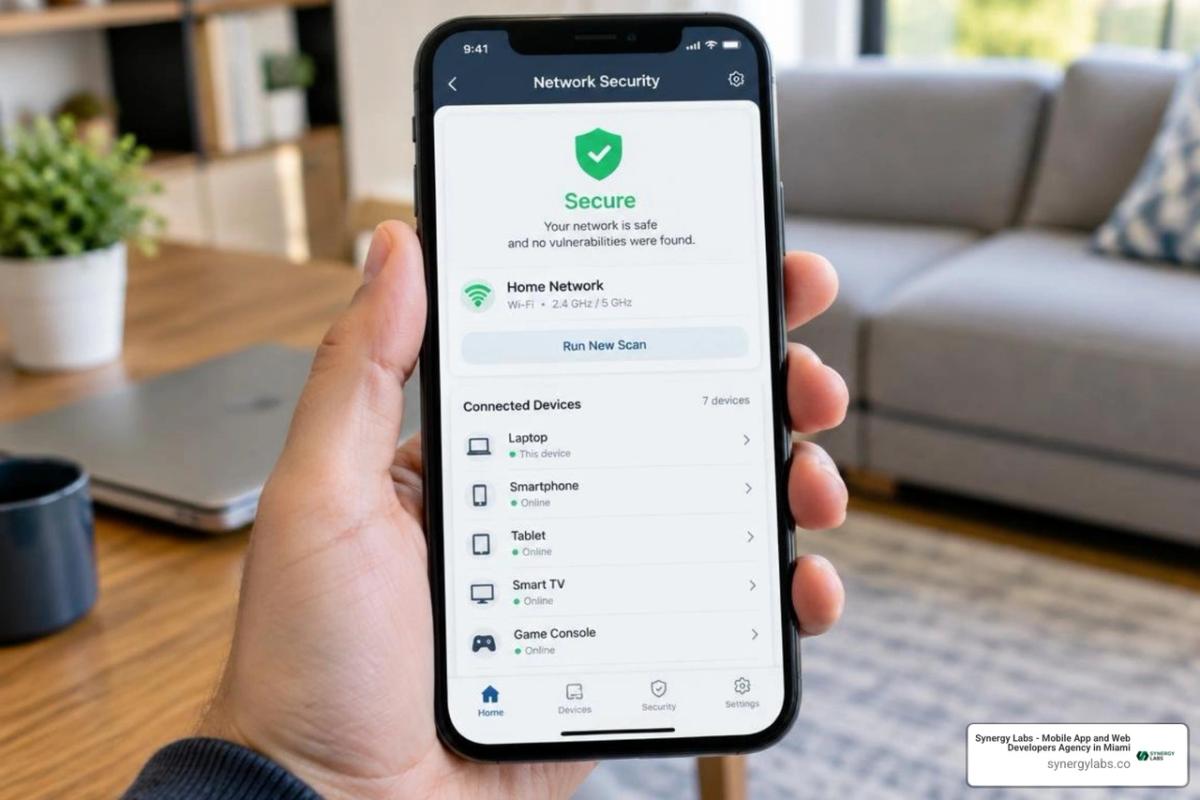
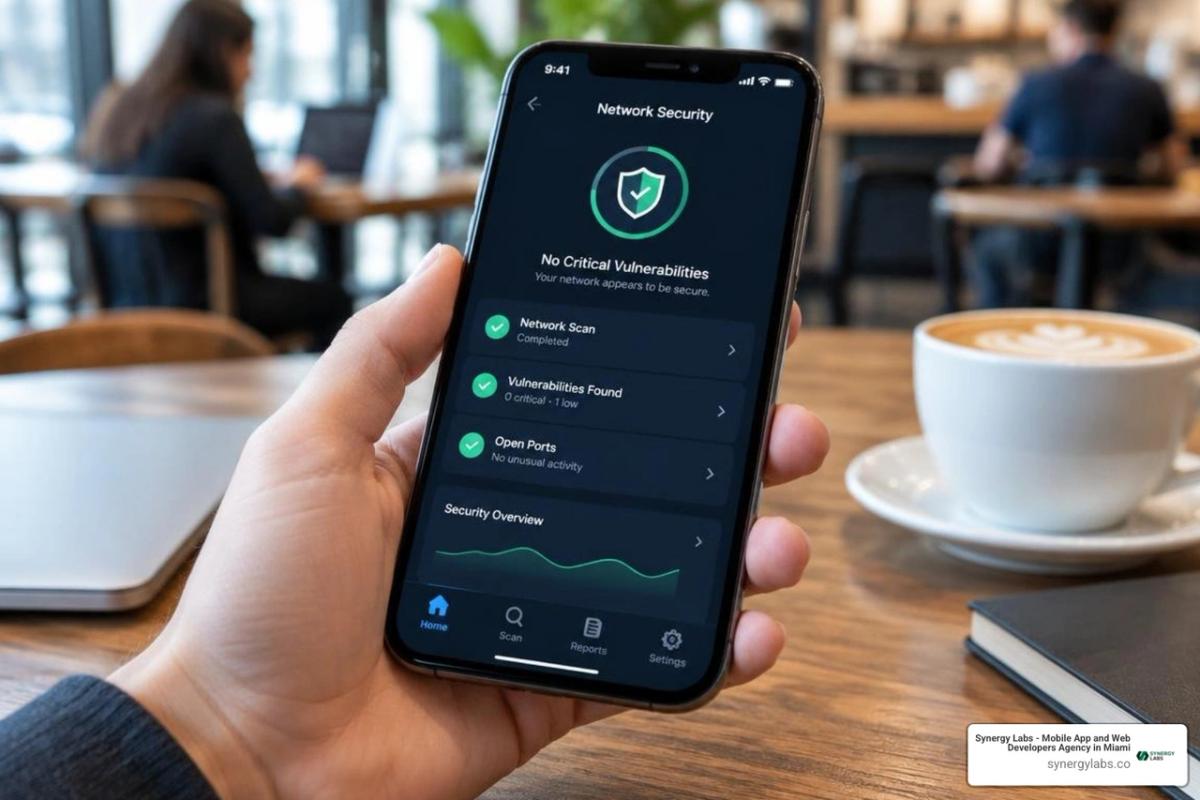
Public Wi-Fi networks present an easy entry point for digital eavesdropping. A reputable free security suite includes a Wi-Fi inspector that checks whether your current hotspot uses outdated encryption protocols (like WEP or open WPA) or exhibits signs of DNS manipulation.
Some free suites also bundle a limited Virtual Private Network (VPN). A VPN routes your internet traffic through an encrypted tunnel, shielding your browsing activity from local network snoopers.
While free VPNs provide crucial encryption when handling sensitive transactions on public hotspots, they almost always come with daily or monthly bandwidth limitations—often ranging from 100 MB per day to a few gigabytes per month.
Leading Free iOS Security Apps and What They Offer
Several established security vendors provide free suites tailored specifically to the operational realities of iOS. Evaluating their capabilities helps you select the right tool for your specific usage habits.
According to comprehensive industry analyses like Mobile Security Suites: Best All-in-One Protection for Smartphones in 2026, the leading free tools distinguish themselves through specialized features rather than generic malware scanning.
Avast One & AVG Mobile Security
Avast and AVG share underlying threat intelligence networks, offering dependable free packages.
- Avast One: Holds a strong 4.7 out of 5 rating from over 100K ratings on the App Store. It bundles an integrated network scanner, data breach monitoring for primary email accounts, an encrypted photo vault (capable of securing up to 40 photos for free), and an automated Wi-Fi inspector.
- AVG Mobile Security: Delivers straightforward Wi-Fi vulnerability scanning, basic identity leak monitoring, and a lightweight footprint designed for simplicity.
Bitdefender Mobile Security
Bitdefender is widely respected for its minimal resource impact and strict privacy policies.
- Boasts a 4.7 App Store rating and includes an integrated web protection module alongside a free daily VPN allowance (typically 200 MB per day).
- Features integrated account privacy checks that alert you if your linked credentials appear in known corporate breaches.
- Operates with minimal background battery drain (tested around 3.5% per day).
Avira Mobile Security
Avira provides a versatile collection of privacy utilities and performance tools.
- Achieves a 4.2-star rating across over 1,800 reviews on the App Store.
- Includes a free VPN limited to 100 MB per day, a privacy manager that helps restrict unwanted Siri data tracking, an integrated call blocker, and an anti-theft console.
- Features a device analyzer and photo cleaner to help free up local storage space.
TotalAV Mobile Security
TotalAV pairs network security with practical device management.
- Holds a 4.6 App Store rating, offering an intuitive interface featuring smart scans for system vulnerabilities.
- Combines data breach alerts with system cleanup tools that help identify duplicate contacts and redundant media files.
Comprehensive Threat Monitoring and Wi-Fi Scanners
The core strength of these applications lies in automated diagnostic scanning. Rather than attempting to scan local app files, these tools audit your overall system configuration.
They verify whether your iOS version contains unpatched security vulnerabilities, inspect connected local routers for open ports and default credentials, and monitor multiple email addresses across breach databases. This automated monitoring runs quietly in the background, providing immediate alerts when actionable security risks arise.
Privacy Management and Anti-Theft Tools
Beyond network security, top-tier free apps deliver localized privacy safeguards. Encrypted photo vaults provide a secondary layer of protection if someone borrows your unlocked device.
Anti-theft modules integrate with web-based dashboards to allow remote device locating, siren triggers, and lock-screen alerts. Understanding how to secure mobile apps and sensitive device storage is just as vital as defending against remote network threats.
Free vs. Paid iOS Security Apps: Are Upgrades Necessary?
Most free mobile security applications use a freemium model. While free tiers provide essential protection against everyday phishing and open network snooping, premium subscriptions unlock advanced automation and comprehensive identity protection.
Common differences between tiers include:
- VPN Bandwidth: Free tiers cap data at 100 MB to 200 MB daily; paid tiers provide unlimited data across global servers.
- Identity Theft Monitoring: Free tiers monitor one or two email addresses; paid tiers include dark-web surveillance for credit cards, phone numbers, and Social Security numbers.
- Automated Web Filtering: Free versions may require manual link verification or basic Safari extensions, whereas premium plans offer system-wide content filtering across all apps.
- Ad-Free Experience: Premium upgrades eliminate persistent in-app prompts encouraging you to purchase higher-tier plans.
Learning comprehensive mobile app protection strategies will help you determine whether your risk profile warrants a recurring subscription or if standard free protections suffice.
Is the Best Free Security App for iPhone Enough for Total Mobile Protection?
For the vast majority of consumers, a reputable free security app—combined with basic digital hygiene—is more than adequate. If you regularly keep iOS updated, avoid clicking unverified links in SMS messages, and activate your free VPN whenever connecting to public Wi-Fi, you mitigate over 95% of common mobile threats.
However, enterprise executives, cryptocurrency holders, and individuals managing highly confidential intellectual property may benefit from premium identity insurance and continuous, system-wide VPN encryption.
Frequently Asked Questions About Free iPhone Security Apps
Can a free iPhone security app scan for viruses inside other apps?
No. Apple’s sandbox model prevents third-party software from reading the internal files or code of other applications. Free security apps protect your device by monitoring network traffic, inspecting Wi-Fi networks, auditing system configurations, and filtering malicious websites before they can load in your browser.
Do free iOS security apps collect and sell user data?
It depends on the provider. Reputable cybersecurity companies provide free tiers as an entry point to encourage premium upgrades, maintaining transparent data privacy policies that respect Apple’s App Tracking Transparency framework. However, untrusted utilities from unknown developers may log your browsing activity for advertising monetization. Always verify app reviews and privacy nutrition labels in the App Store before installing.
How do I check if my iPhone has been compromised for free?
You can perform a reliable security check manually without spending money:
- Navigate to Settings > General > VPN & Device Management and verify that no unfamiliar configuration profiles or unknown VPNs are installed.
- Check Settings > Battery to see if an unknown background application is causing abnormal battery drain or data usage.
- Verify that your device is running the latest iOS release (Settings > General > Software Update).
- Run a scan using a trusted free tool like Avast One or Bitdefender to check your connected Wi-Fi network and scan your primary email address for credential leaks.
Protecting Your Digital Ecosystem with Synergy Labs
Maintaining personal iPhone security requires vigilance, regular system updates, and reliable network protection. But if your organization builds and deploys mobile solutions, securing user endpoints is only half the battle. Your digital infrastructure demands uncompromising, architectural security from the ground up.
At Synergy Labs, we engineer secure, scalable, cross-platform mobile and web applications designed to withstand modern cybersecurity threats. As an industry-leading agency, we provide direct access to senior technical leadership, matching your team with an in-shore CTO and an elite offshore development team.
Our client-centric model guarantees transparent, milestone-based payments and fixed-budget delivery, ensuring your project launches rapidly, efficiently, and securely without unexpected costs.
Whether you are building a consumer app or an enterprise platform, explore our custom mobile application development and security services to see how our team in Miami, New York, San Francisco, London, Dubai, and beyond can bring your vision to life. Connect with our engineering experts today.