

Do You Need Antivirus Software for iPhones?

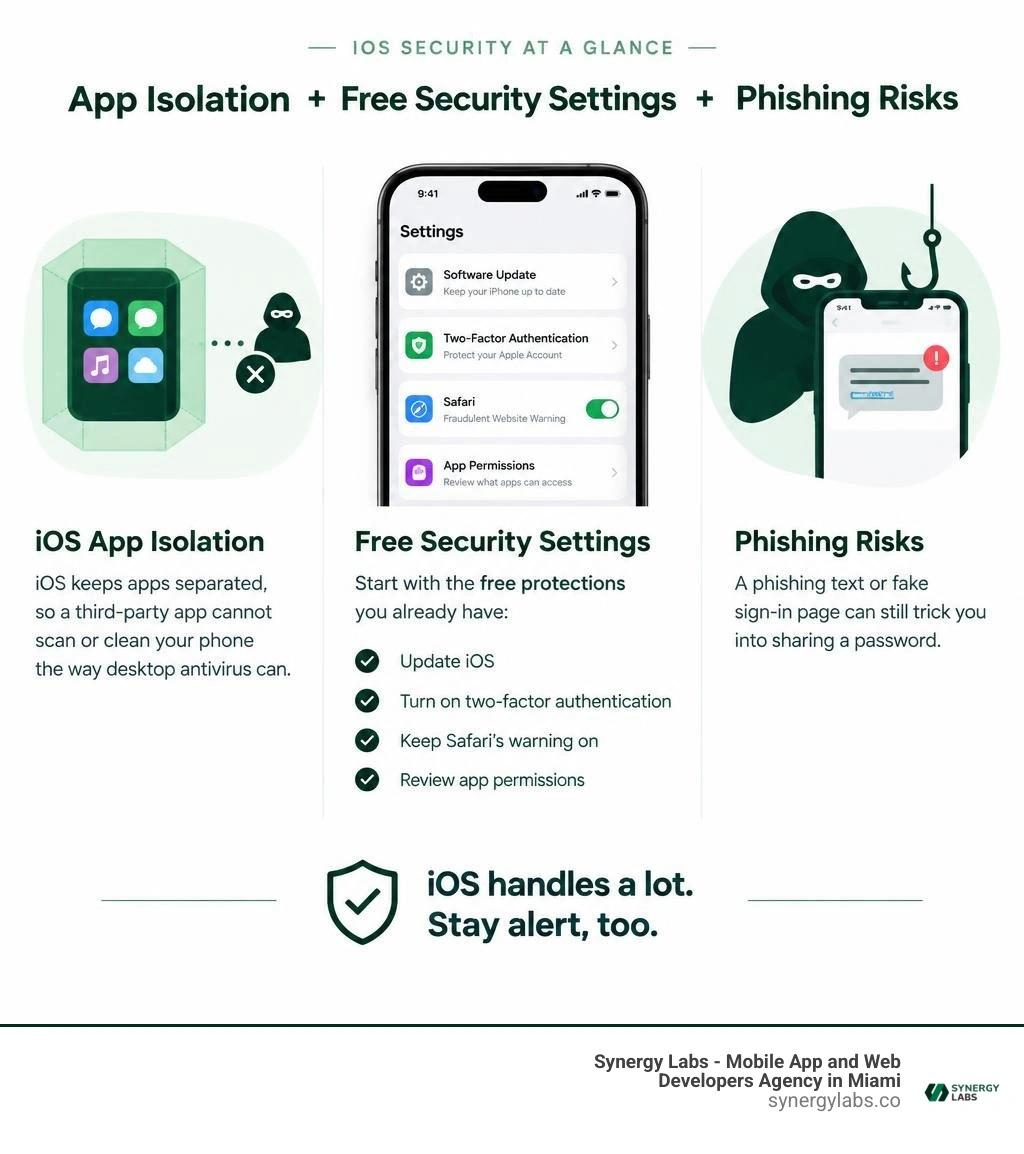
Most people do not need anti virus software for iphones. iOS isolates apps, so a third-party app cannot scan or clean your phone the way desktop antivirus can. Start with the free protections you already have: update iOS, turn on two-factor authentication for your Apple Account, keep Safari's fraudulent website warning on, and review app permissions.
Those steps do not make scams disappear. A phishing text or fake sign-in page can still trick you into sharing a password. This guide shows what iOS handles well, where you need to stay alert, and when an extra security app may help.
As director of product at Synergy Labs, I focus on making security practical without adding tools you do not need.
Easy anti virus software for iphones word list:
Do You Need Anti Virus Software for iPhones in 2026?
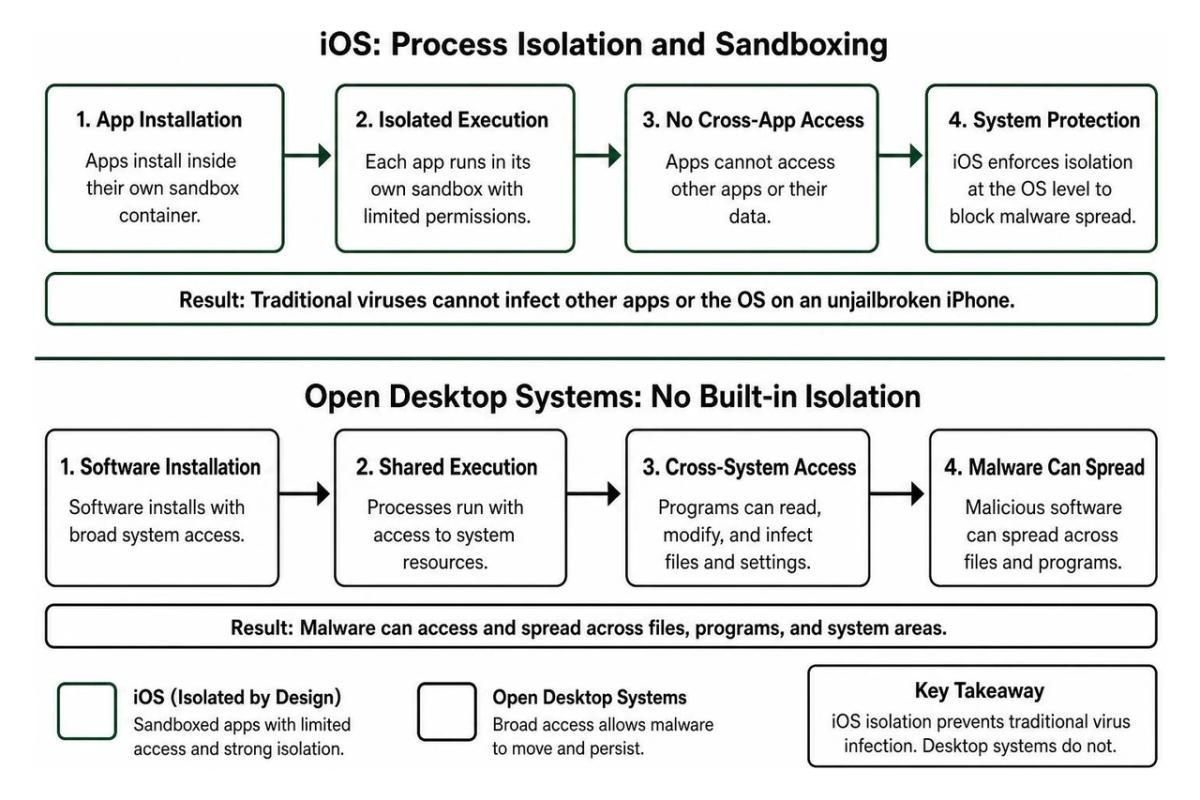
The question of whether Apple handhelds require dedicated security tooling comes down to how iOS handles application execution. On desktop environments or open operating systems, software can inspect background tasks, hook into the system kernel, and sweep through directories looking for rogue scripts. On an iPhone, every single app exists inside an isolated container known as a sandbox.
Because of this architectural structure, traditional virus infection in the classic sense—where one executable quietly infects your host operating system and spreads into neighboring files—is practically nonexistent on an unjailbroken device. When exploring phone antivirus concepts, users quickly learn that iOS simply does not have the open doors that legacy desktop platforms leave ajar.

However, modern cyber threats have changed. Attackers no longer focus heavily on writing complex, self-replicating file payloads when they can simply trick a human into handing over passwords, multi-factor codes, or corporate session tokens. Financial losses tied to cybercrime reached $12.5 billion according to annual FBI reports, and 71% of organizations experienced successful phishing attacks according to industry telemetry. While your operating system cannot catch an old-school virus, your device data remains exposed to social engineering, fake mobile profiles, malicious network traffic, and credential harvesting schemes.
How Traditional Antivirus Software for iPhones Differs from Desktop Solutions
If you install a security utility on macOS or Windows, that program gains deep system privileges. It monitors running memory pools, inspects incoming file packets, checks system registries, and kills rogue processes.
On iOS, third-party utilities run with the exact same sandboxed permissions as a standard calculator or note-taking utility. Apple deliberately denies third-party developers low-level kernel access to protect user privacy and system stability. As noted in academic guidance on mobile malware defenses, mobile operating systems handle process isolation at the root level, making conventional signature-based scanning impossible for outside apps.
Here is what this means in practice:
- No background file sweeps: An external app cannot scan other apps or read their private internal storage.
- No automatic file disinfection: If a rogue payload somehow lands inside an app directory, another security app cannot reach inside and delete it.
- Network-level and URL-focused defense: Instead of file scanning, mobile security apps work through local Virtual Private Network (VPN) filters, DNS proxies, or content-blocker APIs to stop web threats before they hit your browser.
Evaluating Free vs Paid Anti Virus Software for iPhones
Since mobile security apps cannot clean file systems, what do paid tiers actually offer over built-in controls or free alternatives?
When looking for the best free security app for iphone, most users find that free tiers provide basic network checks, safe web shields, and single-address data breach lookup tools. Upgraded subscription tiers generally bundle automated identity monitoring, multi-address dark web surveillance, unlimited VPN bandwidth, and SMS text filtering engines.
For many everyday mobile users, these extra layers are unnecessary if you rely on Safari's integrated anti-phishing filters, iCloud Keychain breach notifications, and common sense. However, for professionals handling critical corporate credentials, business owners, or frequent global travelers, extra automated network and smishing filters can offer peace of mind. To dive deeper into comparing external options, check out our comprehensive analysis on the best mobile security software guide 2026.
How iOS Architecture Protects Your Data Without Third-Party Scanners
Apple built iOS from the ground up around defensive hardware and software controls. Instead of trusting users to maintain security software, the platform enforces data isolation at the silicon level.
At the foundation of this setup is the Secure Enclave—a dedicated hardware coprocessor isolated from the primary application CPU. The Secure Enclave handles cryptographic keys, Face ID biometric matching, and hardware encryption completely independently of the rest of the OS. Even if an operating system vulnerability were to occur, your biometric data and low-level encryption keys remain untouchable. Understanding these layers is part of mastering core mobile app security and engineering resilient digital experiences.
App Store Review and Sideloading Restrictions
Apple enforces strict code signing across its entire mobile ecosystem. Every binary allowed on an iPhone must be digitally signed with a verified developer certificate and reviewed by Apple’s automated and human testing pipelines.
- Static and dynamic analysis: App submissions undergo checks for hidden code execution, private API calls, and unauthorized tracking frameworks.
- Runtime memory defense: iOS employs Address Space Layout Randomization (ASLR) and Data Execution Prevention (DEP), making memory-injection attacks extremely difficult to execute.
- Restricted configuration profiles: Unless an enterprise enrolls a managed device or a user explicitly authorizes a Mobile Device Management (MDM) profile, untrusted installation files cannot run.
For teams building internal tools or consumer products, working with an experienced partner like our iphone apps development miami team ensures that your builds follow every strict code-signing standard without triggering deployment roadblocks.
Built-in Web and Safari Privacy Defenses
Safari includes multiple integrated defenses that run quietly without extra battery drain:
- Fraudulent Website Warning: Safari cross-references site addresses against updated cloud databases of known phishing vectors without logging your personal browsing history.
- Intelligent Tracking Prevention: Machine learning on your device identifies and blocks cross-site trackers from fingerprinting your device.
- Passkeys and iCloud Keychain: Native end-to-end encrypted credential management eliminates simple credential theft by replacing traditional passwords with cryptographic public-private keypairs.
- Isolated Web Processes: Every Safari tab runs in its own memory container, preventing cross-tab data exfiltration.
Real Threats iOS Native Protections Cannot Block Alone
Even with rock-solid architectural sandboxing, attackers have simply pivoted from attacking system code to attacking human psychology. An operating system cannot stop you from believing a fake urgent message from your bank.
Identifying Phishing and Social Engineering Scams
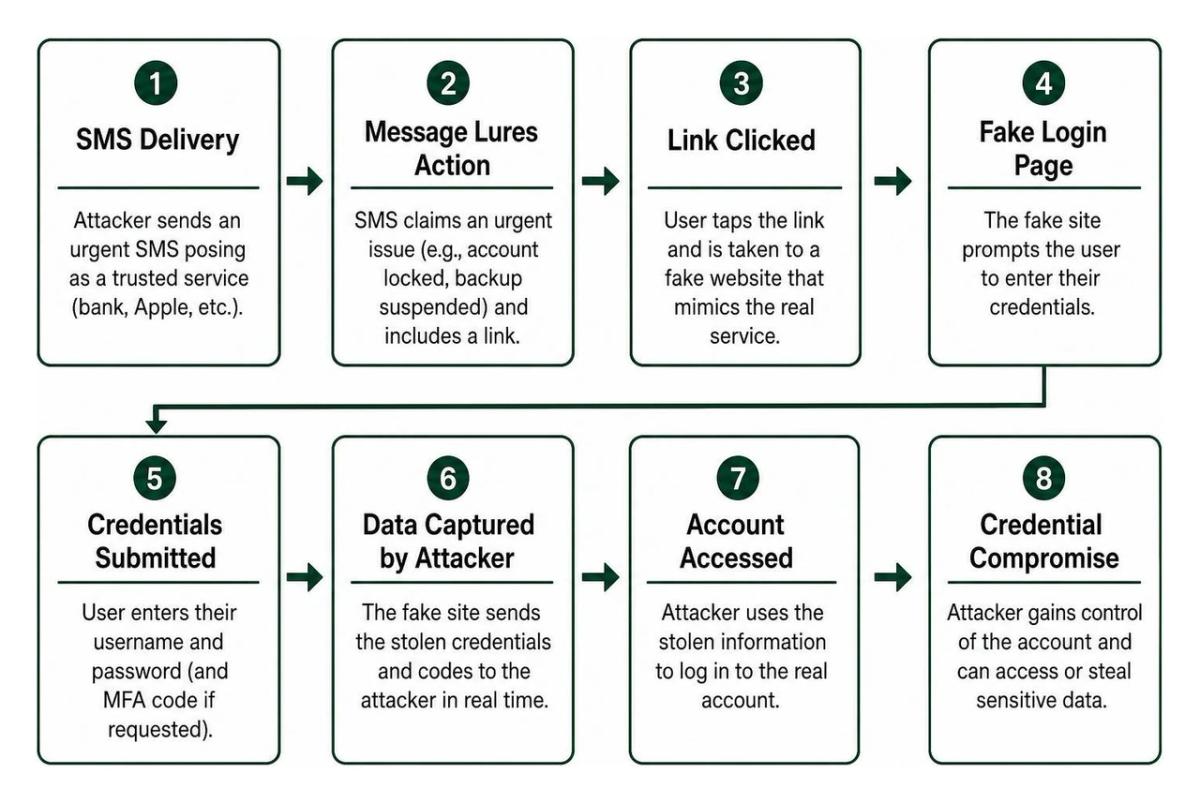
Phishing and SMS-based phishing (smishing) are the primary entry points for personal and corporate compromises in 2026. Attackers design convincing portals that replicate bank dashboards, shipping services, and Apple Account logins. To explore how modern systems defend against these vectors, review key engineering strategies on how to secure mobile apps.
Watch out for these common iPhone-targeted attacks:
- The "Urgent Account Suspension" alert: An SMS stating your cloud backup or bank account has been locked, linking to an off-domain URL designed to capture credentials and multi-factor codes.
- Fake calendar invitations: Spam invitations pushed to your calendar containing links to spam giveaways or malicious configuration profile downloads.
- Deepfake voice and video lures: Scammers using artificial media to mimic corporate executives or family members requesting immediate wire transfers or security code verification.
- MFA fatigue attacks: Threat actors bombarding your phone with continuous authentication prompts hoping you tap "Approve" out of frustration.
Public Wi-Fi Risks and Network Interception
Connecting to unverified open Wi-Fi networks in airports, hotels, and cafes exposes your connection to interception. Bad actors can establish "Evil Twin" hotspots matching legitimate network names.
While modern HTTPS encryption protects the raw contents of most web traffic, open networks still expose:
- Unencrypted DNS requests, revealing every domain you connect to.
- Metadata regarding connected apps and services.
- Opportunities for malicious captive portals designed to harvest email addresses or prompt unsafe certificate installations.
Using an encrypted connection or turning on cellular data bypasses these local intercept points completely.
Essential Native Settings and Practices to Secure Your iPhone
You do not need to spend money on subscription suites to keep your personal data secure. Enabling Apple's native security settings provides high-grade defense against real-world threats:
- Turn on Automatic iOS Updates: Enable automatic system updates and Rapid Security Responses (Settings > General > Software Update) so critical zero-day patches install immediately.
- Enable Two-Factor Authentication (2FA): Ensure your Apple Account uses hardware-bound 2FA or physical security keys (Settings > [Your Name] > Sign-In & Security).
- Activate Safari Fraudulent Website Warning: Verify that anti-phishing protection is running (Settings > Safari > Fraudulent Website Warning).
- Audit App Permissions Periodically: Review which applications have access to your precise location, local network, camera, and microphone (Settings > Privacy & Security).
- Turn on Lockdown Mode for High-Threat Environments: If you are an executive, journalist, or handling sensitive organizational data under targeted threat conditions, enable Lockdown Mode (Settings > Privacy & Security > Lockdown Mode) to strip away complex web fonts, message attachments, and unverified configuration profiles.
- Review Installed Configuration Profiles: Check that no unauthorized MDM profiles are managing your network settings (Settings > General > VPN & Device Management).
Frequently Asked Questions about iPhone Antivirus
Can iPhones get malware or viruses from browsing websites?
Under normal conditions, simply visiting a website on an updated iPhone running Safari will not install a virus. iOS prevents web pages from executing unauthorized binaries outside the browser sandbox. However, websites can redirect you to malicious phishing portals, prompt you to install rogue enterprise profiles, or attempt social engineering tricks. Keeping iOS updated ensures that rare browser engine vulnerabilities are patched before attackers can exploit them.
Do third-party security apps drain iPhone battery life?
Yes, certain third-party security tools can noticeably impact battery health if configured improperly. Apps that run continuous local VPN tunnels to inspect web traffic or run persistent background location tracking consume additional system resources. High-quality security utilities generally keep daily battery impact under 3%, but relying on native Safari content blocking tools requires zero added battery overhead.
What are the main signs that an iPhone has been compromised?
Because traditional viruses do not spread on iOS, device issues are usually tied to battery degradation or rogue profiles rather than a stealth system infection. However, indicators of an account or device compromise include:
- Unexplained spikes in background cellular data usage.
- Rapid battery drain paired with intense overheating when idling.
- Unrecognized configuration profiles listed under your device management settings.
- Messages or emails sent from your accounts without your knowledge.
- Sudden lockouts from your Apple Account or financial apps.
Building Resilient Mobile Defenses with Synergy Labs
Protecting modern mobile experiences requires a shift from outdated virus scanners to robust native architecture, disciplined credential management, and secure software development. While the built-in safeguards of iOS keep common malicious software at bay, building custom applications that protect your users' data takes intentional engineering from the very first line of code.
At Synergy Labs, we engineer secure, enterprise-grade mobile and web applications designed to withstand modern cybersecurity threats. Whether you are launching a new product or modernizing an existing enterprise platform, our team provides:
- Fixed-budget delivery: Predictable project costs with zero hidden budget surprises.
- In-shore CTO leadership with elite offshore development: High-touch technical strategy backed by senior talent and rapid execution.
- Milestone-based payments: Transparent project phases where you only pay when verified deliverables are met.
Ready to bring your mobile product to life with rock-solid security and user-centered design? Explore our custom app development services or visit Synergy Labs today to schedule an architectural consultation with our senior engineering team.