Can You Unlock a Locked Phone and Switch Carriers?

Yes, you can unlock a carrier-locked phone if it meets your carrier's eligibility rules. In most cases, the device must be paid off, not reported lost or stolen, and tied to an account in good standing. Start by checking the phone's carrier-lock status, finding its IMEI number, and submitting an unlock request through the carrier that originally sold it.
A carrier unlock removes the network restriction, so you can use a compatible SIM or eSIM from another provider. It does not remove a forgotten PIN, password, Face ID, fingerprint, or Google account check. Those are screen and account-security locks, and they follow very different rules. If you are dealing with Apple devices, you can explore how you can unlock a locked iPhone or find troubleshooting answers for how to unlock your iPhone. Conversely, knowing how to securely lock your phone prevents unauthorized access to your private data.
Before switching, confirm that the phone supports your new carrier's network bands and that its IMEI is accepted. An unlocked phone is more flexible, but it is not a magic universal remote for every network.
As director of product at Synergy Labs, I approach device freedom the same way we approach secure apps: use the official path first, protect the data, and verify compatibility before making a change.
Can You Unlock a Locked Phone? Understanding Lock Types and Legality
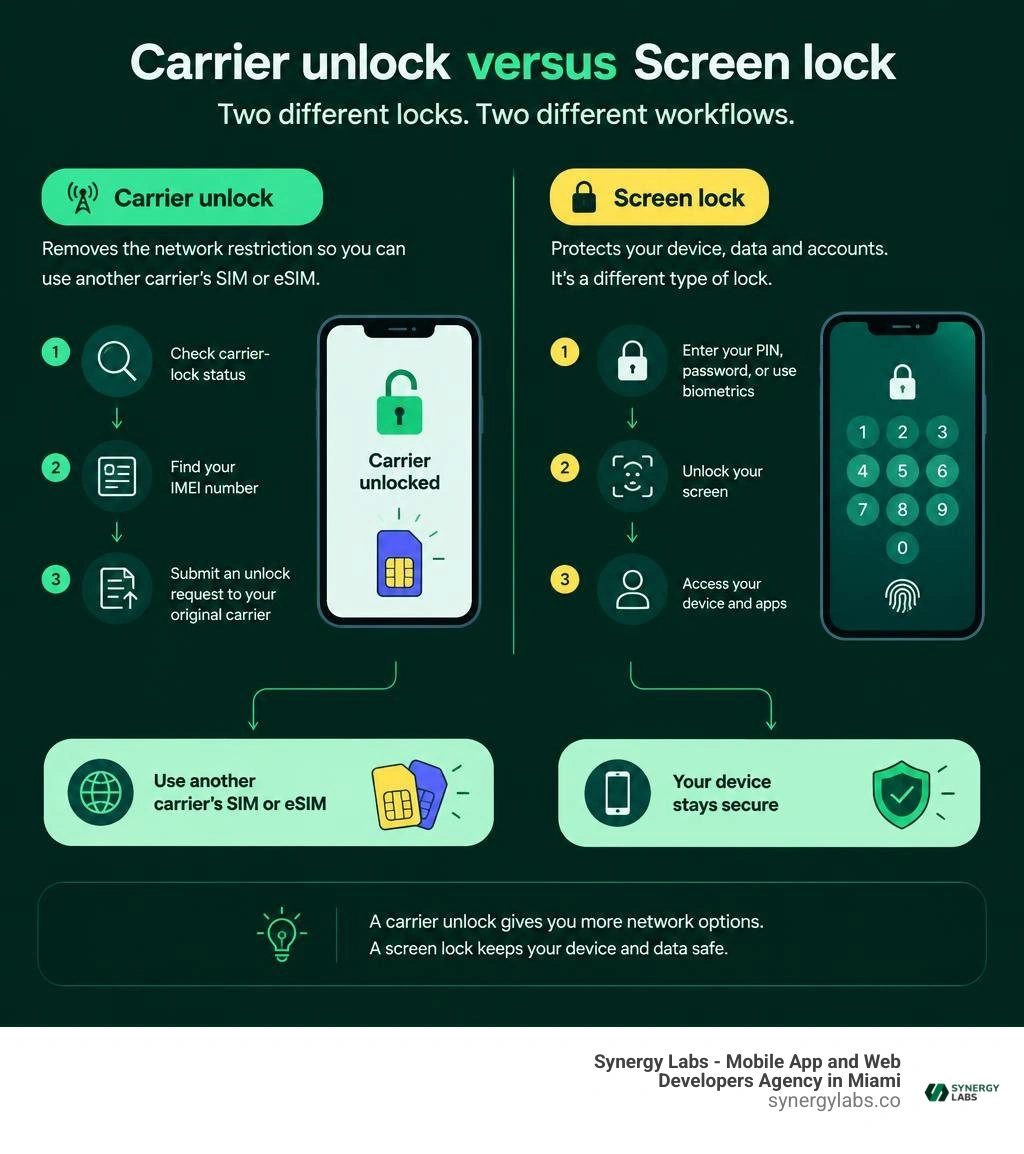
When consumers ask whether they can unlock a locked phone, they often conflate two distinct mechanisms: the carrier lock and the local device lock. A carrier lock is a software policy imposed by mobile network operators to ensure that a subsidized or financed smartphone remains active exclusively on their network until contractual requirements are satisfied.
The legal foundation governing mobile network unlocking is well established. Under Federal Communications Commission (FCC) regulations and the voluntary Consumer Code for Wireless Service established by CTIA, nationwide service providers must establish clear, publicly accessible policies regarding device unlocking. Signatories implemented these standardized baseline rules to ensure that consumers in good standing can migrate their devices once financial agreements are met.
Furthermore, device unlocking complies with modern Digital Millennium Copyright Act (DMCA) exemptions, which clarify that circumvention of technological measures to enable a handset to connect to a different wireless telecommunications network is legally permissible when authorized by the device owner and executed through legitimate methods. Comprehensive consumer resources, such as the Consumer Reports analysis on How to Unlock Your Phone From Any Major Carrier, highlight that regulatory protections ensure customers are not unfairly penalized once device costs are completely cleared.
Carrier Lock vs Screen Lock: Can You Unlock a Locked Phone?
To properly resolve access issues, we must establish a clear technical distinction between a carrier lock and a screen lock:
- Carrier Lock (SIM/Network Lock): Restricts the baseband modem of the mobile device to accept SIM and eSIM profiles solely from the originating carrier. When an unauthorized SIM card is inserted, the operating system generates a network-lock prompt requesting a network control key or displays an unsupported SIM banner. Carrier locks exist at the cellular firmware level and do not restrict access to applications, settings, photos, or personal files stored locally on the handset.
- Screen Lock (User Authentication): A local cryptographic barrier designed to safeguard personal data from unauthorized physical access. Configured via the operating system, it leverages credentials such as alphanumeric passcodes, pattern gestures, or biometric inputs like Touch ID, Face ID, or fingerprint scans. For example, learning how to properly lock Android phone with fingerprint protection ensures that device storage remains encrypted using hardware-backed key storage modules.
- Account Lock (Cloud/Factory Reset Protection): An anti-theft security layer implemented at the platform level (Apple Activation Lock or Google Factory Reset Protection). This lock persists across operating system resets, preventing unauthorized provisioning if the primary account credentials are unknown.
When managing user devices or deploying enterprise mobile applications, understanding these functional layers prevents configuration errors and ensures that administrative policies do not inadvertently lock users out of their hardware.
Compatibility Checks: Verifying Network Bands and Unlocked Status
Before submitting an unlock request or migrating to a new service provider, you must confirm both the current lock state of your phone and its underlying radio hardware compatibility.
How to Check Carrier Lock Status
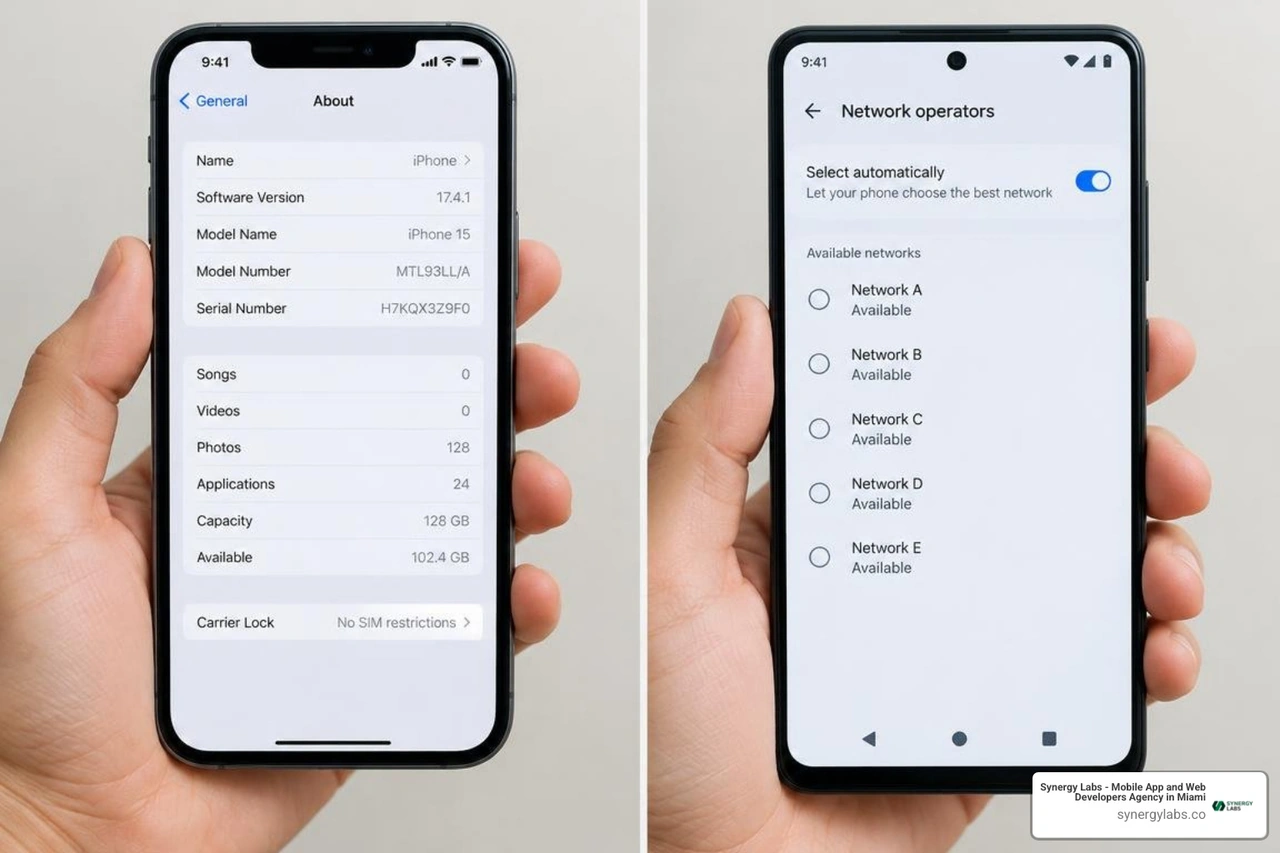
- On iOS (iOS 14 through iOS 19+ in 2026): Navigate to Settings > General > About. Scroll down to locate the Carrier Lock field. If the system displays No SIM restrictions, the device is fully carrier-unlocked.
- On Android (Samsung One UI, Pixel UI, etc.): Navigate to Settings > Connections (or Network & internet) > Mobile networks > Network operators. Toggle off automatic selection; if multiple competitor networks populate the search list, or if the SIM Status under Settings > About phone > Status information > SIM card status states unlocked/ready, your device is unrestricted.
- Direct Carrier Verification: Retrieve the International Mobile Equipment Identity (IMEI) number by dialing
*#06# into the device dialer. Contact the carrier or input the IMEI into their customer support portal to obtain an authoritative status check.
Hardware and Radio Band Compatibility
An unlocked device will only function on a competitor network if its integrated modem supports the radio frequency bands utilized by that carrier. Contemporary 5G architectures utilize a combination of Low-Band (Sub-1GHz), Mid-Band (C-Band, 2.5GHz–3.7GHz), and High-Band (mmWave). While flagship modern devices manufactured after 2020 feature broad multi-band global modems, select carrier-specific variants may lack specific mmWave antennas or localized 5G frequencies.
Always input your device IMEI into the target carrier’s "Bring Your Own Device" (BYOD) verification tool to confirm support for VoLTE (Voice over LTE), Wi-Fi Calling, and specific 5G standalone (SA) deployments before porting numbers.
Step-by-Step Guide to Unlocking Your Phone Across Major Carriers
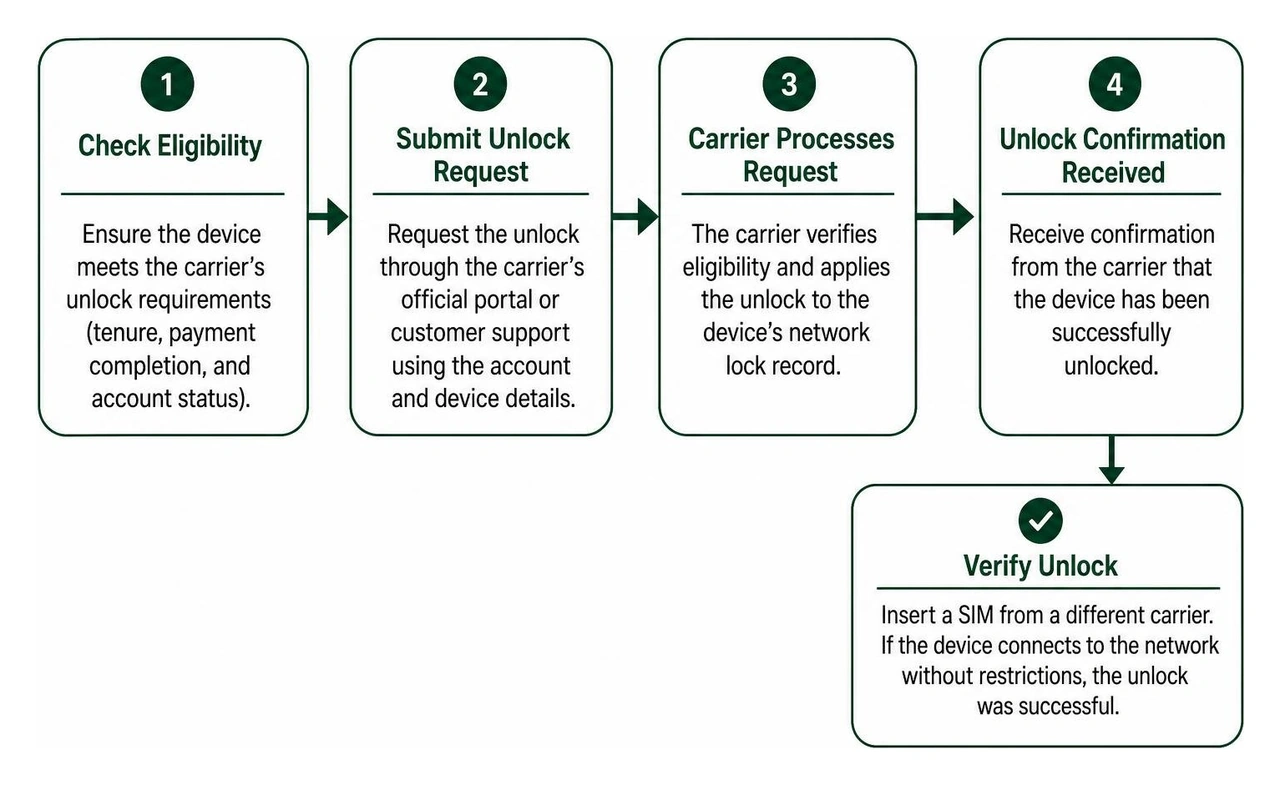
Carrier unlocking follows a standardized workflow across all major network operators. While the underlying process is straightforward, each carrier maintains specific operational guidelines regarding tenure, payment completion, and portal access.
AT&T, T-Mobile, and Verizon Unlock Requirements
Navigating carrier requirements can present administrative hurdles, as documented in media analyses covering how Switching cell phone carriers can be challenging. Below are the technical requirements and actionable steps for major carriers:
1. AT&T Unlocking Framework
- Eligibility Criteria: The device must be fully paid off (all installment plans completed), active on an AT&T account for a minimum of 60 days on postpaid plans or 6 months on AT&T Prepaid, not reported lost, stolen, or associated with fraudulent activity, and the account balance must be past-due free.
- Actionable Steps:
- Obtain your 15-digit IMEI number via
*#06#. - Access the official AT&T Device Unlock Portal online.
- Select "Submit an unlock request," input the IMEI, account details, and a functional email address.
- Confirm the verification link sent via email within 24 hours.
- Once approved (typically within 2 to 5 business days), AT&T transmits the over-the-air provisioning command for iOS devices or emails a network unlock code (NCK) for Android hardware.
2. T-Mobile Unlocking Framework
- Eligibility Criteria: The handset must be a T-Mobile device, fully paid off, active on the network for at least 40 days for postpaid lines, and the account must be in good standing. Prepaid devices require 12 months of active service or more than $100 in service refills since initial activation. T-Mobile limits unlocks to no more than two devices per service line per 12-month period.
- Actionable Steps:
- For Android devices: Connect to Wi-Fi, open Settings > Connections > More connection settings > Network Unlock, and tap Permanent Unlock.
- For iOS devices: Once T-Mobile processes the authorization internally (often automated within 2 business days of final device payoff), insert the new carrier SIM or refresh the eSIM profile to complete activation.
- If automated processing fails, submit a manual request via the T-Mobile customer service application or online account dashboard.
3. Verizon Unlocking Framework
- Eligibility Criteria: Verizon maintains an automated unlocking mechanism. Devices purchased directly from Verizon or authorized retailers are locked for exactly 60 days following initial device activation. This policy applies equally to postpaid and prepaid hardware, regardless of whether the handset is financed on an installment plan, provided the account remains in good standing and is not flagged for fraud.
- Actionable Steps:
- Maintain uninterrupted service for 60 days post-activation.
- Following the 60-day window, Verizon’s backend provisioning system automatically transmits the unlock command over the air.
- Restart your device with an alternative carrier SIM inserted to verify network registration. No manual web portal submission is required.
Expedited Unlocks for Military Deployment
In adherence to CTIA commitments and federal guidelines, personnel deployed in the United States Armed Services are eligible for expedited carrier unlocking prior to standard contract fulfillment or tenure minimums:
- Eligibility and Proof: Active-duty personnel deployed outside their service provider's domestic coverage footprint can request immediate network release. Submission of official military deployment orders or a letter from a commanding officer is mandatory.
- Operational Execution: Providers bypass remaining tenure requirements (such as AT&T's 60-day or T-Mobile's 40-day active-line rules). Account holders must contact their provider’s specialized military support desk directly to upload digital verification. Unlocking is typically processed within 24 to 48 hours, enabling personnel to utilize regional overseas SIM cards instantly upon arrival at international bases.
Screen Lockouts, Factory Reset Protection, and Account Recovery
While carrier locks dictate SIM connectivity, user authentication lockouts prevent direct interaction with the mobile operating system. If you forget a screen PIN or pattern, standard cellular carrier unlocks will not bypass the cryptographic protections safeguarding user storage.
When and How Can You Unlock a Locked Phone Without Losing Data?
Modern mobile operating systems utilize file-based encryption (FBE) where the encryption keys are derived directly from the user's passcode and stored within hardware isolation chips (such as Apple's Secure Enclave, Google's Titan M, or Samsung Knox). Consequently, completely bypassing a screen lock without data loss is only achievable under specific, pre-configured conditions.

1. Biometric Authentication Fallbacks
If the device has not undergone a power cycle (reboot) and has not exceeded operating system timeouts (typically 48 to 72 hours of biometric inactivity), you can use registered biometric sensors to enter the device and immediately perform a comprehensive local or cloud backup.
2. Android Extend Unlock (Smart Lock)
If you previously configured Android's Extend Unlock feature, your device may remain unlocked when connected to a trusted Bluetooth peripheral (such as an automobile entertainment system or smart watch) or while located within a geofenced trusted physical location. Once accessible, users can back up critical files or modify security settings before the next lock state triggers.
3. Samsung SmartThings Find / Previous-Lock Feature
- Legacy Remote Unlock: On pre-configured Samsung devices connected to an active Samsung Account with remote unlock permissions enabled, users previously could unlock screens via the SmartThings Find web portal. Recent security updates have phased out direct remote PIN clearing in favor of account-driven recovery.
- 72-Hour Previous PIN Window (One UI 6.1+): Devices running modern One UI versions provide a 72-hour grace period after changing a screen lock. If you set a new PIN and forget it, tapping the "Forgot PIN" prompt allows you to unlock the handset using the previous credential, provided the attempt occurs within 72 hours of the update.
4. Official Remote Administration
For corporate and managed devices, enterprise administrators can leverage Mobile Device Management (MDM) platforms to issue administrative unlock tokens or temporary PIN overrides without initiating destructive wipes. For personal devices, features like voice lock Android guide 2026 methods or cloud-based recovery platforms can assist users who established reliable voice or account authentications ahead of time.
If no biometric, trusted-device, or vendor-specific recovery fallback exists, a complete device reset is unavoidable to restore hardware functionality.
Managing Second-Hand Devices and Factory Reset Protection (FRP)
Purchasing or receiving a pre-owned handset introduces the risk of encountering account-level security locks:
- Google Factory Reset Protection (FRP): Introduced in Android 5.1 and enforced across modern Android versions, FRP is activated whenever a device is reset via recovery mode (hardware buttons) rather than through the internal Settings menu. Upon booting, the setup wizard prompts for the Google Account credentials previously synchronized on the device.
- Apple Activation Lock: Integrated into Apple's Find My infrastructure, Activation Lock prevents device provisioning after a wipe unless the associated Apple ID and password are authenticated, or the original alphanumeric passcode is supplied.
Resolving these locks requires strict operational steps:
- Legitimate Resolution via Seller: The previous owner must log into their cloud account (iCloud.com or Google Account Security portal) and remotely remove the device from their registered hardware list.
- Carrier & Manufacturer Tier Escalation: If you possess verifiable proof of purchase (such as an itemized commercial receipt showing the serial number and IMEI), authorized manufacturer service desks can review and execute hardware-level lock removals.
- Community Diagnostics: When troubleshooting lock behaviors on specific Android hardware, consulting resources such as the iFixit hardware discussion on How to unlock carrier lock phone? - realmec53 provides insights into distinguishing modem band restrictions from deep operating system account locks.
A widespread search exists across the web for instant unlock software, "emergency dialer bypass codes," and third-party unlock boxes. While commercial services exist that aggregate legitimate carrier unlock portals, using unverified third-party tools or modified firmware packages introduces extreme security and operational risks.
To protect personal and corporate assets, adhere to robust mobile security software standards and avoid running unverified executable packages that claim to bypass cryptographic hardware protections.
- Device Bricking and Baseband Corruption: Unofficial flashing utilities often overwrite critical NVRAM and modem partitions. A corrupted baseband modem renders the smartphone incapable of registering cellular signals, permanently destroying cellular calling, SMS, and data functions.
- Malware and Spyware Injection: Third-party "one-click unlock" desktop executables frequently distribute trojans, credential stealers, and keyloggers. Users attempting to unlock their phones on a personal computer may inadvertently compromise their local workstations and private network infrastructure.
- Voided Hardware Warranties: Rooting, bootloader unlocking, or deploying custom boot images trips hardware security flags (such as Samsung Knox bit eFUSEs). Tripping these security mechanisms permanently disables enterprise security apps, mobile banking platforms, and biometric payment systems.
- Data Breach Vulnerabilities: Bypassing standard platform protections requires disabling core encryption safeguards, exposing local databases to physical extraction and violating fundamental data privacy standards.
- Financial Fraud via Scam Portals: Many online unlock portals promise instant unlocks for a nominal fee, only to request successive payments for non-existent server access keys, ultimately failing to deliver functional codes.
Frequently Asked Questions about Unlocking Locked Phones
How long does it take for a carrier to process an unlock request?
Most domestic carriers process standard device unlock requests within 48 business hours. However, timelines vary based on network infrastructure and verification needs. AT&T requests generally complete within 2 to 5 business days, while T-Mobile often finishes authorization within 2 business days. Verizon unlocks execute automatically after 60 days of active service without requiring administrative processing time. Once authorized, iOS devices update their provisioning profile nearly instantaneously upon connecting to a Wi-Fi or cellular data connection.
Does unlocking a phone erase personal photos and apps?
A standard carrier unlock (network SIM unlock) does not erase photos, downloaded apps, contacts, or internal files. It simply updates the cellular modem configuration to permit connections to competing wireless frequencies. In contrast, unlocking a phone due to a forgotten screen PIN or lock-screen pattern typically requires a factory reset, which completely wipes all local data unless a remote or biometric bypass was established before the lockout.
Is it legal to unlock a phone before paying off the contract?
Under United States law and the CTIA regulatory framework, consumers possess the right to unlock their devices once all contractual and financial obligations are met. While third-party unlocking of a financed handset is not explicitly criminalized under current DMCA exemptions, doing so directly violates your service agreement with the carrier. The carrier retains the right to accelerate all remaining hardware balances, impose early termination fees, and blacklist the device IMEI across shared national equipment registries (preventing network activation across all domestic carriers) if the account defaults.
Securing Your Mobile Ecosystem with Synergy Labs
Navigating the boundaries between hardware security, carrier provisioning, and user authentication requires a deep understanding of mobile architecture. At Synergy Labs, we engineer custom, scalable, cross-platform mobile and web applications built from the ground up with resilient security frameworks. Our development methodologies guarantee that your mobile apps protect end-user integrity while functioning seamlessly across varied hardware platforms, global carrier networks, and enterprise management systems.
When developing complex mobile platforms, maintaining control over security and performance is paramount. Synergy Labs offers an agile, client-focused development experience featuring:
- In-Shore CTO Leadership with an Elite Offshore Engineering Team: Direct collaboration with senior technology leadership paired with cost-effective, high-velocity development pipelines.
- Fixed-Budget Model: Predictable project costs without unexpected billing overruns, ensuring total financial transparency.
- Milestone-Based Payments: You only disburse funds upon successful completion and verification of predefined development stages.
Whether you are building enterprise mobile solutions requiring robust device security policies or launching a consumer application for global deployment, our team provides the technical expertise and ongoing support needed to succeed. Explore our custom mobile app development and security solutions today to accelerate your product roadmap and build world-class digital experiences.


.avif)

.avif)


