

Choosing a Mobile App Tech Stack in 2026

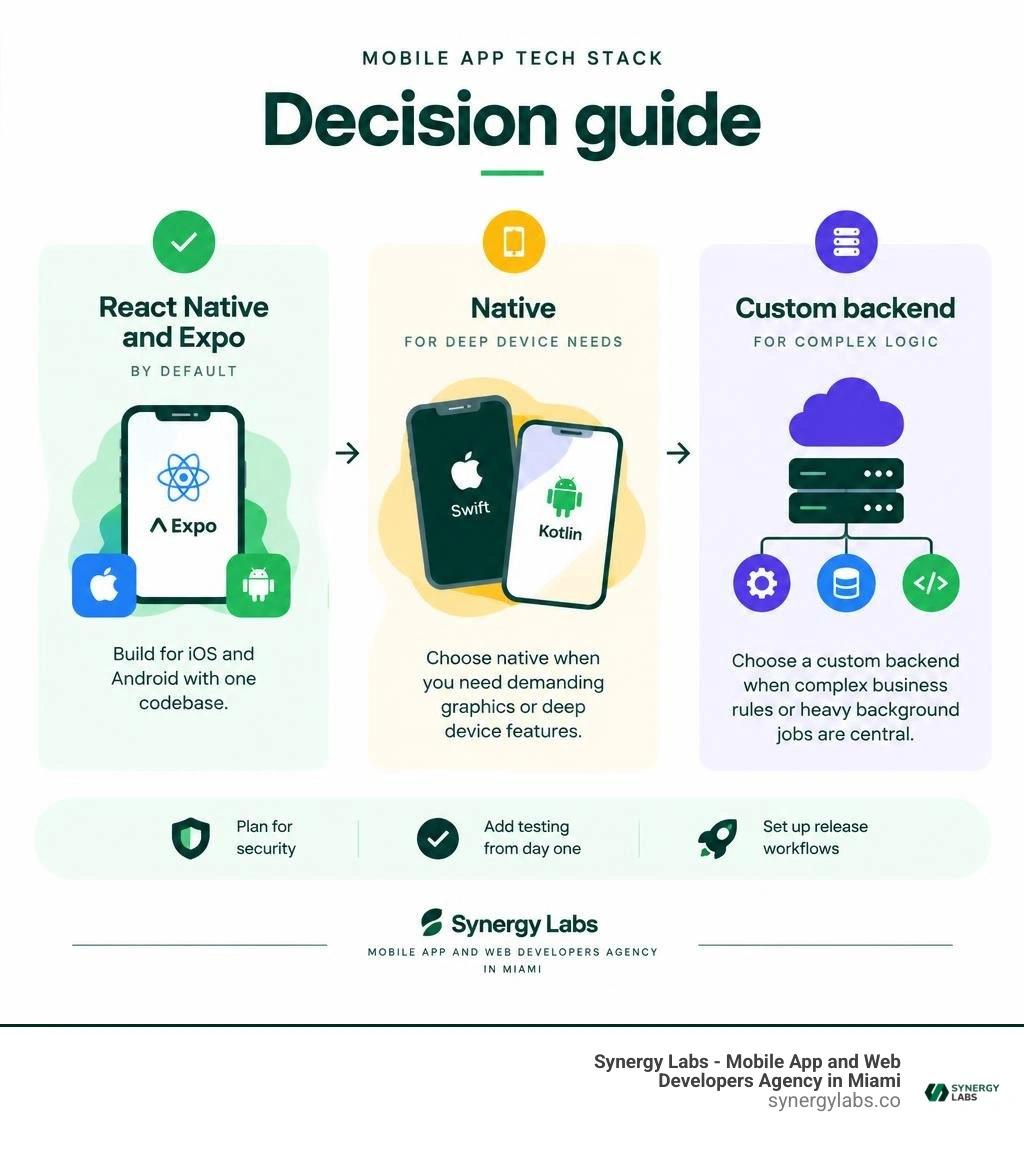
For most startups, a practical mobile app tech stack is React Native with Expo for iOS and Android, Supabase for data and sign-in, and EAS for builds and updates. Add RevenueCat if you sell subscriptions. This setup lets a small team ship quickly without running every part of its own infrastructure.
It is a starting point, not a rule. Choose Swift and Kotlin when the app depends on demanding graphics or deep device features. Choose a custom backend when complex business rules or heavy background jobs are central to the product. In either case, plan for security, testing, and release workflows from day one.
As director of product at Synergy Labs, I'll walk through those choices and the tradeoffs behind them.
Glossary for mobile app tech stack:
- Vibe Coding Developers
- app development success stories
- custom mobile app design
Core Architecture of a Modern Mobile App Tech Stack in 2026
Building mobile applications in 2026 looks fundamentally different from the fragmented, platform-siloed workflows of the past decade. Engineering teams no longer need to accept the massive operational overhead of maintaining separate Swift and Kotlin codebases for standard digital products. Instead, contemporary systems prioritize shared business logic, high release velocity, and strict type safety across every layer of the infrastructure.
At Synergy Labs, we evaluate a mobile stack by analyzing four primary layers:
- The Client Interface Layer: Cross-platform TypeScript execution environments targeting iOS, Android, and web targets.
- The Data and Application Service Layer: Managed cloud infrastructure or custom microservices orchestrating business rules, authentication, and data integrity.
- The Monetization and In-App Purchase Pipeline: Dedicated infrastructure managing cross-store subscriptions, web checkout synchronization, and receipt validation.
- The Continuous Delivery and Release Lifecycle: Automated cloud compilation engines, remote bundle delivery, and end-to-end regression suites.
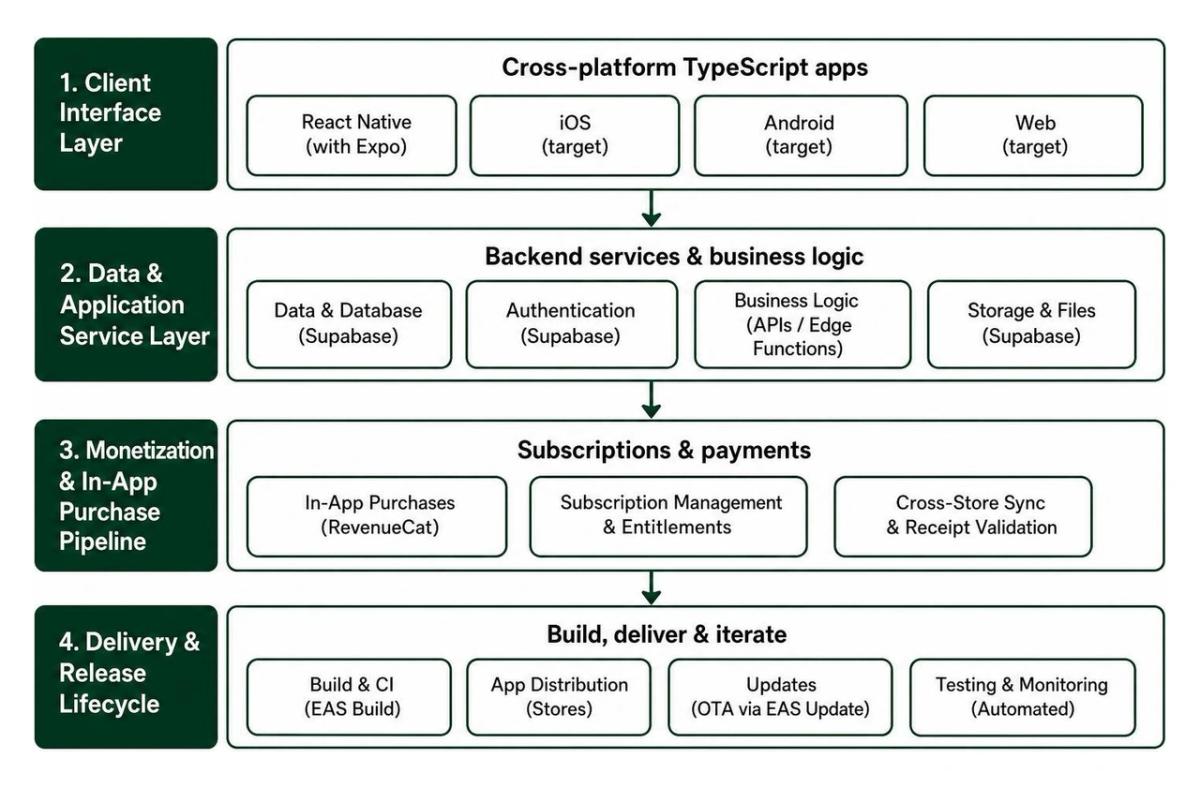
Adopting a unified TypeScript ecosystem across both client and server domains bridges the historic gap between frontend interfaces and backend operations. When choosing a comprehensive cross-platform app development strategy, your development team writes schemas, validation rules, and network calls once, sharing them seamlessly across environments. Combining this strategy with essential developer tooling establishes a predictable release cadence where engineering teams focus on shipping features rather than wrestling with platform-specific boilerplate.
Choosing the Right Mobile App Tech Stack: React Native vs Native
The decision between cross-platform frameworks and fully native builds (Swift for iOS, Kotlin for Android) comes down to your technical requirements, team composition, and product scope.
Native engineering remains irreplaceable for specific computing workloads:
- Complex digital signal processing (DSP), custom audio synthesizers, or low-latency computational video pipelines.
- Deep, low-level platform APIs, such as custom Bluetooth hardware drivers, specialized CoreBluetooth peripherals, or custom background hardware listeners.
- High-intensity 3D rendering engines and AAA mobile game loops requiring direct Metal or Vulkan bindings.
However, for over 90% of consumer products, B2B SaaS workflows, social marketplaces, and fintech platforms, cross-platform frameworks deliver indistinguishable real-world performance while halving ongoing maintenance costs. When evaluating Flutter versus React Native, React Native stands out because of its direct alignment with modern web ecosystems, JavaScript engine optimizations, and vast hiring pool. Understanding these hybrid versus native performance tradeoffs ensures you do not over-engineer an application that simply requires snappy user interfaces, reliable caching, and dependable network requests.
Why Expo and EAS Dominate Client Development
In 2026, building React Native without Expo is an unnecessary hurdle. Gone are the days when Expo was merely a restrictive prototyping sandbox. Today, Expo represents the state-of-the-art framework for production React Native, featuring the New Architecture enabled by default, seamless native module autolinking, and direct access to native code via Config Plugins.
Expo Application Services (EAS) solves the most painful bottleneck in mobile engineering: release infrastructure.
- EAS Build compiles iOS (
.ipa) and Android (.aab) binaries entirely in managed cloud containers, eliminating the classic "it compiled on my local Mac" headache. - EAS Update enables instantaneous dynamic patching of the JavaScript bundle directly on user devices without waiting for App Store or Google Play review queues.
- Local environment parity ensures developers run prebuild commands locally while offloading release candidate generation to automated cloud workers.
By coupling Expo with modern React app patterns, a two-engineer team can comfortably operate with the delivery capacity of a legacy ten-person mobile division without needing a full-time release engineer.
Backend Infrastructure, Data Isolation, and Database Management
A mobile client is only as dependable as the database and API layer beneath it. Modern mobile applications demand sub-100ms response times, offline-first synchronization, bulletproof authentication, and ironclad data isolation. Whether you are building an on-demand logistics platform or an enterprise health app, your backend architecture must prevent unauthorized data exposure while allowing rapid product iteration. Detailed modular software architecture specifications illustrate how decoupling database services from client business logic produces long-term engineering stability.
Supabase vs Custom Backend Services
Choosing between a managed Backend-as-a-Service (BaaS) like Supabase and a custom backend framework (such as .NET or Node.js microservices) depends on where your product's core technical complexity lives.
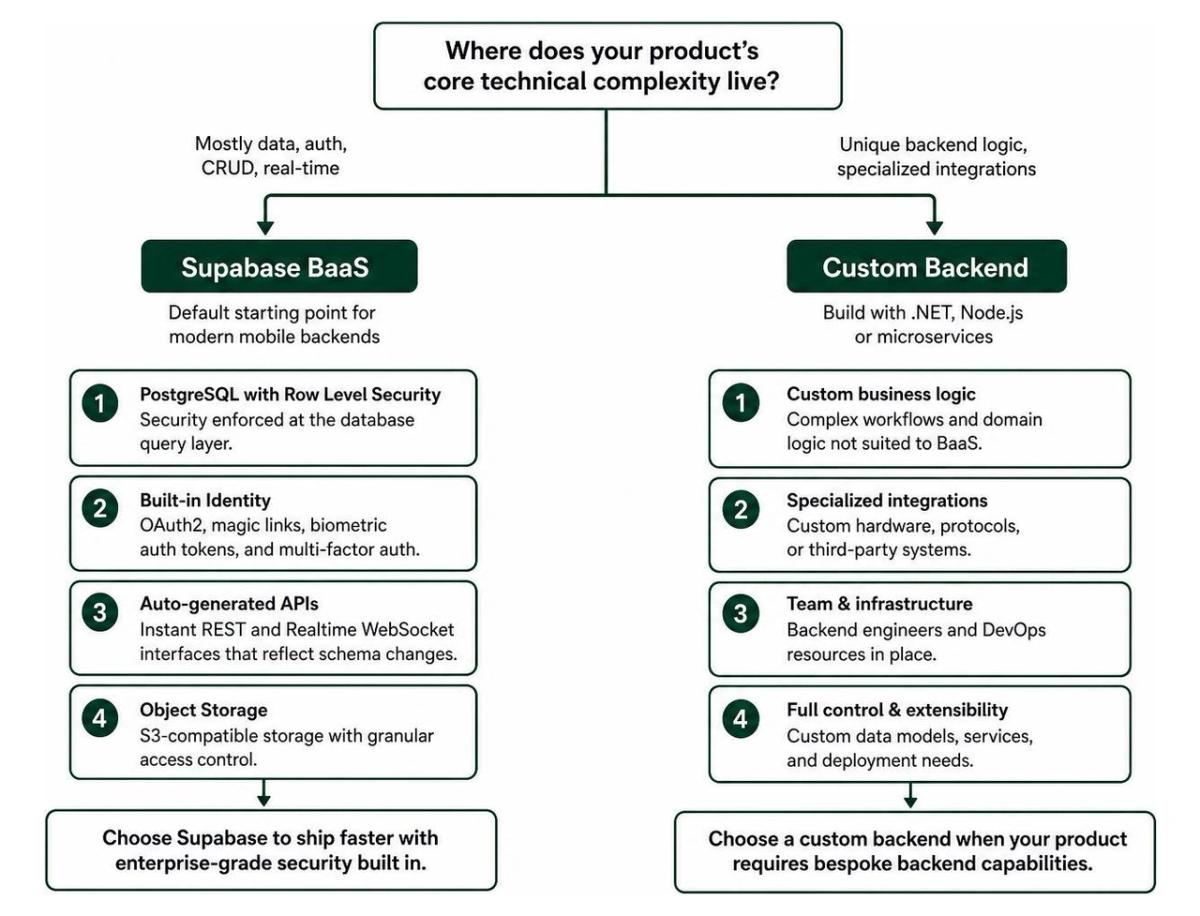
Supabase should be your default starting point for modern mobile backends. Powered by pure, unabstracted PostgreSQL, Supabase provides built-in enterprise security mechanisms, including:
- PostgreSQL Row Level Security (RLS), ensuring that security policies are enforced at the database query layer rather than relying on application code.
- Out-of-the-box identity management supporting OAuth2, magic links, biometric authentication tokens, and multi-factor authentication (MFA).
- Auto-generated REST and Realtime WebSocket interfaces that instantly reflect database schema changes, saving hundreds of hours of manual CRUD endpoint creation.
- S3-compatible cloud object storage with granular access control lists for secure user media uploads.
When evaluating enterprise backend architectures, you should transition from Supabase to a custom backend—such as ASP.NET Core or high-throughput Go services—under specific conditions:
- When your core business logic involves long-running transactional calculations, CPU-intensive background jobs, or custom multi-threaded memory queues.
- When legacy enterprise compliance rules dictate dedicated on-premises infrastructure or custom private cloud governance.
- When your system acts as a middleware router communicating across dozens of legacy ERP systems.
For standard software operations, Supabase cuts infrastructure provisioning from several months to a few days while keeping your database portable and vendor-lock-free.
Multi-Environment Database Strategy for Safe PR Deployments
One of the costliest errors development teams make is running tests against a shared staging database. When multiple engineers merge database migrations simultaneously, schema conflicts, corrupted mock data, and failed rollbacks quickly stall feature releases.
At Synergy Labs, we utilize a structured three-database architecture:
- Production Database: Locked, encrypted at rest, strictly monitored, and accessible only via automated continuous integration deploy keys.
- Staging Database: A persistent, sanitized staging environment mirroring production data schemas for pre-release validation.
- PR Testing Database: A lightweight, dedicated instance that resets automatically for incoming pull requests containing database schema updates.
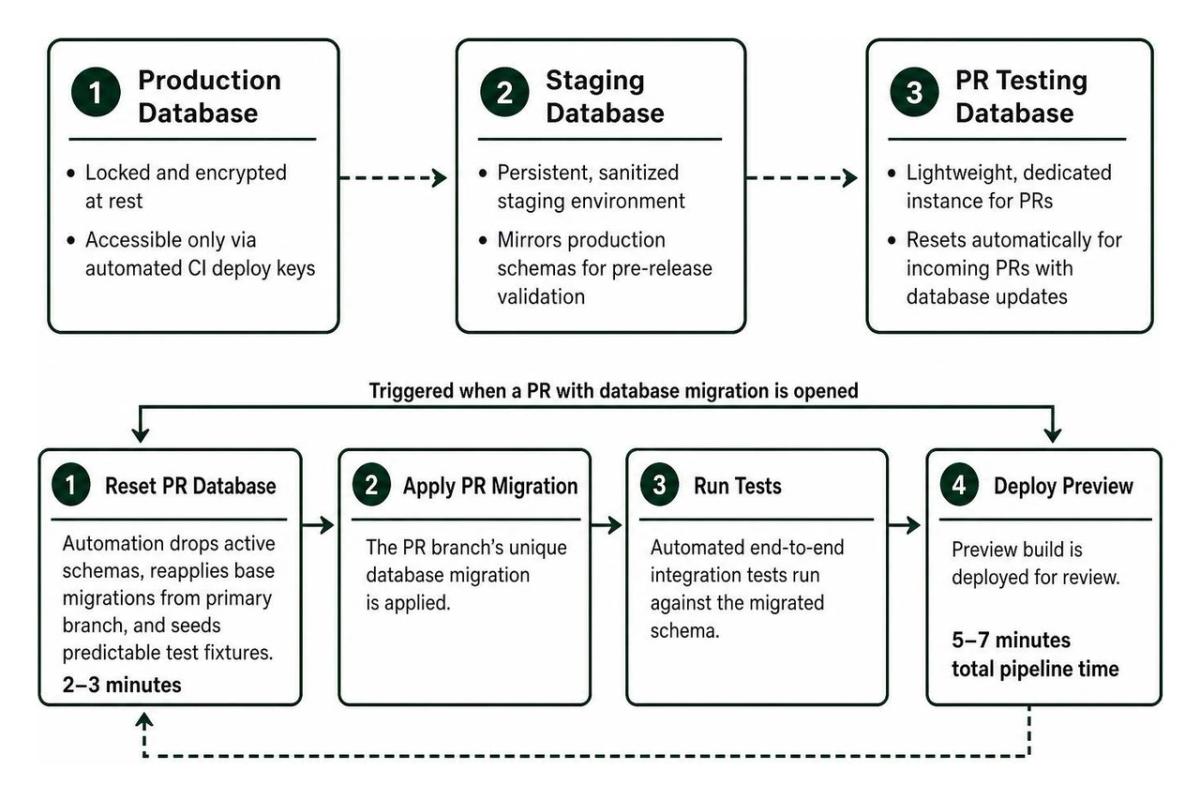
Managing an ephemeral database for every single pull request can rapidly drive cloud infrastructure bills past $100+ per month. Instead, our unified PR testing database approach maintains low operating costs ($50–$75 per month) across environments:
- When a developer opens a PR with a database migration, GitHub Actions triggers an automated reset against the PR database.
- The automated pipeline drops active schemas, reapplies base migrations from the primary branch, and seeds predictable test fixtures in 2 to 3 minutes.
- The PR branch's unique migration is applied, automated end-to-end integration tests run, and preview builds are deployed. The entire pipeline finishes in just 5 to 7 minutes.
This disciplined release workflow isolates production data, guarantees migration safety, and keeps cloud spending lean.
Code Sharing, Monetization, and Unconventional Distribution
Modern mobile software development no longer happens in an isolated mobile-only silo. Product teams often deploy web portals, admin dashboards, marketing funnels, and alternative client interfaces alongside their primary native apps. Unifying these touchpoints within a single shared engineering environment eliminates redundant effort and streamlines monetization.
Monorepo Architecture: Structuring Your Mobile App Tech Stack for 60% Code Reuse
Structuring your application ecosystem inside a unified monorepo (using tools like Turborepo or Nx) allows mobile and web clients to share significant amounts of business logic.
By isolating platform-agnostic code into dedicated internal packages, teams routinely achieve 40% to 60% code reuse across their apps:
packages/api: Houses the Supabase client, query invalidation keys, and network interceptors.packages/types: Contains TypeScript interfaces, database schema types, and cross-application payload contracts.packages/validation: Maintains shared schema definitions (using Zod or Yup) utilized by both web and mobile forms.packages/state: Manages global state machines using Zustand, isolating state logic away from the rendering layer.
In this architecture, your UI rendering components remain completely native to their respective platforms (NativeWind/StyleSheet for mobile, Tailwind CSS for web), while all validation, state transitions, and API communications remain strictly synchronized.
Cross-Platform In-App Purchases with RevenueCat
Implementing native in-app purchases manually across Apple's StoreKit 2 and Google Play Billing is notoriously time-consuming. Managing edge cases like grace periods, billing retries, cross-platform entitlement sync, and server-side cryptographic receipt validation can drain weeks of senior developer time.
RevenueCat simplifies this monetization workflow down to a clean, unified SDK:
- It normalizes purchases across iOS, Android, and web checkouts (Stripe) into a single customer entitlement status.
- It dynamically serves paywall configurations over the air, allowing marketing and growth teams to run price experiments and A/B test UI variations without submitting app store updates.
- It provides reliable server webhook events that trigger backend database updates, marketing automation flows, and customer retention campaigns.
Using dedicated subscription infrastructure ensures your revenue pipelines remain secure, compliant, and operational without custom payment server upkeep.
Zero-Install Distribution via Telegram Mini Apps
While app stores remain the standard distribution channel, emerging platforms present new acquisition opportunities. Telegram Mini Apps represent a modern distribution channel that bypasses store review queues entirely.
Operating as full-screen web applications inside the native Telegram client, Mini Apps provide distinct strategic benefits:
- Direct access to an active audience of over 900 million users already authenticated with built-in communication loops.
- Instant, zero-friction onboarding with no installation prompts or waiting for App Store validation cycles.
- Native device integration allowing access to haptic feedback, biometrics, secure cloud storage, and integrated Telegram wallet payments.
For community-driven products, gaming mechanics, fintech experiments, and virality-focused marketplaces, deploying a lightweight Next.js or React web interface as a Telegram Mini App can serve as a fast go-to-market funnel alongside your flagship mobile apps.
Deployment Workflows, Over-the-Air Updates, and Quality Assurance
Reliable mobile development depends on continuous, automated validation. Shipping a broken update to web users takes minutes to roll back, but distributing a buggy native binary to hundreds of thousands of iOS and Android users can take days of store reviews and user updates to resolve.
Continuous Deployment and Instant OTA Updates with EAS
Continuous delivery in modern mobile engineering requires a clear distinction between native layer changes and application runtime logic updates:
- Native Layer Changes: Upgrading native SDK versions, changing app permissions, or adding third-party native libraries requires compiling a new binary via EAS Build and submitting it for app store review.
- Runtime Logic Updates: Bug fixes, UI adjustments, text corrections, and state handling updates live entirely within the compiled JavaScript bundle and assets.
Using EAS Update, your engineering pipeline pushes over-the-air patches directly to user devices on designated release channels (production, staging, preview). If a critical logic bug escapes into production, your team can publish a verified fix or roll back to a known stable bundle in minutes, keeping users uninterrupted while you work on longer-term updates.
Automated End-to-End Testing with Jest and Maestro
A dependable testing matrix balances fast-running unit tests with realistic end-to-end (E2E) UI validation.
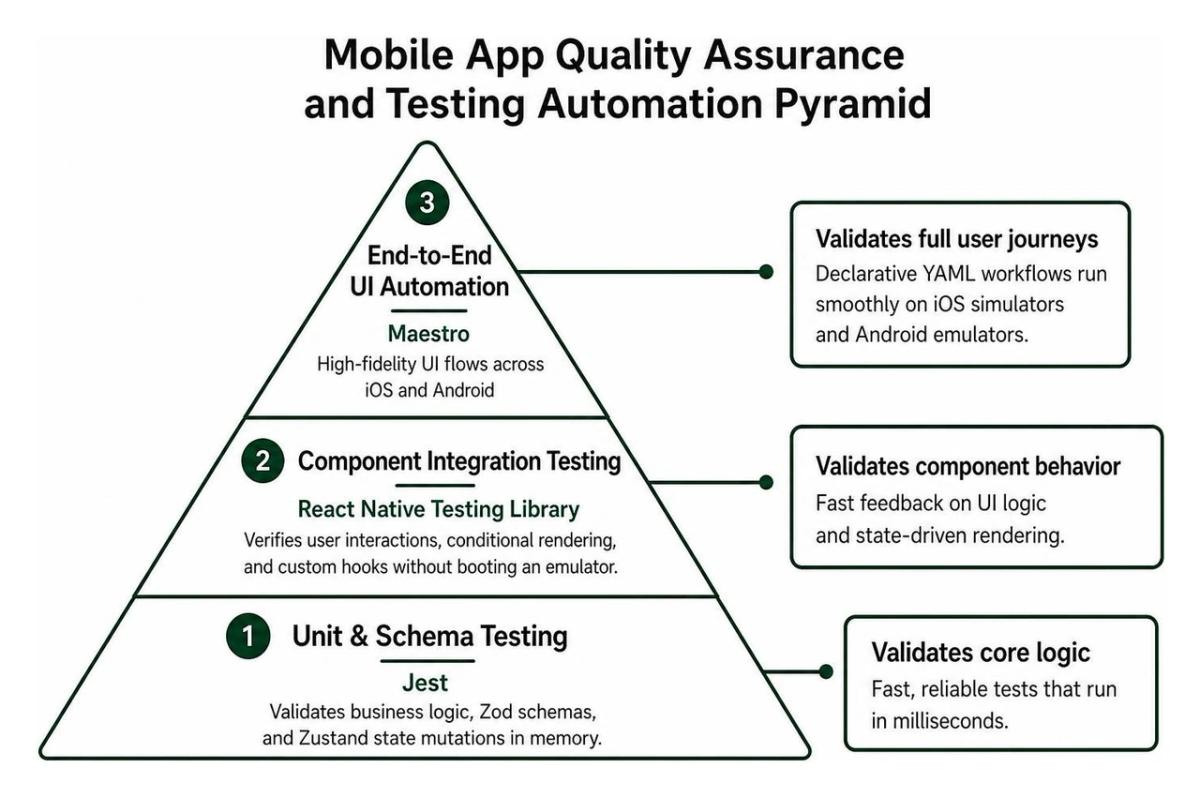
Our production testing strategy focuses on high-impact validation layers:
- Unit & Schema Testing: We use Jest to validate business utility logic, Zod parsing schemas, and Zustand state mutations in memory within milliseconds.
- Component Integration Testing: React Native Testing Library verifies user interactions, conditional component rendering, and custom hooks without booting an emulator.
- End-to-End UI Automation: We use Maestro for high-fidelity UI flows. Unlike older, brittle mobile testing frameworks, Maestro uses declarative YAML workflows that run smoothly across both iOS simulators and Android emulators.
Maestro validates core user paths—such as onboarding flows, authentication, search queries, and in-app checkout journeys—inside GitHub Actions before any release candidate is delivered to users.
Frequently Asked Questions About Mobile App Tech Stacks
How do you choose between React Native and fully native Swift/Kotlin?
Choose React Native with Expo if you are building data-driven consumer apps, B2B SaaS portals, social platforms, or e-commerce experiences where development speed, budget efficiency, and single-team cross-platform delivery are priorities. Choose fully native Swift and Kotlin if your core value proposition requires low-level device control, custom hardware drivers, continuous background computational audio, complex AR/VR processing, or high-frame-rate 3D rendering loops.
How does a three-database architecture reduce cloud backend costs?
Instead of provisioning separate paid database instances for every pull request branch—which easily pushes infrastructure costs past $100+ per month—a three-database model uses a single, dedicated PR database. This database automatically drops, migrates, and seeds test fixtures for pull requests containing schema changes in 2 to 3 minutes, maintaining isolated testing workflows while keeping hosting costs around $50–$75 per month.
When should you build a Telegram Mini App instead of a traditional mobile app?
Build a Telegram Mini App when your product relies on community virality, social sharing loops, rapid conversational onboarding, or global micro-transactions. With over 900 million users already authenticated on Telegram, Mini Apps eliminate store review delays and download barriers, making them an ideal launchpad for interactive MVPs and community utilities.
Building Your Next Production Mobile Architecture

Selecting your software stack isn't about chasing the newest industry trends; it's about choosing proven, maintainable, and cost-effective tools that help you ship high-quality products to users quickly. Adopting a modular stack—pairing React Native and Expo with a Supabase PostgreSQL backend, EAS deployment automation, and a shared monorepo—empowers your team to deliver dependable software across platforms while keeping overhead low.
At Synergy Labs, we help startups, growing companies, and enterprises turn complex product roadmaps into polished mobile applications. We operate with a transparent fixed-budget model, pairing you directly with an in-shore CTO who oversees an elite offshore development team. Backed by milestone-based payments, our engineering approach ensures your app is built securely, on schedule, and within budget.
Ready to bring your mobile vision to life? Explore our custom mobile app development services and let's start building your next high-performance application today.