
How to Start Android Antivirus MVP Development

For android antivirus MVP development, start with a narrow threat list: malicious apps, risky permissions, and phishing links. Build an on-device scanner that checks accessible app details when apps are installed or updated. Add clear risk alerts, then test detection accuracy, false alarms, scan time, and battery use on real phones.
This lean approach helps a startup launch sooner without treating every security feature as a day-one requirement. Android limits what one app can inspect, so the product should explain what it checks and what it cannot see.
As director of product at Synergy Labs, I'll walk through how to turn that focused scope into an app people can understand and trust.
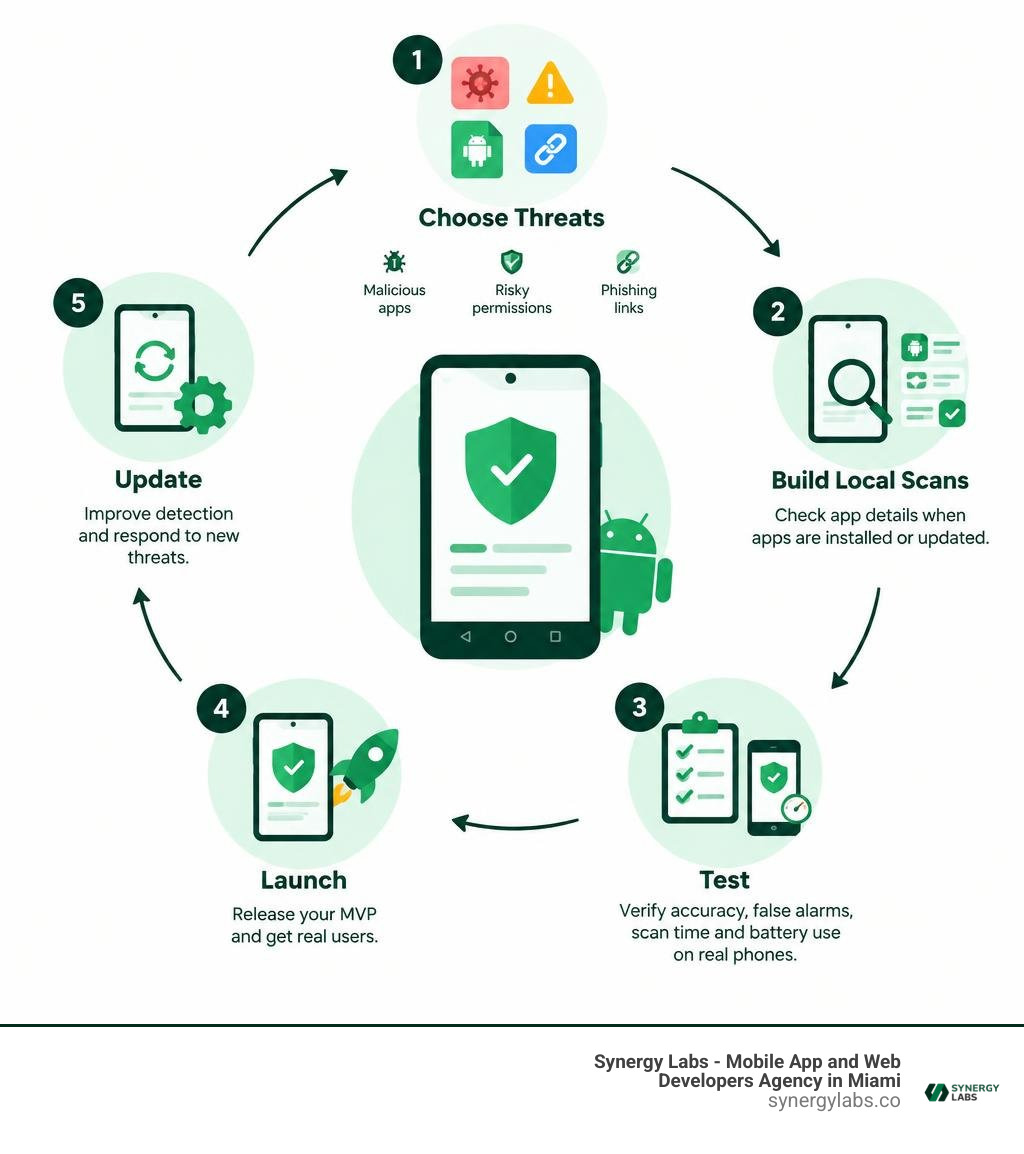
Android antivirus MVP development word guide:
Understanding the Evolving Mobile Threat Landscape
Building a mobile security product requires facing a reality where threat actors adapt faster than app review teams can drink their morning coffee. Android commands more than 70% of the worldwide mobile operating system market across billions of active devices. Because the ecosystem supports open app distribution, sideloading, and diverse third-party app stores, attackers treat mobile endpoints as their primary targets for enterprise espionage, financial theft, and ransomware operations.

Modern mobile attacks have shifted from basic, single-purpose payloads to modular malware suites. In past years, over 45,000 attempts to infect mobile devices with the Loapi malware family were documented across international endpoints. Loapi demonstrated how a single malicious APK could combine ad fraud, SMS subscription hijacking, web crawling, DDoS attacks, and cryptocurrency mining into a single modular package. This complex activity generated intense CPU loads capable of causing severe battery degradation and device instability.
Academic insights, such as those found in academic malware detection studies, confirm that relying solely on static permission manifests or rudimentary file signatures leaves massive blind spots. Attackers split functional modules, download secondary encrypted DEX payloads from command-and-control servers at runtime, and exploit zero-day API vulnerabilities to maintain stealth.
Critical Threats Demanding Real-Time Protection
When designing your minimum viable product, you must prioritize the attack vectors that inflict direct harm on end users:
- Modular Trojans and Financial Stealers: Malicious programs that monitor running applications, inject fake overlay login screens over mobile banking platforms, and steal two-factor authentication tokens.
- Cryptojackers and Device Abusers: Background services running hidden mining scripts that overheat mobile hardware and degrade battery health.
- Mobile Ransomware: Aggressive apps that monitor screen activity, abuse the Android WindowManager to draw persistent blocking views over the interface, and lock users out of their operating system until a ransom is paid.
- SMS Phishing and Malicious Redirects: Smishing links distributed via text messages and malvertising campaigns, designed to trick users into installing malicious updates or yielding corporate credentials. Addressing these threats requires comprehensive mobile app security embedded directly into device-level monitoring.
Why Modern Malware Evades Traditional Scanners
Traditional desktop-style scanners that linearly sweep disk directories fail in mobile environments. Modern mobile malware uses dynamic class loading via DexClassLoader and reflection to execute obfuscated bytecode held in encrypted asset containers.
Furthermore, malware authors aggressively exploit the Android Accessibility Service to intercept user touches, grant background permissions automatically, disable security configurations, and block the uninstallation process by instantly closing system settings when the user attempts removal. An effective MVP must detect these hostile interaction patterns before the malware establishes deep persistence.
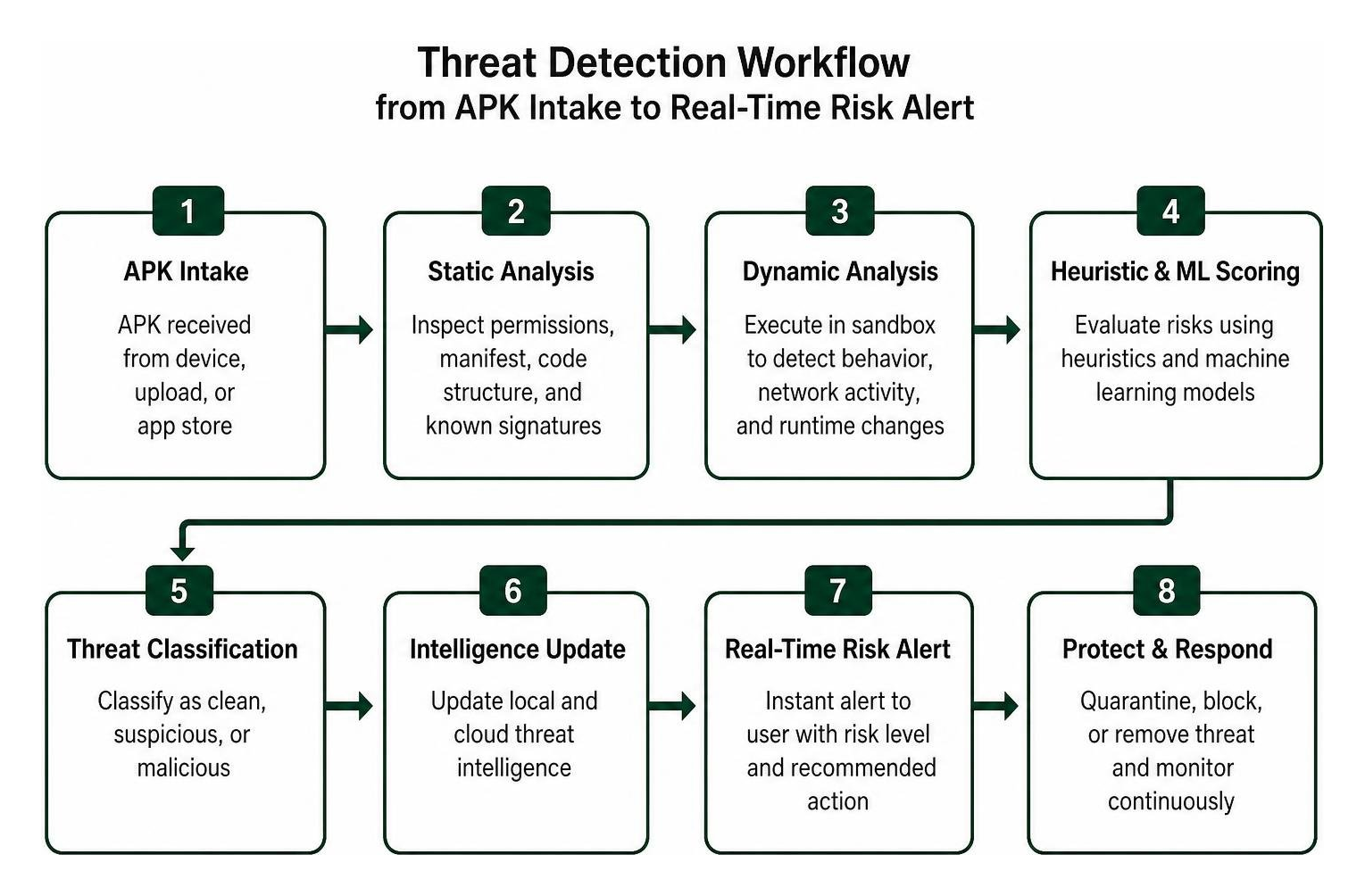
Strategic Architecture for Android Antivirus MVP Development
Founders often assume an antivirus requires a monolithic, battery-draining scanning daemon. In reality, lean security engineering emphasizes modular threat modeling and on-device execution. Keeping your MVP lightweight, transparent, and respectful of hardware resources is essential to prevent users from quickly uninstalling your app.
Essential Feature Set for a Lean Security Product
Your initial product release should concentrate on core defensive capabilities that offer clear security protection without overwhelming your development roadmap:
- Lightweight Package Installer Interceptor: A broadcast-driven scanning service that evaluates every new APK or updated package via
ACTION_PACKAGE_ADDEDandACTION_PACKAGE_REPLACEDevents. - Static Bytecode and Manifest Scanner: A local parsing engine that analyzes the application's binary XML, component declarations, intent filters, and DEX bytecode without running the code.
- Real-Time Threat Notification Engine: An alert pipeline that explains exactly why an app was flagged, distinguishing between critical malware, privacy-invasive trackers, and high-risk utility apps.
- Privacy and Permission Auditor: A clear scoring dashboard that rates the device's overall risk profile by evaluating which apps hold dangerous permissions, such as background location, SMS reading, or camera access. You can explore how these components integrate in our dedicated virus scanner for Android phone architecture.
- Safe Whitelisting Filter: An on-device database storing cryptographic hashes of verified system apps and popular trusted software to avoid redundant scanning overhead.
Open-source implementations like beenuar/shieldapp-android show that building comprehensive on-device security tools—including signature scanning, breach lookups, and network traffic inspection—is achievable without exposing private user telemetry to third-party cloud servers.
Evaluating Static, Dynamic, and ML-Based Detection
Choosing the right detection stack requires balancing accuracy, battery consumption, and execution speed.
Static analysis offers an optimal starting point for an MVP. Tools such as yanghuafang/anti-android-virus demonstrate how building a multi-dimensional signature engine using C++ native code with Aho-Corasick string matching and opcode bitmap pre-filtering achieves efficient scanning speeds of O(n log S) instead of linear scan times.
Dynamic sandboxing on a live mobile device is frequently blocked by modern sandboxing constraints and battery management protocols. Incorporating targeted behavioral heuristics alongside static analysis delivers reliable mobile app protection while keeping resource use low.
Step-by-Step Implementation for Modern Security Teams
Transforming an architectural plan into a working Android antivirus MVP requires structured execution across both native layers and the modern Android application framework.

Planning Your Roadmap for Android Antivirus MVP Development
A successful product cycle begins by standardizing your internal threat taxonomy and defining concrete MVP boundaries:
- Milestone 1: Extraction & Parsing Pipeline: Build the native unpacking logic to extract
AndroidManifest.xml,classes.dex, and certificate metadata directly from APK archives on the device. - Milestone 2: Deterministic Rule Engine: Integrate compact signature databases using YARA-X rules or hash-based matching to catch known malicious campaigns instantly.
- Milestone 3: Heuristic & Permission Risk Engine: Map component combinations, such as an app requesting both
RECEIVE_BOOT_COMPLETEDandSEND_SMSwithout standard user-facing activities. You can read more about hardening your design in our overview on how to secure mobile apps. - Milestone 4: Native JNI Integration: Bridge your core C++ or Rust scanner into Kotlin using the Android NDK, ensuring high-throughput file reads without triggering Java Garbage Collection pauses.
- Milestone 5: User Interface and Remediation UX: Implement clean Jetpack Compose dashboards displaying immediate remediation steps and safe uninstallation instructions.
Training Lightweight Models for Android Antivirus MVP Development
To catch zero-day variants without transmitting user binaries off-device, deploy a compact machine learning model directly on the client. Rigorous on-device malware detection research indicates that models trained on manifest parameters—such as permission declarations, intent filters, exported services, and component ratios—can achieve precision rates of 90% and F1 scores exceeding 0.77 without needing to parse deep bytecode instruction traces.
Academic frameworks like MobiTive and SeqMobile illustrate that quantized neural networks running on mobile hardware can evaluate applications in under 0.5 to 5 seconds. Open projects such as projectmatris/antimalwareapp showcase how an on-device model extracts permission features and maps them into intuitive risk tiers:
- Safe: Legitimate software exhibiting standard component interactions.
- Suspicious: Apps with overlapping high-risk capabilities that warrant user caution.
- Malicious: Severe threats exhibiting active exploit signatures or known malicious patterns.
Engineering Real-Time Scanning and Privacy Protection
Real-time protection must respect both operating system constraints and user privacy:
- Background Management: Schedule full-storage audits and deep scans using Jetpack
WorkManager, configuring battery-charging and Wi-Fi execution constraints to avoid draining active device power. - Privacy-Preserving Threat Intelligence: Never transmit raw file lists, device identifiers, or user activity logs to remote APIs. When verifying unknown hashes against cloud threat feeds, use k-anonymity hashing protocols where only a truncated cryptographic prefix is shared.
- Zero-Trust Whitelisting: Check installed packages against clean reference datasets, such as the National Software Reference Library (NSRL) or verified package databases, before running deeper heuristics. This prevents false alarms on popular banking and enterprise productivity tools.
Overcoming Mobile Constraints and Google Play Compliance
Developing an Android security MVP requires navigating strict Google Play Store policies and modern OS limitations. Since Android 10, scoped storage and privacy controls restrict apps from freely reading the entire device filesystem or accessing device identifiers without explicit permissions.
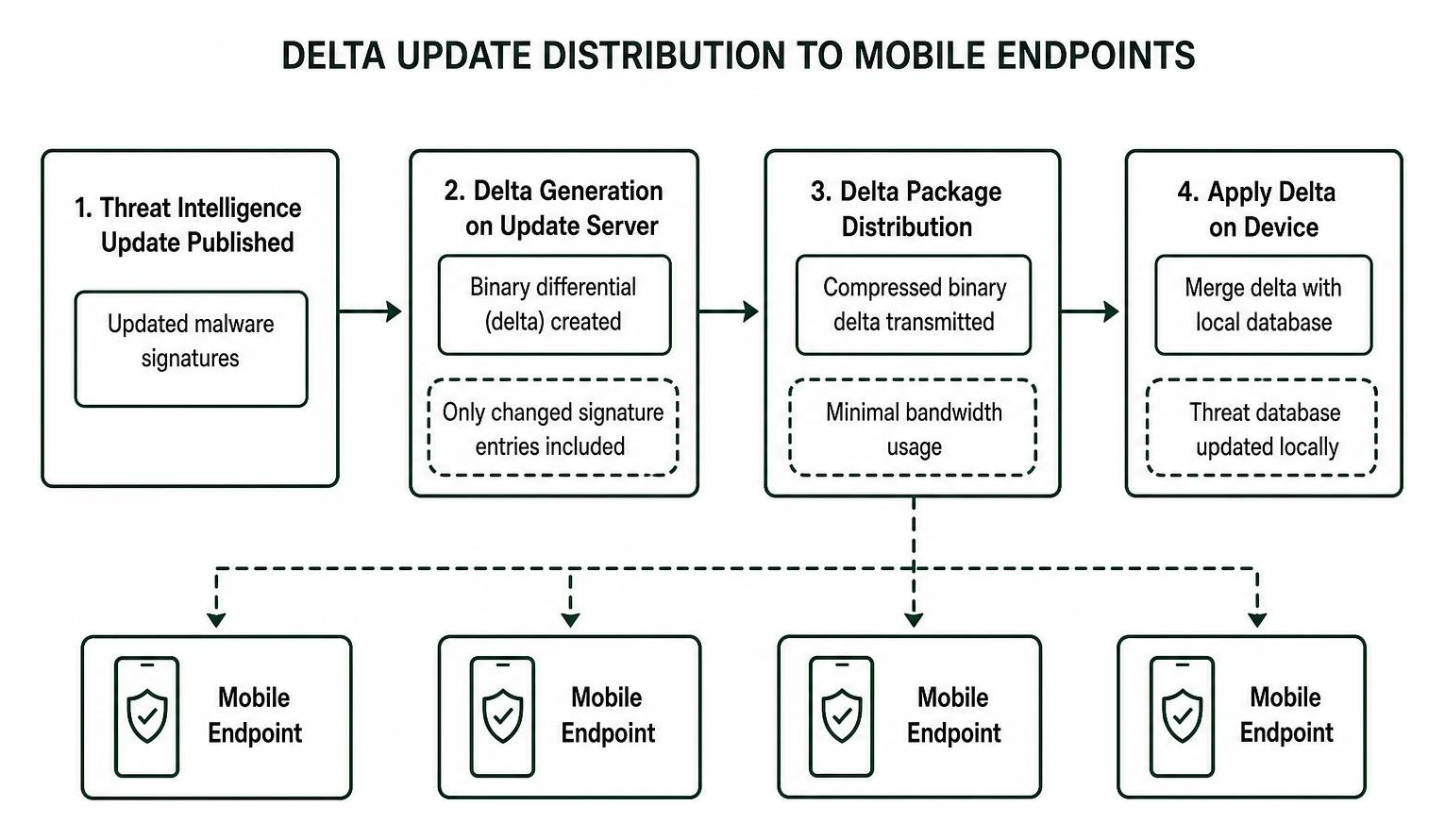
Managing Database Updates and Threat Intelligence
A security engine is only as effective as the freshness of its intelligence. Shipping an updated APK to the Play Store every time a new malware signature appears is unsustainable. Instead, implement a compact, delta-synchronized update system:
- Binary Differential Updates: Distribute threat database updates as compressed binary deltas, transmitting only changed signature entries to minimize bandwidth.
- Model Aging Management: Supervised ML models on mobile devices face accuracy degradation as new evasion methods evolve over time. Plan periodic model refresh cycles every 60 to 90 days to maintain peak precision.
- Community Intelligence Sourcing: Utilize open threat databases such as Koodous to track emerging threat families, keeping your local signature tables aligned with real-world attack campaigns.
Ensuring Performance, Battery Life, and Policy Adherence
Adhering to modern platform standards will safeguard your app against Play Store rejection while building user confidence:
- Strict Avoidance of Risky Shell Access: Do not rely on elevated shell bridges like Shizuku in a consumer product, as granting elevated shell privileges introduces unnecessary attack surface and violates mainstream consumer threat models.
- Non-Blocking UI Threads: Keep all filesystem queries, DEX parsing, and cryptographic checks inside native threads or Kotlin coroutines running on background dispatchers.
- Compliance with Google Play Policies: Google strictly reviews apps requesting permissions such as
MANAGE_EXTERNAL_STORAGEorBIND_ACCESSIBILITY_SERVICE. You must provide clear in-app disclosures and complete core security operations using standard storage APIs and declared security provider roles. - Transparent Remediation Guidance: Avoid presenting false warnings or alarming language. When flagging a suspicious app, clearly explain the detected risks—such as unencrypted data transmission or excessive background permissions—and guide the user through safe removal.
Frequently Asked Questions About Android Antivirus MVPs
What is the most effective detection technique for an Android MVP?
The most practical approach for an initial release is a hybrid static pipeline combining manifest-based static analysis, native signature scanning, and a lightweight machine learning classifier. Static analysis parses DEX files and permission manifests within milliseconds without executing suspicious code. Combining this with a fast native string-matching engine yields high accuracy with near-zero battery drain.
How do on-device ML models protect user privacy?
On-device machine learning models process app metadata, component structures, and permission declarations locally using client-side runtimes like PyTorch Mobile or TensorFlow Lite. Because inference takes place entirely in the device memory, no personal information, app lists, or browsing records are uploaded to remote servers. This offline architecture satisfies modern data privacy regulations.
How often should an antivirus MVP update its threat signatures?
Your MVP should check for lightweight delta signature updates on a daily or hourly schedule when the device is idle and connected to unmetered Wi-Fi. Using binary diffs and compressed trie tables keeps the payload size under a few kilobytes, ensuring users stay protected against active campaigns without consuming mobile data plans.
Build Your Scalable Mobile Security MVP with Synergy Labs
Launching a standout Android antivirus MVP in 2026 requires balancing deep systems engineering, fast scanning performance, and an intuitive user experience. Rather than building bloated utilities that drain batteries and trigger system warnings, modern cybersecurity startups succeed by launching lean, privacy-focused security tools that deliver clear value from the first scan.
At Synergy Labs, we specialize in turning complex technical architectures into market-ready mobile products. Our unique delivery model pairs you with an in-shore CTO who directs high-velocity engineering teams, giving you direct access to senior technical leadership throughout every stage of development.
We protect your capital and eliminate operational risk through our transparent fixed-budget model and milestone-based payment structure. You only release funds when measurable development goals are achieved. Whether you are building an on-device malware scanner, an enterprise endpoint monitor, or a next-generation consumer security suite, explore our custom mobile application development services to accelerate your launch today.