

Mobile App Firewall Protection: Which Tool Fits Your Phone?
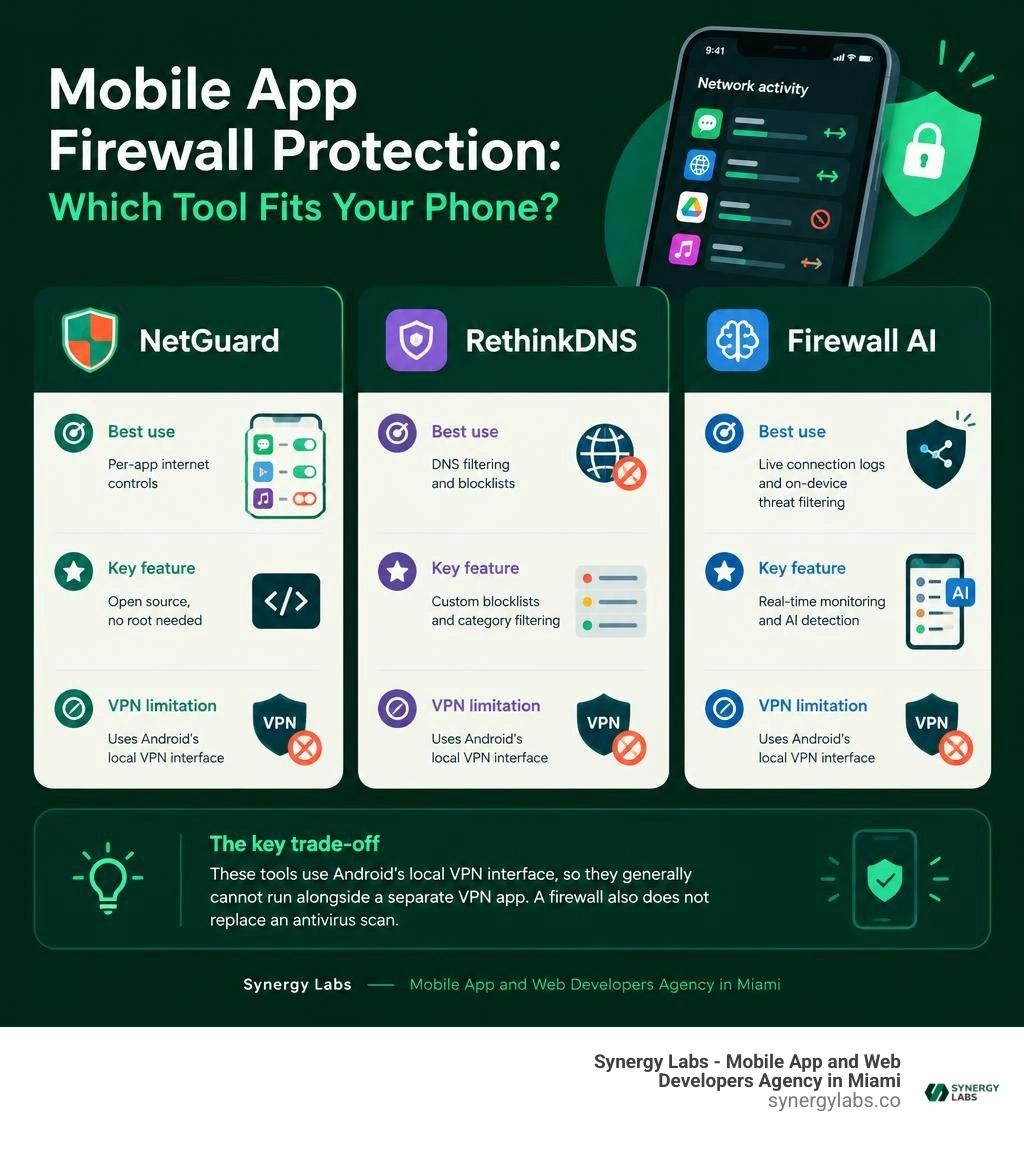
For mobile app firewall protection on Android, start with NetGuard if you want open-source, per-app internet controls. Choose RethinkDNS if DNS filtering and blocklists matter most. Consider Firewall AI if you want live connection logs and on-device threat filtering. All three can help you see or limit where apps connect without rooting your phone.
The key trade-off: these tools use Android's local VPN interface, so they generally cannot run alongside a separate VPN app. A firewall also does not replace an antivirus scan. As director of product at Synergy Labs, I look for the tool that gives you useful control without making the phone harder to use.
Easy mobile app firewall protection glossary:
Why Modern Devices Need Mobile App Firewall Protection
Smartphones have transformed into high-velocity data relays. Every tap, scroll, and background refresh initiates network conversations, often without explicit user awareness. While mobile operating systems implement app permission prompts for cameras and microphones, background data access remains largely open by default. Many installed applications silently establish external connections to analytics servers, advertising networks, and data brokers while your phone sits idle on your desk.

Recent threat telemetry underscores the scale of this problem. Security researchers documented 239 malicious apps in the official Google Play Store that amassed over 42 million combined downloads over a 12-month period leading up to mid-2026. Entering 2026, mobile malware volume increased by 67% year-over-year. These figures reveal that store vetting algorithms alone cannot guarantee clean application behavior. Adopting robust mobile app protection strategies and applying rigorous cybersecurity audit principles directly to mobile network traffic is no longer optional.
The Rise of Mobile Malware and Silent Data Leakage
Mobile applications frequently rely on third-party software development kits (SDKs) to monetize usage, deliver push notifications, and monitor crash diagnostics. These embedded frameworks often transmit device identifiers, precise geolocation data, and app engagement metrics across unvetted networks. Studies show that roughly 75% of analyzed mobile applications share personal user metadata, and 50% transmit location information without explicit user consent.
Beyond aggressive ad trackers, mobile malware strains actively abuse unrestricted network channels. Ad-fraud bots consume background bandwidth by silently clicking hidden advertisements, while stalkerware frameworks transmit screenshots and keystrokes to command-and-control (C2) servers. Because Google Play Protect focuses primarily on known malicious binaries rather than nuanced behavioral metadata leakage, outbound network surveillance provides the necessary secondary inspection layer.
How Mobile Firewalls Complement Antivirus Solutions
A mobile firewall operates fundamentally differently from an antivirus scanner. Antivirus solutions inspect static app binaries, file signatures, and OS permissions to flag known malicious payloads. In contrast, an egress mobile firewall monitors the live networking socket layer, evaluating every outbound packet request against structural routing rules and threat blocklists.
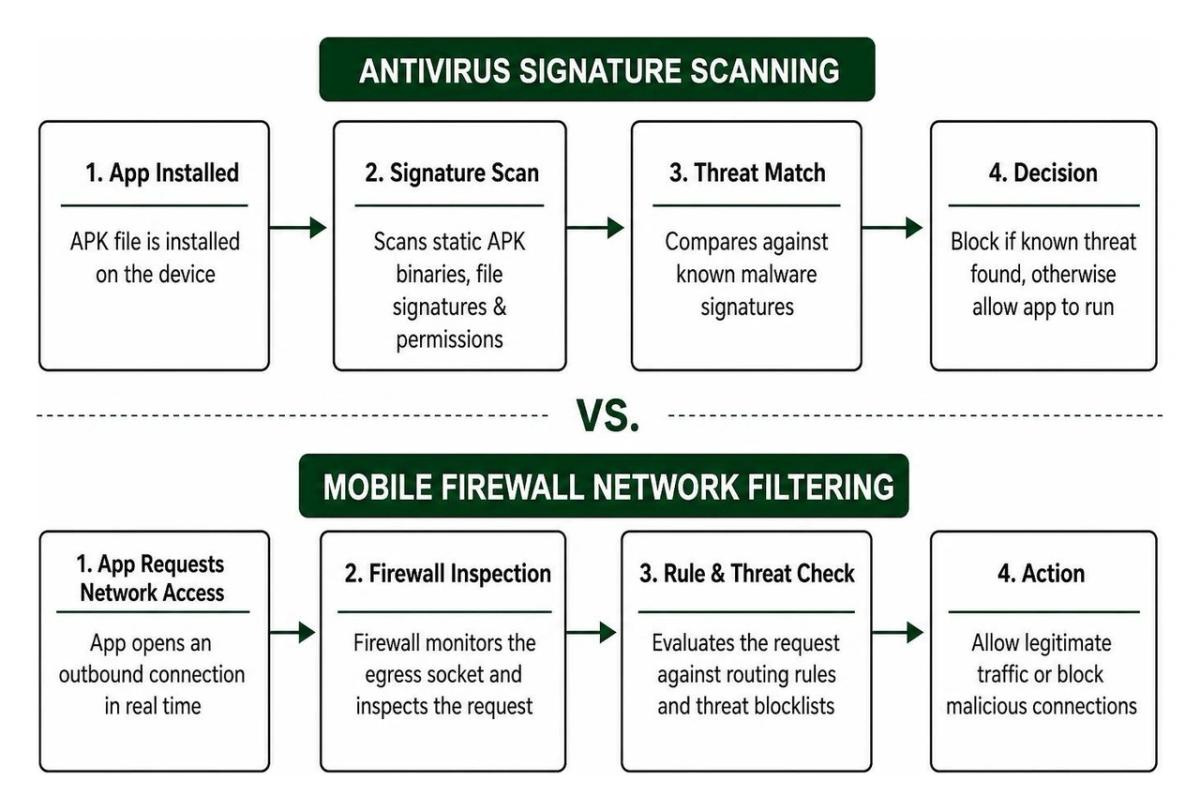
Using a dedicated firewall alongside a reliable phone antivirus tool creates an effective defense-in-depth architecture. Even if a newly engineered zero-day malware variant bypasses initial signature detection, an egress firewall cuts off its connection route, preventing it from exfiltrating sensitive credentials or downloading secondary payloads. Consulting our best mobile security software guide 2026 helps users balance these complementary defensive tools.
How No-Root Network Filtering Works on Android
Historically, setting up a firewall on an Android device required root access to manipulate underlying Linux kernel iptables. Rooting compromises fundamental OS sandboxing protections, voids warranties, and blocks mobile banking applications. Modern mobile firewalls solve this challenge by establishing on-device, no-root packet interception using standard Android architecture frameworks aligned with enterprise endpoint protection patterns.

The Local Android VPN Interface Explained
No-root mobile firewalls create a virtual network interface on your device using Android's native VpnService API. Instead of routing network packets over the internet to a third-party server, the firewall configures a local loopback tunnel. All traffic generated by installed applications passes directly into this on-device virtual interface, allowing the firewall engine to inspect header metadata, resolve destinations, and apply filtering logic locally before the traffic leaves your hardware.
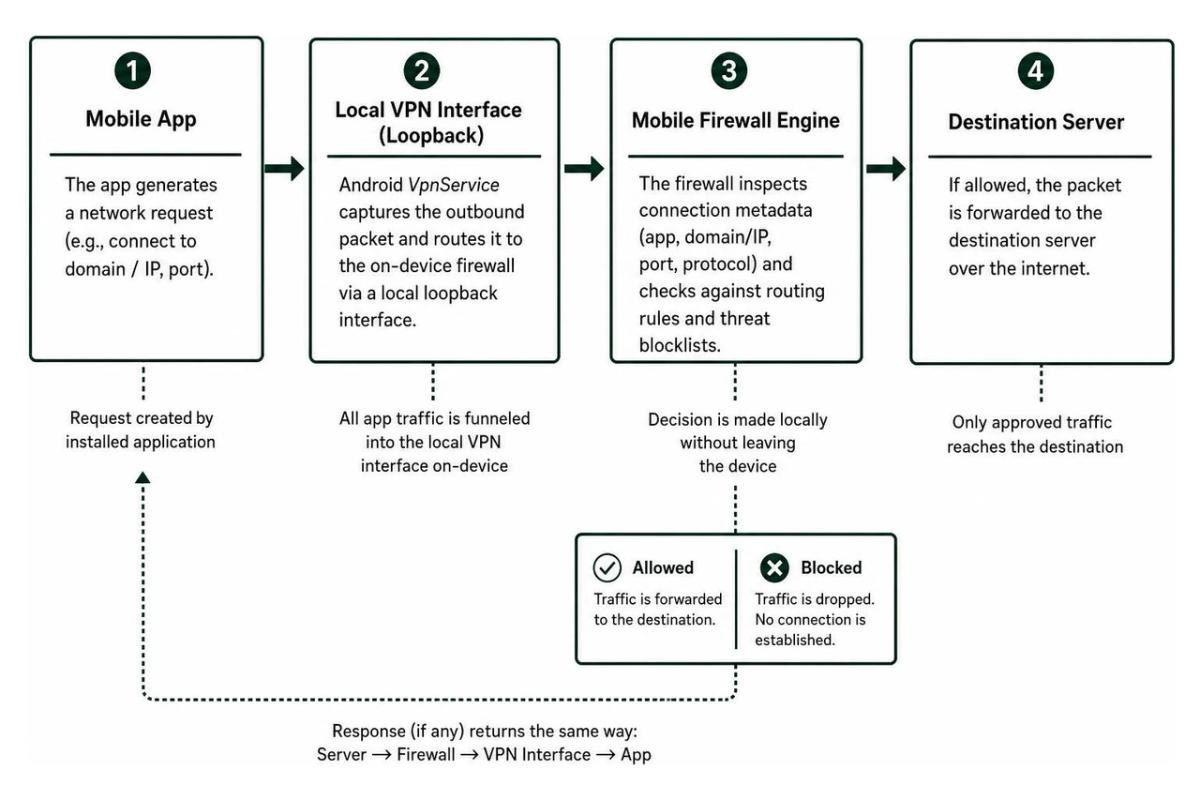
This architecture provides distinct technical advantages:
- Zero External Data Routing: Your raw network traffic never touches external firewall servers, eliminating third-party logging vulnerabilities.
- Encrypted Payload Preservation: The firewall inspects connection metadata—such as source package, target IP address, port number, and requested domain—without attempting to break end-to-end TLS/HTTPS encryption.
- System Component Oversight: Local firewalls can monitor system-level components like Android System SafetyCore, allowing users to observe or restrict automated background communication.
- Strict Single-Slot Allocation: Android restricts active routing to a single
VpnServiceslot per user profile, preventing you from chaining a local firewall with an external proxy VPN at the OS level.
Core Capabilities of Mobile App Firewall Protection
Selecting a mobile firewall requires understanding the network control mechanisms available within modern client-side architectures. Understanding how to secure mobile apps at the network layer requires evaluating several core capabilities:
- Per-App Traffic Toggles: Set granular permissions to allow or deny internet access on a per-package basis.
- Interface-Specific Rules: Configure distinct rules for Wi-Fi, cellular data, and international roaming to optimize bandwidth consumption.
- Live Traffic Telemetry: Real-time logging displaying destination IP addresses, hostnames, geographic endpoints, and timestamped data volumes.
- Domain and IP Filter Lists: Automated blocking using curated domain lists that target trackers, malicious hostnames, and telemetry endpoints.
- Intrusion Prevention Signatures: Heuristic detection algorithms that flag abnormal outbound communication patterns and suspected command-and-control exchanges.
Leading Smartphone Firewall Solutions Compared
Evaluating mobile firewalls involves balancing open-source transparency against commercial threat intelligence feeds. Different tools target specific technical use cases, ranging from packet-level debugging to automated threat blocking.
Evaluating Open-Source vs. Commercial Mobile App Firewall Protection
Open-source firewalls allow developers and privacy advocates to audit underlying codebases, build packages independently, and operate without licensing tiers. These tools excel at reliable packet routing and manual rule enforcement.
Commercial alternatives incorporate dedicated threat research teams, automated hourly intelligence updates, and artificial intelligence models trained to identify suspicious outbound behavior. While commercial tools may charge for real-time threat intelligence feeds, they reduce the manual configuration burden for everyday smartphone users.
Key Tool Profiles: Features, Privacy Policies, and Performance
NetGuard
NetGuard is a premier open-source no-root firewall for Android, maintained by developer Marcel Bokhorst. With over 3,700 stars and 330+ forks on GitHub, it provides a transparent codebase for per-app traffic management.
- Core Strengths: Complete independence from external servers, support for IPv4/IPv6, port forwarding, tethering support, and no baseline data collection.
- Advanced Capabilities: GitHub builds support custom hosts files for device-wide ad blocking, live traffic logging, and raw PCAP packet exports for network diagnostics.
- Cost and Licensing: The base firewall engine is free and open-source under GPLv3. Pro features (PCAP logging, dark themes, and network notifications) require small in-app purchases.
RethinkDNS
Developed as an open-source network utility, Rethink combines DNS-over-HTTPS (DoH) and DNS-over-TLS (DoT) encryption with an on-device firewall interface. Backed by over 4,100 GitHub stars, it gives users granular control over device routing.
- Core Strengths: Integrates over 190 community-curated blocklists (covering malware, spyware, and advertising) with on-device DNS resolver configurations.
- Advanced Capabilities: Allows fine-grained rules such as isolating apps from local network interfaces, blocking unmetered background traffic, and routing specific packages through custom upstream DNS proxies.
- Cost and Licensing: Entirely free and open-source under the Apache 2.0 license, maintained through community support and cloud DNS services.
Firewall AI
Firewall AI provides an automated, intelligence-driven firewall experience. Available via the Play Store, the app holds a 4.1 rating across thousands of user reviews and caters to users wanting managed threat intelligence.
- Core Strengths: Features a proprietary detection engine with over 130 million threat signatures and curated filter lists indexing more than 10 million malicious and tracking domains.
- Advanced Capabilities: Real-time intrusion prevention system (IPS) heuristics flag stalkerware traits and ransomware exfiltration vectors without transmitting personal browsing history off-device.
- Cost and Licensing: A functional free tier provides manual per-app controls; an optional PRO subscription delivers automated daily threat signature and domain filter updates.
Frequently Asked Questions About Mobile Firewalls
Can a mobile firewall run alongside a standard VPN service?
Under standard Android OS architecture, you cannot run a local VPN firewall alongside a traditional remote VPN (such as an encrypted WireGuard or OpenVPN tunnel) within the same user profile. Android enforces a strict single-active VpnService constraint. Activating a remote VPN automatically disconnects the local loopback firewall interface, and vice versa.
Users who require simultaneous protections often deploy encrypted DNS protocols (such as DoH or Private DNS) within the OS settings while maintaining a standard VPN, or run their secondary utility inside Android's Work Profile sandbox.
Will running a local firewall drain smartphone battery life?
Running a local loopback firewall has minimal impact on battery life. Because modern smartphone processors route packets through memory efficiently, local metadata filtering creates negligible CPU overhead.
In everyday use, running a firewall often improves total battery endurance. By cutting off background telemetry, ad polling, and hidden sync requests from unapproved apps, you prevent the device's radio modem from waking up frequently, saving both battery and data.
Does a mobile app firewall protect against incoming network attacks?
Mobile app firewalls focus primarily on egress (outbound) traffic monitoring. Because cellular network operators place mobile devices behind Carrier-Grade Network Address Translation (CGNAT), smartphones rarely expose direct public IP addresses to unsolicited inbound traffic.
Client-side firewalls focus on preventing apps from initiating unwanted outbound connections to tracking servers or malware hosts. For inbound risks on public Wi-Fi networks (such as ARP spoofing or MITM attacks), pairing a firewall with tools that feature Wi-Fi network scanning offers complete coverage.
Modern Mobile Defense: Hardening Your Outbound Traffic
Modern smartphone security requires monitoring outgoing connections just as closely as incoming files. When applications operate with unchecked background access, your private data, device identifiers, and location coordinates remain at risk. Installing an egress firewall using Android's native loopback architecture gives you full visibility into which servers your apps contact and lets you shut down unwanted background traffic.
If your team is designing modern mobile platforms or enterprise tools, building baseline network security directly into the application layer is critical. At Synergy Labs, our team develops reliable digital products using an efficient fixed-budget approach. We combine in-shore CTO oversight with experienced developer talent, organizing delivery through milestone-based payments to ensure your software is deployed quickly and securely.
Ready to build high-performance mobile applications with built-in security? Explore our custom app development services and learn how Synergy Labs turns complex technical architectures into intuitive user experiences.