

Best Phone Lock App Picks for Your Privacy
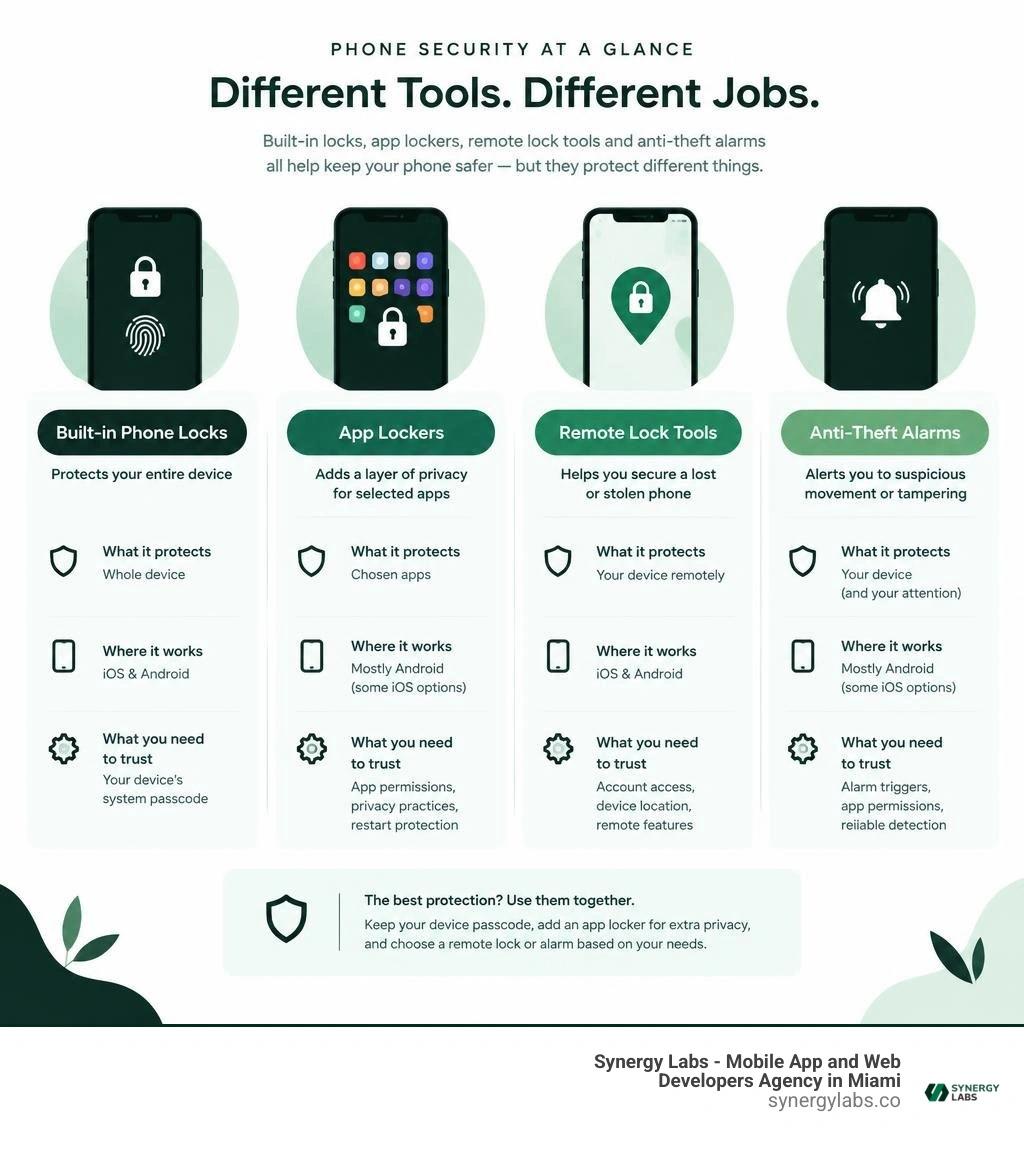
The best phone lock app depends on what you need to protect. On Android, choose an app locker such as AppLock to put a PIN or fingerprint check on selected apps. For a lost phone, start with Google's built-in Remote Lock or Apple's Find My. If theft alerts matter most, a tool such as Padlock Anti-theft Phone Alarm serves a different purpose.
Keep your phone's system passcode on either way. An app locker adds a layer of privacy; it does not replace the device lock. Before installing one, check its permissions, privacy practices, and whether it still protects apps after a restart.
As director of product at Synergy Labs, I'll compare these tools by what they protect, where they work, and what they ask you to trust.
Key terms for phone lock app:
- Android Remote Lock
- Lock Android Device Remotely
- Phone Lock Password
Understanding the Core Types of Mobile Security and Locking Tools
Mobile security is not a one-size-fits-all discipline. When users search for tools to secure their hardware, they encounter several distinct categories of utilities. Understanding these differences ensures you deploy the right protection for your specific threat model.
- App-Specific Lockers: These tools place a secondary authentication barrier over individual applications. Even if an unauthorized party bypasses your primary lock screen, they cannot open your banking tools, messaging threads, or photo galleries without a separate PIN, pattern, or biometric scan.
- Remote Lock and Management Services: Designed for lost or stolen hardware, remote management frameworks allow you to trigger a system-wide lockdown, display a recovery message, or wipe device storage from a web interface.
- Anti-Theft and Motion Alarms: These specialized utilities turn your device into an active physical tripwire. Using internal accelerometer and proximity hardware, they sound loud sirens or dispatch covert tracking alerts if someone lifts your phone from a table or unplugs the charger.
- Screen Lock Utilities and Gesture Enhancers: These tools modify how you interact with the primary lock screen, introducing custom wake gestures, double-tap toggles, or voice-activated triggers.
- Mobile Identity Protection Suites: Broad security suites focus on credential monitoring, dark-web breach alerts, and data compromise detection across online accounts rather than hardware sensors.
At Synergy Labs, we understand that true mobile defense begins with lock phone fundamentals. While native operating system controls provide baseline protection, integrating secondary utilities creates depth. Modern mobile app security relies on layered defenses: native sandboxing protects internal code execution, while dedicated locking tools shield the user interface from casual snooping.
How to Choose the Best Phone Lock App for Your Device
Selecting an effective phone lock utility requires balancing privacy, system performance, and convenience. Because locking tools require deep system access to intercept app launches, choosing a poorly engineered app can introduce stability issues or compromise your private records.
Here are the essential technical features and architectural factors to evaluate:
- Native Hardware Biometrics: Ensure the app integrates directly with platform-level biometric APIs. When you configure your system to lock Android phone with fingerprint authentication, you avoid typing passcodes in public where shoulder-surfers might spot them.
- Intruder Selfie Logging: Advanced lockers quietly capture front-camera photos whenever an incorrect PIN or pattern is entered. This creates a timestamped visual record of anyone attempting unauthorized access.
- Anti-Uninstall and Administrator Protection: Without anti-tamper safeguards, an intruder who gains brief access to an unlocked phone could uninstall your locker from settings. Robust options block access to the system installer and settings menu.
- Offline Data Processing: The most private security utilities operate entirely offline. They do not transmit your usage statistics, app lists, or biometric hashes to external cloud servers.
- Randomized Keypad Layouts: Scrambling numeric keypads on each launch prevents onlookers from deducing your PIN based on finger placement or residual screen smudges.
- Custom Re-Lock Timers: Flexible timeout settings allow you to switch briefly between apps without re-authenticating every single second, reducing user friction.
Platform constraints also dictate functionality. Android leverages Accessibility Services and Usage Stats APIs to detect front-running applications and display authentication overlays immediately. In contrast, iOS enforces strict system sandboxing. Third-party apps cannot inspect running processes or overlay arbitrary locks over native software. If an iOS user forgets their system credentials, standard workflows require recovery through Apple ID credentials rather than third-party bypasses, which is why understanding how do I unlock my iPhone via official recovery paths remains essential.
Top Security Tool Comparisons: App Lockers, Anti-Theft, and Open-Source Solutions

Evaluating popular third-party tools requires inspecting feature breadth, security standards, and user ratings across active app repositories. Industry-grade mobile app protection requires reliable authentication overlays, robust media vaults, and complete transparency regarding device permissions.
Top Phone Lock App Options for Android and iOS
The market for general app lockers features several high-volume utilities designed to protect individual apps, personal media galleries, and system settings.
- AppLock: Maintaining over 100 million downloads and a 4.6-star rating across 1.12 million reviews on Google Play, AppLock on Google Play remains an industry standard. It features social app locking, system settings protection, an encrypted photo vault, intruder selfie capture, and customizable themes. It relies on Usage Access permissions to trigger real-time authentication overlays.
- App Lock - Lock Apps, Password: Boasting over 50 million downloads with a 4.8-star rating from 735,000 reviews, App Lock - Lock Apps, Password provides fingerprint, pattern, and knock-code locking. It includes automatic detection for newly installed apps, a disguised app icon feature, and custom re-lock schedules.
- App Lock and Fingerprint Lock: With a 4.3-star rating from 46,500 reviews, this utility emphasizes anti-surveillance protections. It includes a camouflage icon feature that transforms the launcher icon into an innocuous utility, paired with a randomized numeric keypad to prevent pin-guessing from observers.
- App Locker: App Lock & Protect: Designed for focused privacy with over 1,000 installs, App Locker: App Lock & Protect – Apps on Google Play operates entirely offline. It features specialized protection profiles like Strict, Kids, and Focus modes alongside one-tap app grouping.
- Google Smart Lock (iOS): Unlike its Android counterpart, Google Smart Lock on the Apple App Store functions primarily as a Bluetooth security key manager for Google account two-factor authentication. Holding a 2.5-star rating from 634 reviews, users frequently encounter Bluetooth timeout issues and configuration complexities following major iOS updates.
Anti-Theft Alarms and Gesture-Based Screen Control Tools
When physical theft or touch convenience is the primary objective, alternative tools offer hardware-driven automation.
- Padlock Anti-theft Phone Alarm: Accumulating over 1 million downloads and a 4.3-star rating from 812 reviews, Padlock Anti-theft Phone Alarm safeguards hardware in public environments. It sounds loud sirens and dispatches email or SMS alerts triggered by motion detection, pocket removal, charging cable disconnection, or SIM card extraction. A silent tracking mode enables covert monitoring without alerting the thief.
- AZ Lock: Voice Lock Screen: With over 50,000 downloads, AZ Lock: Voice Lock Screen - Apps on Google Play provides voice-command unlocking as a secondary authentication layer. Users can explore hands-free access routines through our detailed Voice Lock Android Guide 2026 while keeping backup PIN and pattern overrides active.
- Screen On/Off With Double Tap: Holding a 4.5-star rating across 102,000 reviews, Screen On/Off With Double Tap - Apps on Google Play replaces physical power buttons with screen-tap gestures, shake-to-lock triggers, and floating quick-access widgets using Android Accessibility services.
Managing Security Risks, Restart Delays, and Malicious Apps
Third-party security tools require elevated permissions to monitor foreground applications. If you do not vet these tools carefully, they can degrade battery life, introduce aggressive adware, or create security blind spots.
Engineering resilient mobile experiences requires following rigorous practices for how to secure mobile apps, preventing unauthorized code injection and safeguarding device resources.
When to Choose an Open-Source Phone Lock App
For privacy-focused users, open-source repositories provide an alternative to commercial app stores. The Google Play Store and commercial ad networks often bundle analytics trackers into free utilities. Open-source solutions published on verified platforms eliminate commercial tracking.
A prime example is Paranoid's Pal - Privacy Lock | F-Droid - Free and Open Source Android App Repository. It operates 100% offline, requires zero network permissions, and integrates modern Material You design elements alongside shake-to-lock gestures. Open-source utilities allow developers and security researchers to audit the underlying source code, ensuring that your biometric markers and app usage patterns are never stored insecurely or transmitted to external servers.
Troubleshooting Post-Restart Lock Lag and Removing Rogue Apps
A notable vulnerability in third-party Android lockers occurs immediately after a device reboots. Under Android's Direct Boot architecture, encrypted storage remains locked until the user enters their primary lock screen credential. As a result, third-party accessibility and foreground services may experience an execution delay of several seconds upon startup, briefly exposing protected apps. To prevent exploitation, always secure your primary lock screen with a strong system-level credential and enable startup initialization inside your app locker settings.
If you accidentally install a malicious utility masquerading as a security tool—causing pop-up advertisements, battery drain, or unresponsiveness—follow this systematic removal procedure:
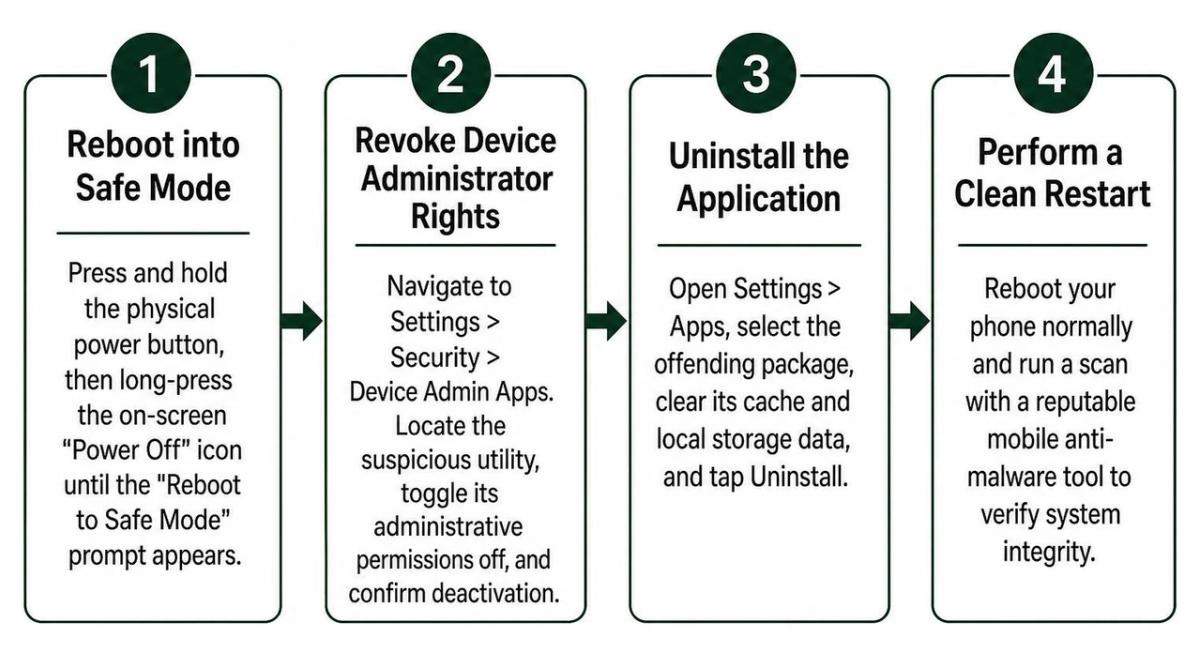
- Reboot into Safe Mode: Press and hold the physical power button, then long-press the on-screen "Power Off" icon until the "Reboot to Safe Mode" prompt appears. Safe Mode disables all third-party background services.
- Revoke Device Administrator Rights: Navigate to Settings > Security > Device Admin Apps. Locate the suspicious utility, toggle its administrative permissions off, and confirm deactivation.
- Uninstall the Application: Open Settings > Apps, select the offending package, clear its cache and local storage data, and tap Uninstall.
- Perform a Clean Restart: Reboot your phone normally and run a scan with a reputable mobile anti-malware tool to verify system integrity.
How to Recover a Lost Device Using Remote Lock and Tracking Features
When a device is physically lost or stolen, an app-specific locker cannot locate the hardware. In these emergency scenarios, remote management tools provide recovery and data protection.
- Google Find My Device / Remote Lock: Ensure remote management is active before an incident occurs. You can trigger an emergency lockdown by visiting the official Remote Lock portal or using standard protocols to remote lock Android phone hardware. The service requires the device to be powered on with an active cellular or Wi-Fi connection.
- Remote Lockdown Execution: When you lock Android device remotely, the system overrides temporary biometric tokens, requires the master password, and displays a custom recovery message with a contact number on the screen.
- Offline SMS and Alarm Triggers: Anti-theft tools like Padlock can listen for coded SMS strings sent from a trusted contact's phone. Upon receiving the text command, the utility can broadcast GPS coordinates or sound maximum-volume sirens even if mobile data is toggled off.
- Apple Find My Ecosystem: iOS devices leverage Apple's encrypted Find My mesh network, utilizing nearby Apple hardware via Bluetooth beacons to track offline devices. If an iPhone is marked as lost, activation lock prevents unauthorized formatting. For persistent credential lockouts, our disabled iPhone unlock guide 2026 explains recovery workflows.
- Remote Factory Wipe: If physical recovery is impossible, issue a remote wipe command through your platform's device portal. This irreversibly sanitizes internal flash memory to protect your corporate and personal accounts.
Frequently Asked Questions About Phone Lock Apps
Why did my app locker fail to secure apps immediately after rebooting?
This issue stems from the operating system's startup architecture. On Android, Direct Boot keeps third-party applications in a dormant state until the user enters the primary lock screen credential to decrypt storage. Once unlocked, the system initializes background processes, but low-priority accessibility and foreground services may take 5 to 15 seconds to bind. To minimize this vulnerability, configure your device with a strong primary lock screen password and disable aggressive OS battery optimization for your lock app so its background service restarts without delay.
How do built-in OS locks differ from third-party app lockers?
Built-in operating system security tools operate at the kernel and hardware level, leveraging dedicated cryptographic hardware (such as Apple's Secure Enclave or Android's Titan M chips) to enforce device-wide encryption. If an unauthorized user attempts to bypass system security, procedures outlined in how can you unlock a locked iPhone show that recovery requires master credentials or complete data erasure. In contrast, third-party app lockers operate at the application layer using software overlays and accessibility hooks to intercept user input, providing convenience and secondary privacy rather than hardware-enforced encryption.
Can a phone lock app help recover a stolen phone without an internet connection?
Yes, specialized anti-theft utilities provide recovery mechanisms that function without an active data connection. Tools configured with SMS receiver permissions can interpret specific encrypted text commands from whitelisted phone numbers, triggering location beacons via return SMS or activating audible sirens. Additionally, motion-sensing alarms trigger localized sirens and capture intruder selfies stored directly to internal memory the moment suspicious handling is detected.
Building Resilient Mobile Defenses with Synergy Labs
Protecting personal and enterprise data requires a multi-layered mobile defense. While standalone app lockers and anti-theft utilities provide immediate privacy against casual snooping, engineering secure, enterprise-grade mobile software requires deep architectural expertise.
At Synergy Labs, we specialize in end-to-end digital product design, custom application development, and robust mobile architecture. Whether you need consumer apps with biometric integration or enterprise-grade mobile security software, our team delivers world-class execution across our locations in Miami FL, New York City NY, San Francisco CA, Austin TX, Chicago IL, Phoenix AZ, Hartford CT, London UK, Dubai UAE, Doha Qatar, and Riyadh Saudi Arabia.
Our unique delivery model combines an in-shore CTO providing technical leadership with a high-velocity offshore development team. We operate on a transparent fixed-budget model with milestone-based payments, ensuring your custom mobile application is built efficiently, launched rapidly, and backed by ongoing technical support.
To learn more about our approach and start your next project, explore our core capabilities:
Contact Synergy Labs today to build scalable, secure mobile solutions that protect your users and accelerate your business growth.