

Why mobile app industry standards matter from day one

Mobile app industry standards give teams a way to build, test, and release apps that are secure, usable, and ready for the rules that apply to them. Start with OWASP MASVS for mobile security, use its testing guide to check your work, and identify any privacy, payment, or health-data requirements before development begins. Add accessibility, performance, and app-store checks to the release plan.
For a startup on a tight timeline, this means catching costly issues early without treating every app as if it has the same risks. As director of product at Synergy Labs, I use that lifecycle view to help teams focus on the checks their app needs most.
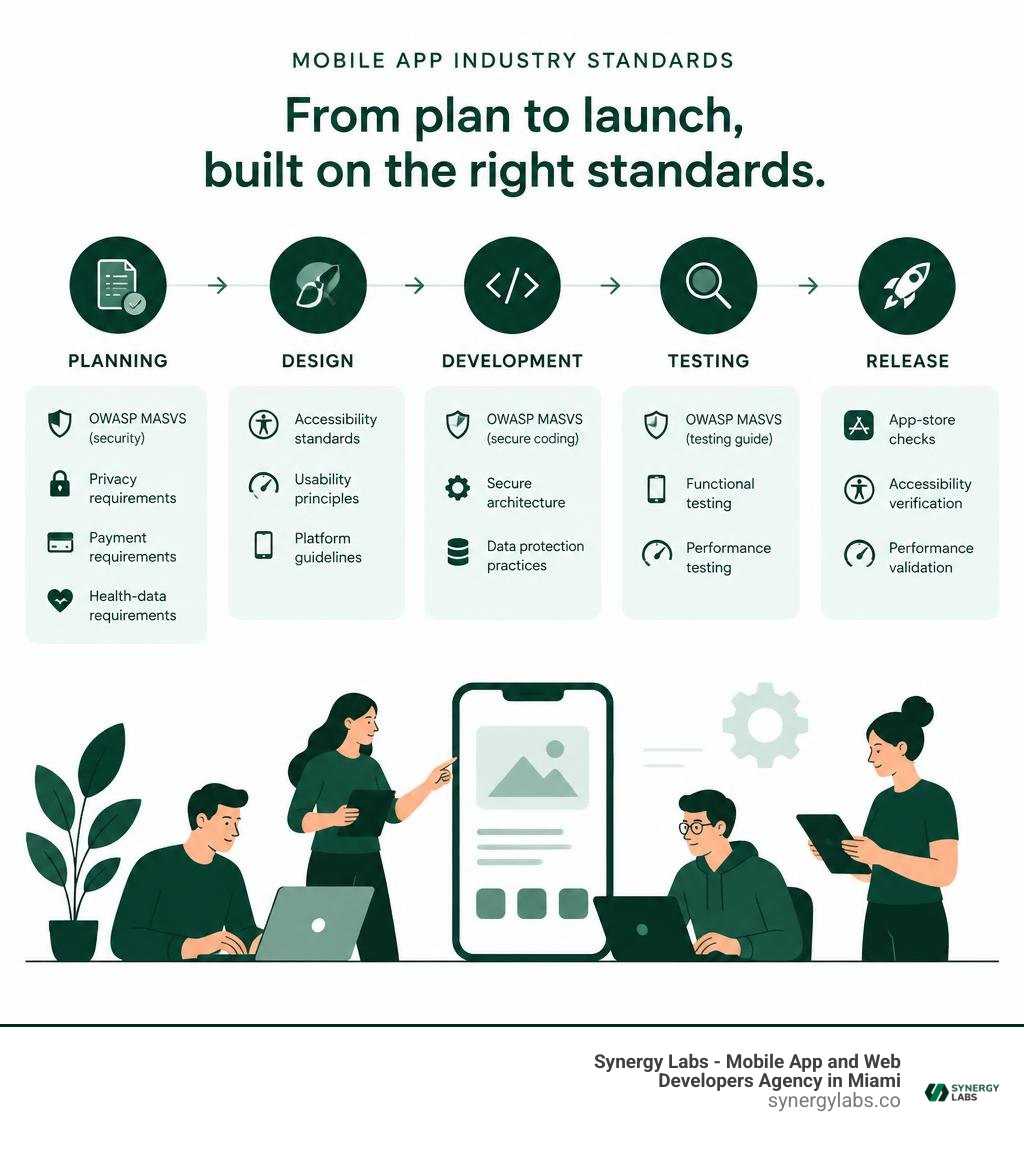
Quick look at mobile app industry standards:
What mobile app industry standards cover across the lifecycle
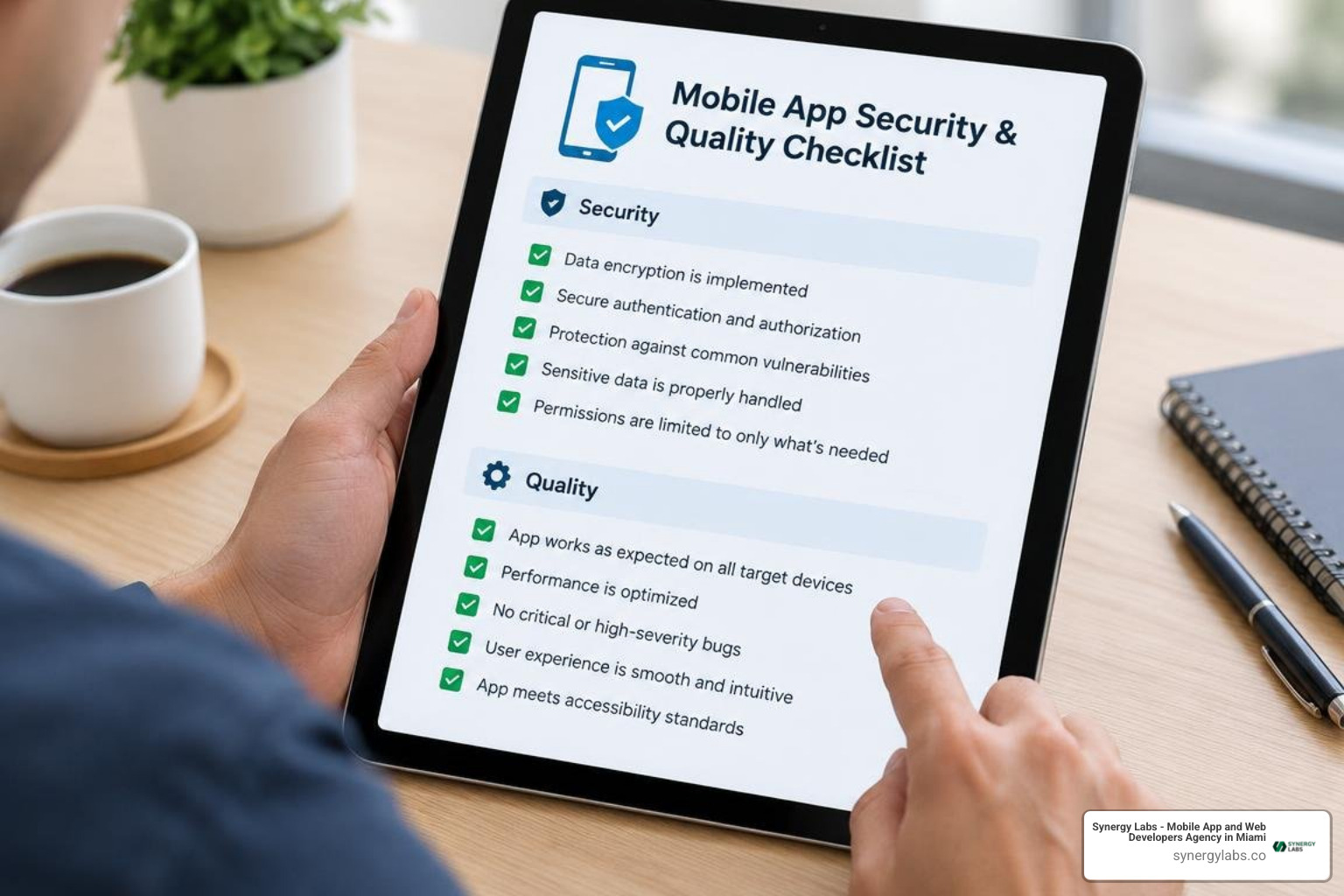
Standards are not one document. We group them into three buckets: industry frameworks (how you manage risk), testing standards (how you verify the app), and compliance standards (what the law or a regulator expects). Around those sit quality benchmarks such as accessibility, performance, and app-store rules. Knowing which bucket a standard belongs in keeps you from asking a legal question of a technical checklist, or the other way around.
How mobile app industry standards turn security goals into testable controls
The OWASP MASVS security and privacy requirements are the most widely used baseline for mobile app security. They are written for architects and developers who build apps, and for testers who need consistent, complete results. The standard is split into eight control groups:
- STORAGE: protect sensitive data at rest on the device.
- CRYPTO: use cryptography correctly and manage keys well.
- AUTH: implement sound authentication and authorization.
- NETWORK: secure data in transit between app and servers.
- PLATFORM: interact safely with the operating system, other apps, WebViews, and the UI.
- CODE: follow secure practices for data processing, input validation, and keeping the app and its components up to date.
- RESILIENCE: resist reverse engineering and tampering.
- PRIVACY: minimize data access and give users control.
The wider OWASP mobile application security resources bring together three pieces: MASVS (the standard), MASWE (a list of mobile-specific security and privacy weaknesses), and MASTG (the testing guide). Think of MASVS as the "what," MASWE as the "what goes wrong," and MASTG as the "how to check."
How mobile app industry standards differ by purpose and scope
Frameworks, regulations, and certifications answer different questions:
- NIST 800-53 is a catalog of security and privacy controls that supports a systematic, risk-based approach. It covers many system types, including mobile and IoT devices.
- ISO 27001 defines requirements for an information security management system, which is a way to manage financial information, intellectual property, employee details, and data entrusted by third parties. Organizations can be certified against it.
- MITRE ATT&CK for Mobile catalogs attacker tactics and techniques, including device access, app-based, and network-based vectors. It is a strong tool for threat modeling.
- Regulations such as GDPR or HIPAA are legal obligations, not optional guidance.
Frameworks and guidance are mostly voluntary, regulations are mandatory, and certifications give you evidence that someone independent checked your work.
Testing standards, weakness catalogs, and vulnerability ratings
MASTG test cases map to MASVS and cover platform internals, static and dynamic analysis, reverse engineering, and tampering. Beyond that, several shared languages help you describe and rank problems:
- OWASP API Top 10 (first released at the end of 2019) covers API risks, which matter because mobile apps lean heavily on APIs.
- CWE Top 25 lists the most dangerous software weaknesses and gives teams a common vocabulary.
- CVE tracks publicly known vulnerabilities, with more than 175,000 records, and works alongside NIST's National Vulnerability Database.
- CVSS scores severity numerically, which translates into low, medium, high, and critical ratings.
Use CVSS ratings to decide what to fix first, and add periodic manual penetration testing for the issues automated tools miss.
Quality benchmarks beyond security
Security is not the only reason users leave. According to a 2020 industry report, 46% of users have stopped using or uninstalled an app because of poor performance. About 19% uninstall over frequent push notifications, another 19% over hang-ups, and around 11% over a complicated interface. Roughly 85% of people use their phone one-handed.
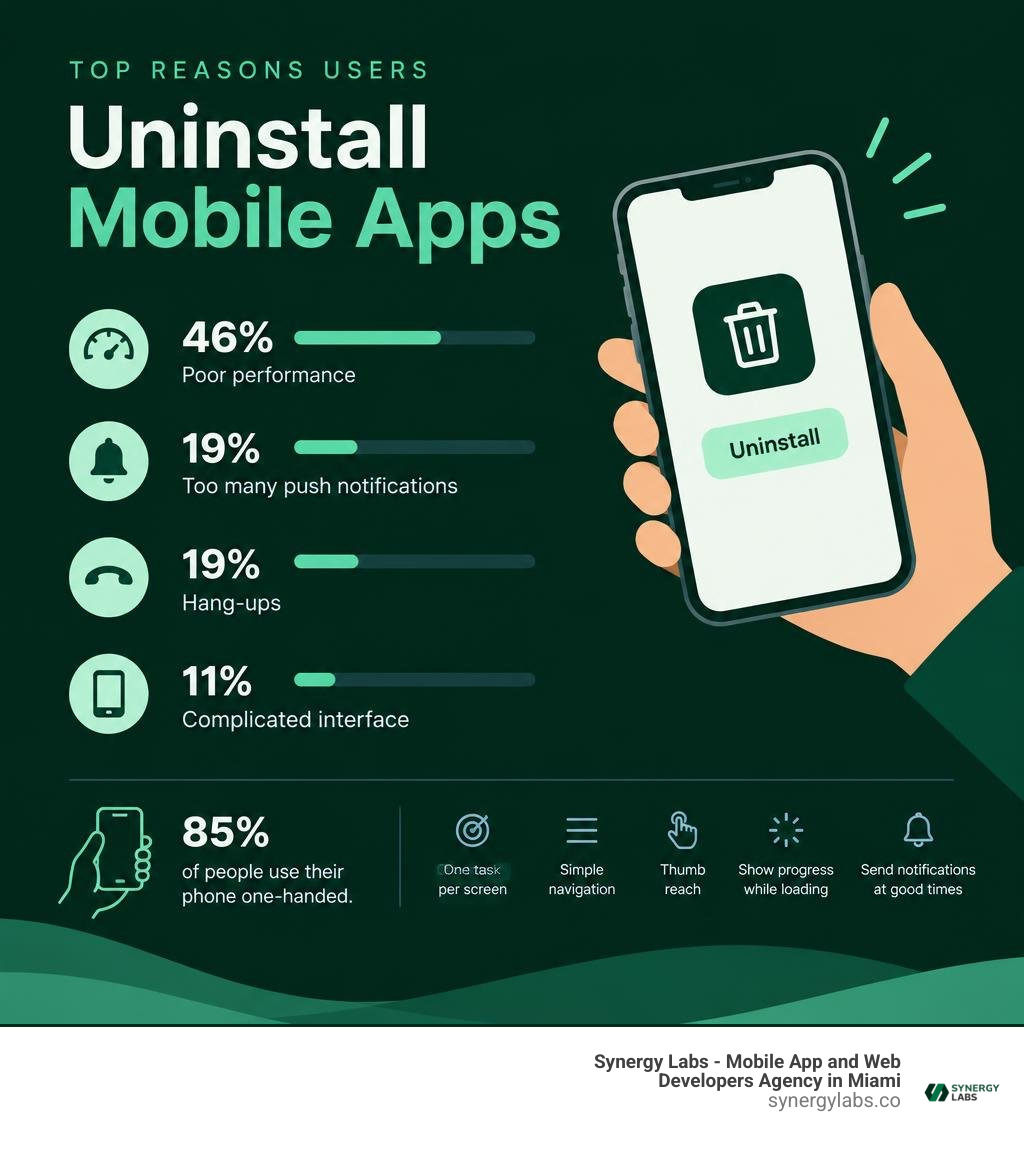
Practical benchmarks follow from that: keep screens uncluttered with one task per screen, keep navigation simple, place common actions within thumb reach, show skeleton screens or progress indicators while loading, and send notifications at sensible times. Follow WCAG for accessibility, plus Apple and Google platform guidelines and app-store review rules. Our guide to user-centered app design goes deeper, and our list of common development mistakes shows where teams usually slip.
Which laws and regional codes apply to mobile apps?

The answer depends on what data you handle, where your users are, and what role you play (data controller, processor, or service provider). Map those three things first.
GDPR, HIPAA, and PCI-DSS: match obligations to the data and use case
- GDPR applies when you process personal data of people in the EU. It expects a lawful basis, valid consent where consent is the basis, data minimization, limited retention, support for user rights such as access and erasure, reasonable protection against loss or exposure, and a breach response process.
- HIPAA (enacted in 1996) protects patient health information from disclosure without consent or knowledge. If your app handles protected health information, expect required safeguards and formal agreements with business associates.
- PCI-DSS applies to any organization or app accepting digital payment information. The smartest move is scope reduction: let a certified payment provider handle card data and use tokenization so your app never touches raw card numbers.
CCPA, FFIEC, FISMA, and NIAP in regulated app environments
- CCPA (2018) gives California consumers the right to know, delete, opt out of the sale of their data, and be free from discrimination.
- FFIEC is a U.S. interagency body of five banking regulators. It published its Cybersecurity Assessment Tool in 2017, and financial institutions use it to gauge risk.
- FISMA (passed in 2002, amended in 2014) requires federal agencies to run agency-wide information security programs.
- NIAP implements Common Criteria in the U.S. and created the Mobile App Vetting Protection Profile for Application Software (v1.3), which federal buyers use when vetting apps.
For all four, keep audit evidence: test results, findings, and remediation records.
The UK Code of Practice for App Store Operators and App Developers
The UK app security and privacy Code of Practice is voluntary, but it gives a concrete roadmap for teams serving UK users, including our London clients. Its eight principles are not ranked and cover operator baselines, developer baselines, vulnerability disclosure, updates, user information, guidance to developers, feedback on rejections, and breach handling.
To meet its expectations, developers should:
- Use industry-standard encryption in transit and at rest.
- Request only the permissions the app truly needs, and make sure the main function still works if optional permissions are declined.
- Share permissions in the app manifest and apply data protection by design.
- Offer simple uninstall and data deletion.
- Run a vulnerability disclosure process and keep third-party libraries and SDKs current.
- Tell users where data is stored, who can access it, why it is used, and when the app was last updated.
Operators are expected to vet submissions, remove verified malicious apps within 48 hours, and contact developers whose apps have gone two years without an update. Under UK GDPR, personal data breaches are reported to the ICO within 72 hours where feasible. The application security requirements mapping site compares several standards against the same eight principles, which is a handy way to spot gaps.
Singapore's Safe App Standard 2.0 and global influence
The Cyber Security Agency of Singapore published Singapore Safe App Standard 2.0 in October 2024, updating its January 2024 original. It targets high-risk apps, such as those that can register third-party payees or raise transfer limits. It covers authentication, authorization, data storage, anti-tampering and anti-reversing, network communication, cryptography, code quality and exploit mitigations, and platform interactions. It is recommended for apps developed and hosted in Singapore, so it is not a universal rule. Still, its areas closely mirror MASVS, which shows how national standards are converging on a shared core. For teams serving banking or fintech clients in Dubai, Doha, or Riyadh, it is a useful benchmark for high-risk features.
How to implement standards throughout the app development lifecycle
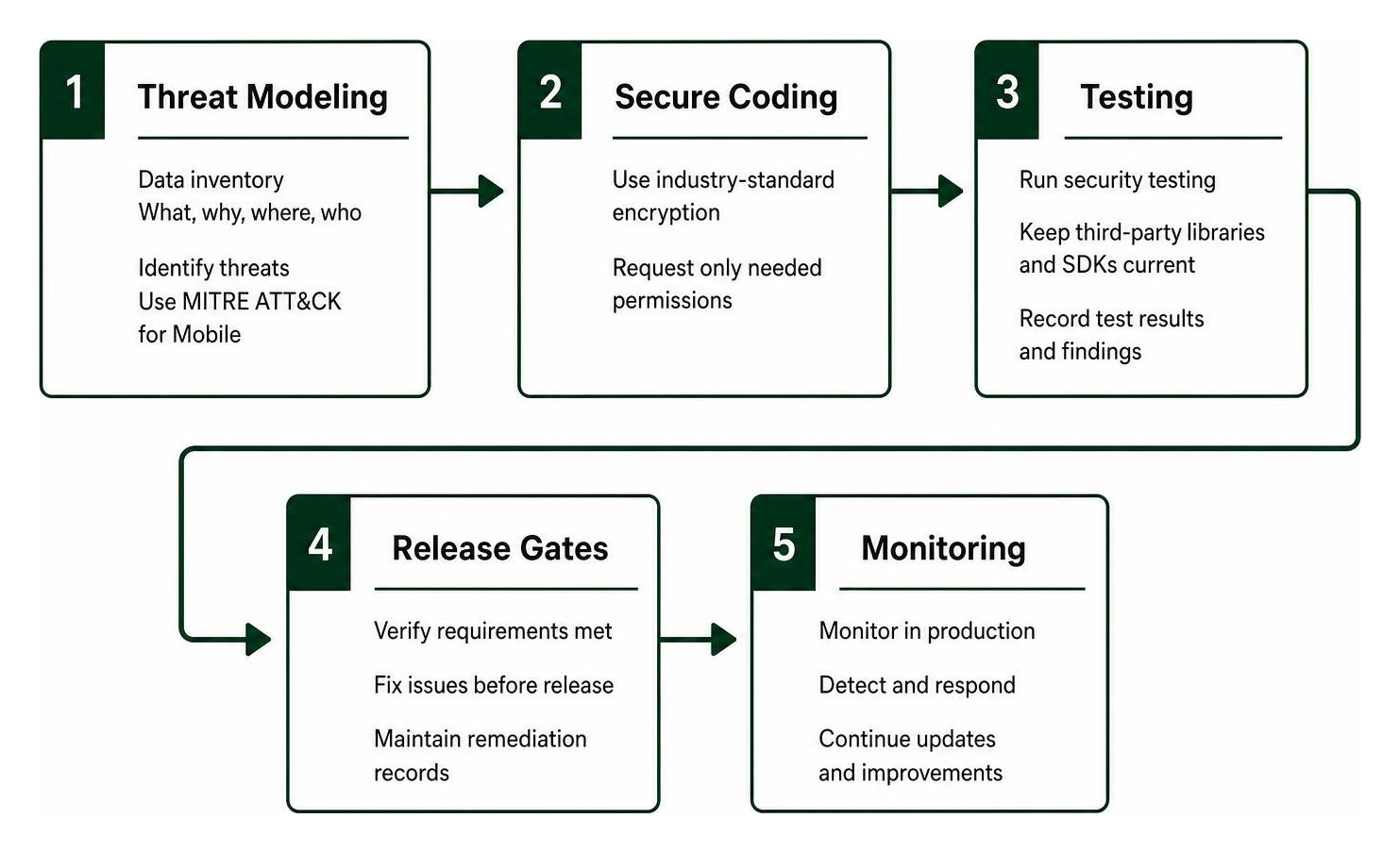
Build a risk-based standards plan before development
Start with a data inventory: what you collect, why, where it goes, and who sees it. Then:
- Build a threat model, using MITRE ATT&CK for Mobile for ideas.
- Define regulatory scope by data type and user location.
- Assign an owner to each control.
- Sort apps and features into risk tiers, so a payment feature gets more scrutiny than a static info screen.
- Write acceptance criteria and security requirements, with privacy by design built in.
This is especially important for large builds, as our enterprise app development guide explains in detail.
Secure code, APIs, SDKs, and open-source dependencies
Third-party code is a major supply chain risk. Keep a full inventory of libraries and SDKs, and generate a software bill of materials, ideally in OWASP CycloneDX format (XML, JSON, or Protocol Buffers). Then:
- Run software composition analysis and monitor for new vulnerabilities in every published version.
- Pin versions and review vendors before adding an SDK.
- Review SDK permissions and telemetry so you know what data leaves the app.
- Track license obligations, because open source stays subject to its license conditions even when it is free.
Intellectual property deserves the same discipline. Mobile apps are layered products protected by several rights: copyright for code and content, trademarks for names and logos, patents where applicable, and trade secrets for confidential know-how. Put ownership terms in contracts with developers and vendors, and register your branding. Our rundown of mobile development tools covers useful tooling.
Test, prioritize, remediate, and retain evidence
Use MASTG test cases on real devices, combining static analysis, dynamic analysis, and API testing, and add manual penetration testing for high-risk apps. Tag findings with CWE, check them against known CVEs, and score them with CVSS. Fix the critical and high items first, retest, and keep the results as your audit trail. Third-party assessment adds credibility when customers or regulators ask. Our look at release trends and development practices shows how this fits modern pipelines.
Independent validation through ADA MASA
The App Defense Alliance created MASA in 2022 on top of OWASP MASVS and MASTG. The App Defense Alliance MASA program sets testable requirements across the same eight areas, validated by an Authorized Lab at the assurance level you choose. Certification lasts 365 days, so plan renewals. For Android apps, a completed verification can earn an independent security review badge in the Google Play Data Safety section, which is a nice trust signal.
Frequently Asked Questions about mobile app industry standards
What is the difference between a framework, a regulation, and a certification?
A control framework (NIST 800-53, ISO 27001) organizes how you manage risk. A regulation (GDPR, HIPAA) is a legal obligation. A verification standard (MASVS) defines testable requirements. A certification or independent assessment (ISO 27001 certification, MASA) is proof that a qualified party checked your work. Audit evidence ties them together.
How can teams balance strong security with privacy and data minimization?
Collect only what you need for a stated purpose, request minimal permissions, keep retention short, and encrypt what you store. Give users control over their data, write clear notices, and test privacy behavior like any other feature. Less data means less to protect, which helps both goals.
What should a mobile app standards checklist include?
- Applicable laws by data type and region
- MASVS controls and chosen assurance level
- SDK and dependency inventory with an SBOM
- Accessibility and performance checks
- App-store requirements
- A testing plan with remediation owners
- Release evidence for audits
Standards Without the Stress: Your Next Release
Aligning your lifecycle with benchmarks comes down to risk-based controls, measurable testing, and regular updates, because standards keep evolving. Done well, it protects user trust and speeds releases instead of slowing them.
At Synergy Labs, we make that practical. You get a fixed-budget model, an in-shore CTO guiding an offshore development team, and milestone-based payments so work moves efficiently and you pay for progress. Explore our mobile app development services and let's build something secure, compliant, and genuinely enjoyable to use.