

Mobile App Localization Services for Global Growth

Mobile app localization services help you adapt an app for each market, not just translate its words. Start by choosing target markets and preparing your code for multiple languages. Then adapt the interface, local formats, and app store listing. Test each version on real devices before launch, and keep it updated as the app changes.
This approach helps users understand and trust the app from their first search to their first tap. For a startup on a tight schedule, building localization into development early is easier than fixing hardcoded text and cramped screens later.
As director of product at Synergy Labs, I’ll walk through the steps that make global launches more manageable.
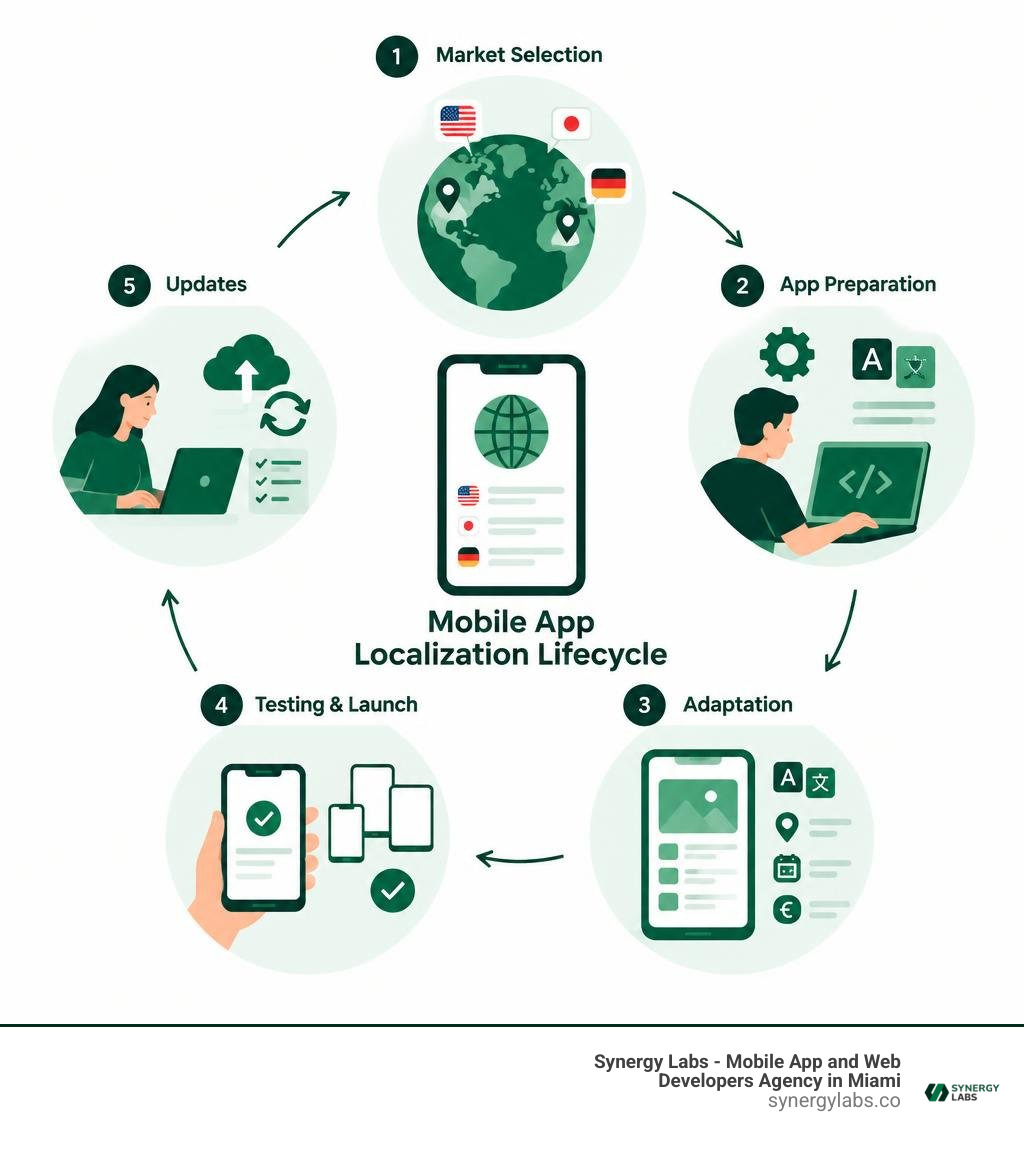
Mobile app localization services terminology:
- app development success stories
- custom mobile app design
- mobile app launch marketing
The Core Foundations of Mobile App Localization Services
Entering the global market requires recognizing how diverse today's mobile landscape truly is. Across the globe, there are over 6.64 billion smartphone users—representing approximately 83.89% of the world's population. Yet less than 20% of global consumers speak English natively or fluently. If your application only speaks English, you are effectively leaving more than four-fifths of the digital world on the table.
When companies embrace comprehensive localization rather than basic word swaps, the commercial rewards are immediate. Industry data demonstrates that localized apps see a 128% increase in downloads per country, alongside an average 26% boost in revenue per country. Simply put, users download, trust, and purchase inside apps that communicate in their native language and respect their cultural background.
Localization encompasses far more than vocabulary. While translation swaps source words into target words, comprehensive localization adapts visual design, numerical conventions, cultural nuances, regulatory compliance, payment rails, and store presentation. Setting up these foundations starts by aligning your software with established international standards, such as Internationalization Quick Tips for the Web, and implementing professional language adaptation standards.
The core business benefits of adopting an end-to-end localization strategy include:
- Rapid international market penetration and elevated brand visibility across global app stores
- Substantial improvements in user onboarding completion and long-term retention rates
- Higher conversion rates by integrating familiar regional payment gateways (such as Pix, UPI, or SEPA)
- Enhanced customer trust through culturally tailored imagery, tone, and compliance disclosures
- Reduced customer support tickets caused by confusing literal translations or broken interface elements
Engineering for Internationalization Before Localization
Before adapting user-facing copy, your engineering team must complete internationalization (i18n). Internationalization is the fundamental architectural process of designing and structuring your codebase so that it can accommodate various languages, scripts, and cultural conventions without requiring invasive code modifications.
The primary rule of i18n is eliminating hardcoded strings. Every single snippet of user-facing text—from navigation headers and button labels to error dialogs and accessibility tags—must be extracted into external resource files. When we architect custom mobile software development projects, we enforce strict linting rules that flag hardcoded text during code commits.
Beyond string extraction, internationalization requires handling dynamic variables properly. Concatenating strings dynamically in code creates broken syntax because word order differs dramatically across languages. Your application must also standardize on UTF-8 character encoding universally to prevent broken text rendering (mojibake). Finally, date, time, currency, and numerical parsing must rely on locale-aware native system formatters rather than custom string templates.
Navigating Platform-Specific Resource Files and Formats
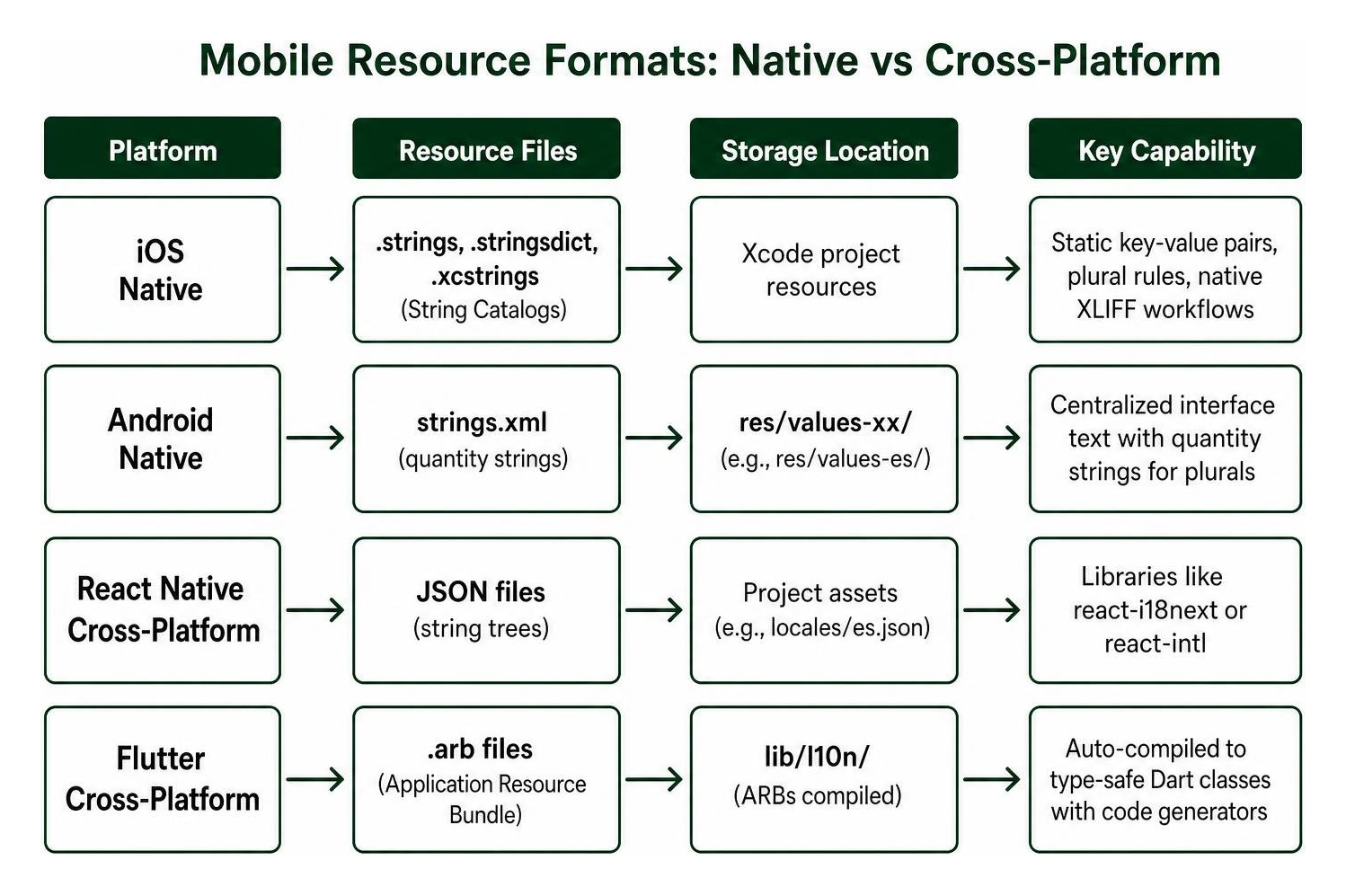
Native and cross-platform ecosystems each maintain distinct standards for storing and compiling localized resources. Understanding these formats ensures smooth handoffs between your developers and linguistic workflows.
- iOS Native: Apple environments historically utilized
.stringsfor static key-value pairs and.stringsdictfor plural rules. Modern iOS applications use consolidated.xcstringsString Catalogs alongside native XLIFF export and import workflows. - Android Native: Android centralizes interface text inside
strings.xmlfiles stored in locale-specific directories (such asres/values-es/for Spanish orres/values-ja/for Japanese), leveraging quantity strings for plurals. - React Native: Modern React Native applications leverage libraries like
react-i18nextorreact-intl, storing string trees inside modular JSON files. - Flutter: Flutter projects organize multilingual resources into Application Resource Bundle (
.arb) files, which automatically compile into type-safe Dart classes using code generators.
When building through a unified cross-platform app development service, keeping consistent key naming structures across iOS and Android assets avoids paying to translate identical strings twice and keeps product terminology aligned.
Architectural Preparation and Technical Localization Workflows
Traditional localization workflows operated on a "waterfall" schedule: developers finished the product, exported massive spreadsheets of text, emailed them to an external translation agency, and waited weeks while freezing UI changes. In modern rapid agile release cycles, this manual model is a recipe for delays, broken screens, and missing strings.
Modern workflows integrate localization directly into your continuous deployment environment. By connecting source control repositories directly to translation automation engines, any updated string key pushed by an engineer instantly routes to linguistic workflows and syncs back without manual intervention.
Evaluating Modern Mobile App Localization Services and Toolchains
Modern localization infrastructure pairs developer-first management tools with intelligent translation automation. Integrating your tech stack using APIs, Command Line Interfaces (CLI), and Git integrations ensures that your team treats language assets with the same precision as source code.
When choosing modern tooling, ensure your stack supports:
- Centralized Translation Memory (TM) to store and reuse previously translated phrases across mobile, backend, and marketing assets
- Automated glossary and style guide enforcement to maintain exact corporate branding across all languages
- Bi-directional repository webhooks that automatically extract new strings on feature branches and generate pull requests when translations are verified
- Direct integrations with modern development environments, as outlined in our mobile app tech stack best practices
Leveraging automated translation workflows allows enterprise teams to cut initial drafting cycles from days to mere hours while reducing localization overhead by up to 80% to 96% compared to legacy manual agency processes. These efficiencies allow development teams to focus on core product features, as detailed in our enterprise app development guide.
Automating Continuous Localization Within CI/CD Pipelines
Continuous localization ensures language updates move in lockstep with your regular deployment sprints. By incorporating localization CLI commands into your CI/CD pipelines (such as GitHub Actions or Fastlane), string verification occurs automatically during every build.
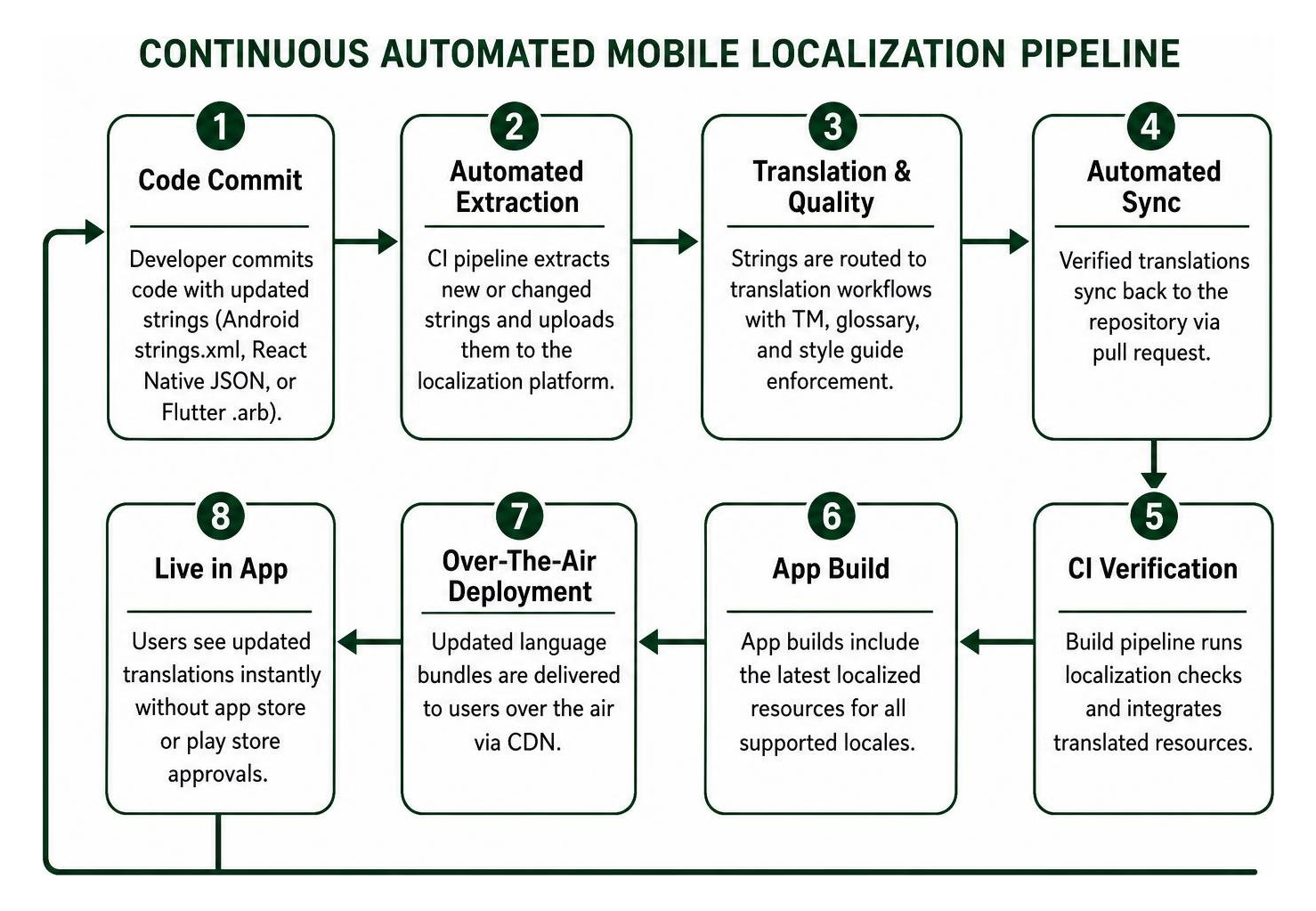
Furthermore, integrating Over-The-Air (OTA) translation delivery frameworks transforms maintenance. Instead of waiting several days for App Store or Google Play review approvals just to fix an awkward translation or truncated button label, OTA delivery pushes updated string bundles directly to end-user devices over the air via a content delivery network. This gives product teams zero-downtime control over multilingual copy.
Managing Linguistic Complexity: Plurals, Variables, and Context
Translating software interfaces involves navigating deep grammatical complexities. Human languages express numbers, genders, and syntax structures in wildly different ways.
A frequent localization flaw is hardcoding basic plural assumptions. In English, we simply distinguish between singular ("1 message") and plural ("2 messages"). However, the Unicode Common Locale Data Repository (CLDR) outlines six distinct plural categories across global languages: zero, one, two, few, many, and other. For instance, Russian uses four distinct grammatical plural forms based on ending digits, while Arabic utilizes all six categories. Using platform-native quantity string mechanisms (like .stringsdict on iOS or <plurals> on Android) is mandatory to prevent embarrassing grammatical errors.
Similarly, positional variable substitution must allow dynamic reordering. If a sentence inserts a user name and an item count, such as "Welcome back, {1}! You have {2} new tasks", target languages like Japanese or German may require placing the count before the user name for natural sentence flow. Native format tokens (such as %1$s and %2$d) let translators reposition variables without touching underlying application logic, supported by expert multilingual communication frameworks.
Integrating Visual Context to Eliminate Translation Bottlenecks
Translating strings in isolation without visual context is the leading cause of broken layouts and inaccurate copy. Consider a short string like "Close". Does it mean closing a modal window, ending an active user session, or shutting down a bank account? Without context, linguists are forced to guess.
Companies that provide visual context tools—such as tagged UI screenshots or interactive design mockups—report up to 70% fewer translator clarification queries and significantly fewer post-release bug reports.
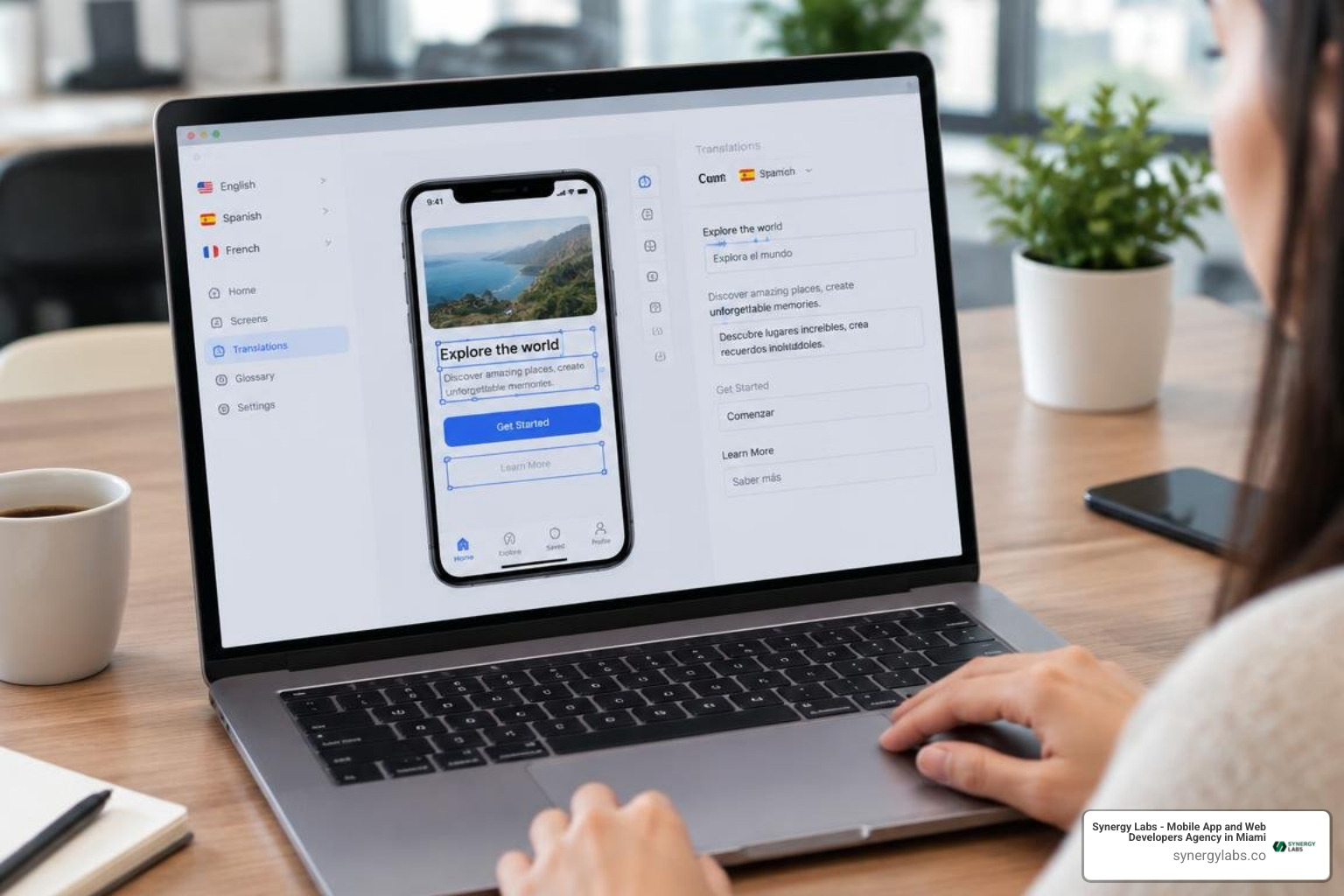
Modern localization platforms automatically attach captured screenshots to corresponding string keys. When translators work on an interface label, they see exactly where it lives on the screen, its visual boundaries, and its intended functional purpose, eliminating guesswork entirely.
Handling Dynamic Layouts, Bidirectional Text, and RTL Scripts
Text length varies substantially across languages. When translating English source text into German, Dutch, or Greek, the translated string often expands by 30% or more. Conversely, East Asian languages like Chinese, Japanese, and Korean frequently contract in length but demand taller line spacing for complex ideographs.
To prevent text clipping, overlapping buttons, and broken containers:
- Implement flexible UI design patterns using Auto Layout (iOS) and ConstraintLayout (Android) with dynamic wrapping rather than fixed pixel dimensions
- Avoid hardcoding static widths or heights on interactive controls and buttons
- Build UI components that allow labels to scale down gracefully or wrap into multiline text blocks when necessary
For Right-to-Left (RTL) languages such as Arabic, Hebrew, and Persian (Farsi), localization requires mirroring your entire user interface. Navigation bars, back buttons, progress indicators, and gesture swipes must flip horizontally. Both iOS and Android provide native layout mirroring attributes (such as leading and trailing constraints instead of left and right), ensuring seamless navigation for RTL audiences.
End-to-End Execution: From App Store Optimization to Dynamic Content
Achieving sustainable global growth requires localizing the complete user journey—beginning before the user even downloads your application.
Localizing App Store Listings and Multilingual ASO
App Store Optimization (ASO) cannot rely on direct word-for-word translation. A keyword that generates massive search volume in the United States might have zero search intent in Japan or Germany. Native search habits reflect distinct local terminologies and cultural preferences.
For example, a fitness application targeting English users might prioritize the search phrase "calorie tracker", whereas users in East Asian markets frequently search for phrases closer to "diet balance management". Conducting dedicated keyword research for each local market is vital to maximize organic store discovery.
When localizing your listings, adhere strictly to platform metadata constraints:
- Apple App Store: App Name (30 characters), Subtitle (30 characters), Dedicated Keyword Field (100 characters, comma-separated), Promotional Text (170 characters), Full Description (4,000 characters).
- Google Play Store: App Name (30 characters), Short Description (80 characters), Full Description (4,000 characters, indexed for keywords), Release Notes (500 characters).
- Visual Store Assets: Translate all screenshot captions, feature callouts, and preview video voiceovers. Use culturally appropriate model photography and region-specific UI currencies inside store screenshots.
Scaling Notifications, In-App Messaging, and Dynamic Backend Strings
A fully localized user experience extends beyond the client-side binary to encompass server-driven content, dynamic communications, and marketing touches.
Push notifications and SMS alerts are critical for re-engagement, but they come with stringent screen display limits. On standard mobile lock screens, push notification titles typically truncate around 65 characters, while message bodies truncate around 110 characters. Translations that expand beyond these thresholds will cut off crucial calls to action.
Server-delivered content requires a localized API architecture. As detailed in our guide to mobile app backend development, your backend microservices must parse incoming HTTP Accept-Language headers and user profile preferences to return appropriately localized payloads for transactional notifications, dynamic product catalogues, and error strings.
Quality Assurance, Testing, and Cost Optimization Strategies
A robust quality assurance (QA) strategy protects your brand reputation and prevents negative app store ratings from poor linguistic implementation.
A highly effective early-stage testing technique is pseudolocalization. Before sending text to linguists, developers replace source characters with accented, expanded Unicode equivalents (for example, transforming "Account Settings" into "[!!! Àççôûñţ Šéţţîñğš !!!]"). Running your application under pseudolocalization immediately exposes hardcoded strings, broken dynamic concatenations, and layout clipping before linguistic translation begins.
Strategic Quality Assurance Across Real Devices
Software emulators are useful during initial development, but they fail to capture real-world hardware nuances. Physical device testing is essential for verifying:
- Accurate font rendering and line-height spacing across diverse screen densities
- Bidirectional layout flipping and gesture directionality in RTL locales
- Hardware-specific notch and home indicator cutoffs on compact budget devices common in emerging markets
- Network latency behavior when fetching server-side localized assets over regional mobile connections
Comprehensive QA involves both functional testing (ensuring buttons trigger correct actions and placeholders populate properly) and linguistic testing (validating that copy matches regional context and brand tone).
Budgeting and Choosing Scalable Mobile App Localization Services
Structuring your localization budget requires balancing speed, translation volume, and quality assurance requirements.
Cost factors generally include:
- Translation Method: Pure human professional translation typically ranges from $0.09 to $0.12+ per source word. A modern hybrid approach—utilizing AI translation engines for rapid initial drafts followed by human post-editing—can reduce overall costs by up to 80% while preserving linguistic nuance.
- Translation Memory Savings: Storing approved phrases ensures you only pay full rates for newly created strings, receiving steep discounts on repeated or updated copy.
- Engineering & Infrastructure: Platform subscription fees for translation management tooling, continuous CI/CD integrations, and OTA deployment infrastructure.
For startups and growing enterprises alike, prioritizing tier-one languages based on addressable market size allows you to scale global operations sustainably without overextending initial engineering budgets.
Frequently Asked Questions About Mobile App Localization
What is the difference between internationalization and mobile app localization?
Internationalization (i18n) is the engineering and architectural phase that prepares an application's codebase to support multiple languages and regions without requiring code refactoring. Localization (l10n) is the subsequent process of adapting content, user interfaces, cultural references, imagery, and store listings for a specific target market and language.
How do over-the-air (OTA) updates work for mobile app translations?
Over-the-air localization allows product teams to deliver updated and newly translated UI strings directly to users' devices through a content delivery network. This framework decouples interface copy updates from native code releases, allowing instant typo fixes and localized promotions without submitting new builds for App Store or Google Play approval.
How much does professional mobile app localization typically cost?
Professional mobile app localization costs depend on total word volume, the number of target languages, and whether you adopt a hybrid AI or human-only translation model. For an average consumer app containing roughly 2,000 to 5,000 interface words, localizing into a new language typically ranges between $200 and $600 per language, with ongoing maintenance costs decreasing over time through translation memory reuse.
Crafting Your Global Mobile Expansion Strategy
Taking a mobile application global is one of the most effective ways to accelerate user acquisition and unlock sustainable revenue streams. However, successful international growth requires far more than dropping text into automated translation tools. It requires clean internationalization architecture, automated CI/CD pipelines, visual context workflows, and rigorous real-device testing.
At Synergy Labs, we specialize in building scalable, enterprise-grade mobile products designed for international markets from day one. Whether you are engineering a new cross-platform app or modernizing an existing codebase for international expansion, our team provides senior technical leadership to ensure your rollout is seamless and cost-effective. We operate on a transparent fixed-budget model with milestone-based payments, pairing an in-shore CTO with elite offshore development teams to deliver exceptional engineering without unexpected budget surprises.
If you are ready to expand your digital footprint and engage audiences worldwide, explore our scalable cross-platform digital solutions and let's build your global mobile strategy together.